Quick Answer
Write MemTest86 image to USB drive via imageUSB. Insert drive into PC. Restart system, open UEFI boot menu, select USB device. Tool boots bare-metal, isolating RAM from OS drivers. Run multiple complete passes. Any reported error confirms defective memory modules or unstable clock timings. Replace bad hardware.
Pros
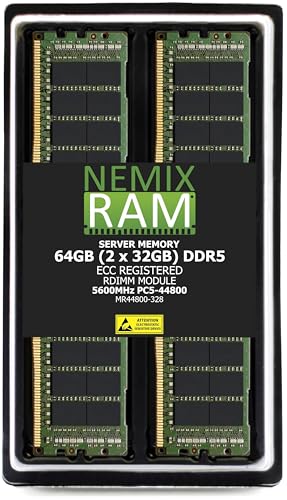
- 64GB total from two 32GB RDIMM modules
- Registered ECC RDIMM with 2Rx8 rank listed
- Listed as compatible with MZ33-AR1 motherboard
- Manufacturer-stated lifetime replacement warranty
Cons
- Works only where the board accepts registered RDIMMs
- Full-population performance is a manufacturer claim

Pros
- High 96GB total capacity in a dual-module kit.
- ECC support adds an extra layer of reliability for supported systems.
- DDR5-5600 specification offers strong bandwidth for workstation tasks.
- Unbuffered UDIMM format is suitable for ECC-capable desktop and workstation boards.
- Lifetime replacement warranty is included.
Cons
- Compatibility is platform-specific, so it will not work in every motherboard or server.
- ECC and exact rank, speed, and population support depend on the system manual and BIOS support.
- Premium workstation memory can cost significantly more than standard consumer DDR5.
Overview: The NEMIX RAM 96GB kit is a DDR5 memory upgrade made for compatible workstation and server-oriented systems. It uses two 48GB unbuffered ECC UDIMMs, runs at 5600MHz, and is specified at 1.1V with a 2Rx8 layout.
Performance and Features: This kit is designed for users who need both capacity and stability, including professionals running large workloads, virtualization, or memory-heavy applications. ECC support helps reduce the risk of silent memory errors, while the DDR5-5600 speed provides strong bandwidth for modern platforms that can use it.
Drawbacks and Considerations: Compatibility is the main limitation. The module type, population rules, and ECC support must match the motherboard or system, so checking the manual before purchase is important. It is also a specialized memory kit, which means it may be unnecessary for basic desktop use.
Verdict: This is a solid choice for buyers who need 96GB of ECC-capable DDR5 for a supported workstation or entry-server platform, including the listed ASRock B850 Steel Legend WiFi compatibility. It is best suited to users who value reliability, capacity, and exact-spec matching more than low-cost consumer memory.

Pros
- Very large 128GB capacity for memory-intensive workloads.
- Standard DDR5 UDIMM form factor for desktop compatibility.
- Matched 4x32GB kit simplifies high-capacity system installation.
- Backed by lifetime replacement warranty and technical support.
Cons
- Requires a motherboard and BIOS that support 128GB DDR5 configurations.
- DDR5-4800 CL40 is a modest speed tier compared with faster enthusiast kits.
- Four-module setups can be more demanding on memory compatibility than 2-module kits.
Overview: NEMIX RAM 128GB (4x32GB) DDR5-4800 CL40 is a full-size 288-pin UDIMM kit for desktop and tower PCs. It is a non-ECC, unbuffered memory set built for systems that support DDR5 and high-capacity configurations.
Performance: With 128GB total capacity, this kit is aimed at demanding multitasking, creative workloads, and keeping many tabs or applications open at once. The DDR5-4800 speed, CL40 timings, 1.1V operating voltage, and 2Rx8 layout match a standard modern desktop memory profile.
Considerations: Compatibility is the main factor to verify before buying. Your motherboard must support DDR5, four 32GB modules, and the required capacity, and some boards may need BIOS support or may not run this kit at full speed in every configuration.
Verdict: This kit makes the most sense for users who need very high memory capacity and want a straightforward desktop upgrade with lifetime replacement coverage and US-based technical support. It is less compelling if you only need basic memory or are chasing the fastest DDR5 speeds.
Why Use a Boot Test for Memory Diagnostics
System memory faults are among the most difficult hardware failures to isolate. Symptoms include random application crashes, kernel panics, Blue Screen of Death (BSOD) stop codes such as MEMORY_MANAGEMENT (0x0000001A) and PAGE_FAULT_IN_NONPAGED_AREA (0x00000050), file system corruption, and silent data corruption that surfaces only during later reads. An operating system-hosted memory test cannot address the physical address ranges occupied by the kernel, drivers, and firmware reservations. A bootable test runs without an operating system, so it can exercise nearly all addressable DRAM directly.
MemTest86, developed by PassMark Software, is a standalone, UEFI-native and legacy-BIOS-capable memory diagnostic. Manufacturer documentation specifies support for DDR3, DDR4, and DDR5 (including ECC variants on supported platforms), XMP and EXPO profile detection, and multi-core test execution. Running from a USB flash drive removes dependence on the installed storage, which matters when the fault under investigation may itself be corrupting the system drive.
Conditions That Justify a Boot-Level Test
A boot-level memory test is warranted in the following scenarios:
- Intermittent BSODs or kernel panics with varying stop codes, which indicate non-deterministic corruption rather than a single faulty driver.
- Instability after enabling XMP, EXPO, or manual overclocking (for example, DDR4-3600 at 1.35 V or DDR5-6000 at 1.25-1.35 V VDD/VDDQ).
- After installing new DIMMs, changing population topology (1 DIMM per channel versus 2 DIMMs per channel), or a BIOS/AGESA/microcode update that retrains memory.
- Repeated file system or archive checksum errors without SMART-reported drive faults.
- Workstation or server validation prior to deployment, particularly for workloads sensitive to bit errors such as simulation, databases, and virtualization hosts.
Creating the Bootable USB Drive
Prerequisites
Required items are a USB flash drive of at least 1 GB capacity (the image is under 100 MB, but small drives of 2-16 GB are the most compatible), a second functional computer, and the current MemTest86 download from the official PassMark site. Back up any data on the drive first; the imaging process erases the device completely. Use a USB 2.0 or 3.x drive from a reputable manufacturer. Counterfeit or degraded flash media can produce boot failures that mimic software faults.
Creating the Drive on Windows
- Download the MemTest86 USB Image Tool package (the ZIP containing the imageUSB utility) and extract it to a local directory.
- Insert the USB drive and run the imageUSB executable with administrator privileges.
- Select the target drive in step 1. Confirm the drive letter and capacity carefully, since imageUSB overwrites the entire device.
- Select the option to write an image to the USB drive and choose the supplied MemTest86 image file.
- Click Write and wait for completion. The write typically completes in under two minutes on USB 3.x media.
- Safely eject the drive through the operating system before removing it.
Creating the Drive on Linux or macOS
PassMark provides a raw disk image for Linux and macOS in the download package. Identify the target device with lsblk (Linux) or diskutil list (macOS). Unmount the device, then write the image using dd with a 4 MB block size, for example: sudo dd if=memtest86-usb.img of=/dev/sdX bs=4M status=progress conv=fsync. A wrong device identifier will destroy data on another disk, so verify the device node against the reported capacity and model before executing the command.
Secure Boot Considerations
Recent MemTest86 releases ship with a binary signed through the Microsoft UEFI certificate authority chain, which allows booting with Secure Boot enabled on most platforms. If a platform refuses to boot the image, verify that the firmware is up to date and that the Microsoft third-party UEFI CA is present in the DB. Disabling Secure Boot temporarily is acceptable for diagnostic purposes, but the setting should be restored afterward.
Running the Test
Pre-Test Configuration
Reproducible results depend on controlling the test environment. Apply the following conditions before booting:
- Configuration under test: Test the configuration that exhibits the fault. If instability appears only with XMP/EXPO enabled, test with the profile enabled first, then retest at JEDEC defaults (for example, DDR4-2133/2400 at 1.20 V or DDR5-4800 at 1.10 V) to determine whether the profile is the cause.
- Thermal state: Allow the system to operate at normal ambient conditions, typically 20-25 °C. DRAM error rates increase with temperature, and engineering evaluations indicate that DIMM temperatures above 85 °C trigger doubled refresh rates (2x refresh) on many DDR4 and DDR5 devices, which can alter error behavior. Ensure airflow over the modules is representative of oper
For related maintenance and equipment benchmarks, review our technical guides on gaming desktop memory, examine multitasking ram benchmarks, and compare pc desktop motherboards. You can also reference our analyses on 4k gaming memory configs and high speed memory setups. For industry engineering standards, consult JEDEC memory standards.