Quick Answer
Command Rate 1T sends commands every clock cycle, giving lowest latency but requiring clean signals. 2T adds wait state, stabilizing high memory clocks and full DIMM banks. Select 1T in BIOS first. Run long stress test. Switch 2T if errors occur. Choose stable setting; real-world performance delta stays negligible.

Pros
- Built for Intel Xeon W-3400 and W-2400 processors on the LGA 4677 platform.
- Five PCIe 5.0 x16 slots offer unusually strong expansion for a workstation motherboard.
- Dual 10G plus 2.5G Ethernet provides high-speed wired networking options.
- Thermal design includes substantial heatsinks, M.2 cooling, and multiple fan headers.
Cons
- Compatibility is limited to the Xeon W-3400 and W-2400 platform, so it is not suitable for mainstream Intel CPUs.
- Only two PCIe 4.0 M.2 slots are listed, which may be modest for storage-heavy builds.
- Wireless networking is not specified in the manufacturer listing.
Overview: The ASUS Pro WS W790-ACE is a workstation motherboard built for Intel Xeon W-3400 and W-2400 processors on the LGA 4677 platform. Its CEB form factor and heavy-duty heatsinks give it a serious, professional appearance suited to high-end builds.
Performance & features: This board focuses on expansion and throughput, with five PCIe 5.0 x16 slots, DDR5 RDIMM support, dual 10G and 2.5G Ethernet, and front and rear USB 3.2 Gen 2x2 Type-C. It also includes 12+1+1 power stages, seven 4-pin PWM fan headers, a Water pump+ header, and ASUS Control Center Express support for advanced management.
Drawbacks & considerations: The platform is highly specialized, so it only makes sense for users who are committed to the Xeon W-3400 or W-2400 family. The manufacturer listing also lists just two PCIe 4.0 M.2 slots, and wireless connectivity is not specified.
Verdict: This is a strong choice for professionals who need workstation-grade expansion, fast wired networking, and robust cooling support. It is less suitable for general desktop users, but it should deliver real value in creator, engineering, and server-adjacent builds.

Pros
- Ultra-low CL26-36-36-96 latency profile
- Rated for up to 6000MT/s overclocked speed
- Integrated AMD EXPO support for AMD chipsets
- Matched 32GB dual-channel (2x16GB) setup
Cons
- Requires manual BIOS configuration for rated speeds
- Higher 1.45V operating voltage for rated profile
- Cannot be mixed with other kits
Pros
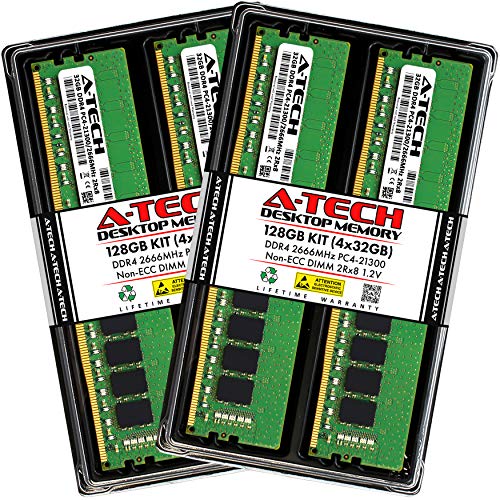
- Large 128GB kit capacity for high-memory workloads and intensive multitasking.
- Standard 288-pin DDR4 UDIMM form factor fits many compatible desktop systems.
- Dual-rank, non-ECC design is suited to mainstream consumer PCs.
- Backed by A-Tech lifetime warranty and support.
Cons
- Only compatible with desktops that support DDR4 UDIMM memory at 2666MHz or similar settings.
- Non-ECC, unbuffered modules are not appropriate for servers or systems that require ECC memory.
- The 4-module kit requires enough free DIMM slots and motherboard support for a 128GB configuration.
Overview: The A-Tech 128GB (4x32GB) DDR4 2666MHz UDIMM kit is a high-capacity desktop memory upgrade built for compatible consumer PCs. It uses standard 288-pin DDR4 modules with a 2Rx8 dual-rank layout and a non-ECC, unbuffered design.
Performance and features: With 2666MHz speed and CL19 timing, this kit is aimed at users who want more memory headroom for multitasking, content creation, and demanding workloads. The four-module configuration makes it easier to reach a large total capacity on supported motherboards.
Drawbacks and considerations: This kit is only for systems that support DDR4 UDIMM memory, and the 128GB total requires enough slots and motherboard support. Because it is non-ECC and unbuffered, it is not a fit for servers or platforms that depend on ECC memory.
Verdict: This A-Tech kit is best for desktop users who need very high capacity and a standard DDR4 upgrade path. It is a practical choice if your system is compatible, but buyers should confirm motherboard support before purchasing.
Command Rate (CR, also tCMD) is one of the few memory timings that works as a signal-integrity setting as much as a performance setting. It sets how many memory clock cycles the controller holds a command and address on the bus before the DRAM devices act on it. Under-tuning it leaves a small amount of latency unused. Over-tuning it produces silent data corruption, WHEA errors, or failure to train at boot. This guide covers the mechanics,
For related maintenance and equipment benchmarks, review our technical guides on gaming desktop memory, examine multitasking ram benchmarks, and compare pc desktop motherboards. You can also reference our analyses on 4k gaming memory configs and high speed memory setups. For industry engineering standards, consult JEDEC memory standards.