Quick Answer
Motherboards stay lit because PSU supplies +5VSB standby rail power constantly, even during shutdown. Standby power runs RGB controllers, audio chips, USB ports. Behavior normal. To disable lights, enable ErP/EuP state S4+S5 in UEFI/BIOS, toggle stealth mode in board firmware, or switch off physical PSU rocker switch. Consult motherboard manual.

Pros
- Compatible with 3rd Gen AMD Ryzen processors on the AM4 platform
- Includes NVMe PCIe 3.0 x4 M.2 storage support for faster boot and load times
- Offers multiple display outputs, including D-Sub, DVI, and HDMI
- Q-Flash Plus adds convenient BIOS update support
Cons
- Only 2 memory slots, so expansion is more limited than on higher-end boards
- Uses PCIe 3.0 rather than newer PCIe 4.0 connectivity
- ALC887 audio is functional, but not a premium onboard audio solution
Overview: The GIGABYTE A520M S2H is a microATX AM4 motherboard made for 3rd Gen AMD Ryzen processors. It focuses on the essentials, with a compact layout and a practical feature set suited to budget desktop builds.
Performance and Features: For everyday systems, it offers dual-channel DDR4 support, a PCIe 3.0 x16 slot, and one NVMe PCIe 3.0 x4 M.2 slot. It also includes 1GbE LAN, ALC887 audio, rear D-Sub, DVI, and HDMI outputs, plus Q-Flash Plus for easier BIOS updates.
Drawbacks and Considerations: This is an entry-level board, so expansion is limited by the 2 DIMM design and PCIe 3.0 connectivity. The ALC887 codec is adequate for basic use, but users looking for stronger audio or more advanced platform features may want a higher-tier motherboard.
Verdict: The A520M S2H is a sensible choice for value-focused AM4 builds where reliability, simple setup, and core connectivity matter most. It is best suited for home PCs, office systems, and affordable Ryzen gaming setups.
Pros
- Supports a wide range of AMD AM4 Ryzen CPUs, including G-Series models.
- Includes PCIe 4.0 support for both graphics and storage expansion.
- Offers 2.5G LAN for faster wired network performance.
- Provides front USB-C plus multiple USB ports for modern connectivity.
Cons
- Micro-ATX size may not fit every case, so chassis compatibility needs to be checked before purchase.
- Only 2 DIMM slots are available, which limits memory expansion compared with larger motherboards.
- The HDMI and DisplayPort outputs require a compatible processor with integrated graphics.
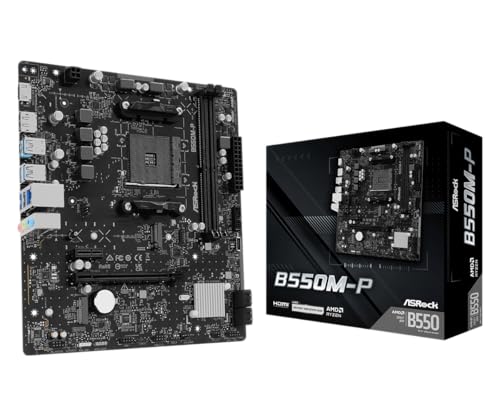
Overview: The ASRock B550M-P is a Micro-ATX AM4 motherboard designed for AMD Ryzen 3000, 4000 G-Series, and 5000 desktop processors. Its compact 9.6 x 7.9 inch layout makes it a good fit for smaller systems, but case compatibility should be verified before buying.
Performance and features: This board brings PCIe 4.0 x16 support for modern graphics cards and a Hyper M.2 slot for fast NVMe storage. DDR4 support up to 4733+ MHz overclocked, along with a 6-phase power design, gives it enough headroom for performance-focused everyday and gaming builds.
Drawbacks to consider: The main limitation is expansion, since it includes only two DIMM slots. The board also depends on a compatible case size, and the HDMI and DisplayPort outputs require a processor with integrated graphics.
Verdict: For compact AM4 builds that need modern storage, faster wired networking, and USB-C convenience, the B550M-P is a practical choice. It is best suited to users who want solid core features without moving to a larger, more expensive motherboard.

Pros
- Supports both 6th and 7th Gen Intel Core processors on the LGA1151 platform.
- Includes DDR4 support for more current memory compatibility than older DDR3 boards.
- Built-in HDMI and Gigabit LAN make it well suited to basic home and office systems.
- Audio Noise Guard and quality capacitors add a useful audio-focused enhancement.
Cons
- The board is limited to 2 memory slots, which reduces future RAM expansion.
- Support is restricted to older Intel processor generations, so it is not a future-ready platform.
- The manufacturer specifications do not list built-in Wi-Fi or other premium expansion features.
Overview: The GIGABYTE GA-H110M-A is a micro ATX motherboard built around the Intel H110 chipset and LGA1151 socket. It is aimed at compact, value-focused desktop builds using 6th or 7th Gen Intel Core processors.
Performance & Features: Dual channel DDR4 support with 2 DIMMs gives users modern memory compatibility in a simple layout. HDMI 1.4, Realtek GbE LAN with cFos Speed, and Audio Noise Guard with high quality audio capacitors cover everyday office, home, and media tasks well.
Drawbacks: This is not a feature-rich enthusiast board. The 2-DIMM design and micro ATX format limit expansion, and support is restricted to older Intel generations. The manufacturer specifications also do not list built-in Wi-Fi or other premium extras.
Verdict: Choose this motherboard if you want a straightforward, dependable foundation for a budget Intel system and do not need advanced upgrade headroom. It suits basic productivity, compact builds, and users who value essential connectivity over extra features.
Why Your Motherboard Stays Lit Up with RGB When the PC Is Off
A motherboard that continues to glow after the operating system has shut down is not malfunctioning in most cases. The behavior is a direct consequence of how ATX power architecture separates the always-on standby rail from the main switched rails. Technical analysis of ATX power supply specifications confirms that the 5VSB (5 V standby) rail remains energized whenever the PSU is connected to mains power and its rear switch is in the “I” position. Any LED controller, header, or peripheral wired to that rail, directly or through a voltage regulator, will continue to receive power in the S5 (soft-off) state.
This guide documents the electrical basis of the behavior, the firmware controls that govern it, hardware-level alternatives, and the safety constraints that apply when working on an energized or recently energized system.
What Standby Power Does
The ATX Standby Rail and ACPI Sleep States
The ATX specification defines a 5VSB rail on pin 9 of the 24-pin main connector (purple wire). The rail is regulated at 5 V ±5% (4.75 V to 5.25 V) and is typically rated between 2.0 A and 3.0 A on consumer PSUs, equating to 10 W to 15 W of standby capacity. In the ACPI S5 state, the main +12 V, +5 V, and +3.3 V rails are disabled via the PS_ON# signal (pin 16, green wire) being held at approximately 3.3 V to 5 V logic high. Only 5VSB remains active.
The standby rail exists to power functions that must operate while the system is nominally off, including:
- The power button logic and Super I/O controller monitoring PWR_BTN#
- Wake-on-LAN (WoL) and Wake-on-USB circuitry
- USB charging ports that remain active in S5 (commonly labeled “Always On” or “USB Power Delivery in S5”)
- Embedded controllers and, on many boards, the addressable LED microcontroller
- DRAM refresh in S3 (suspend-to-RAM), using standby power for self-refresh
Why RGB Remains Active
Motherboard manufacturers implement RGB lighting using dedicated LED controller ICs, often a small microcontroller driving constant-current channels. Standard 12 V RGB headers (4-pin, 12V-G-R-B) supply 12 V common anode with a rated maximum of 3 A (36 W). Addressable ARGB headers (3-pin, 5V-Data-Ground) supply 5 V with a typical limit of 3 A per header, using WS2812B-class protocols with a data signal of approximately 800 kHz.
Manufacturer documentation specifies that onboard lighting zones (chipset heatsink, I/O shroud, PCB trace lighting) are generally fed from 5VSB through a local regulator so that firmware-defined “Stealth,” “Off,” or “Always On” modes can be honored without the main rails active. For 12 V headers in S5, the 12 V line is switched off with the main rails, so externally connected 12 V strips normally go dark. ARGB devices powered from the 5 V header pin can remain lit if the board routes 5VSB to that header, which is a design decision that varies by vendor and model.
Power Consumption in the Lit Standby State
A WS2812B-class LED draws roughly 20 mA per color channel at full intensity, or about 60 mA per LED at full white at 5 V (0.3 W). A typical onboard lighting implementation of 10 to 30 LEDs at moderate brightness and mixed colors draws approximately 0.2 W to 1.5 W. Adding a three-fan ARGB kit (around 24 to 36 LEDs) at moderate brightness can add 1 W to 3 W. Engineering evaluations indicate that typical total standby draw of a modern desktop in S5 with lighting active ranges from approximately 1 W to 5 W at the wall, compared to 0.3 W to 1.0 W with lighting disabled and ErP compliance enabled.
Over 8,760 hours per year, an additional 2 W of standby draw equals about 17.5 kWh annually. At an electricity price of 0.15 USD/kWh, this equates to roughly 2.63 USD per year. The financial impact is negligible, but the continuous load slightly increases 5VSB rail stress and PSU component thermal cycling at low load.
Finding the BIOS Setting
Entering UEFI Firmware Setup
Access UEFI by pressing Delete or F2 during POST on most desktop boards. Enable Advanced Mode (typically F7 on ASUS and MSI, or a dedicated Advanced button on Gigabyte and ASRock). Setting names differ by vendor, but the underlying function, disabling LED output in the S3/S4/S5 states, is consistent.
Vendor-Specific Setting Locations
- ASUS (Aura Sync): Advanced Mode, Advanced, Onboard Devices Configuration, RGB LED Lighting. Set “When system is in sleep, hibernate or soft off states” to Off. Some boards list this as “Aura Lighting Effect” with a “Stealth Mode” toggle.
- MSI (Mystic Light): Settings, Advanced, Power Management Setup, or Settings, Advanced, Onboard LED Control. Dis
For related maintenance and equipment benchmarks, review our technical guides on best gaming pcs, examine multitasking gaming desktops, and compare streaming pc builds. You can also reference our analyses on vr desktop performance and high-performance gaming pcs. For industry engineering standards, consult IEEE Computer Society benchmarks.