

Quick Answer
Never open the power supply case; internal capacitors retain lethal electrical charge. Turn off, unplug the unit, let it cool, and remove it from the chassis. Use short bursts of compressed air through vents to dislodge dust while immobilizing fan blades. Replace heavily clogged units. Keep all ventilation pathways clear.

Pros
- 16GB GDDR7, 256-bit memory, PCIe 5.0 (listed)
- Triple 90mm fans with vapor chamber cooling
- Epic-X ARGB lighting for RGB styling
- VelocityX software for clocks, fan curves and profiles
- HDMI and DisplayPort 2.1 outputs (listed)
Cons
- Listed 11.8-inch length may limit case compatibility
- No customer reviews to verify cooling or noise claims
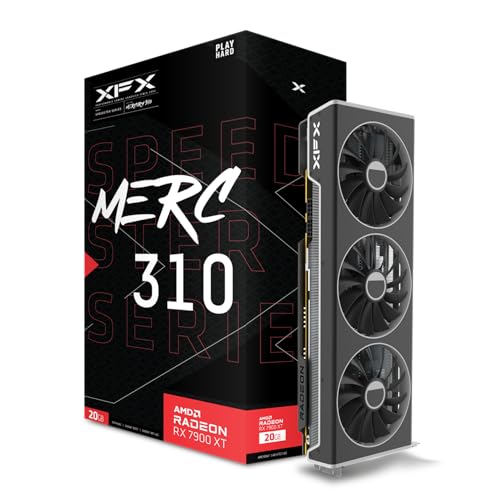
Pros
- 20GB GDDR6 memory listed
- XFX triple-fan cooling solution
- Boost clock up to 2535 MHz (manufacturer-stated)
Cons
- Port, power, and connector details are not listed
- Listed 18-inch length requires case clearance

Pros
- 16GB GDDR6 memory is stated in the features
- PCIe 4.0 x16 interface is listed
- Icicle multi-dimensional cooling system is described
- Stream Assist and acceleration features are mentioned
Cons
- Feature text is partly garbled and lacks verified specifications
- Brand is listed as Generic; confirm the exact card model
Dust accumulation inside an ATX power supply unit (PSU) is a thermal and reliability problem, not a cosmetic one. The safest and most effective maintenance method is external cleaning: no cover removal, no contact with internal components, and no exposure to the primary-side capacitors that can retain lethal charge. This guide covers the failure mechanisms, the safety constraints, a repeatable cleaning procedure, and the criteria for retiring a unit.
Why PSU Dust Matters
A PSU is a switch-mode converter. It rectifies 100-240 V AC mains, charges bulk capacitors to roughly 380-420 V DC (active PFC units), and converts that to regulated +12 V, +5 V, +3.3 V, and +5 VSB outputs. Conversion efficiency of 85-94% at typical loads still leaves heat to dissipate. A 750 W unit at 90% efficiency under full load dissipates approximately 83 W internally, and all of it must leave through a single fan and the rear grille.
Dust degrades this thermal path in four ways:
- Reduced airflow: Dust-clogged intake screens, fan blades, and heatsink fins raise static pressure resistance. Engineering evaluations of axial fans indicate that partial blockage can reduce effective volumetric flow substantially, forcing the fan controller to increase RPM (typically from 800-1,000 RPM at idle to 1,500-2,000 RPM under load).
- Insulating layer on heatsinks: Dust is a poor thermal conductor. A layer on primary and secondary heatsinks raises junction temperatures of MOSFETs and rectifiers.
- Capacitor aging: Electrolytic capacitors are commonly rated at 105 °C. Under the Arrhenius-derived rule used in capacitor datasheets, service life roughly halves for every 10 °C increase in core temperature. A sustained 10-15 °C rise from restricted cooling can cut remaining capacitor life by 50-65%.
- Leakage and arcing risk: Dust holds moisture. In humid environments (above 60% relative humidity), conductive films can form across high-voltage creepage paths on the primary side, increasing leakage current and the likelihood of tracking or nuisance protection trips.
Typical symptoms of dust-related thermal stress include rising fan noise, unexplained shutdowns under load (over-temperature protection, OTP), coil whine changes, and a hot exhaust air stream exceeding 20-25 °C above intake temperature at moderate load.
Safety Rules
Manufacturer documentation consistently carries the label “No user-serviceable parts inside,” and the warning is technically justified. The following rules apply to every cleaning procedure.
- Do not remove the PSU cover. Removal typically voids the warranty and exposes the primary bulk capacitors, which commonly hold 380-420 V DC. Discharge through bleeder resistors can take several minutes, and a failed bleeder leaves the charge in place far longer. Capacitor energy at this voltage is sufficient to cause serious injury.
- Disconnect mains power completely. Switch the rear rocker to O (0), unplug the IEC C13/C14 cable, and hold the system power button for 5-10 seconds to drain residual charge from the motherboard and 5VSB rail.
- Wait at least 5 minutes after disconnecting before any handling, allowing X-capacitors and bulk capacitors to bleed down through their discharge networks.
- Never clean a running unit. Spinning fan blades and live primary circuitry make any in-service cleaning unsafe.
- Control electrostatic discharge (ESD). Use a grounded wrist strap (1 MΩ series resistance) or touch bare chassis metal frequently. Human-body ESD above 3 kV is common on dry days and can damage connected components.
- Avoid liquids and aerosols. Isopropyl alcohol is acceptable only on external plastic or metal surfaces, with the unit disconnected and fully dry. Never spray any fluid through the grille.
- Immobilize the fan before using compressed air. Forced airflow can overspeed the fan beyond its rated RPM (commonly 2,000-2,500 RPM maximum), damaging bearings
For related maintenance and equipment benchmarks, review our technical guides on best gaming pcs, examine vr gaming pc specifications, and compare desktop gaming systems. You can also reference our analyses on 4k gaming desktops and multitasking gaming pcs. For industry engineering standards, consult PCI-SIG specification standards.





