

Quick Answer
PSU fan orientation impacts thermal efficiency. Facing downward draws cool external air via bottom vents, ideal for hard floors with filters. Facing upward pulls internal chassis air, preventing suffocation on carpet or unvented cases. Ensure clear intake, maintain clean dust filters, and monitor PSU temperatures after changes.

Pros
- Listed as a 12GB GDDR7 graphics card
- Dual BIOS switch listed for Quiet and Performance profiles
- Listed with NVIDIA Blackwell architecture and DLSS 4 support
- Listed as SFF-ready for small-form-factor builds
Cons
- Card length and power requirements are not listed
- The 2.5-slot design takes extra expansion space

Pros
- 12GB graphics memory listed for games and AI workloads
- Lists AV1, HEVC, AVC and VP9 hardware media support
- XeSS Frame Generation listed as supported
- Second-generation Xe-cores with XMX AI Engine, per listing
Cons
- Ports, clock speeds and dimensions are not listed
- No customer reviews to verify performance gains
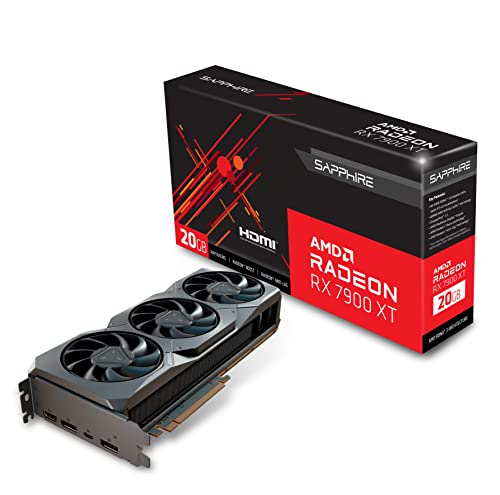
Pros
- Large 20GB memory capacity suited for 4K gaming and demanding tasks
- Multiple modern display outputs including USB-C
- PCI-Express 4.0 for solid bandwidth
Cons
- Large 3-slot design requires a spacious case
- Not suitable for compact or small-form-factor systems
Power supply fan orientation is one of the few cooling variables that costs nothing to change, yet it is frequently misjudged. Flipping an ATX power supply unit (PSU) does not reverse the fan. The fan always draws air in through its own face and expels it through the rear grille. Inverting the unit only changes which air volume the fan samples: the cooler ambient air beneath the chassis, or the warmer air inside the case. That choice affects inlet temperature, particulate loading, acoustic behavior, and the thermal stress on the PSU’s electrolytic capacitors and fan bearing.
PSU Fan Orientation: What Actually Changes
A standard ATX PSU (150 mm wide × 86 mm high, with depths typically from 140 mm to 180 mm) uses a single 120 mm, 135 mm, or 140 mm axial fan on one large face. It runs on a regulated 12 V DC supply and typically draws 0.1 A to 0.5 A depending on speed. The airflow path is fixed: ambient or case air enters through the fan face, passes over the primary heatsink, the transformer, and the secondary rectification and DC-DC stages, then exits through the perforated rear panel.
Two orientations are therefore possible in a bottom-mounted PSU bay:
- Fan down (intake from below): The PSU draws air through a floor vent in the case. The inlet is ambient room air, typically 20-28 °C in a conditioned space.
- Fan up (intake from inside the case): The PSU draws air from the main chamber, where it is preheated by the GPU, VRMs, and storage. In a loaded system this air commonly runs 8-15 °C above ambient near the lower chamber, and higher in cramped or poorly ventilated enclosures.
Heat dissipation inside the PSU is a function of load and efficiency. An 850 W unit delivering 425 W at roughly 90% efficiency dissipates about 47 W internally. At 850 W output and roughly 87-89% efficiency, dissipation rises to about 105-125 W. Every additional degree of inlet temperature translates almost directly to internal component temperature at a given fan speed, so inlet air quality is the dominant variable.
Case Layouts and Their Constraints
Orientation should be decided by the chassis architecture, not by habit. Manufacturer documentation for most modern enclosures specifies the intended orientation through the presence or absence of a floor vent and filter.
Bottom-Mounted PSU with Floor Vent and Shro
For related maintenance and equipment benchmarks, review our technical guides on best gaming pcs, examine vr gaming pc specifications, and compare desktop gaming systems. You can also reference our analyses on 4k gaming desktops and multitasking gaming pcs. For industry engineering standards, consult PCI-SIG specification standards.


