

Quick Verdict: Best SODIMM RAM: Gen4 vs Gen5 Read Speed
When choosing best sodimm ram in 2026, the four factors that decide compatibility and performance are memory generation (DDR3L, DDR4, or DDR5), rated frequency and CAS latency, capacity per module, and physical pin count matched to your motherboard socket. Prioritize confirming your laptop’s suported DDR generation and maximum frequency first, then select the highest-capacity kit within that standard that…

Pros
- 96GB total from two 48GB SODIMM modules
- DDR5-5600, 262-pin, 1.10V, CL46 listed
- Listed as compatible with X14SAV-LVDS board
- Manufacturer-stated lifetime replacement warranty
Cons
- Listing mixes ECC and non-ECC wording
- Performance and reliability claims are manufacturer-stated

Pros
- Large 32GB kit is well suited to multitasking and demanding laptop workloads.
- Broad compatibility for supported 12th Gen Intel Core and AMD Ryzen 7000 systems.
- XMP 3.0 and AMD EXPO support adds flexibility on compatible platforms.
- Non-ECC DDR5 SODIMM design fits standard performance laptops.
Cons
- Only works in laptops that support DDR5 262-pin SODIMM memory, so it is not a universal upgrade.
- Actual operating speed may downclock to 5200MHz or 4800MHz depending on the laptop and CPU support.
- Non-ECC design is not intended for users who need error-correcting memory.
Overview: The Crucial CT2K16G56C46S5 is a 32GB DDR5 laptop memory kit made up of two 16GB SODIMM modules. It uses a standard 262-pin laptop form factor and is built for modern notebooks that support DDR5 upgrades.
Performance: With speeds up to 5600MHz, plus fallback support for 5200MHz and 4800MHz, this kit is aimed at users who want better multitasking, faster app switching, and improved responsiveness in supported systems. It also supports Intel XMP 3.0 and AMD EXPO on the same module, which adds flexibility for compatible Intel and AMD platforms.
- Non-ECC memory for mainstream laptop use
- 1.1V operating voltage for DDR5 efficiency
- Micron testing at component and module levels
Drawbacks: This kit is only appropriate for laptops that accept DDR5 SODIMM memory, and its full speed depends on CPU and system compatibility. Since it is non-ECC, it is not the best fit for workloads that require error-correcting memory.
Verdict: For users with a compatible Intel Core or AMD Ryzen 7000 laptop who want a dependable 32GB upgrade, this Crucial kit offers strong everyday performance and broad platform support.

Pros
- Fast DDR5-5600 specification for modern laptop platforms.
- Dual-module 2x16GB configuration is well suited to multitasking.
- Low 1.1V power requirement supports efficient operation.
- Non-ECC, unbuffered design fits mainstream consumer notebooks.
Cons
- Only compatible with laptops or systems that support DDR5 SO-DIMM memory, so it is not a universal upgrade.
- CL46 latency is functional, but not the lowest timing available in DDR5 memory.
- No heatsink, RGB, or other premium cosmetic features are listed.
Overview: TEAMGROUP Elite SODIMM DDR5 32GB (2x16GB) 5600MHz CL46 is a laptop memory kit built for systems that accept 262-pin DDR5 SO-DIMM modules. Its compact design and 1.1V operating voltage make it a practical upgrade for compatible notebooks.
Performance: The 5600MHz speed and 32GB capacity are aimed at smoother multitasking, faster app switching, and more headroom for everyday productivity, creative work, and browser-heavy use. On-die ECC support can help improve stability at the memory chip level.
Considerations: This is a non-ECC, unbuffered kit intended for consumer laptops rather than server or workstation platforms. CL46 timing is acceptable for DDR5, but users focused on the lowest latency should compare alternatives, and compatibility should be confirmed before buying.
Verdict: Overall, this TEAMGROUP module is best for users who want a straightforward DDR5 laptop RAM upgrade with strong capacity, efficient power use, and solid compatibility with supported systems. It is a sensible choice when stability and multitasking matter more than extra cosmetic features.

Pros
- Single 32GB module for memory-heavy laptop or small PC upgrades
- Manufacturer-rated up to 5600MHz with CL48 timing
- Industry-standard SODIMM form factor listed for many laptops and small PCs
- Per manufacturer, sets maximum speed automatically on compatible systems
- Installation typically needs only a screwdriver on most laptops
Cons
- Maximum speed requires overclocking or BIOS adjustments on some systems
- Peak speed depends on motherboard and CPU support
- Single stick, so a second matching module is needed for a pair

Pros
- High 64GB capacity is well suited to multitasking and memory-intensive laptop workloads
- Two 32GB modules make it a straightforward upgrade for compatible dual-slot systems
- Flexible speed support at 3200MHz, 2933MHz, and 2666MHz improves compatibility
- Non-ECC DDR4 SODIMM design fits standard consumer laptop memory use cases
Cons
- Only compatible with laptops that support DDR4 260-pin SODIMM memory, not DDR5 or desktop DIMMs
- Non-ECC memory is not intended for ECC-dependent server or workstation environments
- 64GB capacity may be more than casual users need for everyday browsing or light office tasks
Overview & Design: The Crucial CT2K32G4SFD832A is a 64GB DDR4 laptop memory kit made up of two 32GB 260-pin SODIMM modules. It is designed for compatible notebooks that use DDR4 RAM and follows a standard, no-frills upgrade format.
Performance & Key Features: Rated at 3200MHz PC4-25600, this kit is built to improve multitasking, application switching, and overall responsiveness in memory-heavy workloads. It can also downclock to 2933MHz or 2666MHz, which helps it work with systems that do not support the full rated speed.
- Non-ECC DDR4 SODIMM memory
- 1.2V operating voltage
- 2Rx8 rank and configuration
- Backed by Micron testing for module and component quality
Drawbacks & Considerations: This kit is limited to laptops that support DDR4 SODIMM memory, so it will not fit DDR5-only systems or desktop motherboards. It is also non-ECC, which means it is not aimed at error-correcting workstation or server use.
Verdict: The Crucial CT2K32G4SFD832A is a strong option for users who need a large laptop RAM upgrade for demanding productivity, content creation, or heavy multitasking. If your notebook supports DDR4 SODIMM memory, it offers a practical capacity boost with useful speed flexibility.

Pros
- Large 32GB kit capacity is well suited for demanding multitasking and productivity use.
- Compatible with a wide range of DDR4 SO-DIMM systems when the correct form factor and capacity are supported.
- JEDEC-standard DDR4 specification and 1.2V operation support stable everyday use.
- Backed by a limited lifetime warranty and technical support.
Cons
- Not compatible with desktop DIMM slots, so it will not work in standard tower PCs.
- Only works with DDR4 SO-DIMM systems, not DDR2, DDR3, DDR5, or ECC Registered memory platforms.
- Buyers need to verify their system's maximum supported capacity and memory type before purchase.
A-Tech 32GB DDR4 2666MHz SODIMM Laptop Memory is a four-module RAM kit built for compatible laptops, notebooks, mini PCs, and all-in-one computers. Its 260-pin SO-DIMM design and JEDEC-standard DDR4 specification make it a straightforward upgrade option for systems that support this memory type.
In everyday use, the main value comes from the 32GB total capacity, which can help with smoother multitasking, better responsiveness, and improved performance in memory-heavy workloads. The 2666MHz speed, non-ECC design, and 1.2V operating voltage match common DDR4 notebook requirements, and the plug-and-play installation makes setup simple.
Compatibility is the biggest consideration. This kit is not for desktop DIMM slots and will not work with DDR2, DDR3, DDR5, or ECC registered platforms. Users should confirm their device supports DDR4 SO-DIMM memory, along with the maximum supported capacity, before buying.
Verdict: This A-Tech kit is best for users who need a reliable 32GB DDR4 memory upgrade for a compatible mobile or compact system. It is a practical choice for productivity and multitasking, provided the system matches the required memory standard.
Pros
- Industry-standard SODIMM form factor for many laptops and small PCs
- Manufacturer says most laptops need only a screwdriver to install
- Auto-sets to maximum speed on compatible systems, per the manufacturer
- DDR5 memory with listed speeds up to 5600MHz and XMP 3.0 support
Cons
- Maximum speed depends on BIOS or overclocking and system components
- Single module; a second 16GB stick is needed for a dual-channel pair

Pros
- High 32GB capacity in a 2x16GB dual-channel kit.
- Fast 3200MHz DDR4 performance for a laptop SODIMM kit.
- XMP 2.0 support simplifies performance tuning on compatible systems.
- Low 1.2V power requirement fits standard DDR4 laptop memory specs.
Cons
- Requires a laptop or notebook with DDR4 SODIMM support; it is not for desktop DIMM slots.
- Full 3200MHz operation depends on system support for XMP 2.0, otherwise it may run at lower speeds.
- CL20 timing is solid but not the lowest latency available in high-end memory kits.
Overview: The PNY XLR8 Gaming MN32GK2D43200X is a 32GB DDR4 notebook memory kit made up of two 16GB SODIMMs. It is designed for laptops and gaming notebooks that support DDR4 memory, and its dual-channel configuration can help systems handle demanding apps more efficiently.
Performance and features: With a rated speed of 3200MHz, CL20 latency, and 1.2V operation, this kit is aimed at users who want a responsive upgrade for gaming, multitasking, and general performance use. XMP 2.0 support makes overclocking simpler on compatible systems, while the kit remains backwards compatible with lower memory frequencies if the laptop does not support XMP.
Drawbacks and considerations: This memory is limited to DDR4 SODIMM laptops, so it is not suitable for desktop PCs. Also, the full 3200MHz profile depends on motherboard and BIOS support for XMP 2.0, which means some systems may run it at reduced speeds.
Verdict: This is a strong option for users upgrading a compatible laptop who want more capacity and fast DDR4 performance in a dual-channel kit. It makes the most sense for gamers, power users, and anyone with a DDR4 notebook that can benefit from 32GB of memory.

Pros
- High 32GB capacity for heavier multitasking and productivity use
- Common DDR4 3200MHz SODIMM specification for compatible laptops
- Low 1.2V power requirement is appropriate for notebook memory
- Backed by a lifetime warranty
Cons
- Not compatible with AMD motherboards, which limits system support
- CL22 latency is functional but not the fastest option in DDR4 memory
- Compatibility depends on whether the laptop supports 32GB SODIMM modules
Overview: Silicon Power SU032GBSFU320F02EC is a 32GB DDR4 3200MHz CL22 260-pin SODIMM memory module made for laptop and notebook upgrades. Its 1.2V, non-ECC design places it squarely in the mainstream consumer memory category.
Performance: In a compatible system, the large 32GB capacity can improve multitasking, support heavier browser use, and help with productivity or creative workloads that benefit from more available RAM. The 3200MHz speed is a solid standard for DDR4 laptop memory.
Drawbacks: The biggest limitation is compatibility, since this module is not compatible with AMD motherboards. Buyers should also confirm that their laptop supports DDR4 SODIMM memory and can accept a single 32GB module before purchasing.
Verdict: This is a practical upgrade for users who need high-capacity DDR4 laptop memory and have a compatible system. It is a sensible choice for notebook owners who value capacity and standard specs, but AMD-based systems should look elsewhere.

Pros
- Fits compatible laptops and notebooks with a 260-pin DDR4 SODIMM slot.
- Non-ECC design matches typical consumer notebook memory requirements.
- Supports multiple lower memory speeds through backward compatibility.
- Includes a 3-year limited guarantee.
Cons
- Only works with systems that support DDR4 SODIMM memory, not desktop DIMM or older DDR generations.
- Mixing this module with other memory kits may cause instability or system failure.
- No detailed compatibility list or XMP-style tuning information is provided in the product data.
Overview: The DATO 32GB DDR4 3200MHz CL22 SODIMM is a notebook memory module designed for compatible laptops and other 260-pin DDR4 systems. Its 1.2V design and non-ECC specification make it a straightforward upgrade for mainstream mobile computers.
Performance: With a 3200MHz speed rating and PC4-25600 bandwidth, this module is aimed at improving day-to-day responsiveness, especially during multitasking and productivity use. The stated backward compatibility with lower frequencies can help it work in systems that do not run memory at full 3200MHz speed.
Drawbacks and considerations: Compatibility is the main concern here. It is only suitable for DDR4 SODIMM laptops, and the brand warns not to mix memory kits, since mismatched modules can lead to instability or failure. Buyers should confirm slot type, supported capacity, and platform compatibility before purchasing.
Verdict: This is a practical upgrade option for users who need more RAM in a supported notebook and want a standard, low-power DDR4 module. It should offer the best value for laptop owners prioritizing capacity and stable everyday performance over advanced tuning features.
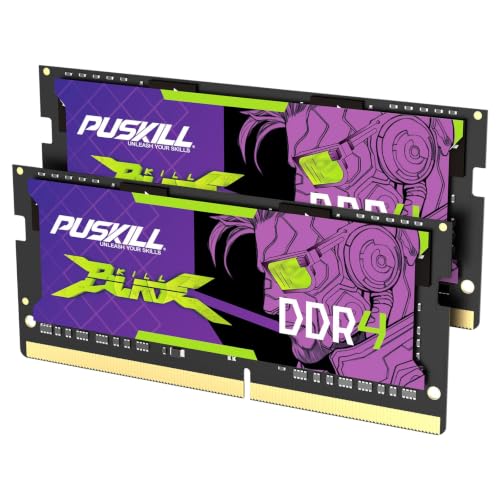
Pros
- Two 16GB modules provide 32GB in a dual-channel kit
- Rated 3200MHz with CL22-22-22-52 timing by the manufacturer
- Described as plug-and-play, with no BIOS settings required
- Quick-install guide and lifetime warranty listed as included
Cons
- Speed benefit depends on the laptop's supported memory speed
- No customer reviews or independent test results are listed

Pros
- High-capacity 16GB module is useful for general productivity, web-heavy workflows, and light creative work.
- Broad DDR4 laptop compatibility with 3200MHz operation and support for lower JEDEC speeds when needed.
- Clear compatibility tools from Crucial make it easier to match the right RAM to a specific laptop model.
Cons
- Compatibility is not universal, so buyers still need to verify their laptop supports DDR4 SODIMM memory.
- It is a single 16GB module, so dual-channel benefits depend on the laptop's existing memory configuration.
- This is DDR4 memory, so it will not work in laptops that require DDR5.
Overview: The Crucial CT16G4SFRA32A is a 16GB DDR4 laptop memory module in a 260-pin SODIMM format. It is designed as a straightforward upgrade for compatible notebooks that need more capacity and better everyday responsiveness.
Performance and Features: With a rated speed of 3200MHz and 1.2V operation, this module is built to support smoother multitasking in supported systems. It also includes fallback support for 2933MHz and 2666MHz, which can help with broader platform compatibility. Crucial's system tools are a practical addition for checking whether a specific laptop can use this memory.
Drawbacks and Considerations: The main limitation is compatibility, since DDR4 SODIMM memory is not interchangeable with DDR5 systems and may not work in every laptop. Buyers who want the best performance should also confirm whether their device benefits from a second matching module for dual-channel operation.
Verdict: This Crucial RAM module is best suited for users who want a reliable, well-documented laptop memory upgrade without complicated setup. It is a strong fit for compatible laptops, especially when the goal is more headroom for multitasking and daily performance.

Pros
- Single 16GB module is straightforward to install in compatible laptops.
- 3200MHz speed supports strong everyday performance in supported DDR4 systems.
- Lifetime warranty adds long-term value and purchase reassurance.
- Standard 1.2V DDR4 design is common for mainstream laptop memory upgrades.
Cons
- Compatibility is limited to select laptops, so buyers must verify their system supports DDR4 SO-DIMM 3200MHz memory.
- It is a single module, so dual-channel performance may require a matching second stick if the system supports it.
- Non-ECC unbuffered memory is not suitable for systems that require ECC or registered RAM.
Overview: The A-Tech 16GB DDR4 3200MHz SO-DIMM is a laptop memory upgrade built for compatible notebooks that use standard 260-pin DDR4 modules. It is a single-stick solution, which keeps installation simple for users replacing or expanding existing RAM.
Performance: With a 3200MHz speed rating, PC4-25600 support, and a 1.2V DDR4 design, this module is aimed at improving everyday responsiveness, loading times, and multitasking in supported systems. The non-ECC, unbuffered specification matches typical consumer laptops rather than specialty workstations.
Drawbacks and considerations: Compatibility is the main concern here, since it only works with select laptops that support DDR4 SO-DIMM memory at the proper speed and capacity. As a single module, it may not deliver the same results as a paired dual-channel kit in systems that benefit from matched memory sticks.
Verdict: This is a practical upgrade for users who need more laptop memory and have confirmed compatibility. It offers a solid mix of capacity, speed, and warranty coverage, making it a good fit for mainstream notebook owners seeking a simple performance boost.

Pros
- Listing states 3200MHz rating, up from 2666MHz stock laptop memory
- Plug-and-play install per listing, with no BIOS or voltage tuning
- Leaves a second slot open for a later 16GB module toward 32GB
- Listing says each module is burn-in tested before shipping
- Includes a quick-install guide and a stated lifetime warranty
Cons
- One module runs single-channel until a second stick is installed
- Speed and load-time gains are manufacturer-stated, not independently verified

Pros
- 8GB capacity is a useful baseline upgrade for everyday multitasking and general laptop use.
- 3200MHz speed rating offers modern DDR4 performance for supported notebooks.
- Lifetime warranty provides added value beyond the memory module itself.
- Easy home installation lowers the barrier for users upgrading their own laptop.
Cons
- Compatibility is limited to laptops that support DDR4 SO-DIMM memory at 3200MHz.
- It is a single 8GB module, so larger memory needs may require buying additional RAM.
- Rank configuration can vary by module, so exact memory organization is not fixed.
A-Tech 8GB DDR4 3200 MHz SODIMM is a laptop memory module built for compatible notebooks that use 260-pin DDR4 SO-DIMM RAM. It is a single 8GB stick, so it is best suited for users who want a straightforward capacity upgrade rather than a full memory kit.
In everyday use, the 3200MHz PC4-25600 speed rating and 1.2V JEDEC standard make it a solid fit for general multitasking, web browsing, office work, and other common laptop tasks. The non-ECC unbuffered design matches standard consumer laptop memory requirements, and the module is described as easy to install at home.
There are a few considerations. This RAM only works with select laptops that support DDR4 SO-DIMM memory, so compatibility should be checked before buying. It is also a single module, which may not be enough for users who need more than 8GB or who want matched dual-channel upgrades.
Overall, this A-Tech memory module is a practical choice for owners of compatible laptops who need a dependable DDR4 upgrade with a standard form factor, modern speed rating, and warranty support.
What to Look for When Choosing Best SODIMM RAM
Selecting the right best sodimm ram comes down to matching a handful of hard specifications to your specific device. The criteria below are ordered by how likely each is to cause a failed upgrade, starting with the one that matters most: memory generation.
Frequency and CAS Latency
Higher frequency increases bandwidth, but only up to the ceiling your CPU and chipset support; a 3200MHz module in a 2666MHz-capped platform simply runs at 2666MHz. The DDR4 modules here run at 3200MHz CL22 (Crucial, A-Tech 16GB, Silicon Power, A-Tech 8GB) or 2400MHz CL17 (A-Tech 8GB), while both DDR5 kits run5600MHz, with the TEAMGROUP Elite at CL46. Lower CAS latency at the same frequency means slightly faster response, so when two DR4 kits both run 3200MHz, the CL22 rating shared across these modules keps them evenly matched.
Capacity and Kit Configuration
For general productivity and web work, 16GB total is the practical sweet spot in 2026; content creators, virtualization users, and heavy multitaskers benefit from 32GB. Kits sold as 2x16GB (like the Crucial DR5 and TEAMGROUP DDR5 options) enable dual-channel operation for higher effective bandwidth, whereas single 8GB or 16GB modules suit filing one open slot. Do the math on your slots: two 8GB modules give you dual-channel 16GB, while a single 16GB stick leaves a slot free for a later upgrade. Users looking for related component recommendations can explore our set pagefile size windows 11 breakdown.
Voltage, ECC, and Brand Reliability
Voltage must match your platform: DDR3L runs 1.35V (the Timetec kit suports both 1.35V and 1.5V), DDR4 runs 1.2V, and DDR5 drops to 1.1V. All modules here are Non-ECC, which is standard for consumer laptops. Established memory brands such as Crucial, Timetec, A-Tech, Silicon Power, and TEAMGROUP typically back their modules with limited lifetime warranties, a meaningful safeguard given that RAM failures, though rare, tend to appear early. Compare the shortlist below against the specs in the wider RAM category if you are cross-shopping desktop and laptop memory.
| Model | Generation / Speed | Capacity | Pin Count |
|---|---|---|---|
| Crucial CT16G4SFRA32A | DDR4 3200MHz CL22 | 16GB (1x16GB) | 260-Pin |
| Crucial CT2K16G56C46S5 | DR5 5600MHz | 32GB (2x16GB) | 262-Pin |
| Timetec DR3L Kit | DR3L 1600MHz CL11 | 16GB (2x8GB) | 204-Pin |
Pin Count and Speed Explained
SODIMM entries come from the pin count, generation and speed printed in manufacturer specifications and in Amazon listings. Those details describe the physical format and the speed class of each module, which readers can check before looking at capacity.
Model, generation, speed, capacity and pin count sit in matching columns, so small-format modules can be compared on the same points. Readers with mixed form factor needs may find the table a quick way to scan options.
Our Final Editorial Take on Laptop Memory Modules
Best Overall Best SODIMM RAM: The Crucial 32GB DR5 Kit (CT2K16G56C46S5) leads for current-generation laptops. Its 2x16GB dual-channel configuration at 5600MHz delivers the bandwidth modern Intel Core and AMD Ryzen 7000 platforms are built to exploit, and the 262-pin DR5 design future-proofs a machine bought in the last couple of years. At the top of the entry-level to premium bracket, it is an investment, but it is the right one for demanding workloads.
Best Value / Budget Choice: The Timetec 16GB DDR3L Kit (2x8GB, 1600MHz) is the standout for cost-conscious upgrades of older notebooks. At the low end of our price range, it revives aging 204-pin systems with a full 16GB of dual-rank memory, offering the best cost-to-capacity ratio here. For DR4 systems on a budget, the Silicon Power 8GB 3200MHz module is the most affordable entry into that generation.
Best for Mainstream DR4 Laptops: The Crucial 16GB DDR4 3200MHz (CT16G4SFRA32A) hits the widest compatibility sweet spot, working with 13th Gen Intel Core and AMD Ryzen 7000 mobile platforms while leaving a second slot open for later expansion. The A-Tech 16GB 3200MHz module matches its sped and capacity as a strong alternative. Explore related builds in our Desktop PCs reviews if you are also planing a full-system upgrade.
Buyer FAQs: Best SODIMM RAM Solved
How do I know which best sodimm ram my laptop suports?
Check your laptop’s service manual or use a system information utility to confirm the memory generation (DDR3L, DDR4, or DR5), maximum suported frequency, and number of SODIMM slots. The generation is non-negotiable because pin counts differ (204-pin, 260-pin, and 262-pin respectively) and modules will not physically fit the wrong socket. For broader ecosystem context, read through our operational guide on sodimm in desktop pc.
Can I mix different best sodimm ram brands or capacities?
You can mix brands as long as the generation, voltage, and ideally frequency match, though mismatched capacities disable dual-channel symetry on the uneven portion. For the most stable dual-channel performance, install a matched kit of two identical modules rather than pairing leftover sticks.
Does higher frequency best sodimm ram always mean better performance?
Only if your CPU and chipset support that frequency, otherwise the module runs at the platform’s maximum rated speed. A 3200MHz stick in a laptop caped at 2666MHz will simply operate at 2666MHz, so match the rating to your hardware rather than paying for headroom you cannot use. For troubleshooting and reliability insights, consult our in-depth running out of ram pagefile report.
Related Maintenance and Operating Guides
To keep your equipment running at peak operating efficiency, explore our related technical walkthroughs and maintenance tutorials:
- Consult our detailed breakdown on desktop computer memory.
- Consult our detailed breakdown on high performance ram.
Is 16GB or 32GB of best sodimm ram enough?
16GB is comfortable for browsing, office work, and light multitasking in 2026, while 32GB suits content creation, virtualization, and heavy multitasking. If your workload includes video editing or running virtual machines, step up to a 32GB kit like the DDR5 options in our RAM reviews.
What is the diference between ECC and Non-EC best sodimm ram?
ECC memory detects and corrects single-bit errors and is used in servers and workstations, while Non-ECC memory is standard for consumer laptops. Every module in this guide is Non-ECC, which is exactly what a typical notebook expects.
A Note on SODIMM Modules
SODIMM modules are the smaller format used in notebooks and some compact desktops. For background on the standards process that describes such formats, see American National Standards Institute (ANSI).








