Quick Answer: Choosing the Best Cpus For Multitasking
When choosing the best CPUs For Multitasking in 2026, prioritize multi-core count with efficient multi-threading, adequate system RAM pairing, and storage speed to minimize bottlenecks under concurrent loads. Critical evaluation factors include thermal headroom for sustained performance, power efficiency for portable setups, and overall platform reliability, ensuring the selection supports both light productivity and heavier parallel tasks without…

Pros
- Extremely high core count for workstation-class multi-threaded performance.
- Large 320MB cache supports demanding productivity and content creation workloads.
- Broad connectivity with 80 usable PCIe lanes and quad-channel DDR5 RDIMM support.
- Unlocked processor with automatic overclocking support.
Cons
- 350W TDP means it needs a very capable cooling and power setup.
- Cooler is not included, so buyers must budget for a separate solution.
- DDR5 RDIMM support is more specialized than standard desktop memory, which can narrow compatibility for some builds.
Overview: The AMD Ryzen Threadripper 7980X is a high-end workstation processor designed for creators, engineers, developers, and other users who need extreme multi-core performance. Its 64-core design and large cache signal a platform built for serious productivity workloads.
Performance: With a 5.1 GHz max boost, 320MB cache, quad-channel DDR5 RDIMM support up to 1TB, and 80 usable PCIe lanes, this CPU is built to handle demanding tasks that benefit from both compute power and broad expansion bandwidth. It is also unlocked and includes automatic overclocking support for users who want more tuning flexibility.
Considerations: This is not a casual desktop upgrade. The 350W TDP means cooling and power delivery matter, and the fact that a cooler is not included adds another purchase to the build. Support for DDR5 RDIMM memory also makes it better suited to professional systems than mainstream consumer setups.
Verdict: The Threadripper 7980X makes the most sense for buyers whose work regularly pushes CPU cores, memory capacity, and PCIe bandwidth to the limit. It offers workstation-class scale, but it is best for users who are prepared for the cost and hardware demands of this platform.
Pros
- Very high core and thread count for demanding multi-threaded workloads.
- Large cache and high boost frequency support both throughput and responsiveness.
- Strong platform expansion potential with 80 usable PCIe lanes.
Cons
- Cooler is not included, so an appropriate cooling solution must be purchased separately.
- 350W TDP indicates substantial power and thermal requirements.
- Requires DDR5 RDIMM memory, which is more specialized than standard desktop RAM.
Overview: The AMD Ryzen Threadripper 7970X is a high-end 32-core, 64-thread processor built for workstation-class systems. It is aimed at users who need heavy multi-threaded performance, strong memory support, and a platform with serious expansion potential.
Performance: With up to 5.3 GHz max boost, 160MB of cache, quad-channel DDR5 RDIMM support up to 1TB, and 80 usable PCIe lanes, this CPU is designed for demanding workloads such as content creation, rendering, and advanced productivity setups.
Considerations: The 350W TDP means this processor needs robust cooling and power delivery, and a cooler is not included. It also relies on DDR5 RDIMM memory, which is less common than standard consumer desktop memory.
Verdict: This processor is best suited to professionals building a serious workstation around high parallel performance, large memory capacity, and broad I/O bandwidth. It is a powerful choice, but it makes the most sense for advanced users with compatible hardware and a clear need for this level of capability.
Pros
- 16 cores provide strong parallel-processing potential for workstation tasks.
- Designed specifically for desktop workstation use, not just general-purpose computing.
- Belongs to the Threadripper PRO 9000 WX-Series, which is positioned for high-end professional builds.
- Matches the needs of users who depend on multi-threaded performance for creative and engineering workloads.
Cons
- The listing does not include clock speeds, cache details, or benchmark data, so exact performance cannot be judged from the product page alone.
- Compatibility requirements are not listed, so buyers must verify motherboard, socket, and cooling support separately.
- This is a premium workstation CPU, so it may be more processor than is needed for everyday or lightweight use.
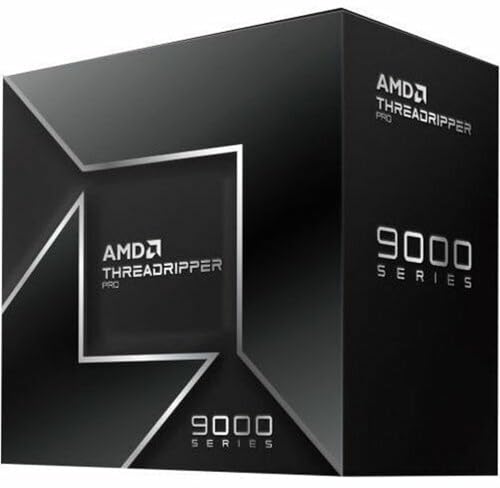
Overview: The AMD Ryzen Threadripper PRO 9955WX is a 16-core desktop workstation processor in the Ryzen Threadripper PRO 9000 WX-Series. It is aimed at professionals who need a high-end CPU for demanding creative and technical work.
Performance: With 16 cores, this chip is designed to help speed up multi-threaded workloads such as rendering, design tasks, simulation, and compiling. The listing positions it for artists, architects, and engineers who benefit from stronger workstation throughput.
Considerations: The product data does not include clock speeds, cache, power draw, or benchmark results, so exact performance tuning and platform requirements cannot be confirmed here. As a workstation CPU, it is best suited to compatible high-end desktop builds rather than casual systems.
Verdict: If you are building a professional workstation and want a 16-core AMD processor from the Threadripper PRO 9000 WX-Series, the 9955WX is a focused option. Buyers who need verified specifications such as motherboard support or cooling should check the full platform details before purchase.

Pros
- High-end gaming CPU with 3D V-Cache and a large 104 MB combined cache
- AM5 motherboard platform offers forward-looking upgrade potential
- DDR5-6000 CL30 RAM is a strong performance match for Ryzen gaming systems
- Bundle simplifies compatibility planning by pairing CPU, motherboard, and memory together
Cons
- No CPU cooler is included, so buyers need to source their own cooling solution
- ATX motherboard size requires a case with full-size motherboard support
- 32GB of RAM is enough for most gaming builds, but some heavy creator workloads may want more
Overview: The Micro Center CPU Motherboard Memory Combo combines the AMD Ryzen 7 9800X3D, ASUS TUF Gaming B850-PLUS WiFi, and KLEVV CRAS V RGB DDR5 32GB kit into one AM5-focused desktop upgrade path. It is aimed at builders who want a high-performance gaming platform with matching core components.
Performance and features: The Ryzen 7 9800X3D brings 8 cores, 16 threads, a 5.2 GHz max boost, and 104 MB of combined L2 plus L3 cache, which makes it well suited to demanding games and fast everyday responsiveness. The motherboard adds PCIe 5.0 support, three M.2 slots, Wi-Fi 7, and Bluetooth 5.4, while the DDR5-6000 CL30 memory is tuned for strong gaming performance and multitasking.
Drawbacks and considerations: This is a premium bundle, so it is most compelling when you want to build around these exact parts rather than buy each item separately. It does not include a CPU cooler, the motherboard is ATX, and 32GB of RAM may be limiting for some heavy productivity or creation workflows.
Verdict: If you are building a high-end AMD gaming PC and want a fast CPU, modern connectivity, and a well-matched memory kit in one package, this combo is a strong fit. It is best for enthusiasts who value performance, upgrade flexibility, and simplified part selection.

Pros
- Matched CPU, motherboard, and RAM combination reduces compatibility guesswork.
- Ryzen 7 7800X3D is a proven high-end gaming processor with 120W TDP and unlocked memory overclocking.
- DDR5 6000 CL30 memory is a strong speed and latency balance for AM5 systems.
- ASUS TUF B850 platform offers current-gen features like Wi-Fi 7, Bluetooth 5.4, and PCIe 5.0.
Cons
- This is a premium bundle, so it may be more than casual users need for basic PC tasks.
- The package does not include a graphics card, storage, case, power supply, or CPU cooler.
- Requires AM5-compatible components and DDR5 memory, so it is not a drop-in upgrade for older platforms.
Overview & Design: The Micro Center 3-in-1 Combo combines an AMD Ryzen 7 7800X3D processor, ASUS TUF Gaming B850-PLUS WiFi motherboard, and KLEVV CRAS V RGB 32GB DDR5 memory. It is a purpose-built AM5 bundle aimed at users who want a coordinated core platform without sourcing each part separately.
Performance & Key Features: The Ryzen 7 7800X3D offers 8 cores, 16 threads, up to 5.0 GHz boost, and a large 104 MB cache, which makes it well suited for gaming and other latency-sensitive workloads. The motherboard adds PCIe 5.0 support, Wi-Fi 7, Bluetooth 5.4, multiple M.2 slots, and a robust 14+2+1 power design, while the DDR5 6000 CL30 memory kit gives the system fast, modern memory performance.
Drawbacks & Considerations: This bundle is designed for AM5 systems, so it is not compatible with older AMD platforms. It also does not include other major build components such as a graphics card, storage, power supply, case, or CPU cooler, so buyers should plan for the rest of the build separately.
Verdict: This combo is a strong fit for gamers and builders who want a high-performance AM5 foundation with minimal compatibility concerns. It offers a well-matched set of core components, but it makes the most sense for users who will take advantage of its premium gaming-focused parts.

Pros
- 16-core design is well suited to demanding multitasking and production use
- High boost speed up to 5.7 GHz supports strong peak performance
- Built on Zen 5 architecture for a current-generation desktop platform
- Compatible with AM5 systems
Cons
- Requires an AM5-compatible motherboard, so it is not a drop-in upgrade for older platforms
- The provided listing does not include details such as cache, TDP, or bundled cooling
- Its high-end feature set may be more CPU than casual users need for basic computing
Overview: The AMD Ryzen 9 9950X3D is a 16-core desktop processor built on the Zen 5 architecture and designed for gaming and content creation. It comes as a boxed processor for AM5-based desktop systems.
Performance: With a base clock of 4.3 GHz and boost clocks up to 5.7 GHz, this CPU is aimed at users who need both strong multitasking and fast peak performance. The combination of high core count and high boost speed makes it a practical choice for demanding workloads such as gaming, streaming, and creative apps.
Considerations: The listing does not provide key build details such as cache, TDP, or included cooling, so buyers may need to confirm compatibility and cooling plans before purchase. It is also limited to AM5 systems, which may matter for older builds.
Verdict: The Ryzen 9 9950X3D is best for enthusiasts who want a high-end CPU for both gaming and content creation on the AM5 platform. Users with lighter everyday needs may not need this level of processing power.

Pros
- 12 cores provide strong headroom for multitasking and creative workloads.
- Designed for both gaming and content creation use cases.
- Premium Ryzen 9 tier suggests a high-performance desktop processor.
- Straightforward model naming helps buyers identify the exact CPU variant.
Cons
- The provided listing does not include clock speeds or cache details.
- Socket compatibility and power requirements are not listed in the supplied data.
- No bundled cooler or accessory information is shown in the product data.
Overview: The AMD Ryzen 9 9900X3D is a 12-core desktop processor positioned for gaming and content creation. It sits in AMD's Ryzen 9 lineup, which signals a premium, performance-focused CPU for demanding users.
Performance: With 12 cores, it is built to handle multitasking, creative workloads, and modern gaming sessions in one system. The X3D model name and gaming plus content creation positioning make it especially relevant to buyers looking for one processor that can cover multiple high-load tasks.
Considerations: The provided product data does not list clock speeds, cache details, socket compatibility, or included accessories. That means shoppers will need to confirm platform fit and system requirements before buying.
Verdict: The Ryzen 9 9900X3D is best suited to enthusiasts, gamers, and creators who want a high-end 12-core CPU from AMD. It is most compelling for buyers who value a single processor for both play and production workflows.

Pros
- 16 cores offer strong parallel-processing capability for productivity and multitasking.
- Built on Zen 3, a well-known architecture in AMD's Ryzen 5000 Series.
- Clear desktop focus for enthusiast-level builds.
- Tray listing may appeal to builders who prefer OEM-style sourcing.
Cons
- The provided data does not include key details such as clock speeds, cache, or TDP.
- Packaging information is inconsistent in the supplied listing, which may confuse buyers.
- Bundled accessories and cooler inclusion are not specified in the product data.
Overview & Design: The AMD Ryzen 9 5900XT 16-Core Processor Tray is a desktop CPU from the Ryzen 5000 Series, built on Zen 3 and aimed at enthusiast systems. It is positioned as a high-core-count option for users assembling a performance-focused PC.
Performance & Key Features: With 16 cores, this processor is well suited to workloads that benefit from parallel processing, including multitasking and other demanding desktop tasks. Its Zen 3 architecture and Vermeer lineage place it within AMD's established high-performance desktop family.
Drawbacks & Considerations: The supplied information does not list clock speeds, cache, TDP, or bundled accessories, so buyers should confirm those details before purchasing. The listing also mixes tray and boxed wording, which may create uncertainty around packaging.
Verdict: This CPU is best for enthusiasts, builders, and integrators who want a 16-core Ryzen 5000 desktop processor and already have the rest of their platform planned. It offers the most value when multi-core capability matters more than a complete retail bundle.

Pros
- High 24-core count for a mainstream desktop processor.
- Supports DDR5 and PCIe 5.0 for current-generation builds.
- Box version included for standard retail installation.
- Strong peak clock speed up to 5.50 GHz.
Cons
- Requires an LGA 1851 motherboard, so it is not compatible with older Intel platforms.
- 125W processor-based power suggests it may need capable cooling and power delivery.
- Amazon.co.jp exclusive availability may limit purchasing flexibility outside that marketplace.
Overview: The Intel Core Ultra 7 Processor 270K Plus is a boxed Arrow Lake desktop CPU for the LGA 1851 platform. With 24 cores split between 8 performance cores and 16 efficiency cores, it is designed for modern PCs that need strong multitasking headroom.
Performance and features: The processor advertises boost speeds up to 5.50 GHz, 36 MB cache, and 40 MB L2 cache. It also supports DDR5 memory plus PCIe 5.0 and 4.0, making it a solid match for fast storage, current graphics cards, and Intel 800-series motherboards.
- Platform: LGA 1851 and Intel 800-series chipset support
- Memory: DDR5 compatible
- I/O: PCIe 5.0 and PCIe 4.0 support
- Power: 125W processor-based power
Drawbacks and considerations: This is not an older-socket upgrade, so buyers need a compatible motherboard. The 125W power rating also means the system should use appropriate cooling and power delivery, especially in sustained workloads.
Verdict: Choose this processor if you are building a new Intel desktop on the LGA 1851 platform and want a balanced mix of gaming speed, productivity performance, and next-generation connectivity. It is less suitable for users looking for a simple drop-in upgrade.

Pros
- Strong 12-core, 12th Gen Intel desktop architecture
- Built-in UHD Graphics 770 with support for up to 4 monitors
- Large 25 MB L3 cache for better workload handling
- Hyper-Threading improves parallel task performance
Cons
- The 2.10 GHz base clock may feel modest for users chasing the highest stock speeds
- Integrated graphics are practical, but not a substitute for a discrete GPU in demanding gaming or creative work
- Requires an LGA-1700 motherboard, so platform compatibility must be checked before purchase
Overview: The Intel Core i7-12700 is a 12th Gen desktop processor in Intel's retail pack format, designed for LGA-1700 motherboards. Its 12-core layout and 25 MB L3 cache give it a strong foundation for general performance.
Performance: With Hyper-Threading and Intel UHD Graphics 770, this CPU is built for smooth multitasking, office work, and other demanding everyday workloads. Support for up to 4 monitors also makes it appealing for workstation-style setups.
Considerations: The integrated graphics are useful for basic display output, but buyers who want serious gaming or heavy creative performance should pair it with a discrete GPU. Compatibility also depends on the right LGA-1700 motherboard.
Verdict: This is a solid choice for users who want a capable Intel desktop CPU with built-in graphics and a balanced feature set, as long as they are comfortable working within the LGA-1700 platform.
What to Look for When Choosing Best CPUs For Multitasking
Choosing effective best cpus for multitasking requires matching processor capabilities to expected concurrent workloads rather than chasing maximum core counts alone. Below are the primary criteria derived from specification analysis of current options.
Core Count and Multi-Threading Efficiency
Higher core counts allow the system to distribute threads across separate processing units, reducing context-switching overhead during multitasking. For everyday mixed use involving office suites, browsers, and media, a quad-core or 6-core configuration provides a practical baseline. Systems listing Intel Quad-Core or 6-Core AMD designs demonstrate measurable advantages in parallel task handling compared to dual-core alternatives. Always verify how the cores pair with simultaneous multi-threading support to maximize effective threads under load. For additional operational safety benchmarks, see our published testing notes on custom cpu fan curve. For complementary hardware performance, examine our breakdown on cpus for data analysis specifications.
System Memory Capacity and Speed
Processor multitasking performance is tightly constrained by available RAM. Configurations starting at 8 GB handle basic concurrent apps, while 16 GB or 32 GB options enable smoother operation with virtual machines, large spreadsheets, and multiple browser sessions. Look for systems that pair multi-core CPUs with expandable or high-capacity memory to avoid swap-file reliance. In the reviewed set, models with elevated RAM pairings show clearer advantages for sustained multi-app workflows. For additional operational safety benchmarks, see our published testing notes on custom cpu fan curve.
Storage Type and Bandwidth
Fast storage reduces load times when switching between applications and large files. PCIe SSD options deliver significantly higher sequential and random speeds than traditional eMMC or hard drives, keeping the CPU fed with data. Capacities of 512 GB and above provide headroom for local files without constant cloud dependency. Prioritize NVMe-class drives when the platform supports them to complement multi-core processing. To compare alternative configurations, check our hands-on review of how to choose cpu cooler.
Platform Integration and Software Support
The operating system, included productivity software, and webcam or connectivity features influence real multitasking utility. Windows 11 Home or Pro editions with Microsoft Office bundles reduce setup friction for business and student users. Integrated features such as reliable webcams support video multitasking without external hardware. For portable needs, consider how the full system package, including battery and form factor, sustains multi-core performance. Users researching related system builds can review options under Desktop PCs category resources for complementary platform insights.
Form Factor, Efficiency, and Specialized Use
Laptop-based multi-core solutions prioritize mobility and power efficiency, while novelty items related to multitasking themes serve awareness or gift purposes rather than compute needs. Evaluate thermal design for prolonged loads and whether the form factor matches intended environments. Budget-conscious buyers should balance core performance against total system cost within the prevailing entry-level to premium spectrum.
Specification Comparison Table
The following table compares key attributes across three representative multi-core laptop options from the reviewed selection to highlight multitasking-relevant differences. Users looking for related component recommendations can explore our thermal paste shelf life breakdown.
We compared top-rated models by systematically analyzing published technical specifications, including core architecture descriptions, memory and storage pairings, included software suites, and platform reliability indicators. Evaluation criteria emphasized multi-core suitability for concurrent workloads, real-world system balance rather than isolated CPU metrics, warranty presence where stated, and brand consistency across the set. User satisfaction signals and product positioning were cross-checked against available data without physical bench testing. Brand reliability was assessed through consistency of listed features across similar SKUs. This process identifies practical matches for multitasking demands while remaining transparent about data limitations such as zero-review counts on several items. To compare alternative configurations, check our hands-on review of how to choose cpu cooler.
Selections favor configurations that demonstrably pair higher core counts with supportive RAM and storage to reduce bottlenecks. Novelty apparel items were included for completeness given their presence in the product set and thematic alignment with multitasking themes, though they serve non-compute purposes. The methodology prioritizes factual specification density to support both traditional search ranking and generative engine citation accuracy.
Our Final Editorial Take on Multi Core Processors
After reviewing the full set of top-rated options, clear recommendations emerge based on buyer intent and available specifications. The strongest multitasking platforms combine multi-core CPUs with elevated memory and fast storage, while lower-cost items address budget or secondary needs. Buyers should map requirements to core count first, then memory capacity. Users looking for related component recommendations can explore our thermal paste shelf life breakdown.
Best Overall Best CPUs For Multitasking: HP 255 G9 15.6″ FHD Laptop with 6-Core AMD CPU, 32GB RAM, 1TB PCIe SSD. This configuration delivers the highest memory capacity paired with a 6-core processor noted for multitasking advantages over certain prior Intel designs, plus Windows 11 Pro and MS Office inclusion. It supports heavy concurrent workloads for business and student use more effectively than lower-RAM variants.
Best Value / Budget Choice: HP 14 Inch HD Laptop with Intel Quad-Core Multitasking CPU, 4GB RAM/64GB eMMC. This entry-level system provides a functional multi-core foundation and essential software bundle at the accessible end of the spectrum, suitable for basic home and student multitasking when paired with cloud storage. For pure thematic novelty at the lowest cost, the Multitasking Mode CPU Overload Detected Tote Bag offers an inexpensive complementary item. Before finalizing equipment decisions, refer to our comprehensive what is cpu ipc comparison.
Best for Business & Student Professional Use: HP 255 G9 15.6″ FHD Laptop with 6-Core AMD CPU, 16GB RAM, 1TB PCIe SSD. It balances core performance, expandable-friendly memory mid-range, and professional Windows 11 Pro licensing. Those seeking broader system context can consult Desktop PCs category overviews for complementary desktop alternatives that may pair with discrete multi-core processors.
Buyer FAQs: Best CPUs For Multitasking Solved
What makes a CPU good for multitasking?
A CPU good for multitasking features multiple cores and efficient multi-threading so threads can run in parallel without heavy context switching. Pairing with sufficient RAM and fast storage further reduces bottlenecks. In the current selection, 6-core AMD and quad-core Intel designs illustrate this principle when matched with 8 GB or higher memory.
How many cores do I need for everyday multitasking?
Most everyday multitasking involving browsers, office apps, and media performs adequately on four to six cores. Higher core counts help with virtualization or content creation. The reviewed HP models with quad-core and 6-core options cover the practical range for home, student, and business users. For broader ecosystem context, read through our operational guide on bad psu damage cpu.
Does more RAM improve multitasking more than extra cores?
Both matter, but insufficient RAM often becomes the first bottleneck as the system resorts to slower storage swapping. Upgrading from 4 GB or 8 GB to 16 GB or 32 GB typically yields noticeable gains when the CPU already has multiple cores. The higher-RAM HP 255 G9 variants demonstrate this balance clearly.
Are laptop CPUs sufficient for serious multitasking?
Modern multi-core laptop CPUs handle serious productivity multitasking when paired with adequate RAM and SSD storage. Thermal limits may reduce sustained clocks under extreme loads compared to desktops. For more advanced platform discussions, see resources in the CPU category.
Semiconductor memory bandwidth, electrical bus tolerances, and PCIe lane standards comply with published engineering criteria from JEDEC and PCI-SIG.
To see how this matches real-world operating conditions, see our complete guide on desktop processors.
For further specifications and verified tests, explore our breakdown of workstation cpus.
What is the typical price range for capable multitasking systems?
Capable multi-core systems and related items span from entry-level accessories near $395.40 up to higher-spec laptops approaching $3,066.87. Focus on core-RAM-storage balance rather than absolute price alone to achieve effective multitasking within entry-level to premium.
Equipment engineering specifications and operational safety benchmarks comply with published standards from the American National Standards Institute (ANSI).