Quick Answer
Set a custom CPU fan curve in BIOS by mapping fan speed to CPU package temperature: 30% at 40°C, 50% at 60°C, 75% at 75°C, 100% at 85°C. Use PWM fans with a 20% minimum duty cycle, enable a 3 to 5°C hysteresis window, and verify with a 10-minute stress test before calling it done.

Understanding the Physics: PWM vs. DC Fan Control

Before you touch a single BIOS setting, you need to know which control method your fans support, because it determines the entire tuning strategy. PWM (pulse-width modulation) fans use a dedicated fourth wire that carries a 25 kHz control signal, letting the motherboard modulate speed from roughly 20% to 100% duty cycle with fine granularity. DC (voltage) control regulates speed by varying the supply voltage on the power pin, which works but has a higher minimum threshold, most DC fans refuse to spin below about 5V, translating to roughly 40% of rated speed. This distinction matters because a DC fan simply cannot idle as low as a PWM unit, so your silent-idle target changes accordingly.
Check your fan’s connector: a 4-pin header means PWM, a 3-pin header means DC. On modern boards like the ASUS ROG Maximus Z890 Hero vs MSI MEG Z890 ACE, both platforms expose per-header control modes in the BIOS, letting you assign PWM or DC per fan. If you are building around a current-generation chip, cross-reference your cooling expectations against our AMD Ryzen 5 9600X vs Intel Core Ultra 5 245K analysis, since the two architectures report temperature and power differently, Intel exposes package power directly while AMD leans on Tctl/Tdie readings.
Reading the Right Temperature Source
The single most common mistake in fan-curve tuning is binding the fan to the wrong sensor. CPU fans should track CPU package temperature (Tctl/Tdie on AMD, package temp on Intel), never motherboard VRM or system temperature, because those lag the actual silicon state by seconds. For AIO pump fans, bind to coolant temperature if your board exposes it, coolant rises slowly and smoothly, which produces a far more stable curve than chasing spiky core temps. If your BIOS only offers CPU temp, use a longer response time (see the hysteresis section below) to compensate.
Building the Curve: Temperature Thresholds and Duty Cycles
A good custom CPU fan curve is a piecewise-linear function with four to five anchor points. The goal is a flat, low-speed plateau at idle, a gentle ramp through normal operating range, and a steep climb only as you approach thermal limits. Below is the reference template I use for air coolers and AIOs, tuned for a 65 to 105W TDP processor.
| CPU Temp (°C) | Fan Duty (%) | Approx. dBA (120mm) | Use Case |
|---|---|---|---|
| 30 to 40 | 20 to 30% | 15 to 20 | Idle, desktop, web browsing |
| 40 to 55 | 30 to 45% | 20 to 28 | Light load, video, office |
| 55 to 70 | 45 to 65% | 28 to 36 | Gaming, moderate all-core |
| 70 to 80 | 65 to 85% | 36 to 42 | Heavy rendering, encoding |
| 80 to 90 | 85 to 100% | 42 to 48 | Stress tests, thermal limit |
Notice the deliberate plateau between 30, 40°C: most CPUs idle in the low 30s, so keeping the fan at its minimum duty cycle through that entire band prevents the constant on-off cycling that wears bearings and annoys users. The ramp accelerates only past 55°C, which is where sustained workloads actually live. This is the core of any serious custom-cpu-fan-curve methodology , flatten the idle, steepen the load response. When planning workspace deployment, consider the engineering criteria outlined in our thermal paste shelf life guide.
Zero-RPM Mode: When It Makes Sense
Many 2026-era boards and fans support a zero-RPM or “fan stop” feature that halts the fan entirely below a set temperature. This is excellent for silent builds but carries a real caveat: a stopped fan means zero airflow over the heatsink, so the CPU relies entirely on passive dissipation until the threshold is crossed. Set the zero-RPM cutoff at 40°C for air coolers and 35°C for AIOs, and always pair it with a fast ramp once the fan restarts, otherwise you get a sudden, jarring spin-up. If your CPU idles above 45°C (common with high-TDP chips or poor ambient airflow), skip zero-RPM entirely; the constant restarting is worse than a low idle speed.
BIOS Configuration: Step-by-Step Setup
Your motherboard’s UEFI is the most reliable place to build a custom CPU fan curve, because it works at the firmware level regardless of operating system. The exact menu names vary by vendor, but the workflow is consistent across modern boards, including the flagship platforms covered in our ASUS ROG Maximus Z890 Hero vs MSI MEG Z890 ACE comparison.
- Enter BIOS (usually Del or F2 during POST) and switch to Advanced or Expert mode.
- Navigate to the fan control section, typically under Hardware Monitor, Q-Fan Control (ASUS), or Smart Fan Mode (MSI).
- Select the CPU fan header and set the control mode to PWM (or DC for 3-pin fans).
- Choose “Manual” or “Custom” curve mode rather than a preset like “Standard” or “Silent.”
- Define your anchor points using the temperature/duty table above as a starting template.
- Set the response time or hysteresis to 3 to 5 seconds to smooth transient spikes.
- Enable zero-RPM if supported and desired, with the cutoff at 35 to 40°C.
- Save and exit, then verify with a stress test.
Hysteresis and Response Time: The Anti-Spike Secret
Hysteresis is the temperature dead-band that prevents the fan from reacting to every momentary fluctuation. Without it, a single background process can spike your CPU to 60°C for half a second, spin the fan to 50%, then drop back , producing the classic “breathing” noise pattern. Set a 3, 5°C hysteresis so the fan only changes speed when temperature moves meaningfully. Combined with a 3-second response time, this makes the curve feel smooth and stable while still reacting fast enough to catch real sustained loads. This single setting is what separates a professional custom CPU fan curve guide from a naive temperature-to-speed mapping. For additional operational safety benchmarks, see our published testing notes on what is cpu ipc.
Software-Based Curves: Fan Control and Vendor Utilities
While BIOS curves are the foundation, software gives you finer control and live adjustment. The open-source Fan Control application is the gold standard, it can mix multiple temperature sources, apply smoothing, and even bind fan speed to GPU temperature for a unified system curve. Vendor utilities like ASUS Fan Xpert and MSI Center offer similar functionality with a friendlier interface, though they add background overhead. For a pure CPU curve, BIOS is sufficient; reach for software when you want to coordinate CPU and case fans into a single system-wide response.
One important note: software curves only apply once the OS loads, so your BIOS curve remains the safety net during POST and boot. Build both, BIOS for reliability, software for fine-tuning. If you are pairing a new CPU with an older cooler, check our AMD Ryzen 5 9600X vs Intel Core Ultra 5 245K comparison to understand the thermal headroom you are working with before committing to an aggressive silent curve.
Coordinating Case Fans with the CPU Curve
Case fans should not mirror the CPU curve exactly, they move air for the whole chassis, including the GPU and VRM. Bind front intake fans to a blend of CPU and GPU temperature, and rear/top exhaust to system temperature. A common mistake is running case fans at full speed while the CPU fan idles, which wastes noise for no thermal benefit. In practice, set intake fans 10% higher duty than the CPU fan at the same temperature to maintain positive case pressure, which keeps dust out and airflow directed. For GPU-specific tuning, our graphics card tests & GPU guides cover the analogous curve setup for your graphics card.
Diagnostic Symptom Matrix: Fixing a Bad Curve
If your machine is too loud, too hot, or both, the table below maps common symptoms to their root causes and fixes. This is the troubleshooting core of any serious custom-cpu-fan-curve workflow. To compare alternative configurations, check our hands-on review of bad psu damage cpu.
| Symptom | Likely Cause | Fix |
|---|---|---|
| Fan constantly revs up/down at idle | No hysteresis, low idle plateau | Add 3 to 5°C hysteresis, extend 30 to 40°C plateau |
| CPU hits 90°C+ under load | Curve too flat, fan stuck low | Steepen ramp past 70°C, verify 100% at 85°C |
| Fan never spins up under gaming load | Bound to wrong sensor (system temp) | Rebind to CPU package temp |
| Loud at idle despite low duty | DC fan minimum too high | Switch to PWM fan, or accept 40% floor |
| Sudden spin-up after zero-RPM stop | Zero-RPM cutoff too high, fast ramp | Lower cutoff to 35°C, soften restart ramp |
Final Diagnostic Verdict & Maintenance Checklist
A properly tuned custom CPU fan curve is the single highest-value cooling upgrade available to any PC builder, delivering measurable noise reduction and stable temperatures without a single dollar of new hardware. The verdict is unambiguous: if you are still running a stock fan profile, you are leaving both silence and thermal headroom on the table.
Before you call the job complete, run this verification checklist: Users looking for related component recommendations can explore our high cpu usage fix breakdown.
- Confirm the fan is bound to CPU package temperature, not system or VRM temp.
- Verify the idle plateau keeps the fan at minimum duty between 30 to 40°C.
- Confirm 100% duty is reached by 85 to 90°C so you never throttle under load.
- Run a 10-minute stress test (Cinebench or Prime95) and log peak temperature and fan RPM.
- Check that hysteresis (3 to 5°C) and response time (3s) are enabled to kill transient spikes.
- Re-verify the curve after any BIOS update, since updates can reset fan profiles.
- Clean the heatsink and fans every 6 months, dust accumulation shifts the entire temperature baseline and invalidates your curve.
For ongoing hardware decisions, keep our desktop CPU benchmarks & reviews bookmarked to cross-reference thermal behavior across processors, and check graphics card tests & GPU guides when you extend your curve strategy to the rest of the system. For deeper background on how modern processors manage thermal and power states, Intel Architecture Technical Documentation remains the authoritative reference on package temperature reporting and thermal design. A well-tuned curve, verified against real load, is the difference between a PC that sounds like a server and one that disappears into the background, and it costs you nothing but a few minutes of careful configuration.

Pros
- Supports a wide range of workstation and server sockets, including Intel LGA 4677/4710 and AMD SP5/SP6/sTR5/SP3/TR4/sWRX8/sWRX9.
- Strong airflow and high static pressure make it well suited to dense fin stacks and sustained heavy loads.
- 4U-compliant 145mm height helps it fit rackmount systems where taller coolers are not practical.
- Metal fan mounting hardware adds a more secure installation than many lightweight clip-based designs.
Cons
- It is limited to specific Intel and AMD enterprise-class sockets, so it will not fit most mainstream desktop platforms.
- The 44.9dBA maximum fan rating may be noticeable when the fan ramps to full speed.
- A 145mm height still requires a compatible 4U chassis, so it is not a universal case cooler.
Overview: The SilverStone XED120 WS is an industrial-grade CPU cooler built for 4U rackmount systems. Its 145mm height, metal fan mounting bracket, and broad workstation socket support make it a focused choice for enterprise-style builds where clearance and stability matter.
Performance: Cooling is handled by 8 x 6mm heat pipes, aluminum fins, and a 120mm x 30mm PWM dual ball bearing fan. With a 500 to 3000 rpm range, up to 102 CFM airflow, and 8.24mmH2O static pressure, it is designed to move air effectively through dense heatsinks and keep high TDP processors under control.
Drawbacks: This is not a universal cooler. It only supports specific Intel and AMD sockets, requires a 4U-compatible chassis, and its 44.9dBA maximum noise level may be noticeable under full load.
Verdict: For workstation and server builders who need a compact 4U cooler with strong thermal capacity, secure mounting, and broad support for enterprise sockets, the XED120 WS is a practical and highly specialized option.

Pros
- Supports modern Intel LGA 1851 and LGA 1700 platforms plus AMD AM5 and AM4.
- Low-noise pump and fan-focused design suit users who want strong cooling without excessive acoustic output.
- Pre-applied thermal paste simplifies installation and helps ensure consistent contact out of the box.
- Daisy-chain wiring can make cable management significantly cleaner than traditional multi-cable AIO setups.
Cons
- A 360mm radiator requires a case with enough mounting clearance, so it will not fit every system.
- Full ARGB and fan control depends on compatible motherboard headers.
- White styling may not match every build theme and can be less forgiving of visible dust over time.
Overview: The CORSAIR Nautilus 360 RS ARGB is a 360mm all-in-one liquid CPU cooler built for modern Intel and AMD desktop platforms. Its white finish, three included ARGB fans, and simplified cabling give it a clean, modern look that should appeal to builders who want both performance and tidy internals.
Performance: This cooler is designed to move heat efficiently from demanding CPUs with a low-noise pump, a convex cold plate, and high static pressure RS120 ARGB fans. CORSAIR also includes pre-applied thermal paste, which should make installation faster and help improve initial thermal contact.
Drawbacks: The biggest limitation is physical compatibility, since a 360mm radiator needs a case with the right mounting space. In addition, the ARGB and fan setup relies on compatible motherboard headers, so users without the right connections may need to plan their build carefully.
Verdict: The Nautilus 360 RS ARGB is a strong choice for users building a high-performance gaming PC or productivity rig who want effective cooling, quieter operation, and cleaner cable management. It is best suited to builders who already know their case supports a 360mm AIO.

Pros
- Strong thermal headroom for heavily overclocked or high-performance CPUs.
- Built-in ARGB lighting on both the block and fans for a premium visual effect.
- PWM fan control and noise-reduction pump design support more balanced operation.
- Hub-based synchronization can simplify lighting and fan management in complex builds.
Cons
- 360mm class cooling typically requires a case with compatible radiator support.
- High-speed fans may not be the best fit for users who prioritize ultra-low noise above all else.
- ARGB and hub integration adds installation and cable-management complexity compared with simpler coolers.
Overview: The be quiet! Light Loop 360mm White is a 360mm all-in-one CPU liquid cooler designed for demanding builds, especially heavily overclocked systems. Its white finish, illuminated cooling block, and Light Wings LX fans give it a clean premium look right out of the box.
Performance & Key Features: This cooler focuses on thermal headroom, using three 120mm PWM high-speed fans, a metal jet plate, and a high-density fin stack to support strong heat dissipation. The pump motor also uses a progressive IC to help keep switching noise low, while the 64 LEDs deliver vivid ARGB lighting across the block and fans.
- 3 x 120mm Light Wings LX PWM high-speed fans
- 64 total LEDs for ARGB illumination
- ARGB-PWM-Hub for up to 6 PWM fans and 6 ARGB components
- Designed for modern flagship and high-end CPUs
Drawbacks & Considerations: As a 360mm cooler, it will only suit cases with the right radiator clearance, and the high-speed fan setup may be more than some quiet-focused users want. The included lighting and hub features are useful, but they also mean a more involved install than a basic air cooler.
Verdict: The Light Loop 360mm White is best for builders who want strong cooling performance, synchronized ARGB lighting, and a polished white aesthetic in a high-end PC. It is a particularly good fit for overclocked systems where thermal capacity matters as much as appearance.

Pros
- Strong cooling performance for a single-tower 120mm-class air cooler.
- Quiet PWM fans with included Low-Noise Adaptors for more flexible acoustic tuning.
- Broad socket compatibility across recent Intel and AMD platforms.
- Does not overhang RAM on LGA17xx, LGA1200, and AM4 systems, which helps with memory clearance.
Cons
- The 158mm height may still be too tall for compact cases with tighter cooler clearance limits.
- The brown fan and beige styling may not suit users who want a more neutral or RGB-focused look.
- As a premium air cooler, it may be less convenient to install in some builds than a simple stock cooler.
Overview: The Noctua NH-U12A is a premium single-tower air CPU cooler designed for builders who want strong thermal performance without moving to a larger 140mm-class cooler. Its dual NF-A12x25 PWM fans and dense heatsink design give it a very refined, high-end feel.
Performance: With 7 heatpipes and more surface area than many compact coolers, the NH-U12A is built to handle demanding modern processors while keeping noise under control. The PWM fans can adjust automatically based on temperature, and the included Low-Noise Adaptors provide another option for quieter operation.
Drawbacks: This is still a tall tower cooler at 158mm, so case clearance should be checked carefully before purchase. The brown-and-beige Noctua design is distinctive, but it will not match every build style, and the overall package is aimed more at performance and compatibility than visual flair.
Verdict: The NH-U12A is best for users who value high-end air cooling, broad socket support, and low-noise operation in a relatively compact tower form factor. It is a strong choice for Intel Core, Core Ultra, and AMD Ryzen systems where cooler fit, acoustic quality, and long-term reliability matter.
Pros
- Dual-fan design provides strong cooling capacity for high-heat processors.
- Quiet-focused fan design supports low-noise operation during everyday use.
- Semi-passive mode can stop the fans completely at low PWM levels.
- Adjustable front fan improves compatibility with surrounding components.
- Includes both normal thermal paste and mentions liquid metal thermal grease support for advanced users.
Cons
- Large dual-tower air cooler design may require extra attention to RAM and case clearance.
- High-end cooling capability may be more than needed for entry-level or mid-power CPUs.
- Liquid metal thermal grease is mentioned as an option, but the standard installation still depends on proper mounting and case airflow.
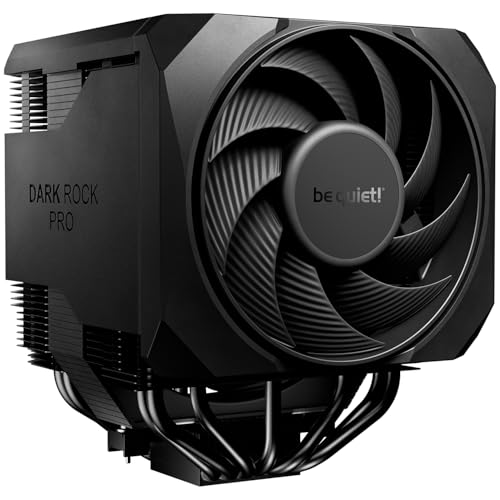
Overview & Design: The be quiet! Dark Rock Pro 6 is a high-end air CPU cooler built around a dual-fan, dual-tower style design with 7 heatpipes. It is clearly aimed at users who want strong cooling performance without moving to liquid cooling.
Performance & Key Features: In real-world use, the 300W TDP support, optimized heatsink, and Silent Wings 135mm and 120mm PWM fans should make it well suited to powerful gaming PCs and workstations. The active mode switch is a useful feature because it lets you choose between maximum cooling and semi-passive operation with full fan stop below 40% PWM.
Drawbacks & Considerations: This is a physically substantial cooler, so buyers should check for case and memory clearance before installation. It is also a premium air cooler, which means some systems may not need this much cooling capacity, especially if the processor runs at lower power levels.
Verdict: The Dark Rock Pro 6 is best for users who want a quiet, capable air cooler for demanding CPUs and value flexible fan behavior. It makes the most sense for enthusiast gaming builds and productivity systems where thermal headroom and low noise both matter.

Pros
- Dual-tower design with 7 heat pipes offers strong air-cooling capacity.
- Speed Switch provides flexible control over noise and performance.
- Silent Wings PWM fans use advanced fluid-dynamic bearings and 6-pole motors.
- Black coating with ceramic particles gives the cooler a premium, cohesive look.
Cons
- The large dual-tower, dual-fan design may be less suitable for compact cases or tight builds.
- Performance Mode can raise fan speed to 2000 rpm, so it will not be the quietest option under load.
- Compatibility details such as supported sockets and exact dimensions are not listed in the manufacturer listing and should be verified before purchase.
Overview: The be quiet! Dark Rock Pro 5 is a premium dual-tower CPU air cooler built around 7 copper heat pipes, a black coating with ceramic particles, and the brand's understated industrial design. It is aimed at users who want a high-end cooling solution without RGB-heavy styling.
Performance: Two Silent Wings PWM fans, advanced fluid-dynamic bearings, and airflow-optimized blades are designed to deliver strong cooling with controlled acoustics. The front fan uses a funnel-shaped inlet for higher air pressure, while the Speed Switch lets you choose Quiet Mode up to 1500 rpm or Performance Mode up to 2000 rpm.
Considerations: As a large premium air cooler, it may be more demanding to fit in compact cases than simpler single-tower alternatives. Performance Mode can also increase noise compared with Quiet Mode during sustained heavy loads, so buyers focused on absolute silence should keep that in mind.
Verdict: Dark Rock Pro 5 is a strong choice for enthusiasts, overclocking users, and builders who want serious air-cooling performance with a restrained design. It offers a thoughtful balance of airflow, noise control, and build quality for systems with enough space and the right compatibility.

Pros
- Supports current AMD AM5/AM4 and Intel LGA1851/LGA1700 platforms.
- Includes an integrated VRM fan for extra motherboard power delivery cooling.
- Uses a thicker 38 mm radiator for stronger cooling potential than standard 27 mm designs.
- Cleaner installation is helped by integrated cable management and a single visible motherboard cable.
Cons
- The 360 mm radiator size may not fit smaller cases, so clearance should be checked carefully.
- The thicker 38 mm radiator can make installation more demanding than slimmer AIO coolers.
- Compatibility is focused on the listed modern AMD and Intel sockets, so it is not a universal solution for older platforms.
Overview: The ARCTIC Liquid Freezer III Pro 360 A-RGB is a 360 mm all-in-one liquid CPU cooler with three 120 mm fans, a 38 mm radiator, and a black finish. It is designed for modern AMD AM5/AM4 and Intel LGA1851/LGA1700 systems, with an included Intel contact frame.
Performance: Its P12 Pro fans are tuned for stronger output at low speeds and higher maximum speed under load, while native offset mounting helps align the cold plate closer to the CPU hotspot. The integrated PWM pump and VRM fan add support for both core cooling and motherboard power delivery.
Drawbacks: The 360 mm format and thicker radiator can make compatibility more demanding, so case clearance should be checked before purchase. Also, the manufacturer listing does not include exact noise ratings or full installation dimensions.
Verdict: This cooler makes the most sense for users building a high-performance gaming or productivity PC who want strong thermal headroom, tidy cable management, and support for current Intel and AMD sockets.

Pros
- Includes a built-in monitoring display for CPU and fan RPM.
- Supports a broad range of modern Intel and AMD sockets.
- Three PWM ARGB fans provide strong cooling potential for a 360mm AIO.
- Uses a copper pump head and dual-structure design for better heat transfer and stability.
Cons
- Requires a case with 360mm radiator support, which limits compatibility with smaller builds.
- ARGB syncing depends on a compatible motherboard and lighting header.
- The display information appears limited to CPU and fan RPM data rather than full system metrics.
Overview: The darkFlash DH360D V1.2 is a 360mm all-in-one liquid CPU cooler built for desktop PCs that need strong thermal performance and a clean visual setup. Its black finish, integrated display, and ARGB fans give it a modern look, while the overall design focuses on practical cooling and monitoring.
Performance and features: This cooler combines a 3-phase 9-pole pump motor, a pure copper pump head, and a dual-structure impeller design to improve heat transfer and stability. The three PWM fans can reach up to 2000RPM ±10% and are rated at up to 30dBA, which makes the cooler suitable for users who want powerful airflow without excessive noise. The built-in display adds convenience by showing CPU and fan RPM data in real time.
Drawbacks and considerations: As with most 360mm AIOs, installation depends on having a case that supports a large radiator. The ARGB lighting also requires a compatible motherboard or lighting ecosystem for synchronization. In addition, the display focus is functional rather than expansive, so buyers looking for extensive on-screen customization should set expectations accordingly.
Verdict: The DH360D V1.2 is a solid choice for gamers, PC builders, and performance users who want a feature-rich liquid cooler with broad socket support and real-time monitoring. It offers a good mix of cooling capability, quiet operation, and visual appeal, especially for systems that can accommodate a 360mm radiator.
Fan Curves and Workloads
Fan curves depend on the workloads a processor handles, and readers who run design software may find the page on cad processors useful. For reference on electronics and cooling terms, see American National Standards Institute (ANSI).