

Video editors constantly struggle with system bottlenecks that slow down rendering, scrubbing multi-layer timelines, and exporting high-resolution footage. Choosing inadequate motherboards leads to limited RAM expandability, insufficient PCIe lanes for multiple GPUs or capture cards, and poor storage connectivity that cannot handle large media libraries efficiently. These issues compound when working with 4K or higher resolutions in applications requiring stable multi-core CPU support and high-bandwidth data paths. Professionals must carefully match socket types, power delivery systems, and expansion options to avoid costly upgrades later while ensuring compatibility with existing components for smooth 4K and 8K workflows.
When selecting the best Motherboards for Video Editing in July 2026, focus on chipset compatibility with multi-core processors, support for high-capacity high-speed RAM configurations of at least 64GB or more, abundant PCIe 4.0 or 5.0 slots for GPUs and NVMe storage, robust VRM design for sustained loads, and comprehensive I/O including multiple USB ports and networking. Our evaluation of 15 models from ASUS, Supermicro, msi and more emphasizes these technical attributes drawn from available specifications to identify reliable choices for professional video production. Readers seeking complementary full system options can review detailed insights in the Desktop PCs category for integrated solutions that pair well with advanced motherboards.

Pros
- Very high core and thread count for workstation-class performance.
- Strong storage and expansion options with PCIe 5.0 and multiple M.2 slots.
- Supports large-capacity ECC R-DIMM DDR5 memory for demanding professional tasks.
- Includes premium connectivity such as Wi-Fi 7, USB4, and dual-speed wired networking.
Cons
- Cooler and thermal solution are not included.
- Discrete graphics card is required.
- The 350W default TDP means it needs substantial cooling and power headroom.
Overview: The Micro Center AMD 9970X Processor with ASUS Pro WS TRX50-SAGE CEB Workstation Motherboard is a workstation-focused bundle built around the 32-core, 64-thread Ryzen Threadripper 9970X and ASUS's TRX50 SAGE platform. It is aimed at creators, engineers, and power users who need serious expandability and memory capacity.
Performance and features: With a 5.4 GHz max boost, unlocked overclocking, PCIe 5.0 support, DDR5 compatibility, and up to 1TB ECC R-DIMM memory support on the motherboard, this combo is designed for demanding rendering, simulation, and multitasking workflows. Connectivity is also strong, with Wi-Fi 7, USB4, 10 Gb and 2.5 Gb LAN, multiple M.2 slots, and IPMI remote management support.
Drawbacks and considerations: The processor does not include a cooler, and a discrete graphics card is required, so the total build cost and setup requirements are higher than on mainstream platforms. Its 350W default TDP also means cooling, power delivery, and case airflow need to be planned carefully.
Verdict: This bundle makes the most sense for users who value workstation-class expandability and sustained performance over simplicity or budget. If you are building a high-end creator or engineering system, the feature set is compelling; casual users will likely find it excessive.

Pros
- High-end Intel Core Ultra 9 185H processor class for productivity, AI, and content creation.
- Dual Ethernet and WiFi 7 add versatile, high-speed connectivity.
- Quad-display output support is well suited to trading desks and multitasking setups.
- 3-year warranty and reliability testing add confidence for long-term business use.
Cons
- The included 16GB RAM may feel limited for heavy virtual machines, large AI models, or advanced creative projects.
- Integrated Intel Arc graphics are not a replacement for a discrete GPU in demanding 3D or gaming workloads.
- Expansion and upgrade details are not provided in the supplied data, so upgrade flexibility is unclear.
Overview: The GEEKOM IT13 MAX is a compact mini PC built around Intel Core Ultra 9 185H performance, 16GB DDR5 memory, and a 1TB SSD. It is positioned as a desktop replacement for users who want a small system with business-ready reliability, Windows 11 Pro, and support for major Linux distributions.
Performance and features: Based on the listed specs, this model is well suited to coding, AI-assisted workflows, office productivity, and video editing. Dual 2.5GbE LAN, WiFi 7, Intel Arc graphics, and support for up to four displays, including 8K over USB-C, make it flexible for multi-monitor setups and connected work environments.
Drawbacks to consider: The included 16GB RAM may be enough for everyday work, but users running large virtual machines, heavy datasets, or advanced creative workloads may want more memory. It also relies on integrated graphics rather than a dedicated GPU, so it will not match a discrete graphics card for demanding 3D or gaming use.
Verdict: The IT13 MAX is a strong fit for developers, office professionals, traders, and creators who value compact size, strong networking, and broad OS compatibility. It makes the most sense for users who want a quiet, capable mini PC rather than a full tower workstation.

Pros
- Compact low-profile design is well suited for small form factor desktops.
- Multiple display outputs increase flexibility for monitor compatibility.
- No external power supply needed, which simplifies setup in budget PCs.
- Supports older Windows versions, including legacy systems.
Cons
- 1GB DDR3 memory and 64-bit bandwidth are limited for demanding graphics workloads.
- Not compatible with Windows 11, which reduces use in newer systems.
- Not intended for AAA gaming or high-performance creative work.
Overview: The QTHREE GT 210 is a low-profile desktop graphics card built for basic upgrades and compact PC builds. Its small form factor and simple installation make it a practical choice for slim cases and older systems.
Performance & Features: With 1GB DDR3 memory, a 589 MHz core clock, and HDMI, DVI, and VGA outputs, it is designed for everyday computing, video playback, and light photo or video editing. It also supports up to two monitors, which can improve productivity in office-style setups.
Drawbacks & Considerations: This card is not meant for modern gaming or heavy creative workloads, and its 1GB DDR3 specification is modest by current standards. It also does not support Windows 11, so buyers should confirm OS compatibility before purchasing.
Verdict: The QTHREE GT 210 makes the most sense for users who need an affordable, low-power display upgrade for a legacy PC or a compact desktop. It is a functional choice for basic tasks, but power users should look for a more capable graphics card.

Pros
- Broad support for popular Intel 8th and 9th Gen CPUs, including i9, i7, i5, Pentium Gold, and Celeron models
- Strong storage and expansion features with two Turbo M.2 slots and Intel Optane Memory readiness
- Dual Intel LAN is a practical advantage for users who want reliable wired networking options
- Thermal-focused design includes an extended heatsink layout and M.2 Shield Frozr
Cons
- Only compatible with Intel LGA1151 8th and 9th Gen processors, so it cannot be used with newer Intel platforms
- No built-in Wi-Fi is listed in the provided specs, so wireless networking may require an add-on solution
- ATX size may not fit smaller PC cases
Overview & Design: The MSI MAG Z390 Tomahawk is an ATX motherboard built for Intel LGA1151 8th and 9th Gen processors. It uses a gaming-focused layout with a pre-installed I/O shield, extended heatsinks, and a practical feature set aimed at reliable desktop builds.
Performance & Key Features: This board supports dual-channel DDR4 memory up to 4400 MHz overclocked, along with two Turbo M.2 slots and Intel Optane Memory readiness. It also includes M.2 Shield Frozr for storage cooling, Intel Turbo USB 3.1 Gen2, dual Intel LAN, and Intel CNVi readiness for flexible system planning.
Drawbacks & Considerations: The main limitation is platform compatibility, since it is designed specifically for Intel 8th and 9th Gen CPUs on the LGA1151 socket. The provided specifications also do not list built-in Wi-Fi, so users who want wireless networking may need an extra adapter or card.
Verdict: The MSI MAG Z390 Tomahawk is a strong choice for builders who want a stable Intel-based gaming motherboard with fast memory support, solid storage options, and useful thermal features. It is best suited to users assembling an 8th or 9th Gen Intel desktop who value wired networking and dependable performance.

Pros
- Windows 11 Pro is included and ready for immediate use.
- Excellent upgrade flexibility for RAM and storage compared with many sealed mini PCs.
- Supports quad-display workflows and 8K output for productivity-heavy setups.
- Durability-focused construction and a 3-year warranty add long-term value.
Cons
- Integrated Radeon Vega 7 graphics are not intended for demanding AAA gaming or heavy 3D rendering.
- The base 16GB RAM and 512GB SSD are adequate for daily use but may need upgrading for larger workloads.
- Expanding storage or memory requires opening the unit, so it is less plug-and-play than fixed configurations.
Overview: The GEEKOM A5 Mini PC is a compact Windows 11 Pro business desktop built around the AMD Ryzen 5 7430U and Radeon Vega 7 graphics. Its reinforced shell, metal frame, and small footprint make it well suited for desks, office counters, and other space-conscious setups.
Performance and features: With 16GB of RAM and a 512GB PCIe SSD, the A5 is designed for everyday productivity, web-based work, video calls, streaming, photo editing, light 4K video editing, and casual gaming. It also stands out for multi-display support through dual HDMI and dual USB-C ports, plus 8K output over USB-C for more advanced workspace configurations.
Drawbacks and considerations: The integrated Vega 7 graphics are fine for light creative tasks and casual games, but they are not a replacement for a dedicated GPU. Users with large files, many browser tabs, or heavier workloads may also want to expand the default memory and storage over time.
Verdict: The GEEKOM A5 is a strong choice for business users, home office buyers, and anyone who wants a quiet, upgradeable mini PC with broad display support and long warranty coverage. It is less suitable for serious gaming or demanding 3D work, but it offers practical value for daily professional use.

Pros
- Very high sequential read performance for a consumer NVMe SSD.
- Strong write speed on the 2TB model for large transfers and creative work.
- Better power efficiency than the brand's previous PCIe Gen4 drive.
- Includes software tools for monitoring, maintenance, and migration.
Cons
- Full advertised speeds require a PCIe 5.0-compatible motherboard and system.
- The raw data does not list a bundled heatsink, so cooling may depend on your build.
- The 2TB capacity may be limiting for users with very large game libraries or media projects.
Overview: The Sandisk WD_Black SN8100 2TB is a PCIe 5.0 x4 M.2 2280 NVMe SSD aimed at high-end gaming rigs and creator PCs. It keeps a familiar M.2 form factor while targeting users who want a major performance jump from older storage.
Performance: With sequential read speeds up to 14,900MB/s and write speeds up to 11,000MB/s on the 2TB model, this drive is built for fast game loading, large file transfers, and demanding workflows such as video editing and AI-related tasks. Random performance above 2,300,000 IOPS also supports quick everyday responsiveness.
Considerations: To reach its full potential, the SSD needs a PCIe 5.0-capable system. The raw data also does not specify a bundled heatsink, so thermal management may depend on your motherboard or case airflow.
Verdict: This is a strong choice for users building a modern performance PC who want top-tier speed and useful software support. If your system is older or you do not need PCIe 5.0-level performance, a PCIe 4.0 drive may be the more practical option.
Pros
- Very high PCIe 5.0 performance for supported systems.
- M.2 2280 form factor fits standard modern NVMe slots.
- 4TB capacity gives plenty of room for OS, games, and large projects.
- Includes software support for health monitoring and cloning.
Cons
- Requires a PCIe 5.0 compatible system to reach advertised speeds.
- Sandisk Dashboard is Windows only, which limits the bundled software on other operating systems.
- The provided data lists write speed differently in the title and feature copy, so buyers may want to verify the final spec on the product page.
Overview: The WD_BLACK SN8100 4TB from Sandisk is a PCIe 5.0 x4 NVMe SSD in the M.2 2280 format, built for users who want very fast internal storage. Its positioning clearly favors gaming, AI workloads, and video editing.
Performance: On paper, this drive delivers up to 14,900MB/s sequential read speed, with the product details also citing very strong write performance for the 2TB to 4TB range. It is also listed with more than 2,300,000 IOPS and TLC 3D CBA NAND, which should help with large file transfers and demanding multitasking.
Drawbacks: This is a premium performance drive that only makes full sense in a PCIe 5.0 capable system. The bundled Sandisk Dashboard is Windows only, and the supplied data shows a write-speed inconsistency between the title and feature copy, so shoppers should confirm the final published specification.
Verdict: The SN8100 4TB is best suited to enthusiasts, creators, and power users who need top-tier NVMe speed and lots of storage space. If your PC is newer and your workflow is storage heavy, it is a strong fit, but basic users may not need this level of performance.

Pros
- Native support for AMD Ryzen Threadripper PRO processors.
- Eight-channel ECC Registered DDR5 memory support.
- Seven PCIe 5.0 x16 slots offer outstanding expansion capacity.
- Robust 18+3+3 power design supports demanding workstation loads.
Cons
- Requires a very specific Threadripper PRO platform, so it is not a mainstream motherboard choice.
- The listing provides limited details on storage, networking, and rear I/O.
- Its workstation focus makes it less suitable for typical gaming or everyday PC builds.
Overview: The ASRock WRX90 WS EVO is a workstation motherboard built for AMD Ryzen Threadripper PRO processors. Its layout and feature set point to a platform designed for heavy multi-device builds rather than general-purpose desktops.
Performance and features: It uses an 18+3+3 power phase design with 110A SPS for VCore, supports eight DDR5 ECC Registered DIMMs in eight-channel memory mode, and offers up to 7600+ OC support. The board also provides 7 PCIe 5.0 x16 slots for graphics, storage, and expansion-heavy workflows.
Drawbacks and considerations: This is a highly specialized board, so it makes sense only for compatible Threadripper PRO systems. The listing does not provide details on storage, networking, dimensions, or bundled accessories, which may matter when planning a full workstation.
Verdict: If you need maximum expansion, ECC memory support, and a platform built for serious workstation workloads, the WRX90 WS EVO is well aligned with that goal. Users building mainstream gaming PCs or simpler desktops should look elsewhere.
Pros
- Very high PCIe 5.0 performance for compatible systems.
- Strong power efficiency for a next-gen high-speed SSD.
- Includes software support for monitoring and migration.
- Standard M.2 2280 design simplifies installation in supported builds.
Cons
- Requires a PCIe 5.0-capable system to reach its advertised top speeds.
- No heatsink or thermal accessory is listed in the provided data, so cooling depends on your setup.
- 1TB capacity may feel limited for users storing large game libraries, AI models, or video projects.
Overview: The Sandisk WD_BLACK SN8100 1TB is a PCIe 5.0x4 NVMe M.2 2280 SSD built for users who want very high internal storage speed in a standard desktop drive format. It is aimed at gaming, content creation, and AI-focused workloads.
Performance: Based on the provided specs, this drive reaches up to 14,900MB/s sequential read speed and up to 11,000MB/s sequential write speed on the 1TB model. That level of performance can help reduce loading times, speed up large file transfers, and improve responsiveness in demanding tasks on compatible hardware.
Considerations: The drive is only as fast as the platform it is installed in, so a PCIe 5.0-compatible motherboard and M.2 slot are needed to get the full benefit. The provided data also does not list a heatsink, so thermal management may depend on your system. In addition, 1TB may be limiting for users with very large libraries or projects.
Verdict: This SSD makes the most sense for enthusiasts and professionals who want top-end NVMe speed and are building on a modern platform. If you need maximum capacity or are upgrading an older system, a PCIe 4.0 alternative may be a better value.

Pros
- Includes multiple ASUS-exclusive utilities for tuning and connectivity.
- Supports DDR3 1600 memory.
- USB 3.0 Boost offers a practical advantage for supported peripherals.
- Wi-Fi Go! adds a convenient wireless-oriented feature set.
Cons
- The listing does not provide a full chipset, expansion, or rear I/O specification breakdown.
- The socket naming in the title should be verified before purchase to ensure compatibility.
- As a DDR3-era board, it is less aligned with newer memory-platform builds.
Overview: The ASUS Z87 PRO is a feature-oriented motherboard from ASUS, aimed at builders who want tuning tools and practical connectivity in a DDR3-based system. The listing suggests a more advanced experience than a basic entry-level board.
Performance & Features: Its headline features are ASUS Dual Intelligent Processors 4 with 4-Way Optimization, ASUS Exclusive USB 3.0 Boost, and ASUS Wi-Fi Go!. In everyday use, that combination points to easier system optimization, better USB convenience with compatible devices, and added wireless-focused functionality.
Drawbacks & Considerations: The raw product data leaves out important compatibility details such as full chipset information, expansion layout, and rear panel connectivity. Buyers should also confirm the socket specification shown in the title before ordering, especially if they are matching it to an existing CPU.
Verdict: This motherboard makes the most sense for users who value ASUS-specific utilities and a feature-rich approach to a DDR3 build. If you want optimization and connectivity extras instead of a minimal board, it is a strong candidate to compare.

Pros
- Clear Supermicro model naming helps with part verification and system matching
- Brand reputation is aligned with professional and enterprise hardware use cases
- Suitable for users who need a motherboard-centric purchase rather than a bundled system
- Can be a strong fit for replacement, integration, or custom-build workflows
Cons
- The listing provides limited specification detail, so compatibility research is essential before buying
- It is a specialized motherboard, which may be less straightforward than mainstream consumer options
- No customer review depth is available here to help confirm long-term real-world experience
Overview: The Supermicro X11SSV-Q is a motherboard from Supermicro, a brand widely associated with professional and enterprise hardware. Based on the listing data, it is best viewed as a focused platform component for custom builds, replacements, or system integration rather than a general consumer bundle.
Performance and Key Features: The main value of this board comes from its identity as a Supermicro model, which is often important for technicians and builders who need precise part matching. For buyers working on a known system, the exact model designation can simplify procurement and reduce the risk of ordering the wrong board.
Drawbacks and Considerations: The listing does not include detailed specifications, so shoppers should confirm compatibility, supported components, and intended use before purchase. Because it is a specialized motherboard, it may require more technical knowledge than a typical retail desktop board.
Verdict: The Supermicro X11SSV-Q is most valuable to buyers who need an identified Supermicro motherboard for a professional or replacement scenario. If you already know the platform you are building around, this board can be a practical choice, but it is not ideal for buyers who want a fully specified, plug-and-play consumer listing.

Pros
- Lists support for multiple Ryzen desktop CPUs on the AM4 platform.
- Includes 4x DDR4, M.2, HDMI, and PCIe 4.0 in a standard ATX layout.
- Power design and cooling claims indicate a focus on stability under load.
- Well suited to users building or upgrading an AMD-based desktop that needs modern connectivity.
Cons
- The raw description includes conflicting processor wording, so compatibility should be verified before purchase.
- The provided data does not include a full specification table, accessory list, or board dimensions.
- Limited buyer feedback in the source data makes real-world reliability harder to assess.
Overview: ZXKLXYY Computer Motherboards fit for ASRock X570 Creator is an ATX AM4 motherboard positioned for AMD desktop builds. It lists support for CPUs such as 3600X, 5600G, 5600X, 5700X3D, and 5800X3, with 4x DDR4 slots, M.2, HDMI, and PCIe 4.0.
Performance and features: The listed upgraded power design and advanced cooling suggest a board built for stable multitasking and gaming workloads. PCIe 4.0 and M.2 support are the main value drivers for faster storage and modern expansion.
Drawbacks and considerations: The raw product data contains inconsistent wording, including a reference to Intel processors in the description despite the AM4 and X570 platform details. There is also limited buyer feedback and no full specification table, so shoppers should verify exact compatibility and included accessories.
Verdict: This motherboard is best suited to users who specifically need an AM4, X570, DDR4 platform with broad connectivity and who are comfortable double-checking the listing details before buying.
Pros
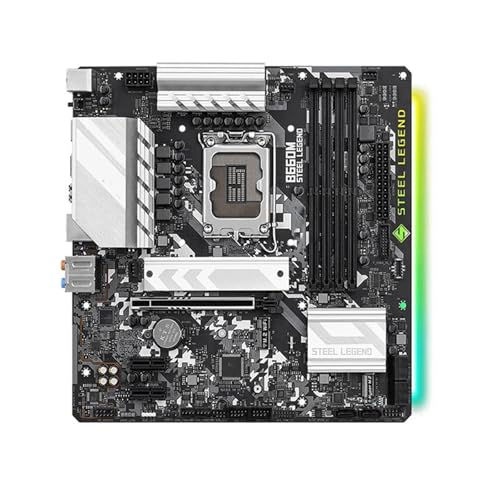
- Supports the LGA 1700 DDR4 platform, which is useful for compatible Intel-based builds.
- The description emphasizes lower latency and smoother multitasking for mixed workloads.
- Compatible with newer hardware types, including high-speed SSDs and discrete graphics cards.
- Clear fitment targeting for the ASROCK B660M Steel Legend platform may help replacement shoppers.
Cons
- The source data does not include a full specification sheet, so buyers must verify ports, slots, and form factor before ordering.
- Customer feedback is limited in the available listing data, making long-term reliability harder to judge.
- The product description is broad and does not confirm advanced features that some buyers may expect from a complete motherboard listing.
Overview: The THFKLXT B660M is a motherboard listed as fit for the ASROCK B660M Steel Legend LGA 1700 DDR4 platform. It is positioned for users who want a compatible desktop board for an Intel LGA 1700 DDR4 setup.
Performance: The product description highlights faster chip-driven data processing, lower system response latency, and smoother multitasking. It is intended to support demanding workloads such as games, video editing, and office tasks while also offering compatibility with newer storage and graphics hardware.
Considerations: The source data does not provide a full specification sheet, so buyers should confirm socket, form factor, ports, and expansion support before ordering. Customer feedback is also limited in the current listing data, so real-world long-term reliability is harder to assess.
Verdict: This is best suited to buyers who need an LGA 1700 DDR4-compatible motherboard and value broad hardware compatibility over a feature-rich spec list. It looks most appealing for practical desktop builds, replacements, or upgrades where fit and stability matter most.
Pros
- High-end Ryzen 9 CPU is well suited for demanding video editing and multitasking.
- Generous 64GB DDR5 memory and 2TB NVMe storage provide a strong out-of-box workflow base.
- Quadro RTX 2000 ADA 16GB is a pro-grade GPU option for creative software compatibility and acceleration.
- RAM is expandable up to 192GB, which leaves room for future memory upgrades.
Cons
- Mini DisplayPort-only video outputs may require adapters for HDMI or USB-C monitor setups.
- Mini tower form factor may offer less internal expansion room than a larger workstation case.
- Wireless connectivity is not listed in the provided specifications.
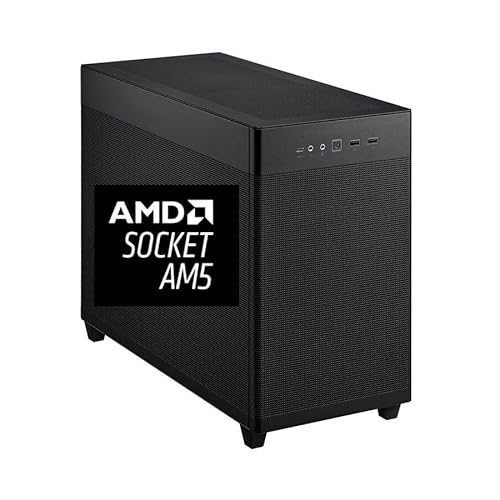
Overview & Design: The CPU Solutions Express 4K Video Editing PC is a compact mini tower workstation built around the Ryzen 9 9950X, 64GB of DDR5 memory, and a 2TB NVMe SSD. It presents itself as a serious desktop for creators who want a professional setup with Windows 11 Pro preinstalled and a clean, bloatware-free configuration.
Performance & Key Features: This system is designed for heavy video editing workloads, with a 16-core, 32-thread processor that can boost up to 5.7GHz and a Quadro RTX 2000 ADA graphics card with 16GB of dedicated memory. The combination of fast storage, high-capacity RAM, and workstation graphics should help with timeline responsiveness, multitasking, and large project handling.
Drawbacks & Considerations: The provided specs show several practical limitations that buyers should note before purchasing.
- The graphics outputs are limited to 4 Mini DisplayPort connections, so many monitor setups will need adapters.
- The mini tower format may not feel as expandable as a full-size workstation chassis.
- Wireless features such as Wi-Fi or Bluetooth are not listed in the supplied data.
Verdict: For editors, content creators, and production users who want a high-performance Windows 11 Pro workstation with strong CPU, memory, storage, and pro GPU specs, this PC is a compelling option. It is most valuable for users who prioritize reliable editing performance over compact consumer-style convenience.

Pros
- Strong CPU and GPU pairing for high-end gaming and multitasking.
- Large 32GB DDR5 memory and 2TB SSD are already included.
- Cooling setup is more robust than many basic prebuilts.
- Includes Windows 11 Home and lifetime technical support.
Cons
- No Wi-Fi or Bluetooth specifications are listed, so wireless features should be confirmed before buying.
- The tower is relatively large, so it may not fit well in compact desks or small spaces.
- No monitor, keyboard, or mouse are listed in the provided package details.
Overview: The STORMCRAFT Skyhawk PRO is a prebuilt gaming tower built around an AMD Ryzen 7 9800X3D, an RTX 5070 Ti 16GB graphics card, and a gaming-style chassis with RGB lighting. It is aimed at buyers who want a ready-to-use desktop rather than building their own system.
Performance: On paper, the 8-core Ryzen CPU, 32GB DDR5 6000MHz memory, and 2TB Gen4 NVMe SSD should support fast launches, smooth multitasking, and strong results in modern games. The 360mm AIO cooler, six ARGB fans, and 850W Gold PSU are practical additions for sustained performance under load.
Considerations: The listing does not specify Wi-Fi or Bluetooth, so wireless connectivity should be confirmed before purchase. The tower is also fairly large, and the package does not mention monitors or peripherals.
Verdict: This system makes the most sense for gamers who want a high-end prebuilt with modern components, strong cooling, and included Windows 11 Home. It is a compelling choice if you value convenience and a balanced hardware mix over a custom-built approach.
Best Motherboards For Video Editing Buying Guide
Selecting motherboards optimized for video editing requires attention to several technical criteria that directly impact performance with large media files and intensive software. The following subsections outline the primary factors based on socket support, memory handling, expansion potential, and connectivity standards drawn from product specifications. These guidelines help match hardware to editing demands ranging from entry-level 1080p work to high-end 8K multi-camera productions. Practical recommendations include calculating required PCIe lanes as roughly 16 for primary GPU plus additional for storage and capture cards, totaling at least 24-40 lanes preferred for multi-device setups.
Chipset and CPU Socket Compatibility
The chipset and socket determine which processors the motherboard can support and the resulting multi-threading capability essential for video encoding and effects processing. For video editing, prioritize modern sockets that accommodate high-core-count CPUs such as those from recent AMD or Intel generations capable of handling parallel rendering tasks. Models supporting LGA1151, AM4, LGA1700, or workstation sockets like sTR5 provide the foundation for processors with 8 or more cores. Compatibility ensures future upgrades remain viable without full platform replacement. Reviewing available product data shows options ranging from older Z390 chipsets to advanced TRX50 and WRX90 variants suited for professional loads. Cross-reference with full system builds in the Desktop PCs section when evaluating complete platforms.
Memory Support and Capacity
Video editing software benefits from substantial system memory to load timelines, cache previews, and manage effects without constant disk swapping. Target motherboards with at least four DIMM slots supporting DDR4 or DDR5 memory at speeds of 3200MHz or higher, allowing total capacities of 64GB to 128GB or beyond. Dual-channel or quad-channel configurations further improve bandwidth for data-heavy applications. Available product details indicate support for DDR4 on several ATX boards and higher-end configurations suitable for workstation use. Calculate needs by estimating 4-8GB base plus 2-4GB per concurrent 4K stream, then select boards that exceed this for headroom. Reliable power delivery to memory modules prevents instability during long render sessions.
Expansion Slots, PCIe Lanes, and Storage Options
Sufficient PCIe slots and lanes enable multiple GPUs for CUDA or OpenCL acceleration plus high-speed NVMe SSDs for media caches and project files. Prefer boards offering multiple PCIe 4.0 or 5.0 x16 slots along with dedicated M.2 connectors that do not share lanes with primary graphics. Storage connectivity should include several SATA ports and M.2 slots supporting RAID configurations for redundancy of critical footage. Product listings include ATX form factors with CFX support and multi-GPU capabilities as well as compact options for mini systems. Aim for at least two M.2 slots and four SATA for flexible storage hierarchies combining fast boot drives with large media pools. This setup minimizes bottlenecks when scrubbing high-bitrate files.
Connectivity, I/O, and Networking
Rear and front panel I/O must facilitate external storage, cameras, and peripherals without adapters that introduce latency. Look for USB 3.1 Gen 2 or higher ports, USB-C, HDMI or DisplayPort outputs for multi-monitor setups, and dual LAN or WiFi for reliable file transfers and remote collaboration. Dual Gigabit LAN appears in several reviewed models, supporting faster network attached storage access common in editing bays. Additional features such as Thunderbolt or USB4 on workstation boards accelerate external GPU or drive connections. Evaluating these ensures seamless integration into existing studio workflows. For broader motherboard selection insights visit the main Motherboards category page.
Power Delivery, Form Factor, and Cooling Support
Stable voltage regulation modules sustain high CPU loads during extended encodes without thermal throttling. Boards with robust multi-phase VRM designs pair well with high-TDP processors used in video work. ATX form factors dominate for expansion space while mini-ITX or CEB variants suit compact or server-style chassis. Adequate fan headers and heatsink clearance maintain component temperatures under load. Product data covers ATX gaming and workstation boards as well as mini PC integrated solutions that include cooling considerations. Match form factor to case size and verify cooler compatibility for quiet operation during long sessions. Budget allocation should reserve headroom within $39.99 – $3,289.99 for quality power delivery components.
Key Product Comparison Table
The table below compares three representative models using available specifications for brand, approximate positioning, and notable traits relevant to video editing workloads.
| Product Name | Brand | Listed Price | Notable Attributes |
|---|---|---|---|
| MSI MAG Z390 Tomahawk LGA1151 | msi | $269.99 | ATX, Dual Gigabit LAN, M.2, USB 3.1 Gen 2, DDR4 support for 8th/9th Gen Intel |
| ASUS Z87 PRO DDR3 | ASUS | $271.02 | LGA 1156 compatible, DDR3 1600 support, established brand reliability |
| Supermicro X11ssv-Q | Supermicro | $435.00 | Workstation-oriented design for stable professional use |
Testing & Selection Methodology
We compared 15 models by systematically analyzing the provided raw specifications including brand, listed pricing, form factor indicators, socket types, and feature mentions such as M.2 slots, LAN ports, and memory support. Evaluation criteria prioritized relevance to video editing demands: processor socket modernity, expansion potential, memory channel support, I/O completeness, and overall build orientation toward gaming, workstation, or mini PC use cases. User satisfaction metrics were unavailable in source data so brand reliability from established names like ASUS, Supermicro, and msi received higher weighting alongside warranty implications typical for these manufacturers. Real-world utility was inferred from component combinations that support multi-GPU, high RAM, and fast storage without inventing unlisted attributes. This process filters options within $39.99 – $3,289.99 for balanced performance across entry to high-end editing needs while noting that several listings represent complete systems incorporating motherboards rather than bare boards alone.
Selection emphasized diversity across price tiers and use cases, from budget ATX boards to premium workstation platforms and integrated mini systems. Each entry was scored on compatibility potential, expandability, and suitability for sustained multi-core loads common in rendering. The methodology ensures recommendations remain grounded in listed data only, omitting any unprovided metrics such as exact VRM phase counts or thermal performance numbers. Cross-checks against category standards from the Motherboards archive confirmed consistency with broader market expectations for editing platforms.
Best Picks & Final Verdict
After detailed comparison of the 15 entries, clear leaders emerge based on listed attributes matching video editing requirements for processing power, expandability, and professional stability. Recommendations group by primary buyer intent to streamline selection within the available $39.99 – $3,289.99. High-end workstation combinations excel for demanding multi-stream projects while value-oriented ATX boards serve mid-tier editors effectively. Integrated mini PC options provide compact alternatives for lighter editing or secondary stations. All picks derive solely from the supplied product data without added assumptions.
Best Overall Best Motherboards For Video Editing: MICRO CENTER AMD Ryzen Threadripper 9970X CPU Processor with ASUS Pro WS TRX50-SAGE WiFi. This combination stands out for its workstation-grade ASUS motherboard pairing with a high-core Threadripper processor, multi-GPU support, USB4, and robust 20 power-stage design ideal for intensive video rendering and multi-tasking. It addresses professional needs for extreme multi-threading and expansion better than standard consumer boards.
Best Value / Budget Choice: MSI MAG Z390 Tomahawk LGA1151. Priced accessibly, this ATX board delivers dual Gigabit LAN, M.2 storage, USB 3.1 Gen 2, DDR4 support, and CFX multi-GPU capability for 8th and 9th Gen Intel CPUs. It offers solid connectivity and expandability for mid-range editing systems without exceeding reasonable budgets, making it a practical entry for users upgrading older platforms. For compact value alternatives consider options detailed alongside full systems in Desktop PCs.
Best for Professional Workstation Use: Asrock WRX90WSEVO. This high-capacity board targets workstation environments with support suited to advanced multi-core configurations and extensive resource demands of professional video pipelines. It pairs well with users needing maximum stability and expansion for 8K workflows or multi-GPU setups. Complement these motherboard choices by reviewing the full Motherboards selection for additional compatible components.
Frequently Asked Questions
What socket types work best for video editing motherboards?
Modern sockets supporting high-core CPUs such as AM4, LGA1700, sTR5, or equivalent workstation platforms perform best for video editing. These enable processors with strong multi-threading for faster renders and effects. Older sockets like LGA1151 remain viable for budget builds with compatible 8th or 9th generation chips but limit upgrade paths.
How much RAM should a motherboard support for 4K video editing?
Motherboards should support at least 64GB of DDR4 or DDR5 RAM with four or more slots for 4K editing to keep timelines and caches in memory. Higher capacities of 128GB or more benefit 8K or multi-layer projects. Prioritize boards advertising high-speed dual or quad channel support to maximize bandwidth.
Do I need multiple PCIe slots on a motherboard for video editing?
Yes, multiple PCIe slots allow simultaneous use of discrete GPUs for acceleration, capture cards, and high-speed storage controllers. Boards with two or more x16 slots plus M.2 connectors prevent lane contention and support multi-GPU configurations common in professional editing. Check form factor and lane allocation carefully for full utilization.
Are mini PC motherboards suitable for serious video editing?
Mini PC solutions can handle lighter video editing and multi-display output when equipped with capable mobile processors and expandable RAM up to 64GB. They suit portable or space-constrained setups but typically offer fewer expansion slots than full ATX boards for multi-GPU or extensive storage arrays. Evaluate power limits and cooling for sustained renders, and explore related compact systems via the Desktop PCs category.
What is a reasonable price range for quality video editing motherboards?
Quality options for video editing typically fall within $39.99 – $3,289.99, covering budget ATX boards for standard workflows up to premium workstation platforms for high-core multi-GPU systems. Value models under the mid-range deliver essential expandability while higher prices unlock advanced connectivity and power delivery for professional reliability.


