Quick Answer: Choosing the Best Motherboards For Gaming
When choosing the best motherboards for gaming in 2026, focus on AM5 or LGA 1700 socket support paired with robust multi-phase power stages (14+ or higher), at least three PCIe 5.0 M.2 slots, WiFi 7 or 6E connectivity, and 2.5GbE or faster LAN for stable low-latency play. We evaluated top-rated models spanning budget Intel options to premium AMD X870…

Pros
- Native support for AMD Ryzen 7000 series processors on the AM5 platform.
- Four DDR5 slots with up to 128GB maximum memory capacity.
- Two PCIe 5.0 x16 slots for next-generation expansion bandwidth.
- Includes a vertical M.2 slot for flexible storage mounting.
Cons
- Requires AMD AM5 CPUs and DDR5 memory, so it is not compatible with older Ryzen or DDR4 systems.
- Integrated graphics support depends on the specific CPU used.
- The manufacturer specs do not list the full rear I/O and connectivity details, so buyers should verify those separately.
Overview: The ASRock X670E Taichi Carrara is an AM5 motherboard designed for AMD Ryzen 7000 series processors. It presents itself as a premium desktop base for builders who want a modern platform with current socket and memory support.
Performance and features: Its dual-channel DDR5 design supports 4 memory slots and up to 128GB total capacity, which is useful for heavy multitasking and demanding workloads. The board also includes two PCIe 5.0 x16 slots and a vertical M.2 slot, giving it strong expansion potential for fast storage and high-bandwidth add-in hardware.
Drawbacks and considerations: This motherboard is limited to AMD AM5 and Ryzen 7000 compatibility, so it will not work as an upgrade path for older platforms. Integrated graphics support also varies by CPU, and the manufacturer listing does not include a full list of rear-panel connectivity.
Verdict: The X670E Taichi Carrara is best suited to enthusiasts building a high-end Ryzen 7000 system and buyers who want DDR5 and PCIe 5.0 support from the start. If you are committed to the AM5 ecosystem, it offers a strong and future-focused specification set.

Pros
- Supports the latest AMD AM5 desktop CPUs, including Ryzen 9000 series.
- Includes premium connectivity options such as WiFi 7, 5Gb LAN, PCIe 5.0, and USB4.
- Offers four M.2 slots for high-capacity, high-speed storage expansion.
- Built-in EZ PC DIY features like AIO Q-Connector and DIMM Fit can simplify assembly and setup.
Cons
- Requires an AM5-compatible Ryzen CPU and DDR5 memory, so it is not suitable for older platform upgrades.
- ATX size may be too large for compact PC cases.
- Advanced AI and overclocking features are most useful for experienced users or builders willing to tune settings.
Overview & Design: The ASUS ROG Strix X870E-A Gaming WIFI7 NEO is an AM5 ATX motherboard built for modern high-performance PC builds. It is positioned as a premium board with a feature set that targets gamers, power users, and builders looking for an advanced foundation.
Performance & Key Features: Its support for AMD Ryzen 9000, 8000, and 7000 series processors, along with DDR5 memory, PCIe 5.0, four M.2 slots, WiFi 7, 5Gb LAN, and dual USB4, gives it strong bandwidth and expansion potential. ASUS also includes AI-focused and overclocking tools such as AI Cache Boost, AI Overclocking, AI Cooling II, AI Networking II, Dynamic OC Switcher, and Core Flex.
Drawbacks & Considerations: This is an enthusiast-class motherboard, so it may be more capable than many mainstream builds need. It also requires compatible AM5 CPUs and DDR5 memory, and its ATX form factor may not fit smaller cases.
Verdict: The ASUS ROG Strix X870E-A Gaming WIFI7 NEO is best for users who want a feature-rich AM5 motherboard with modern connectivity and strong upgrade headroom. It makes the most sense for high-end gaming, productivity, and AI-ready builds where expansion and performance tuning matter.

Pros
- Supports AMD AM5 Ryzen 9000, 8000, and 7000 Series processors
- Four DDR5 DIMM slots with listed EXPO and XMP memory support
- Listed with triple NVMe x4 M.2 slots and PCIe 5.0 connectivity
- Twin 14+2+2 phase digital VRM design per manufacturer
- USB-C and Bluetooth 5.3 listed in connectivity features
Cons
- Title cites WiFi 6E and 2.5GbE, not confirmed in feature bullets

Pros
- Dual Thunderbolt 4 Type-C ports
- 18+1+1+1+1 power phase design, manufacturer-stated
- Toolless multi-layer M.2 heatsink
- Memory OC Shield and 20K capacitor design listed
Cons
- Product description is brief and light on details
- Performance claims are manufacturer-stated, not verified

Pros
- Modern Intel platform with support for 14th, 13th, and 12th Gen CPUs
- Fast DDR5 and PCIe 5.0 support make it well suited for current high-performance builds
- Strong connectivity with Wi-Fi 6E, Bluetooth 5.3, and 2.5Gbps Ethernet
- Thermal design includes extended heatsinks and thermal pads for better sustained performance
Cons
- Only compatible with Intel LGA 1700 processors, so it is not an option for AMD builds
- DDR5 memory is required, which may mean replacing existing DDR4 RAM
- ATX form factor may not fit smaller compact cases
Overview: The MSI Z790 Gaming Plus WiFi is an ATX motherboard built for Intel LGA 1700 systems. It supports 14th, 13th, and 12th Gen Intel processors and uses DDR5 memory, making it a strong foundation for a current-generation gaming or productivity build.
Performance: The board pairs a 14+1+1 Duet Rail power system with dual 8-pin CPU power connectors, Core Boost, and Memory Boost. For storage and graphics, it adds PCIe 5.0, Lightning Gen 4 x4 M.2 with M.2 Shield Frozr, and USB 3.2 Gen 2x2 20G, while Wi-Fi 6E, Bluetooth 5.3, and 2.5Gbps LAN cover fast connectivity.
Considerations: This is a feature-rich platform, but it is limited to Intel LGA 1700 CPUs and DDR5 memory, so it is not compatible with AMD processors or DDR4-only upgrade paths. The ATX size also means buyers should confirm case support before purchase.
Verdict: Buyers who want a modern Intel gaming motherboard with strong power delivery, fast networking, and high-speed expansion will get the most value here.

Pros
- Supports AMD Ryzen 9000, 8000, and 7000 series on AM5
- Compact microATX form factor fits smaller desktop cases
- Includes PCIe 5.0 support and high-speed USB-C connectivity
- 10+2+2 power phase design with fully covered MOSFET heatsinks
- Equipped with Wi-Fi 6E and 2.5GbE LAN
Cons
- Provides only two M.2 storage slots
- Networking is Wi-Fi 6E rather than the newer Wi-Fi 7 standard

Pros
- Robust 18+1+1+1+1 power phase setup with 80A Smart Power Stages
- Accommodates up to 5 M.2 solid-state drives for expansive storage
- Integrated WiFi 7 connectivity for modern wireless networking
- Supports DDR5 memory up to a stated 9066+ MHz via overclocking
Cons
- Peak 9066+ MHz memory performance requires specialized overclocking
- Large standard ATX layout will not fit compact PC chassis

Pros
- Manufacturer-listed 14+1+1+1+1 phase power design
- Four DDR5 DIMM slots listed up to 8933+ MHz (OC)
- Toolless multi-layer M.2 heatsink listed
- HDMI, DisplayPort and Thunderbolt 4 Type-C outputs
Cons
- Top memory speeds depend on overclocking
- No customer reviews listed to verify performance

Pros
- Strong networking options with WiFi 6 and 2.5Gb LAN.
- Good storage flexibility with two M.2 slots and one PCIe 4.0 x4 connection.
- BIOS Flashback can simplify CPU support updates and recovery.
- Useful cooling controls for builders who want quieter system tuning.
Cons
- Limited to the AM4 platform, so it is only suitable for compatible Ryzen CPUs.
- Only two onboard M.2 slots, which may be restrictive for users wanting more NVMe expansion.
- Thunderbolt 3 support is via header rather than a built-in rear port.
Overview: The ASUS TUF Gaming B550-PLUS WiFi II is a full-size ATX motherboard for AMD AM4 systems, aimed at builders using 3rd Gen Ryzen processors. It has a practical gaming-oriented layout, integrated WiFi 6, and support for Aura Sync lighting, giving it a clean and functional build focus.
Performance and features: This board stands out for its 8+2 DrMOS power design, PCIe 4.0 support, and dual M.2 slots for NVMe storage. It also adds 2.5Gb LAN, USB 3.2 Gen 2 Type-A and Type-C ports, HDMI 2.1, DisplayPort 1.2, and a Thunderbolt 3 header, so it covers most modern gaming and productivity needs well.
Drawbacks and considerations: The biggest limitation is platform scope, since it only supports the AM4 ecosystem. It also offers two M.2 slots rather than a larger number of onboard storage options, and Thunderbolt 3 is available through a header instead of a built-in rear port.
Verdict: This motherboard makes the most sense for gamers and PC builders who want dependable power delivery, strong networking, and good expansion without moving to a newer platform. If you are building or upgrading within AM4 and value balanced connectivity, it is a practical choice.

Pros
- Direct support for AMD Ryzen 7000 Series processors.
- Strong 14+2+1 phase power delivery for an entry-to-midrange AM5 board.
- DDR5 support with four DIMM slots and up to 6200+(OC) headroom.
- Useful display outputs and multiple PCIe slots for flexible builds.
Cons
- Built-in Wi-Fi is not listed, so wireless networking may require a separate module.
- The raw product data does not specify storage, USB, or audio connectivity details, so buyers should verify those before purchase.
- DDR5 support is listed up to 6200+(OC), which may be limiting for users chasing extreme memory overclocks.
Overview: The ASRock B650 PRO RS is a motherboard for AMD Ryzen 7000 Series processors, built for users who want a practical AM5 platform with modern memory support and sensible expansion options.
Performance: Its 14+2+1 phase power design with SPS is the key technical advantage, helping support stable CPU power delivery. Four DDR5 DIMM slots and support for up to 6200+(OC) give it solid memory flexibility, while the PCIe 4.0 x16 slot keeps graphics bandwidth current.
- Connectivity: HDMI and DisplayPort outputs are included for compatible integrated graphics.
- Expansion: PCIe 3.0 x16, PCIe 4.0 x1, and M.2 Key-E support add useful upgrade paths.
Drawbacks and Verdict: Built-in Wi-Fi is not listed in the manufacturer listing, so wireless networking may require an add-on module. Overall, this board is best suited to builders who want a stable Ryzen 7000 foundation with DDR5 support, strong power delivery, and straightforward display options.
Pros
- Broad AM5 CPU compatibility supports multiple Ryzen generations.
- DDR5 with 4 memory slots allows flexible capacity and performance tuning.
- Built-in Wi-Fi 6E and Bluetooth 5.3 reduce the need for extra adapters.
- Q-Flash Plus lets you update BIOS without installing CPU, RAM, or GPU.
Cons
- mATX form factor offers fewer expansion options than larger ATX motherboards.
- Storage expansion is limited to two M.2 slots, which may be restrictive for users with many NVMe drives.
- GbE LAN is listed instead of faster multi-gig Ethernet.
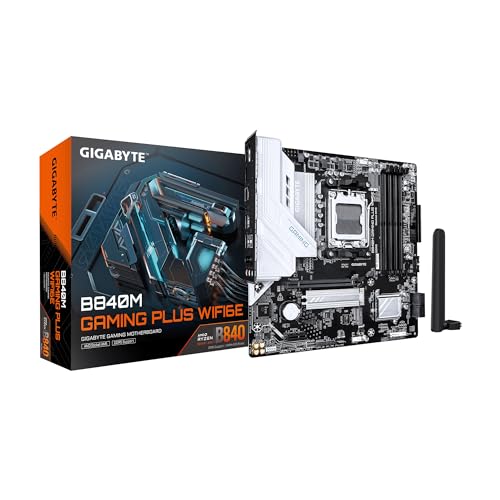
Overview & Design: The GIGABYTE B840M GAMING PLUS WIFI6E is a micro-ATX AM5 motherboard built for Ryzen 9000, 8000, and 7000 series processors. Its 8+2+2 digital VRM layout, 6-layer PCB, and VRM heatsinks give it a solid foundation for a compact gaming or productivity PC.
Performance & Key Features: This board supports DDR5 memory with 4 DIMM slots and AMD EXPO, plus two PCIe 4.0 M.2 slots for fast NVMe storage. Connectivity is well rounded with Wi-Fi 6E, Bluetooth 5.3, GbE LAN, a PCIe 4.0 x16 slot with reinforcement, and multiple USB 3.2 ports including Type-C.
Drawbacks & Considerations: As an mATX board, it will not offer the same expansion room as full-size ATX models. The included networking is limited to Gigabit Ethernet, and the storage setup is focused on two M.2 drives, so users needing more expansion may want a larger board.
Verdict: This motherboard is a strong fit for builders who want an AM5 platform with modern wireless features, DDR5 support, and easy DIY conveniences in a smaller footprint. It is especially appealing for users assembling a practical gaming PC or a clean, compact upgrade build.

Pros
- Supports a wide range of AMD Ryzen 9000, 8000, and 7000 Series CPUs on the AM5 platform.
- Strong connectivity options include Wi-Fi 6E, Bluetooth 5.3, and 2.5Gbps wired networking.
- Thermal-focused design includes an extended heatsink and M.2 Shield Frozr for better cooling.
- DDR5 support with up to 7200+ MHz OC gives room for higher-performance memory kits.
Cons
- Uses PCIe 4.0 rather than PCIe 5.0, so it is not the newest option for future-proof expansion.
- ATX size requires a compatible mid-tower or larger case.
- Detailed bundled accessory information is not provided in the raw product data.
Overview: The MSI B650 Gaming Plus WiFi is an AM5 ATX motherboard built for AMD Ryzen 9000, 8000, and 7000 Series processors. It presents a practical gaming-focused layout with DDR5 support and an emphasis on stable power delivery and cooling.
Performance and Features: Key hardware highlights include a 12+2+1 Duet Rail power system, dual 8-pin CPU power connectors, Core Boost, and Memory Boost. For storage and graphics, it supports PCIe 4.0 slots and Lightning Gen 4 x4 M.2 with M.2 Shield Frozr. Wireless and wired connectivity are also strong, with Wi-Fi 6E, Bluetooth 5.3, 2.5Gbps LAN, and USB 3.2 Gen 2x2 20G.
- Memory support: Dual-channel DDR5 with 7200+ MHz OC capability.
- Thermals: Extended heatsink, 7W/mK MOSFET thermal pads, and additional choke thermal pads.
- Connectivity: Wi-Fi 6E, Bluetooth 5.3, 2.5Gbps LAN, HDMI, and DisplayPort.
Drawbacks and Verdict: The main tradeoff is that this board uses PCIe 4.0 rather than PCIe 5.0, which may matter to buyers focused on the newest expansion standard. It is also an ATX board, so it needs the right case size. Overall, it is a solid choice for gamers and PC builders who want a feature-rich AM5 motherboard with strong networking, DDR5 support, and dependable thermal design.

Pros
- Onboard Wi-Fi is included, so users do not need an extra wireless adapter.
- Wide AM4 CPU support covers multiple Ryzen desktop generations.
- Cooling-focused hardware includes large heatsinks and Fan Xpert 2+ support.
- Multiple display outputs add flexibility for monitor compatibility and APU-based systems.
Cons
- The microATX form factor usually offers fewer expansion options than a full-size ATX board.
- 802.11ac Wi-Fi is older than newer Wi-Fi 6 solutions.
- The A520 platform is more entry-level than higher-end AM4 chipsets.
Overview: The ASUS TUF Gaming A520M-PLUS (WiFi) is a microATX AM4 motherboard built for Ryzen 5000, 4000 G-Series, and 3000 Series desktop processors. It is aimed at compact PC builders who want a practical board with TUF styling.
Performance and features: The board includes 802.11ac Wi-Fi, TUF LANGuard, TurboLAN, large VRM and PCH heatsinks, Fan Xpert 2+, BIOS FlashBack, 32Gb/s M.2 support, SATA 6Gb/s, and display outputs for DisplayPort, HDMI, and D-Sub.
Drawbacks to consider: As a microATX board with an A520 platform, it is more basic than higher-end AM4 options and will usually offer fewer expansion possibilities than larger ATX models. Its wireless support is also limited to 802.11ac rather than newer Wi-Fi 6.
Verdict: This motherboard makes the most sense for budget-conscious Ryzen builds, small gaming PCs, or users who want built-in Wi-Fi and straightforward connectivity without paying for premium extras.

Pros
- Strong feature set for an AM4 B550 board at this level, including PCIe 4.0 and dual M.2 support.
- Q-Flash Plus is valuable for Ryzen upgrades and first-time builds.
- 10+3 power phase design is more robust than basic entry-level boards.
- Front USB-C support adds convenience for newer PC cases.
Cons
- DDR4 support only, so it does not work with DDR5 memory.
- Only one M.2 slot supports PCIe 4.0, while the second is PCIe 3.0.
- Built-in Wi-Fi is not listed, so wireless networking may require an adapter.
Overview & Design: The GIGABYTE B550 Gaming X V2 is an AMD AM4 ATX motherboard built for Ryzen 5000, 4000, and 3000 Series processors. Its integrated I/O shield, VRM heatsink, and straightforward layout are aimed at making assembly easier and cleaner for DIY builders.
Performance & Key Features: This board brings a 10+3 power phase design, DDR4 support across four DIMM slots, and PCIe 4.0 connectivity for a modern gaming or productivity setup. Dual M.2 slots, front USB-C, GbE LAN, and Q-Flash Plus add practical value for faster storage, easier case connectivity, and simple BIOS updates.
Drawbacks & Considerations: The main limitations are typical for an AM4 platform. It uses DDR4 rather than DDR5, only one M.2 slot is PCIe 4.0, and built-in Wi-Fi is not specified, so users who need wireless networking may need a separate solution.
Verdict: This motherboard is a strong fit for users building or upgrading an AMD AM4 system who want solid power delivery, modern storage support, and easy BIOS management without moving to a newer platform.

Pros
- Compatible with 3rd Gen AMD Ryzen processors on the AM4 platform
- Includes NVMe PCIe 3.0 x4 M.2 storage support for faster boot and load times
- Offers multiple display outputs, including D-Sub, DVI, and HDMI
- Q-Flash Plus adds convenient BIOS update support
Cons
- Only 2 memory slots, so expansion is more limited than on higher-end boards
- Uses PCIe 3.0 rather than newer PCIe 4.0 connectivity
- ALC887 audio is functional, but not a premium onboard audio solution
Overview: The GIGABYTE A520M S2H is a microATX AM4 motherboard made for 3rd Gen AMD Ryzen processors. It focuses on the essentials, with a compact layout and a practical feature set suited to budget desktop builds.
Performance and Features: For everyday systems, it offers dual-channel DDR4 support, a PCIe 3.0 x16 slot, and one NVMe PCIe 3.0 x4 M.2 slot. It also includes 1GbE LAN, ALC887 audio, rear D-Sub, DVI, and HDMI outputs, plus Q-Flash Plus for easier BIOS updates.
Drawbacks and Considerations: This is an entry-level board, so expansion is limited by the 2 DIMM design and PCIe 3.0 connectivity. The ALC887 codec is adequate for basic use, but users looking for stronger audio or more advanced platform features may want a higher-tier motherboard.
Verdict: The A520M S2H is a sensible choice for value-focused AM4 builds where reliability, simple setup, and core connectivity matter most. It is best suited for home PCs, office systems, and affordable Ryzen gaming setups.
Essential Engineering Checklist for Best Motherboards For Gaming
A structured approach to selecting motherboards prevents costly mismatches and ensures the board matches both current hardware and planned upgrades. The following criteria distill the most important technical factors based on the specifications of the models reviewed. To evaluate matched hardware tolerances, consult our detailed overview of mix nvme and sata ssd. For complementary hardware performance, examine our breakdown on motherboard buying guide specifications.
Socket and Chipset Compatibility
Socket choice dictates CPU options and future longevity. AMD AM5 boards support Ryzen 7000, 8000, and 9000 series processors with long-term platform commitments, while LGA 1700 covers 12th through 14th-gen Intel CPUs. Chipsets further refine features: X870 and X870E deliver maximum PCIe 5.0 lanes and USB4 for high-end gaming, B850 balances features and cost for mid-range builds, and B760 or B550 provide solid entry points with PCIe 4.0. Matching the socket to your planned CPU generation avoids forced upgrades later and maximizes multi-core gaming performance.
Power Delivery and VRM Design
Stable power is essential for overclocking and sustained high loads. Look for boards with 14+2 or higher phase designs and high-amperage SPS stages (such as 80A) that handle peak current from unlocked CPUs without voltage droop. Premium models like those with 16+2+2 or 18+2+2 configurations excel here, reducing heat and improving longevity under 4K gaming or content creation workloads. Inadequate VRMs lead to thermal throttling, so prioritize boards advertising robust phase counts and quality components for reliable daily use. When planning workspace deployment, consider the engineering criteria outlined in our pcie riser cable signal degradation guide. For complementary hardware performance, examine our breakdown on am5 motherboards specifications.
Connectivity, Networking, and Expansion
Modern gaming demands fast wireless and wired options plus ample storage and GPU bandwidth. WiFi 7 with multi-antenna support and 2.5GbE or 5Gbps LAN minimize latency in online multiplayer, while USB4 or 40Gbps ports enable high-speed peripherals and external storage. Expansion should include at least three to five M.2 slots with PCIe 5.0 support for sequential speeds over 10 GB/s, plus full-length PCIe 5.0 x16 for graphics cards. Boards lacking these force trade-offs in multi-GPU or multi-drive setups common in high-end gaming PCs.
Memory Support and Overclocking Features
DDR5 is standard on current platforms and enables higher frequencies with AEMP or Expo profiles for optimized latency. Boards supporting higher DIMM counts and robust overclocking tools (dynamic OC switchers, core flex, AI-assisted tuning) unlock additional performance for competitive gaming. BIOS flashback and clear CMOS buttons simplify recovery from failed overclocks. When pairing with high-speed kits, verify QVL lists to ensure stability above standard JEDEC speeds without compromising system reliability.
Build Quality, Cooling, and Warranty
Heatsinks covering VRMs and M.2 slots maintain lower temperatures during extended sessions, while steel-reinforced PCIe slots protect against GPU sag. Features such as Q-Release, EZ-Latch, and pre-installed I/O shields speed assembly. Warranty length, including five-year coverage on select models, indicates manufacturer confidence. Brand reliability from ASUS, MSI, and GIGABYTE consistently shows strong firmware support and component durability across gaming workloads. For deeper category insights, consult resources on motherboards that cover related form factors and platforms.
The table below compares three representative models across key attributes drawn directly from their specifications to illustrate differences in capability.
We compared top-rated motherboards by systematically reviewing manufacturer specifications for VRM phase count and quality, PCIe generation and lane allocation, M.2 and SATA storage options, USB and networking standards, memory support, and physical build features such as heatsinks and latches. Evaluation criteria also include warranty duration, brand track record for BIOS updates and reliability under gaming loads, and overall feature density relative to form factor. This process prioritizes objective data points over subjective claims, ensuring selections reflect practical utility for gaming PC builders seeking stable power, expansion headroom, and modern connectivity without unsubstantiated performance assertions.
User satisfaction indicators and long-term support metrics from ASUS, MSI, and GIGABYTE further informed rankings where available, with emphasis on real-world factors like ease of installation and thermal design. Boards were grouped by platform (AM5 versus LGA 1700) and intended use tier to highlight trade-offs in cost-to-feature ratios across the full set.
Final Verdict: Choosing the Right Motherboards For Gaming
After analyzing specifications across the full selection of top-rated boards, clear recommendations emerge based on buyer priorities ranging from maximum feature density to cost efficiency. These picks balance power delivery, expansion, and connectivity while remaining within the observed entry-level to premium spectrum.
Best Overall Best Motherboards For Gaming: ASUS ROG Strix X870E-E Gaming WiFi. Its 18+2+2 power stages, five M.2 slots with PCIe 5.0, WiFi 7, USB4, Dynamic OC Switcher, and Core Flex deliver the highest combination of stability, bandwidth, and overclocking tools for high-end AMD Ryzen 9000 gaming builds. Premium connectivity and AI-assisted features make it the strongest all-around choice for users seeking minimal compromises. To compare alternative configurations, check our hands-on review of how to clear cmos.
Best Value / Budget Choice: MSI PRO B760-P WiFi DDR4 ProSeries Motherboard. Supporting 12th/13th/14th-gen Intel processors on LGA 1700 with DDR4, PCIe 4.0, WiFi 6E, 2.5Gbps LAN, and solid USB options, it provides reliable entry-level performance at the lower end of available pricing. Ideal for cost-conscious gamers building or upgrading without requiring the latest AM5 platform.
Best for High-End AMD Ryzen Builds: MSI MPG X870E Carbon WiFi. Featuring PCIe 5.0, M.2 Gen5, USB 40Gbps, WiFi 7, Bluetooth 5.4, and 5Gbps LAN on the X870E chipset, it targets enthusiasts needing extensive I/O and bandwidth. For builders exploring full system contexts, related coverage of desktop PCs and additional motherboards options can help complete the platform selection process. Overall, prioritize socket match and VRM quality first, then layer connectivity and expansion according to storage and networking needs.
Common Questions on Best Motherboards For Gaming Answered
What socket is best for gaming motherboards in 2026?
AM5 is currently the strongest choice for most new gaming builds because it supports AMD Ryzen 7000 through 9000 series CPUs with ongoing platform longevity and full PCIe 5.0 support. LGA 1700 remains viable for Intel 12th-14th gen systems if you already own compatible processors or prefer DDR4 memory options. Users looking for related component recommendations can explore our atx vs matx vs itx breakdown.
How many power stages do I need on a gaming motherboard?
A minimum of 14+2 phases with quality 80A stages provides stable power for mid-to-high-end CPUs under gaming loads. Higher counts such as 16+2+2 or 18+2+2 offer greater headroom for overclocking and better thermal performance during extended sessions with multi-core processors.
Is WiFi 7 necessary for a gaming motherboard?
WiFi 7 is recommended for future-proof low-latency wireless gaming and multi-device homes, though WiFi 6E remains sufficient for most current needs. Pair either with a 2.5GbE or faster wired LAN connection for the most reliable competitive online experience.
How much should I budget for the best motherboards for gaming?
Expect to stay within entry-level to premium for quality options that cover entry-level Intel boards through premium AMD X870 models with advanced features. Spending toward the higher end unlocks more M.2 slots, stronger VRMs, and WiFi 7, while lower-priced models still deliver solid PCIe 4.0 and WiFi 6E performance for standard gaming.
Can I use an older motherboard with a new gaming CPU?
Compatibility depends on socket and BIOS support; AM5 boards generally work with newer Ryzen generations after a BIOS update, while LGA 1700 covers multiple Intel generations natively. Always verify the QVL and current BIOS version before purchasing to avoid incompatibility, and consider browsing additional resources on motherboards for platform-specific guidance.
Gaming Board Background Reading
Gaming boards differ in power delivery, slot layout, and cooling hardware, and each choice affects stability. Start with the general safety principles covered by American National Standards Institute (ANSI) as background for your shopping.