

Choosing Best Mini ITX Gaming Motherboards requires more than finding a compact board with the correct socket. Mini-ITX systems concentrate the processor, memory, storage, power delivery, networking, and expansion hardware onto a small PCB, so every connector and compatibility decision matters. A mismatched socket prevents installation, limited M.2 capacity can restrict future storage upgrades, and inadequate case airflow may reduce sustained processor performance. Buyers also need to distinguish platform-level features from conveniences: PCIe 5.0 can improve upgrade flexibility, while Wi-Fi 7, USB4, 2.5GbE networking, display outputs, and tool-free retention mechanisms affect connectivity and assembly. For July 2026, we compared 4 options from GIGABYTE, ASRock, ASUS across the supplied $89.99 – $415.99, focusing on specifications that have practical consequences in a gaming build. Readers planning a complete compact system can also use our broader motherboard reviews and compatibility resources to compare Mini-ITX models with other form factors.
The best Mini ITX Gaming Motherboards in July 2026 should match the processor socket first, then provide the required DDR generation, storage connections, PCIe support, network speed, rear-panel connectivity, and power-delivery features within the buyer’s budget. Among these 4 models, AM5 boards offer the strongest set of enthusiast connectivity features, the LGA1851 option targets Intel Core Ultra systems with DDR5 and PCIe 5.0, and the LGA1700 model provides a lower-cost DDR4 route for compatible Intel processors.

Pros
- Supports AMD Ryzen 7000, 8000, and 9000 series processors on the AM5 socket.
- Strong power delivery for a Mini ITX motherboard, with 110A-rated stages and ProCool II connectors.
- Includes modern connectivity such as WiFi 7, USB4, PCIe 5.0, and dual M.2 slots.
- Offers several ASUS AI and ROG tuning features for easier performance optimization.
Cons
- Mini ITX form factor limits expansion compared with larger ATX or Micro ATX motherboards.
- Only 2 M.2 slots may be restrictive for users planning multiple high-capacity NVMe drives.
- The premium feature set may be more than basic or budget-focused builds require.
Overview: The ASUS ROG STRIX X870-I GAMING WIFI is a Mini ITX motherboard built for AMD AM5 systems. It is aimed at users who want a compact platform without giving up the premium features expected from a high-end gaming board.
Performance and features: Its 10+2+1 power solution rated at 110A per stage is designed to support demanding Ryzen processors, while PCIe 5.0, dual M.2 slots, WiFi 7, and USB4 bring modern connectivity to small-form-factor builds. ASUS AI Overclocking, AI Cooling II, AI Networking, and AEMP add convenience for users who want easier tuning and setup.
Drawbacks: The Mini ITX design naturally limits expansion compared with larger boards, so builders with many add-in cards or multiple storage drives may feel constrained. The dual M.2 layout is useful, but it is still less flexible than what some ATX platforms can offer.
Verdict: This motherboard is best suited to enthusiasts building a compact AMD AM5 PC who want strong power delivery, modern I/O, and advanced tuning tools. If space savings and premium connectivity matter more than maximum expansion, it is a compelling option.

Pros
- Supports Intel Core Ultra processors on the LGA1851 platform
- High DDR5 ceiling of up to 8933+ OC across 2 DIMMs
- Includes PCIe 5.0 M.2 support for fast storage
- Built-in WiFi 6E and modern display outputs improve connectivity flexibility
Cons
- Mini ITX size limits expansion compared with larger motherboard formats
- DDR5 8933+ is an overclocked speed and depends on compatible CPU and memory
- Only two DIMM slots may restrict memory upgrade flexibility for some users
Overview: The ASRock B860I WiFi 6E is a Mini ITX motherboard built for Intel Core Ultra processors on the LGA1851 platform. It combines a compact layout with modern features such as DDR5 support, WiFi 6E, and integrated display outputs.
Performance: Its 8+1+1+1+1 power phase design and dual-channel DDR5 support up to 8933+ OC point to a board aimed at fast memory performance and stable operation. The BLAZING M.2 PCIe Gen5 x4 slot is a strong match for high-speed NVMe storage, while HDMI and DisplayPort add flexibility for systems using integrated graphics.
Drawbacks: As a Mini ITX board, it offers less expansion room than larger ATX or microATX models. The top memory speed is an overclocked rating, so real-world results will vary based on the CPU, memory kit, and overall build quality.
Verdict: This motherboard is a practical choice for compact Intel Core Ultra builds where fast storage, strong memory support, and modern connectivity matter more than expansion capacity. It should appeal most to small form factor enthusiasts and space-conscious builders.
Pros
- Supports a wide range of Intel LGA1700 CPUs, including 14th Gen models.
- Compact Mini-ITX layout is well suited to small cases and embedded builds.
- Includes eDP, HDMI, and DisplayPort for versatile display configurations.
- Uses DDR4 memory, which is generally more affordable than DDR5.
Cons
- Mini-ITX size limits expansion compared with larger motherboard formats.
- Wireless networking is Wi-Fi 5 rather than newer Wi-Fi 6 or Wi-Fi 6E.
- eDP functionality is only useful for compatible panel-based applications and supported processor graphics.
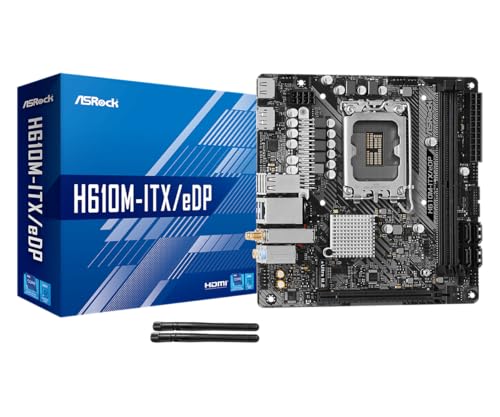
Overview: The ASRock H610M-ITX/eDP is a Mini-ITX motherboard built around Intel's LGA1700 platform. It is designed for compact systems, with a clean feature set and ASRock Super Alloy components that aim to support long-term reliability in small enclosures.
Performance and features: This board supports 14th, 13th, and 12th Gen Intel Core processors, DDR4 memory up to 3200MHz, and a PCIe 4.0 x16 slot for a graphics card. Storage flexibility is good for the size, with one Ultra M.2 slot and four SATA3 ports. Display connectivity is also a highlight, thanks to HDMI 2.1, DisplayPort 1.4, and a dedicated eDP connector for compatible panel applications.
Drawbacks and considerations: The Mini-ITX form factor naturally limits expansion, so users needing multiple add-in cards or more room for upgrades may want a larger board. Wi-Fi 5 is adequate for many builds, but it is not the newest wireless standard. The eDP output is also specialized, so not every user will need or fully use that feature.
Verdict: This motherboard makes the most sense for users building a compact Intel-based PC, SFF workstation, embedded system, or display-focused project. If you want a small board with broad CPU support, DDR4 compatibility, and useful display options, it is a well-rounded choice.

Pros
- Mini-ITX layout is ideal for compact, high-performance small-form-factor PCs.
- Dual M.2 support and PCIe 5.0 deliver modern expansion capability for storage and graphics.
- WiFi 7 plus 2.5GbE LAN provide strong next-gen connectivity options.
- AM5 and DDR5 support keep it aligned with the latest AMD platform requirements.
Cons
- Mini-ITX boards have fewer expansion options than larger ATX or Micro-ATX motherboards.
- Only 2 DIMM slots limit memory expansion compared with larger platforms.
- The feature set is geared toward premium builds, so it may be more than some basic users need.
Overview: The GIGABYTE X870I AORUS PRO ICE is a Mini-ITX motherboard built for AMD AM5 systems. It targets compact PC builders who want a modern feature set without moving up to a larger board format.
Performance and features: With support for Ryzen 9000, 8000, and 7000 Series processors, DDR5 memory with AMD EXPO, PCIe 5.0, and two M.2 slots, it is designed for fast storage and strong platform longevity. Front and rear USB-C, WiFi 7, and 2.5GbE LAN make it well suited for gaming, productivity, and connected home setups.
Drawbacks and considerations: The Mini-ITX design naturally limits expandability, and the 2-DIMM layout offers less memory flexibility than larger motherboards. Buyers should also expect a more specialized board that is aimed at compact premium builds rather than budget-focused systems.
Verdict: This motherboard makes the most sense for users building a high-end small-form-factor Ryzen PC who want modern connectivity, fast storage support, and easier installation features in a compact footprint.
Best Mini ITX Gaming Motherboards Buying Guide
Processor socket and chipset compatibility
Socket compatibility is the first non-negotiable requirement. The ASRock H610M-ITX/eDP uses LGA1700 and supports the listed Intel 14th, 13th, and 12th Gen Core processor families. The ASRock B860I WiFi uses LGA1851 for Intel Core Ultra processors, while the GIGABYTE X870I AORUS PRO ICE and ASUS ROG STRIX X870-I GAMING WIFI use AMD AM5. These sockets are not interchangeable, even when two boards share DDR5 or PCIe 5.0 support.
The chipset determines part of the available feature set, but the board’s actual connectors remain more important than the chipset name alone. H610 is positioned as the simpler platform in this group, whereas B860 and X870 provide newer interfaces for their respective Intel and AMD ecosystems. Before purchasing, verify the exact processor model against the manufacturer’s CPU support list and check whether a BIOS update is required. Our desktop PC buying resources provide additional context for matching processors, graphics cards, memory, and power supplies.
| Model | Socket and chipset | Memory | Graphics interface | Wireless and LAN | Storage information |
|---|---|---|---|---|---|
| ASRock H610M-ITX/eDP | LGA1700, H610 | DDR4 | PCIe 4.0 | Wi-Fi 5, Intel Gigabit LAN | Not specified in supplied data |
| GIGABYTE X870I AORUS PRO ICE | AM5, X870 | DDR5 | PCIe 5.0 | Wi-Fi 7, 2.5GbE LAN | 2 M.2 connectors |
| ASUS ROG STRIX X870-I GAMING WIFI | AM5, X870 | DDR5 with AEMP | PCIe 5.0 | Wi-Fi 7, networking features | 2 M.2 connectors |
| ASRock B860I WiFi | LGA1851, B860 | DDR5, listed up to 8933 MHz and 128GB | PCIe 5.0 | Wi-Fi 6E, wired LAN speed not specified | M.2 and SATA3 6.0 Gb/s support |
DDR generation, capacity, and memory speed
Memory support affects both the initial build cost and the available upgrade path. The ASRock H610M-ITX/eDP uses DDR4, which may suit buyers who already own compatible memory or want to control total platform cost. The other listed boards use DDR5. DDR4 and DDR5 modules have different electrical and physical designs, so they cannot be installed interchangeably.
Capacity should be selected according to workload rather than the highest advertised frequency. Gaming, voice chat, browser tabs, recording software, and background utilities all consume memory simultaneously. Add the expected memory use of those workloads, include reasonable headroom, and then select a supported kit. The ASRock B860I WiFi is explicitly listed with support up to 128GB and 8933 MHz DDR5, while the supplied data does not state maximum capacities for the other models. High memory speeds can also depend on the processor, memory kit, BIOS, and controller quality, so an advertised maximum is not a guaranteed plug-and-play operating speed.
Power delivery, cooling, and sustained performance
Mini-ITX power delivery operates in a confined area, making case ventilation and cooler clearance especially important. The ASUS ROG STRIX X870-I specifies a 10+2+1 power-stage arrangement and includes Dynamic OC Switcher, Core Flex, and AI overclocking controls. The ASRock H610M-ITX/eDP lists Dr.MOS power components, but the supplied specifications do not provide a phase count. Equivalent details were not supplied for the GIGABYTE X870I AORUS PRO ICE or ASRock B860I WiFi, so they should not be assigned an unsupported power-delivery ranking.
For practical planning, compare the processor’s expected sustained power with the cooling capacity of the chosen case and CPU cooler. A high-end board does not compensate for restricted intake airflow or a cooler that cannot manage the processor under long gaming and productivity loads. Check the clearance around the socket, memory modules, M.2 heatsinks, graphics card, and case radiator before ordering. Compact builds benefit from a defined airflow path in which intake fans deliver cool air and exhaust fans remove heat rather than circulating it inside the chassis.
PCIe, M.2 storage, and upgrade capacity
Expansion planning is more restrictive on Mini-ITX than on larger boards because the form factor generally centers on a single graphics-card slot. The ASRock H610M-ITX/eDP lists PCIe 4.0, while the GIGABYTE X870I, ASUS X870-I, and ASRock B860I list PCIe 5.0. PCIe generations are backward compatible at the interface level, but an installed device operates according to the slowest supported link in the chain. Buyers should confirm the slot generation and lane configuration in the official manual when a specific bandwidth level is required.
Storage capacity should be planned before assembly because some M.2 connectors can become difficult to access after the graphics card and cooler are installed. The GIGABYTE and ASUS X870 boards each list two M.2 connectors. The ASRock B860I lists M.2 and SATA3 6.0 Gb/s support, although the supplied data does not specify its M.2 connector count. A simple planning formula is required storage capacity divided by the capacity of each intended drive, rounded up to a whole drive. Compare that result with the board’s available M.2 and SATA connections, while allowing at least one future expansion path where possible.
Networking, USB, display outputs, and assembly features
Network and external connectivity can determine whether adapters or hubs are needed. The GIGABYTE X870I AORUS PRO ICE provides Wi-Fi 7, 2.5GbE LAN, and USB-C. The ASUS ROG STRIX X870-I also lists Wi-Fi 7 and adds USB4 plus AI networking features. The ASRock B860I includes Wi-Fi 6E, while the H610M-ITX/eDP includes Wi-Fi 5 and Intel Gigabit LAN. Actual wireless throughput depends on the router, channel conditions, antenna placement, and client configuration, so the wireless standard alone should not be treated as a guaranteed speed.
Display and assembly features matter for specific builds. The ASRock H610M-ITX/eDP lists eDP, HDMI, and DisplayPort, making it the most explicitly display-oriented model in the supplied data, although video output still depends on processor graphics support. The GIGABYTE board includes EZ-Latch, and the ASUS board includes Q-Release Slim, both intended to simplify component installation or removal. Review rear-panel port diagrams, internal USB headers, fan headers, and front-panel connections in the official manual because those details were not fully provided in the source data. More form-factor comparisons are available in our Motherboards category.
Price, warranty, and platform longevity
The listed models cover $89.99 – $415.99, so value depends on whether the extra features will actually be used. A buyer who needs basic LGA1700 compatibility, DDR4, and standard Gigabit networking may gain little from paying for USB4 or Wi-Fi 7. Conversely, an AM5 gaming system expected to use high-speed external storage, faster wired networking, multiple NVMe drives, or advanced tuning controls may justify a higher initial motherboard cost.
Warranty coverage is part of long-term value. The GIGABYTE X870I AORUS PRO ICE explicitly includes a 5-year warranty in the supplied listing, while warranty terms were not specified for the other products. Confirm regional coverage, registration requirements, exclusions, and return procedures with the manufacturer or retailer. Platform longevity should also be evaluated through processor availability, BIOS support, and the cost of compatible memory rather than chipset age alone.
Testing and Selection Methodology
We compared 4 models by analyzing the provided processor socket, chipset, memory generation, PCIe standard, M.2 information, networking, display connectivity, assembly features, warranty, and position within $89.99 – $415.99. This is a specification-based review, not a claim of hands-on laboratory testing. We prioritized compatibility first, followed by useful gaming and small-form-factor features, upgrade flexibility, and cost-to-feature balance.
Brand reliability and warranty information were considered only where supported by the supplied listings. User satisfaction normally helps identify BIOS issues, wireless stability, memory compatibility, and long-term failures, but the source data did not provide usable rating or review information for these products. We therefore did not create a customer-satisfaction score or infer reliability from missing feedback. Specifications that were absent are identified as not specified rather than estimated.
Best Picks and Final Verdict
Best Overall Best Mini ITX Gaming Motherboards: GIGABYTE X870I AORUS PRO ICE. This model offers the most balanced combination of AM5 support, DDR5, PCIe 5.0, two M.2 connectors, Wi-Fi 7, 2.5GbE LAN, USB-C, EZ-Latch, and an explicitly listed 5-year warranty. It lacks some of the specialized tuning and USB4 features listed for the ASUS model, but its feature set and lower position within $89.99 – $415.99 make it the stronger general recommendation for a modern compact AMD gaming system.
Best Value and Budget Choice: ASRock H610M-ITX/eDP. This board is the practical option for a compatible LGA1700 build where DDR4 support, PCIe 4.0, Intel Gigabit LAN, Wi-Fi 5, and multiple display connections meet the requirement. It sits at the lower end of the supplied price range and can reduce platform cost for buyers who already own DDR4. Its older wireless standard and simpler platform make it less appropriate for users prioritizing maximum expansion bandwidth. Compare complete build costs through our desktop PC reviews before selecting a processor and memory kit.
Best for Enthusiast AM5 Tuning: ASUS ROG STRIX X870-I GAMING WIFI. Its 10+2+1 power stages, Dynamic OC Switcher, Core Flex, DDR5 AEMP, AI overclocking, USB4, Wi-Fi 7, two M.2 connectors, PCIe 5.0, and Q-Release Slim target buyers who will use advanced tuning and high-speed connectivity. For an Intel Core Ultra build, the ASRock B860I WiFi is the more relevant alternative because it combines LGA1851, DDR5, Wi-Fi 6E, M.2, SATA3, and PCIe 5.0 support at a lower position in the listed range than the premium X870 options.
Frequently Asked Questions
What should I look for when buying Best Mini ITX Gaming Motherboards?
Start with CPU socket compatibility, then compare memory generation, PCIe support, M.2 capacity, networking, USB connections, display outputs, cooling clearance, and warranty. The processor and board must use the same socket, and the memory must match the board’s specified DDR generation.
Is Mini-ITX good for a high-performance gaming PC?
Yes, Mini-ITX can support a high-performance gaming PC when the motherboard, case, cooling system, graphics card, and power supply are compatible. The main constraints are fewer expansion slots, tighter component clearance, and more demanding thermal management compared with larger form factors.
Should I choose AM5, LGA1851, or LGA1700?
Choose the socket required by the processor you intend to install. AM5 applies to the listed AMD X870 boards, LGA1851 applies to the ASRock B860I for Intel Core Ultra processors, and LGA1700 applies to the H610M-ITX/eDP for the specified Intel Core generations. Our motherboard comparison guides can help you evaluate platform features before committing to a CPU.
Do I need PCIe 5.0 for gaming?
No, PCIe 5.0 is not an absolute requirement for a gaming system, but it can provide more upgrade flexibility for future graphics and storage devices. PCIe 4.0 remains functional for compatible hardware, and real-world performance depends on the device, lane configuration, game workload, and system architecture.
Are Wi-Fi 7 and 2.5GbE worth paying more for?
Wi-Fi 7 and 2.5GbE are most useful when the rest of the network supports those standards or when large local transfers are common. A faster motherboard interface cannot exceed the capabilities of the router, network switch, cabling, internet plan, or remote server, so buyers should evaluate the complete network before paying more.


