

A search for Best Motherboards For Machine Learning can produce a confusing mix of server boards, embedded systems, single-board computers, developer kits, and M.2 AI accelerators. These products are not interchangeable: a conventional motherboard provides the processor socket, memory channels, PCIe lanes, storage interfaces, and networking needed to build a complete workstation, while an accelerator module adds dedicated AI processing to a compatible host. The main challenge is therefore not simply finding the fastest device, but determining whether the hardware supports the intended processor, accelerator, operating system, memory capacity, and physical installation. Our July 2026 review examines 15 listings across the available $29.90 – $40,953.82, with particular attention to products that disclose measurable specifications such as 26 TOPS processing, 16GB memory, PCIe expansion, or a 180W system power design. Readers planning a complete workstation should also review the broader desktop PC platform requirements that affect cooling, power delivery, storage, and accelerator compatibility.
The best Motherboards for Machine Learning in July 2026 should match the workload first: confirm whether you need model training, edge inference, robotics development, or a general embedded computer, then verify processor support, usable PCIe connectivity, memory capacity, operating-system compatibility, cooling, and power requirements. This comparison gives greater weight to clearly documented hardware, including the Jetson Orin NX kit with 16GB RAM, Hailo-8 modules rated at 26 TOPS, the Supermicro SYS-E300-13AD with a 180W 1U platform, and the CM3588 Plus board with 4x PCIe 3.0, while treating unspecified specifications, warranty terms, and customer-satisfaction data as unknown rather than making assumptions.
Pros
- High 26TOPS compute rating is well suited to local AI inference on edge devices
- Low typical power consumption of 2.5W supports efficient operation
- Broad framework compatibility covers major machine learning ecosystems
- Wide operating temperature range of -40°C to 85°C supports demanding environments
Cons
- Module only, so it does not include a host board such as the Raspberry Pi 5
- Requires compatible M.2 integration and setup, which may be less convenient for beginners
- The listing does not provide detailed bundled-accessory or physical-dimension information
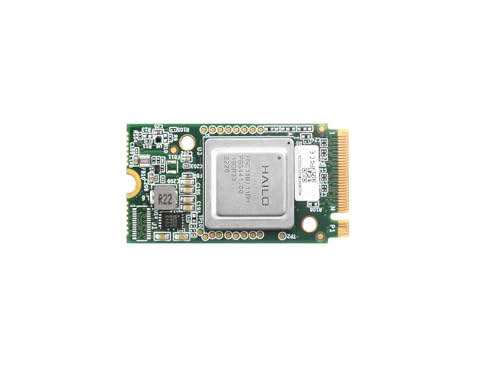
Overview: The waveshare Hailo-8 M.2 AI Accelerator Module is an edge AI add-on built around the 26TOPS Hailo-8 processor. It is aimed at developers and makers who want more local inference capability from a Raspberry Pi 5 or other compatible host.
Performance: With 2.5W typical power consumption, the module focuses on efficient, low-latency AI inference rather than general-purpose computing. It also supports simultaneous multi-stream and multi-model processing, and works with TensorFlow, TensorFlow Lite, ONNX, Keras, and PyTorch on Linux and Windows systems.
Drawbacks: This is a module only, so the host platform and any installation hardware must be provided separately. It also requires compatibility checks and software setup, which may be less convenient for users looking for a simple plug-and-play accessory.
Verdict: If your project needs compact, efficient edge AI acceleration and you are comfortable with system integration, this module is a strong technical fit. Users who want a complete out-of-the-box kit may want to factor in the extra setup steps.
Pros
- Very complete bundle with power adapter, storage, display, camera, and input accessories included
- 16GB RAM makes it better suited for heavier development tasks than basic single board computer kits
- Includes wireless networking hardware for easier setup and connectivity
- Aluminum alloy case adds a more durable enclosure to the package
Cons
- The raw data does not list full port details, dimensions, or power specifications, so compatibility checks are still needed
- This is a premium bundled kit, which may be more than many users need for simple SBC projects
- No review text is provided in the source data, so long-term user experience is hard to verify from feedback alone
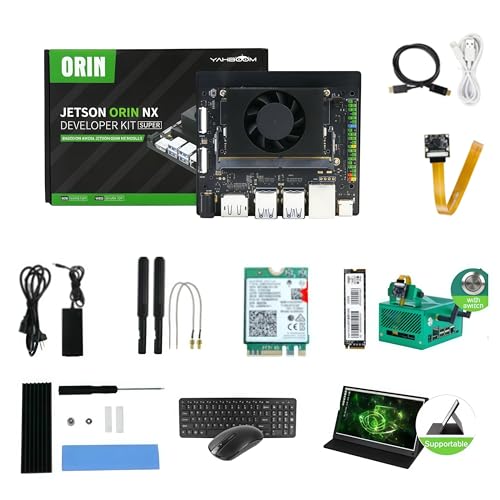
Overview: The MiiElAOD Jetson Orin NX Super Developer Kit is a bundled single board computer package built around 16GB RAM. It arrives as a full setup with a power adapter, wireless networking parts, storage, a camera, display, case, and input devices.
Performance: With 16GB RAM and a 128GB SSD included, this kit is better suited to AI development, robotics prototyping, and edge computing than a bare board. The added camera, screen, and connectivity accessories can shorten setup time for test benches and demo environments.
Considerations: The raw data does not provide detailed port maps, dimensions, power draw, or software image information, so compatibility planning still matters. The bundle is also more comprehensive than many basic SBC kits, which may be unnecessary for simple projects.
Verdict: This is a practical choice for users who want an all-in-one Jetson Orin NX development station rather than a minimal board-only package. It offers the most value to developers, labs, and makers who prioritize convenience and an expanded accessory set.

Pros
- High 26 TOPS compute capability in a compact M.2 accelerator form factor.
- Low typical power draw of 2.5W supports efficient edge deployments.
- Wide AI framework support increases flexibility for developers.
- Linux and Windows compatibility broadens host system options.
- Official Wiki resources are provided for setup and support.
Cons
- Requires a compatible PCIe or M.2 host system, so it is not a standalone AI device.
- The raw product data does not include dimensions, cooling requirements, or full accessory details.
- Best suited for AI acceleration projects, so it may be unnecessary for simpler Raspberry Pi builds.
Overview: The Waveshare Hailo-8 M.2 AI Accelerator Module is a PCIe-based edge AI add-on built around the 26 TOPS Hailo-8 processor. It is designed for Raspberry Pi 5 and other compatible Linux or Windows systems, and the included PCIe to M.2 adapter board helps simplify integration.
Performance: Its key strength is low-latency AI inferencing at a typical power consumption of 2.5W, which makes it well suited to compact embedded projects. Support for TensorFlow, TensorFlow Lite, ONNX, Keras, and PyTorch gives developers flexibility across common AI workflows, including multi-stream and multi-model use cases.
Considerations: This is a specialized accelerator, so it only makes sense for users who already have a compatible host platform and a real need for edge AI performance. The product data does not list dimensions or thermal accessories, so buyers should confirm fit, cooling, and system compatibility before purchase.
Verdict: The module is best for Raspberry Pi 5 users, embedded developers, and edge AI builders who want strong inference performance without high power draw. If your project depends on supported frameworks and PCIe-based expansion, it offers a focused and practical upgrade path.

Pros
- Combines a color screen and joystick controls in a single micro:bit accessory.
- Useful for both coding education and interactive game creation.
- Includes multiple built-in controls for more engaging hands-on projects.
- Supported by tutorials and technical support resources from ELECFREAKS.
Cons
- micro:bit is not included, so buyers must already own the board or purchase it separately.
- The micro:bit motherboard must be inserted into the slot to operate the unit.
- Product tips note that the screen may feel a little loose, which may concern some users.
Overview: The ELECFREAKS microbit Retro Arcade is a MakeCode-compatible expansion board designed for micro:bit V2. Its translucent acrylic body and curved shape give it a polished look, while the joystick-style layout makes it feel like a practical learning tool rather than a basic add-on.
Performance & Key Features: This board combines a TFT 160x128 color screen with 4 directional buttons, A/B buttons, and a reset button. In practice, that means students can build interactive games, test controls, and explore remote-control projects while using MakeCode to learn logic, creativity, and computational thinking.
Drawbacks & Considerations:
- micro:bit is not included, so it is not a complete standalone product.
- The micro:bit must be inserted into the card slot to drive the board.
- The product tips note that the screen may feel a little loose.
Verdict: This is a strong choice for STEM classrooms, coding clubs, and learners who want a more tactile way to explore micro:bit projects. It offers useful controls and learning resources, but it makes the most sense for users who already have a compatible micro:bit board.

Pros
- Includes a pre-configured laptop, which simplifies setup compared with sourcing software and hardware separately.
- 24/7 phone or chat support with 1-on-1 remote assistance can shorten troubleshooting delays.
- Vacation Mode is useful for users who do not print every day and want the system ready after idle periods.
- The bundle approach, including the oven, makes it a more complete starter solution for DTF production.
Cons
- Higher upfront investment than entry-level printer-only setups.
- As a DTF system, it still depends on films, inks, and routine upkeep rather than a low-maintenance office printer workflow.
- The listing does not provide detailed specifications such as dimensions, so buyers may need to verify workspace and compatibility before purchase.
Overview: The RocRow InkSonic H13 is an A3+ DTF printer bundle built around the F1080 printhead, and it arrives with an oven and a pre-configured laptop. The setup is aimed at first-time users and small shops that want a guided path into direct-to-film printing.
Performance: According to the listing, the printer can produce a full A3 print in about 3 minutes and uses RIP software to optimize layout and cut film waste. Features like white ink circulation, siphon-based filling, a vacuum suction platform, adjustable pinch rollers, and built-in heating are meant to improve print consistency and feeding stability.
Drawbacks: This is a specialized DTF system rather than a simple desktop printer, so buyers should expect consumables, routine maintenance, and a learning curve. The listing also does not provide a full specification sheet, so workspace planning and compatibility checks may require extra verification before purchase.
Verdict: The H13 makes the most sense for users who value speed, guided setup, and support more than low entry cost or minimalist operation. For small apparel businesses and beginners who want an all-in-one DTF bundle, it offers a practical feature set with some real tradeoffs.
Pros
- Fast A3 output is a strong fit for small business production needs.
- All-in-one bundle reduces the need to source separate setup components.
- Maintenance-focused design may help lower downtime and troubleshooting frequency.
- White ink handling and film stability features support more consistent print results.
Cons
- This is a specialized DTF system, so it is better suited to users who plan to print regularly than casual hobby users.
- The bundle likely requires ongoing consumables such as film and inks, which adds operating cost over time.
- Even with tutorials and support, DTF printing still involves setup, calibration, and routine maintenance.
Overview: The RocRow InkSonic H13 is an A3+ DTF printer bundle built around the F1080 low-temperature printhead, and it ships with an oven and a preconfigured laptop. It is aimed at beginners and small businesses that want an all-in-one apparel printing setup instead of assembling separate hardware and software.
Performance: According to the product details, the printer can produce a full A3 print in about 3 minutes and uses upgraded RIP software to help optimize layout and reduce film waste. The white ink circulation system, one-click ink filling, and anti-sedimentation module are intended to keep white underbase output stable and improve print consistency over time.
Drawbacks: Like most DTF systems, this is not a plug-and-forget device. It still depends on regular maintenance, ink management, and consumables, and the overall workflow is best suited to users who have repeated print demand rather than occasional personal projects.
Verdict: The H13 makes the most sense for users who value speed, bundled setup convenience, and maintenance-focused features in a production-oriented DTF printer. It is a practical choice for small apparel shops and new sellers who want a guided path into DTF printing.

Pros
- Compact 1U form factor is well suited to dense deployment environments.
- Wide Intel Core CPU support makes it adaptable to different performance needs.
- Dual Ethernet configuration includes faster 2.5GbE networking.
- Application-focused platform is a good fit for edge and embedded workloads.
Cons
- Single-processor design will not suit users who need multi-socket scalability.
- Storage expansion is optional, so additional drive support may require extra configuration.
- Only one 2.5GbE and one 1GbE LAN port are listed, which may be limiting for network-heavy setups.
Overview & Design: The Supermicro SYS-E300-13AD is a compact 1U Alder Lake-S embedded system built on the X13SAV-LVDS platform. It is designed for space-limited deployments where a small rack footprint and a focused hardware layout are important.
Performance & Key Features: This system supports a single Intel Core i9, i7, i5, or i3 processor, giving buyers flexibility across different performance tiers. It also includes 1 x 2.5GbE and 1 x 1GbE RJ45 LAN ports, and it is positioned for digital signage, AI inference, machine learning, surveillance security server use, and medical applications.
Drawbacks & Considerations: The single-CPU design is a clear limit for users who need higher parallel scaling. Storage expansion is listed as supporting up to two optional 2.5-inch drive bays, so buyers should plan for add-on configuration if extra local storage is required. The network setup is practical, but not especially expansive for larger multi-network environments.
Verdict: The SYS-E300-13AD is best for buyers who want a Supermicro embedded platform with modern Intel Core CPU support, compact 1U packaging, and wired connectivity for edge workloads. It is most compelling when space efficiency and application-specific deployment matter more than maximum expansion.

Pros
- High 26 TOPS AI performance for compact edge deployments
- Low typical power draw at 2.5W
- Broad framework support across popular AI stacks
- Wide operating temperature range from -40°C to 85°C
Cons
- Requires a compatible host system and PCIe to M.2 integration, so it is not a standalone device
- The listing does not provide details such as dimensions, cooling needs, or included accessories
- Limited review history makes long-term reliability harder to judge from customer feedback
Overview: The TUOPUONE Hailo-8 M.2 AI Accelerator is a compact edge AI add-on for Raspberry Pi 5 and other compatible systems. It combines a Hailo-8 26 TOPS AI processor with a PCIe to M.2 adapter board, giving developers a practical way to add dedicated inference hardware to a Linux or Windows setup.
Performance: With 26 TOPS of AI compute and a typical power draw of 2.5W, this module is designed for real-time, low-latency inferencing. It also supports simultaneous multi-stream and multi-model workloads, which can be useful for vision pipelines, sensor processing, and other edge applications where responsiveness matters.
Compatibility and considerations: The module supports TensorFlow, TensorFlow Lite, ONNX, Keras, and PyTorch, so it fits into a wide range of development workflows. It also supports an operating temperature range from -40°C to 85°C, but buyers should note that it still requires a compatible host and proper PCIe or M.2 integration. The listing does not provide details such as dimensions, cooling requirements, or included accessories.
Verdict: The TUOPUONE Hailo-8 M.2 AI Accelerator is best suited to developers, makers, and edge AI users who want efficient on-device inference rather than general-purpose computing. If your platform supports the interface and you need dedicated AI acceleration for Raspberry Pi 5 or similar systems, it is a capable option to consider.

Pros
- Includes 4x PCIe 3.0 for expansion flexibility
- Bundle provides 32GB RAM and 64GB eMMC in one package
- Stability and maintenance are specifically emphasized in the listing
- Simple installation may help reduce setup friction
Cons
- The raw listing does not provide full interface, power, size, or cooling specifications
- No customer review details or benchmark data are available in the supplied information
- Compatibility should be verified carefully because the bundle configuration may not suit every project
Overview: The RCTCBRZVTW CM3588 Plus is a motherboard based on the RK3588 platform, offered here as Bundle 2 with 32GB RAM and 64GB eMMC. It is positioned as an expandable board for builders, developers, and embedded projects that need onboard storage and a stable hardware base.
Performance & features: Its main practical advantage is the inclusion of 4x PCIe 3.0 expansion, which can support flexible peripheral setups. The listing also highlights long-term stable use, easy maintenance, and simple installation, making it a workable choice for projects that value serviceability.
Drawbacks & considerations: The raw product data does not list full interface, power, size, or cooling details, so compatibility must be checked carefully before purchase. There are also no customer review details or benchmark results in the provided information, which limits independent performance validation.
Verdict: If you need an RK3588 motherboard with generous memory, onboard eMMC, and PCIe expansion, this model is worth considering. Buyers who require a complete spec sheet or are comparing boards for a tightly defined deployment should verify every requirement first.

Pros
- Focused on stability, which is important for always-on or long-running builds.
- Installation is described as simple, making deployment more approachable.
- Maintenance is positioned as easy, which can help with upkeep and troubleshooting.
Cons
- The listing provides very limited technical specifications, so key details are still unclear.
- No ports, dimensions, power requirements, or accessory bundle are specified in the raw data.
- The product information is sparse, which makes side-by-side comparison harder for buyers.
Overview: The RCTCBRZVTW H618 Zero2W(1G) is a single board computer aimed at users who want a compact, practical platform for general-purpose computing and embedded-style projects. The available information points to a design that prioritizes stability and straightforward use.
Performance and Features: The main strengths highlighted in the listing are long-term stable use, easy installation, and easy maintenance. That makes this board a reasonable fit for applications where reliability matters more than flashy extras, especially when you want a simple board that can be set up and kept running with less effort.
Drawbacks and Considerations: The product data is thin, so important purchasing details such as interfaces, dimensions, power draw, and included accessories are not provided. Buyers who need precise hardware specifications should verify compatibility before ordering, especially for a project with strict requirements.
Verdict: This board makes the most sense for makers, learners, and embedded users who value stable operation and low-maintenance use over a feature-rich spec sheet. If you need a basic single board computer with a clear emphasis on simplicity and longevity, it is worth considering.

Pros
- Built around the XCZU5EV Zynq UltraScale+ MPSoC for advanced FPGA and embedded processing work.
- Includes PCIe support for more capable system integration and data movement.
- Marketed for stable long-term use, which supports ongoing development and testing.
- Simple installation and easy maintenance improve usability during project iteration.
Cons
- This is a specialized development board, so it is not ideal for casual or beginner users.
- The listing does not provide detailed specs such as memory, I/O counts, or dimensions.
- Users should verify compatibility with their specific FPGA and interface requirements before buying.
Overview: The RCTCBRZVTW XCZU5EV is an FPGA development board based on the Zynq UltraScale+ MPSoC XCZU5EV. It is positioned as a technical platform for embedded development, with a focus on stable long-term use, straightforward maintenance, and simple installation.
Performance & Key Features: Its main appeal is the combination of FPGA flexibility and processor capability, which can be useful for custom hardware control, robotics work, and other embedded applications. The PCIe support adds value for system integration, while the AXU5EVB-P MIPI package reference suggests a board aimed at interface-oriented development.
Drawbacks & Considerations: The product data provided here is limited, so key details such as memory, I/O count, dimensions, and included accessories are not specified. Because it is an advanced development board, it is better suited to users who already need FPGA or MPSoC hardware and can work through a more technical setup process.
Verdict: If you need a Zynq UltraScale+ MPSoC development platform with PCIe-oriented capability and a focus on stable operation, this board is worth considering. It will deliver the most value to engineers, developers, and robotics builders who need a flexible embedded hardware base.

Pros
- Built around the Zynq UltraScale+ MPSoC XCZU19EG for advanced FPGA and embedded prototyping
- Includes 100G HPC connectivity for high-speed development use cases
- Listing emphasizes long-term stability for ongoing lab or engineering use
- Simple installation and maintenance can improve usability during project iteration
Cons
- The listing provides very limited technical detail beyond the chipset and 100G HPC feature
- No information is given about included accessories, dimensions, power requirements, or expansion options
- It appears geared toward experienced FPGA users, so it may be less approachable for beginners
Overview: The RCTCBRZVTW FPGA Development Board is a specialized prototyping board built around the Zynq UltraScale+ MPSoC XCZU19EG and positioned for high-speed development work. The listing emphasizes stable long-term use, simple installation, and straightforward maintenance.
Performance & key features: Its most notable specification is the 100G HPC capability, which points to use cases where bandwidth and connectivity matter. For FPGA engineers and embedded developers, that combination makes it suitable for building and validating demanding hardware designs.
Drawbacks & considerations: The raw product data is sparse, so important buying details such as memory, dimensions, power requirements, and included accessories are not provided. It also looks like a niche professional board, so beginners may find it more complex than entry-level development kits.
Verdict: This board makes the most sense for advanced users who need a Zynq UltraScale+ MPSoC platform with high-speed HPC support and value stability over consumer-friendly simplicity. If you need detailed accessory information or a beginner-oriented setup, compare it carefully before buying.

Pros
- Uses the Zynq UltraScale+ MPSoC XCZU19EG, a capable foundation for FPGA development.
- PCIe connectivity adds flexibility for expansion and integration.
- Stability-focused design supports long-term use.
- Maintenance and installation are described as straightforward.
Cons
- The raw listing does not provide detailed technical specifications beyond the core platform and PCIe mention.
- No bundled accessories, dimensions, or compatibility details are specified in the provided data.
- The board is likely best suited to users already familiar with FPGA development workflows.
Overview: The RCTCBRZVTW FPGA Development Board is built around the Zynq UltraScale+ MPSoC XCZU19EG and includes PCIe support. It is positioned as a prototyping board for embedded and FPGA development work, with an emphasis on stable long-term use and easy maintenance.
Performance and Features: Based on the provided information, the board is intended for a wide range of applications and simple installation. PCIe support suggests it is meant for integration into more advanced development setups, while the XCZU19EG platform makes it suitable for projects that need both programmable logic and processor capabilities.
- Stability: Designed for long-term use
- Maintenance: Easy to maintain
- Installation: Simple operation and setup
- Use cases: Broad application potential
Drawbacks and Considerations: The listing does not include detailed specifications such as memory, I/O layout, dimensions, or included accessories. That means buyers will need to verify compatibility and project requirements before purchasing, especially if they need a fully documented development kit.
Verdict: This board is best for engineers, developers, and advanced hobbyists who need an XCZU19EG-based FPGA platform with PCIe support. It offers a practical foundation for prototyping, but the limited listing details mean it is most suitable for users who can assess hardware requirements independently.
Pros
- Designed for long-term stable use.
- Easy to install for straightforward setup.
- Easy to maintain, which may help reduce downtime.
- Broad application focus adds flexibility for different projects.
Cons
- The listing does not provide detailed information about ports, storage, or expansion options.
- Operating system, power requirements, and included accessories are not specified.
- No customer review details are available in the supplied data, so real-world feedback is limited.
Overview: The RCTCBRZVTW H618 Zero2W(4G) is a single board computer positioned for compact and practical builds. The listing emphasizes stability, easy maintenance, and simple installation, which points to a user-friendly design philosophy.
Performance and features: With H618 and DDR4 referenced in the title, the board is presented as a modern SBC option for long-term use. Its broad application focus makes it suitable for general embedded tasks and projects where reliability and straightforward setup matter more than advanced feature detail.
Drawbacks and considerations: The raw product data leaves out important technical details such as interfaces, storage support, power needs, dimensions, and included accessories. There are also no customer review details in the provided information, so buyers cannot verify real-world behavior from feedback here.
Verdict: This board is best suited to buyers who value stability, maintainability, and easy installation. If you need a simple SBC platform and can confirm the missing specifications before purchase, it may be a practical choice for a range of applications.

Pros
- Built around a capable Zynq UltraScale+ MPSoC XCZU9EG device.
- Includes 4K video positioning for higher-end video-centric projects.
- Stability and maintainability are explicitly emphasized in the listing.
- Installation and operation are described as simple, which can speed up initial setup.
Cons
- The raw listing does not provide detailed hardware specs such as memory, interfaces, or expansion details.
- It is likely more suitable for experienced FPGA users than for beginners.
- Included accessories and exact package contents are not clearly itemized in the source data.
Overview: The RCTCBRZVTW AXU15EGB Deluxe Package is an FPGA development board based on the Zynq UltraScale+ MPSoC XCZU9EG. It is aimed at prototyping and embedded development, with an emphasis on stable long-term use and flexible project work.
Performance: The listed 4K video capability makes it a strong candidate for video-processing, imaging, and multimedia-focused FPGA projects. Its simple installation and easy maintenance are practical benefits for iterative development environments.
Considerations: The source data provides only limited technical detail, so buyers should confirm the exact interfaces, memory configuration, and included accessories before purchasing. The board also appears better aligned with advanced users than with first-time FPGA learners.
Verdict: If you need a Zynq UltraScale+ based board for serious prototyping and 4K video experimentation, this product is worth considering. If you prefer a fully documented beginner kit, it may be better to compare alternatives first.
Best Motherboards For Machine Learning Buying Guide
Start With the Workload: Training, Inference, or Development
The correct platform depends on whether the system will train models, run trained models, or support software development. Model training generally benefits from high memory capacity, fast storage, and one or more high-bandwidth accelerator connections. Edge inference can prioritize low power use, compact dimensions, and a dedicated neural-processing module. The Hailo-8 listings specify 26 TOPS and Linux or Windows support, making them relevant to compatible acceleration projects, but the supplied data does not state that they are intended for full model-training workloads.
A Jetson Orin NX developer kit is a more integrated option because the listing combines the computing platform with 16GB RAM. The Supermicro SYS-E300-13AD is an embedded system built around an Alder Lake-S platform and an X13SAV-LVDS board, but no discrete AI accelerator is specified. Before purchasing, map the model framework, operating system, drivers, and accelerator runtime to the hardware rather than relying on the presence of terms such as AI or machine learning.
Check PCIe Lane Availability and Connector Format
PCIe compatibility includes the connector, lane count, generation, electrical wiring, and available bandwidth. An M.2 accelerator may physically resemble an SSD while requiring a different M.2 key or PCIe connection. The Waveshare Hailo-8 module-only package is appropriate only when the host already has the required compatible slot, while the separate Waveshare package and TUOPUONE package explicitly include a PCIe-to-M.2 adapter board. That adapter can simplify installation in a conventional expansion slot, but chassis clearance and software support still need verification.
For bandwidth planning, theoretical PCIe throughput increases with each generation and with lane count, but actual application performance is also limited by protocol overhead, model size, preprocessing, and data transfers. The RCTCBRZVTW CM3588 Plus listing specifies 4x PCIe 3.0, which signals multiple expansion connections, although the supplied data does not identify their lane allocation or compatibility with specific accelerators. For additional component-level context, browse the site’s motherboard reviews and platform comparisons.
Match Memory Capacity to the Model and Dataset
Memory capacity determines whether the operating system, framework, model, and active data can remain resident without excessive swapping. A practical estimate is to add the model footprint, runtime overhead, operating-system use, and expected working data, then retain additional headroom for temporary tensors and concurrent processes. If that estimate approaches the installed capacity, select a platform with more memory or an upgrade path rather than assuming storage can substitute for RAM without a performance penalty.
Among the supplied listings, the Jetson Orin NX kit identifies 16GB RAM, while the CM3588 Plus bundle identifies 32GB and 64GB eMMC in its product name. EMMC is storage rather than system memory, so it should not be interpreted as RAM. The RCTCBRZVTW Zero2W listing identifies a 1G configuration and DDR4, but its processor performance, expansion bandwidth, and machine-learning acceleration capabilities are not specified.
| Product | Platform type | Specified compute or memory | Expansion or package detail | Specified OS support |
|---|---|---|---|---|
| Jetson Orin NX Super Developer Kit | Integrated developer kit | 16GB RAM configuration | Not specified | Not specified |
| Waveshare Hailo-8 Module with Adapter | M.2 AI accelerator | 26 TOPS Hailo-8 processor | PCIe-to-M.2 adapter included | Linux and Windows |
| Supermicro SYS-E300-13AD | 1U IoT and embedded system | Alder Lake-S platform | X13SAV-LVDS board, 180W system | Not specified |
| RCTCBRZVTW CM3588 Plus | RK3588 motherboard bundle | 32GB or 64GB eMMC identified | 4x PCIe 3.0 | Not specified |
Plan Power Delivery, Cooling, and Chassis Space
Machine-learning stability depends on sustained power and cooling, not only peak processor specifications. Add the maximum expected consumption of the processor, accelerator, memory, drives, fans, and peripherals, then retain capacity for transient loads and future expansion. A platform should also have airflow across voltage-regulation components, storage, and accelerator modules because compact hardware can reduce performance when thermal limits are reached.
The Supermicro SYS-E300-13AD is listed with a 180W 1U embedded chassis, providing a concrete system-level power specification. Power consumption is not provided for the Hailo-8 modules, Jetson kit, CM3588 Plus, or Zero2W in the supplied data, so buyers should consult the current manufacturer documentation before selecting a power supply or enclosure. A 1U system also imposes different noise and airflow constraints from a desktop tower or passively cooled edge device.
Evaluate Software Support and Total Platform Cost
Hardware is useful only when drivers, development tools, supported frameworks, and operating-system versions align with the project. The Hailo-8 listings explicitly identify Linux and Windows compatibility, but they do not provide supported distributions, driver versions, or framework details. The other listings provide limited software information, so compatibility should be confirmed against the exact application stack before purchase.
Compare total cost rather than the product price alone. A module-only accelerator may require a host computer, adapter, storage, cooling, and cabling, while a developer kit or embedded system may include more of the usable platform. Options in this review span $29.90 to $40,953.82, but the least expensive listing is not automatically suitable for machine learning. Products such as the EF ELECFREAKS micro:bit arcade controller and DTF printer bundles appear in the supplied catalog yet do not disclose the motherboard or accelerator specifications needed to recommend them as general machine-learning platforms.
Testing and Selection Methodology
We compared 15 models by analyzing the supplied product titles, platform types, processing claims, memory information, PCIe connectivity, included adapters, operating-system support, power specifications, and intended use. Products received more consideration when their listings disclosed measurable attributes, such as 26 TOPS, 16GB RAM, 4x PCIe 3.0, or a 180W system design. We did not claim hands-on testing, and we did not infer missing chipset, dimension, thermal, networking, or warranty details.
We also considered value in the context of what is included. A module-only accelerator was evaluated differently from an integrated developer kit, complete embedded system, or educational controller. Current user-satisfaction metrics were not supplied for these listings, so ratings could not be used as a meaningful differentiator. Warranty coverage was also not specified. Brand reliability was therefore assessed conservatively through the clarity and relevance of the available platform information, not through unsupported assumptions about long-term failure rates.
Best Picks and Final Verdict
Best Overall Best Motherboards For Machine Learning: Jetson Orin NX Super Developer Kit with 16GB RAM. This is the most integrated machine-learning development option in the supplied data because it combines a recognized developer-kit format with a specified 16GB memory configuration. It is a stronger starting point for buyers who want a self-contained edge-development platform rather than an accelerator that still needs a compatible host. However, storage, ports, power consumption, operating-system support, and included accessories should be confirmed for the exact kit configuration.
Best Value / Budget Choice: Waveshare Hailo-8 M.2 AI Accelerator Module, Module Only. This version provides the stated 26 TOPS Hailo-8 processor and Linux or Windows support without charging for an adapter that an experienced builder may already have. Its cost-to-performance case is strongest for users with a verified compatible M.2 connection. Buyers who need a conventional PCIe installation should instead consider the Waveshare or TUOPUONE package that includes a PCIe-to-M.2 adapter board.
Best for Embedded and Industrial System Planning: Supermicro SYS-E300-13AD. Its Alder Lake-S platform, X13SAV-LVDS motherboard, 180W power specification, and 1U IoT or embedded format make it the clearest system-level option for professional integration. No dedicated AI accelerator is listed, so its suitability depends on the intended processor workload and available expansion. Compare its deployment requirements with other desktop and embedded computer platforms before choosing supporting storage, cooling, and acceleration hardware.
Frequently Asked Questions
What should I look for in a motherboard for machine learning?
Look for a platform that supports the required processor, memory capacity, accelerator interface, storage, operating system, cooling, and power supply. For GPU or accelerator expansion, verify the physical slot, PCIe generation, lane allocation, chassis clearance, and power connections rather than checking only whether the board has a full-length slot.
Is a Hailo-8 M.2 module a complete machine-learning computer?
No, the listed Hailo-8 M.2 products are accelerator modules that require a compatible host system. The module-only Waveshare version requires an appropriate connection, while other listed packages include a PCIe-to-M.2 adapter. The host still needs a processor, memory, storage, operating system, power, and supported software.
Can these platforms be used for training AI models?
Training suitability cannot be confirmed for every listed product because GPU resources, accelerator memory, software frameworks, and thermal limits are not fully specified. The Hailo-8 listings disclose 26 TOPS but do not state full model-training capabilities, while the Jetson kit provides a 16GB memory configuration without complete compute specifications in the supplied data.
How much RAM does a machine-learning motherboard need?
The required RAM depends on model size, dataset handling, framework overhead, and whether training occurs locally. Estimate the combined memory footprint of the operating system, model, runtime, and active data, then leave additional headroom. Consult the broader motherboard selection resources when comparing memory slots, supported capacities, and expansion requirements.
Is the cheapest listed product the best budget machine-learning option?
No, the lowest price does not establish machine-learning suitability. Some catalog entries are educational controllers or specialized printer bundles rather than documented AI computing platforms. A better budget purchase is the least expensive product that supports the required workload and includes, or works with, all necessary host hardware and software.


