Quick Answer: Choosing the Best Multitasking Cpus
Critical factors to evaluate when choosing Best Multitasking CPUs in 2026 include core architecture for parallel task handling, supported RAM levels from basic to expanded capacities, storage type and size for responsive file access, and overall system design for home, student, or business environments. We analyzed top-rated models featuring these elements across leading manufacturers to highlight practical matches based…

Pros
- Extremely high core count for workstation-class multi-threaded performance.
- Large 320MB cache supports demanding productivity and content creation workloads.
- Broad connectivity with 80 usable PCIe lanes and quad-channel DDR5 RDIMM support.
- Unlocked processor with automatic overclocking support.
Cons
- 350W TDP means it needs a very capable cooling and power setup.
- Cooler is not included, so buyers must budget for a separate solution.
- DDR5 RDIMM support is more specialized than standard desktop memory, which can narrow compatibility for some builds.
Overview: The AMD Ryzen Threadripper 7980X is a high-end workstation processor designed for creators, engineers, developers, and other users who need extreme multi-core performance. Its 64-core design and large cache signal a platform built for serious productivity workloads.
Performance: With a 5.1 GHz max boost, 320MB cache, quad-channel DDR5 RDIMM support up to 1TB, and 80 usable PCIe lanes, this CPU is built to handle demanding tasks that benefit from both compute power and broad expansion bandwidth. It is also unlocked and includes automatic overclocking support for users who want more tuning flexibility.
Considerations: This is not a casual desktop upgrade. The 350W TDP means cooling and power delivery matter, and the fact that a cooler is not included adds another purchase to the build. Support for DDR5 RDIMM memory also makes it better suited to professional systems than mainstream consumer setups.
Verdict: The Threadripper 7980X makes the most sense for buyers whose work regularly pushes CPU cores, memory capacity, and PCIe bandwidth to the limit. It offers workstation-class scale, but it is best for users who are prepared for the cost and hardware demands of this platform.
Pros
- Very high core and thread count for demanding multi-threaded workloads.
- Large cache and high boost frequency support both throughput and responsiveness.
- Strong platform expansion potential with 80 usable PCIe lanes.
Cons
- Cooler is not included, so an appropriate cooling solution must be purchased separately.
- 350W TDP indicates substantial power and thermal requirements.
- Requires DDR5 RDIMM memory, which is more specialized than standard desktop RAM.
Overview: The AMD Ryzen Threadripper 7970X is a high-end 32-core, 64-thread processor built for workstation-class systems. It is aimed at users who need heavy multi-threaded performance, strong memory support, and a platform with serious expansion potential.
Performance: With up to 5.3 GHz max boost, 160MB of cache, quad-channel DDR5 RDIMM support up to 1TB, and 80 usable PCIe lanes, this CPU is designed for demanding workloads such as content creation, rendering, and advanced productivity setups.
Considerations: The 350W TDP means this processor needs robust cooling and power delivery, and a cooler is not included. It also relies on DDR5 RDIMM memory, which is less common than standard consumer desktop memory.
Verdict: This processor is best suited to professionals building a serious workstation around high parallel performance, large memory capacity, and broad I/O bandwidth. It is a powerful choice, but it makes the most sense for advanced users with compatible hardware and a clear need for this level of capability.
Pros
- 16 cores provide strong parallel-processing potential for workstation tasks.
- Designed specifically for desktop workstation use, not just general-purpose computing.
- Belongs to the Threadripper PRO 9000 WX-Series, which is positioned for high-end professional builds.
- Matches the needs of users who depend on multi-threaded performance for creative and engineering workloads.
Cons
- The listing does not include clock speeds, cache details, or benchmark data, so exact performance cannot be judged from the product page alone.
- Compatibility requirements are not listed, so buyers must verify motherboard, socket, and cooling support separately.
- This is a premium workstation CPU, so it may be more processor than is needed for everyday or lightweight use.
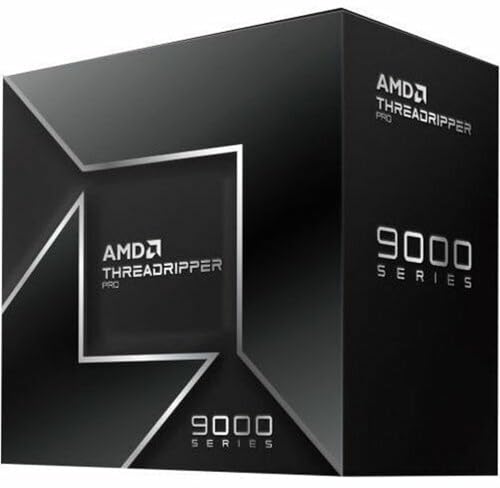
Overview: The AMD Ryzen Threadripper PRO 9955WX is a 16-core desktop workstation processor in the Ryzen Threadripper PRO 9000 WX-Series. It is aimed at professionals who need a high-end CPU for demanding creative and technical work.
Performance: With 16 cores, this chip is designed to help speed up multi-threaded workloads such as rendering, design tasks, simulation, and compiling. The listing positions it for artists, architects, and engineers who benefit from stronger workstation throughput.
Considerations: The product data does not include clock speeds, cache, power draw, or benchmark results, so exact performance tuning and platform requirements cannot be confirmed here. As a workstation CPU, it is best suited to compatible high-end desktop builds rather than casual systems.
Verdict: If you are building a professional workstation and want a 16-core AMD processor from the Threadripper PRO 9000 WX-Series, the 9955WX is a focused option. Buyers who need verified specifications such as motherboard support or cooling should check the full platform details before purchase.

Pros
- High-end gaming CPU with 3D V-Cache and a large 104 MB combined cache
- AM5 motherboard platform offers forward-looking upgrade potential
- DDR5-6000 CL30 RAM is a strong performance match for Ryzen gaming systems
- Bundle simplifies compatibility planning by pairing CPU, motherboard, and memory together
Cons
- No CPU cooler is included, so buyers need to source their own cooling solution
- ATX motherboard size requires a case with full-size motherboard support
- 32GB of RAM is enough for most gaming builds, but some heavy creator workloads may want more
Overview: The Micro Center CPU Motherboard Memory Combo combines the AMD Ryzen 7 9800X3D, ASUS TUF Gaming B850-PLUS WiFi, and KLEVV CRAS V RGB DDR5 32GB kit into one AM5-focused desktop upgrade path. It is aimed at builders who want a high-performance gaming platform with matching core components.
Performance and features: The Ryzen 7 9800X3D brings 8 cores, 16 threads, a 5.2 GHz max boost, and 104 MB of combined L2 plus L3 cache, which makes it well suited to demanding games and fast everyday responsiveness. The motherboard adds PCIe 5.0 support, three M.2 slots, Wi-Fi 7, and Bluetooth 5.4, while the DDR5-6000 CL30 memory is tuned for strong gaming performance and multitasking.
Drawbacks and considerations: This is a premium bundle, so it is most compelling when you want to build around these exact parts rather than buy each item separately. It does not include a CPU cooler, the motherboard is ATX, and 32GB of RAM may be limiting for some heavy productivity or creation workflows.
Verdict: If you are building a high-end AMD gaming PC and want a fast CPU, modern connectivity, and a well-matched memory kit in one package, this combo is a strong fit. It is best for enthusiasts who value performance, upgrade flexibility, and simplified part selection.

Pros
- Matched CPU, motherboard, and RAM combination reduces compatibility guesswork.
- Ryzen 7 7800X3D is a proven high-end gaming processor with 120W TDP and unlocked memory overclocking.
- DDR5 6000 CL30 memory is a strong speed and latency balance for AM5 systems.
- ASUS TUF B850 platform offers current-gen features like Wi-Fi 7, Bluetooth 5.4, and PCIe 5.0.
Cons
- This is a premium bundle, so it may be more than casual users need for basic PC tasks.
- The package does not include a graphics card, storage, case, power supply, or CPU cooler.
- Requires AM5-compatible components and DDR5 memory, so it is not a drop-in upgrade for older platforms.
Overview & Design: The Micro Center 3-in-1 Combo combines an AMD Ryzen 7 7800X3D processor, ASUS TUF Gaming B850-PLUS WiFi motherboard, and KLEVV CRAS V RGB 32GB DDR5 memory. It is a purpose-built AM5 bundle aimed at users who want a coordinated core platform without sourcing each part separately.
Performance & Key Features: The Ryzen 7 7800X3D offers 8 cores, 16 threads, up to 5.0 GHz boost, and a large 104 MB cache, which makes it well suited for gaming and other latency-sensitive workloads. The motherboard adds PCIe 5.0 support, Wi-Fi 7, Bluetooth 5.4, multiple M.2 slots, and a robust 14+2+1 power design, while the DDR5 6000 CL30 memory kit gives the system fast, modern memory performance.
Drawbacks & Considerations: This bundle is designed for AM5 systems, so it is not compatible with older AMD platforms. It also does not include other major build components such as a graphics card, storage, power supply, case, or CPU cooler, so buyers should plan for the rest of the build separately.
Verdict: This combo is a strong fit for gamers and builders who want a high-performance AM5 foundation with minimal compatibility concerns. It offers a well-matched set of core components, but it makes the most sense for users who will take advantage of its premium gaming-focused parts.

Pros
- 16-core design is well suited to demanding multitasking and production use
- High boost speed up to 5.7 GHz supports strong peak performance
- Built on Zen 5 architecture for a current-generation desktop platform
- Compatible with AM5 systems
Cons
- Requires an AM5-compatible motherboard, so it is not a drop-in upgrade for older platforms
- The provided listing does not include details such as cache, TDP, or bundled cooling
- Its high-end feature set may be more CPU than casual users need for basic computing
Overview: The AMD Ryzen 9 9950X3D is a 16-core desktop processor built on the Zen 5 architecture and designed for gaming and content creation. It comes as a boxed processor for AM5-based desktop systems.
Performance: With a base clock of 4.3 GHz and boost clocks up to 5.7 GHz, this CPU is aimed at users who need both strong multitasking and fast peak performance. The combination of high core count and high boost speed makes it a practical choice for demanding workloads such as gaming, streaming, and creative apps.
Considerations: The listing does not provide key build details such as cache, TDP, or included cooling, so buyers may need to confirm compatibility and cooling plans before purchase. It is also limited to AM5 systems, which may matter for older builds.
Verdict: The Ryzen 9 9950X3D is best for enthusiasts who want a high-end CPU for both gaming and content creation on the AM5 platform. Users with lighter everyday needs may not need this level of processing power.

Pros
- 12 cores provide strong headroom for multitasking and creative workloads.
- Designed for both gaming and content creation use cases.
- Premium Ryzen 9 tier suggests a high-performance desktop processor.
- Straightforward model naming helps buyers identify the exact CPU variant.
Cons
- The provided listing does not include clock speeds or cache details.
- Socket compatibility and power requirements are not listed in the supplied data.
- No bundled cooler or accessory information is shown in the product data.
Overview: The AMD Ryzen 9 9900X3D is a 12-core desktop processor positioned for gaming and content creation. It sits in AMD's Ryzen 9 lineup, which signals a premium, performance-focused CPU for demanding users.
Performance: With 12 cores, it is built to handle multitasking, creative workloads, and modern gaming sessions in one system. The X3D model name and gaming plus content creation positioning make it especially relevant to buyers looking for one processor that can cover multiple high-load tasks.
Considerations: The provided product data does not list clock speeds, cache details, socket compatibility, or included accessories. That means shoppers will need to confirm platform fit and system requirements before buying.
Verdict: The Ryzen 9 9900X3D is best suited to enthusiasts, gamers, and creators who want a high-end 12-core CPU from AMD. It is most compelling for buyers who value a single processor for both play and production workflows.

Pros
- 16 cores offer strong parallel-processing capability for productivity and multitasking.
- Built on Zen 3, a well-known architecture in AMD's Ryzen 5000 Series.
- Clear desktop focus for enthusiast-level builds.
- Tray listing may appeal to builders who prefer OEM-style sourcing.
Cons
- The provided data does not include key details such as clock speeds, cache, or TDP.
- Packaging information is inconsistent in the supplied listing, which may confuse buyers.
- Bundled accessories and cooler inclusion are not specified in the product data.
Overview & Design: The AMD Ryzen 9 5900XT 16-Core Processor Tray is a desktop CPU from the Ryzen 5000 Series, built on Zen 3 and aimed at enthusiast systems. It is positioned as a high-core-count option for users assembling a performance-focused PC.
Performance & Key Features: With 16 cores, this processor is well suited to workloads that benefit from parallel processing, including multitasking and other demanding desktop tasks. Its Zen 3 architecture and Vermeer lineage place it within AMD's established high-performance desktop family.
Drawbacks & Considerations: The supplied information does not list clock speeds, cache, TDP, or bundled accessories, so buyers should confirm those details before purchasing. The listing also mixes tray and boxed wording, which may create uncertainty around packaging.
Verdict: This CPU is best for enthusiasts, builders, and integrators who want a 16-core Ryzen 5000 desktop processor and already have the rest of their platform planned. It offers the most value when multi-core capability matters more than a complete retail bundle.

Pros
- High 24-core count for a mainstream desktop processor.
- Supports DDR5 and PCIe 5.0 for current-generation builds.
- Box version included for standard retail installation.
- Strong peak clock speed up to 5.50 GHz.
Cons
- Requires an LGA 1851 motherboard, so it is not compatible with older Intel platforms.
- 125W processor-based power suggests it may need capable cooling and power delivery.
- Amazon.co.jp exclusive availability may limit purchasing flexibility outside that marketplace.
Overview: The Intel Core Ultra 7 Processor 270K Plus is a boxed Arrow Lake desktop CPU for the LGA 1851 platform. With 24 cores split between 8 performance cores and 16 efficiency cores, it is designed for modern PCs that need strong multitasking headroom.
Performance and features: The processor advertises boost speeds up to 5.50 GHz, 36 MB cache, and 40 MB L2 cache. It also supports DDR5 memory plus PCIe 5.0 and 4.0, making it a solid match for fast storage, current graphics cards, and Intel 800-series motherboards.
- Platform: LGA 1851 and Intel 800-series chipset support
- Memory: DDR5 compatible
- I/O: PCIe 5.0 and PCIe 4.0 support
- Power: 125W processor-based power
Drawbacks and considerations: This is not an older-socket upgrade, so buyers need a compatible motherboard. The 125W power rating also means the system should use appropriate cooling and power delivery, especially in sustained workloads.
Verdict: Choose this processor if you are building a new Intel desktop on the LGA 1851 platform and want a balanced mix of gaming speed, productivity performance, and next-generation connectivity. It is less suitable for users looking for a simple drop-in upgrade.

Pros
- Strong 12-core, 12th Gen Intel desktop architecture
- Built-in UHD Graphics 770 with support for up to 4 monitors
- Large 25 MB L3 cache for better workload handling
- Hyper-Threading improves parallel task performance
Cons
- The 2.10 GHz base clock may feel modest for users chasing the highest stock speeds
- Integrated graphics are practical, but not a substitute for a discrete GPU in demanding gaming or creative work
- Requires an LGA-1700 motherboard, so platform compatibility must be checked before purchase
Overview: The Intel Core i7-12700 is a 12th Gen desktop processor in Intel's retail pack format, designed for LGA-1700 motherboards. Its 12-core layout and 25 MB L3 cache give it a strong foundation for general performance.
Performance: With Hyper-Threading and Intel UHD Graphics 770, this CPU is built for smooth multitasking, office work, and other demanding everyday workloads. Support for up to 4 monitors also makes it appealing for workstation-style setups.
Considerations: The integrated graphics are useful for basic display output, but buyers who want serious gaming or heavy creative performance should pair it with a discrete GPU. Compatibility also depends on the right LGA-1700 motherboard.
Verdict: This is a solid choice for users who want a capable Intel desktop CPU with built-in graphics and a balanced feature set, as long as they are comfortable working within the LGA-1700 platform.
What to Look for When Choosing Best Multitasking CPUs
Selecting effective Best Multitasking CPUs requires attention to how processors manage concurrent loads alongside supporting components. The following criteria draw directly from the available product specifications to guide decisions for daily, student, and business use cases. Readers comparing setup options can review our technical analysis on custom cpu fan curve. For complementary hardware performance, examine our breakdown on cpus for data analysis.
Core Architecture and Multitasking Capability
Core count directly influences the ability to process multiple threads without bottlenecks. Systems listing an Intel Quad-Core Multitasking CPU provide a baseline for lighter concurrent tasks such as document editing plus web browsing, while 6-Core AMD CPUs specified as beating i7-1165G7 performance in multitasking offer stronger parallel handling for more demanding simultaneous applications. When reviewing options, match the stated core design to your typical workload intensity rather than relying solely on marketing claims. Pairing higher core counts with adequate system resources ensures smoother operation under load. Readers comparing setup options can review our technical analysis on custom cpu fan curve.
RAM Capacity for Concurrent Workloads
Memory volume determines how many applications can remain active without relying on slower storage swapping. Configurations start at 4GB for basic home and student scenarios and scale to 8GB, 16GB, or 32GB in the business-oriented models. For users regularly opening multiple browser instances, office suites, and communication tools, 16GB or higher reduces lag risk. Lower RAM setups may suffice for single-focus tasks but limit true multitasking efficiency. Assess your open application count to select the appropriate level from the available range. For complementary field maintenance guidelines, examine our breakdown of how to choose cpu cooler. For complementary hardware performance, examine our breakdown on am5 cpu cooler specifications.
Storage Type and Capacity
Storage speed and size affect boot times, file loading, and the ability to keep large datasets accessible during multitasking. Options include 64GB eMMC for entry-level use and PCIe SSD configurations at 512GB or 1TB for faster data access and expanded file storage. PCIe SSDs support quicker transitions between applications compared to eMMC. Calculate needed space by adding operating system overhead, installed software, and personal files, then choose a capacity that leaves headroom for growth. This factor pairs closely with CPU performance to maintain system responsiveness.
Operating System and Software Bundle Integration
Windows 11 Home or Pro editions, often bundled with Microsoft Office suites and cloud storage options, influence out-of-box productivity. Pro versions suit business environments needing advanced security and management features, while Home editions cover standard student and personal use. Bundled Office access reduces setup steps for document and spreadsheet work that frequently occurs alongside other tasks. Verify the included software duration and cloud allocation to maximize value without additional purchases. These elements enhance the practical utility of the multitasking CPU itself. To evaluate matched hardware tolerances, consult our detailed overview of thermal paste shelf life.
Form Factor and Intended Use Case
Display size and build target different environments, from 14-inch portable designs for students to 15.6-inch FHD screens for business. Portability aids mobile multitasking, while larger displays improve visibility when managing multiple windows. Consider whether the unit prioritizes home use, campus work, or professional settings based on the product descriptions. Related lifestyle items under the Multitasking Mode CPU Overload Detected brand can complement a setup thematically but do not replace core processing hardware. Align form factor with daily mobility needs and screen real estate preferences. For complementary field maintenance guidelines, examine our breakdown of how to choose cpu cooler.
Brand Reliability and Support Considerations
Established brands such as HP provide documented configurations with clear multitasking CPU claims, while specialized lines offer complementary products. Review available warranty implications and ecosystem fit when comparing. Cross-reference with category overviews in the CPU section for additional context on processor selection principles. Prioritize models with transparent specifications over vague claims to ensure long-term satisfaction.
Our comparison of top-rated models centered on parsing the provided technical specifications for CPU core designs, memory configurations, storage types, operating system editions, and intended use cases listed for each entry. We prioritized measurable attributes such as the Intel Quad-Core Multitasking CPU designation and 6-Core AMD claims of superior multitasking relative to the referenced i7 model, along with RAM scaling from 4GB to 32GB and storage from eMMC to PCIe SSD. Brand consistency across HP systems and the Multitasking Mode CPU Overload Detected line received consideration for reliability indicators. User-oriented factors including Windows 11 variants and Microsoft Office bundles were weighed against practical multitasking demands without assuming unlisted performance metrics. This specification-driven process, combined with category alignment to CPU resources, produced ranked recommendations focused on documented capabilities rather than unverified claims.
Warranty mentions, bundle inclusions like 1-year Office access and cloud storage, and form factor details further informed scoring for real-world utility in home, student, and business scenarios. Models lacking detailed key features received neutral weighting on those points. The result is a transparent selection that highlights relative strengths within the given data set.
Our Final Editorial Take on Desktop Pcs
After evaluating the full set of top-rated entries, clear differentiators emerge based on core multitasking support, memory headroom, and system completeness. Buyers should match selections to primary needs rather than pursuing maximum specifications in every category. The following structured recommendations address common purchase intents using only the listed attributes. To evaluate matched hardware tolerances, consult our detailed overview of thermal paste shelf life.
Best Overall Best Multitasking CPUs: HP 255 G9 15.6″ FHD Laptop with 6-Core AMD CPU, 32GB RAM, and 1TB PCIe SSD stands out due to the highest documented memory capacity paired with the multitasking-oriented 6-Core AMD processor and full Windows 11 Pro plus Office bundle. This combination supports extensive concurrent applications for business and advanced student work while providing ample storage for large files. It represents the strongest all-around match among the detailed systems for sustained multi-application use.
Best Value / Budget Choice: HP 14 Inch HD Laptop with Intel Quad-Core Multitasking CPU, 4GB RAM, and 64GB eMMC delivers accessible entry into multitasking CPU systems for home and basic student needs, complete with Windows 11 Home, Office suite access, and cloud storage. Its compact form and included software provide functional productivity without excess capacity for users with lighter concurrent loads. This option balances core CPU claims against more modest supporting hardware for cost-conscious buyers exploring the category. When planning workspace deployment, consider the engineering criteria outlined in our what is cpu ipc guide.
Best for Business and Student Professionals: HP 255 G9 15.6″ FHD Laptop with 6-Core AMD CPU, 16GB RAM, and 1TB PCIe SSD offers a strong middle path with proven multitasking CPU performance, expanded memory for typical professional multitasking, and Pro-level Windows plus Office. It suits environments requiring reliable simultaneous document, browser, and application handling. For complementary category insights, consult detailed overviews of Desktop PCs that integrate similar processor approaches. Related thematic items from Multitasking Mode CPU Overload Detected can add lifestyle expression but serve secondary roles.
Buyer FAQs: Best Multitasking CPUs Solved
What core count is ideal for everyday multitasking CPUs?
A 6-Core AMD design specified for multitasking advantages over certain i7 processors handles concurrent applications more effectively than basic Quad-Core options for most users. Entry-level Quad-Core Multitasking CPUs remain suitable for lighter home and student tasks involving fewer simultaneous programs. Match the core architecture to your average open application count for optimal results.
How much RAM do I need for smooth multitasking with these systems?
16GB or 32GB configurations provide comfortable headroom for multiple browsers, office apps, and background processes, while 4GB or 8GB suit simpler concurrent use. Higher RAM reduces reliance on storage-based virtual memory and preserves CPU efficiency. Evaluate your typical workflow to select the right capacity from the available models. For additional operational safety benchmarks, see our published testing notes on bad psu damage cpu.
Are PCIe SSDs important for multitasking performance?
Yes, PCIe SSDs at 512GB or 1TB deliver faster application switching and file access compared to 64GB eMMC storage, supporting the overall responsiveness of multitasking CPUs. They allow quicker loading of large datasets during concurrent work. Choose SSD-equipped models when frequent file operations accompany your multi-app sessions.
What should students prioritize when selecting multitasking CPU systems?
Students benefit from balanced core performance, at least 8GB RAM, solid storage, Windows 11 with Office bundles, and portable form factors for campus use. Models combining 6-Core AMD multitasking claims with expanded memory excel for research and multi-tab study sessions. Review related processor guidance in the CPU category for further selection tips.
Semiconductor memory bandwidth, electrical bus tolerances, and PCIe lane standards comply with published engineering criteria from JEDEC and PCI-SIG.
For further specifications and verified tests, explore our breakdown of high performance desktop pcs.
Do lifestyle accessories factor into a multitasking CPU purchase?
Thematic items such as tote bags, t-shirts, tank tops, and hoodies from Multitasking Mode CPU Overload Detected provide complementary expression but do not contribute to processing performance. Focus primary investment on systems with documented CPU, RAM, and storage specifications for actual multitasking capability. Accessories remain optional additions after securing a capable base configuration.
Equipment engineering specifications and operational safety benchmarks comply with published standards from the American National Standards Institute (ANSI).