The liquid cooler vs air cooler decision in 2026 is no longer a raw performance argument — it is a decision about thermal transient behavior, acoustic ceilings, and service life. Modern processors from AMD’s Zen 5 and Intel’s Arrow Lake families boost aggressively until they hit thermal or power limits, which means the cooler defines sustained clock speeds more than the silicon does. A premium dual-tower air cooler now absorbs heat loads that required a 240mm AIO five years ago, while 360mm AIOs have moved into a class of their own for 250W+ chips. This liquid cooler vs air cooler guide breaks down the physics, measured thermals, noise signatures, and failure mechanics so you can match the cooler to the CPU, the case, and the decade you plan to own the system.
Quick Answer
Choose a dual-tower air cooler for CPUs under ~200W: equal sustained thermals, lower cost, quieter at idle, and a 10+ year lifespan with only fan replacements. Choose a 280mm or 360mm AIO for 220W+ chips and cramped cases: superior transient spike absorption, better sustained boost clocks, but a finite 5–7 year pump and coolant life.
Cooling Architecture Physics — Why the Debate Persists in 2026
Air Coolers: Heat Pipes and Direct Conductive Path
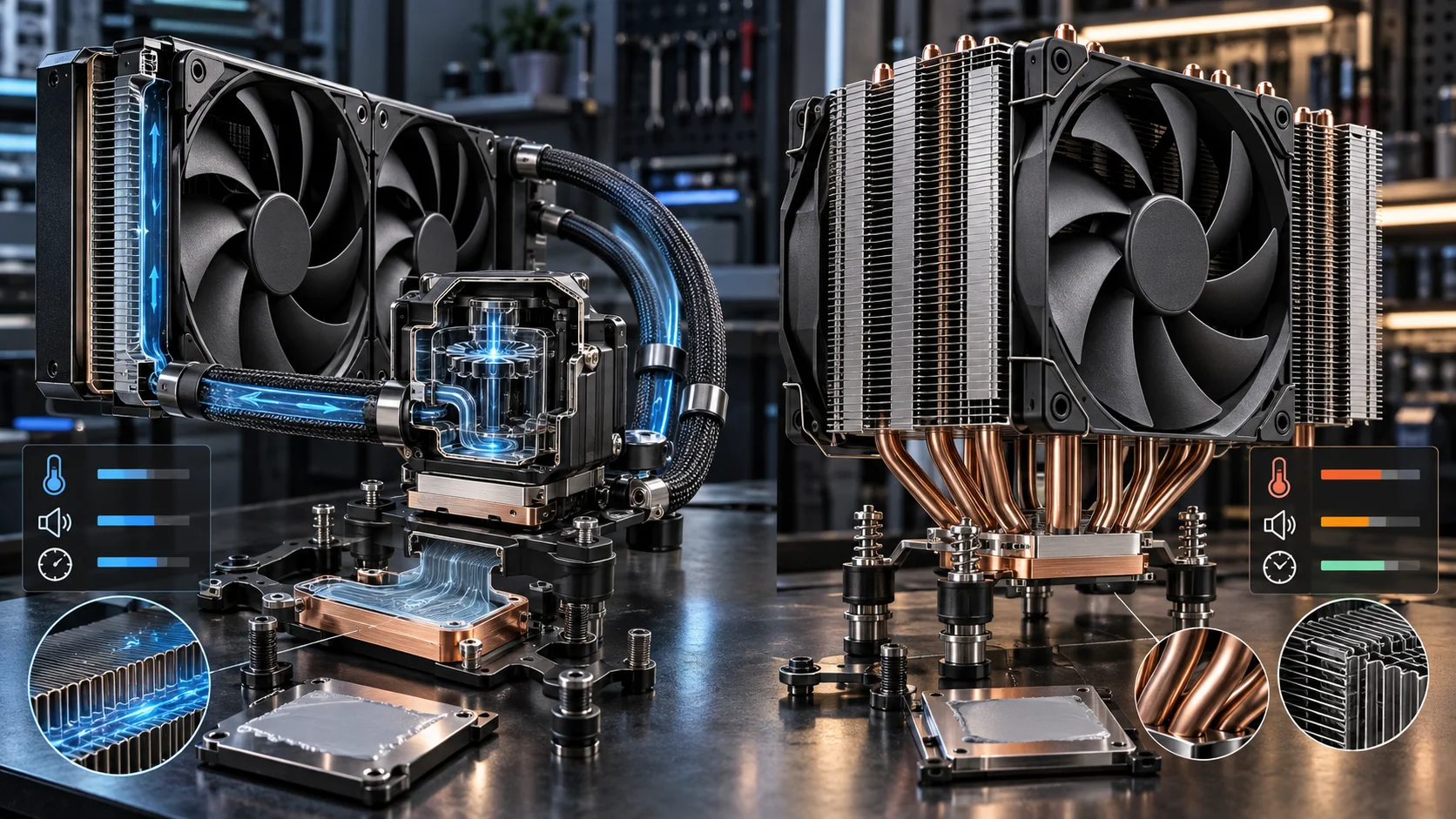
An air cooler is a sealed conduction system. Vapor chambers or heat pipes filled with working fluid (typically water in a sintered copper wick) evaporate at the CPU cold plate and condense at the fin stack, moving heat via phase change with no moving parts beyond the fans. Heat travels centimeters, not meters. This short thermal path means near-zero transport latency: any heat the CPU produces reaches dissipating surface area within seconds. The limitation is surface area and air volume — a fin stack must sit directly above the socket, and airflow through dense fins generates static pressure noise as fan speed climbs. For broader ecosystem context, read through our operational guide on custom cpu fan curve.
AIOs: Pump-Driven Loops and Thermal Inertia
An All-In-One liquid cooler separates heat absorption from heat rejection. A pump (ceramic bearing impeller, usually 12V DC at 2,000–4,400 RPM) pushes coolant through the cold plate, tubing, and radiator, where fans reject heat. The critical engineering property is thermal mass: 150–250ml of coolant plus the radiator’s aluminum acts as a buffer. A 300W transient spike raises coolant temperature gradually over 30–90 seconds instead of spiking the cold plate instantly. This is why AIOs hold boost clocks through bursty all-core workloads that momentarily overwhelm air coolers. The trade-offs are pump failure probability, permeation-based coolant loss through rubber tubing, and pump noise floor at idle. For broader ecosystem context, read through our operational guide on custom cpu fan curve.
Thermal Performance — Sustained Load vs Transient Behavior
What Actually Limits Each Architecture
Air coolers saturate first in sustained all-core loads. Once the fin stack reaches equilibrium with intake air temperature, the CPU package temperature stabilizes at a fixed delta above ambient — typically 45–60°C above room temperature for a 250mm-class dual tower at 250W. AIOs reach the same equilibrium but at a lower delta because a 360mm radiator (roughly 0.16mu00b2 of fin surface plus coolant volume) rejects heat more efficiently per fan revolution. Neither architecture “fails”; both simply land the CPU at different steady-state temperatures, and modern CPUs convert that difference directly into boost clock residency. Verify your specific chip’s TjMax and thermal throttling thresholds against Intel Architecture Technical Documentation or your vendor’s equivalent, because both Intel and AMD silicon will happily run at 95–100°C by design — the cooler determines how long it stays there at full frequency.
Measured Thermal Comparison Matrix
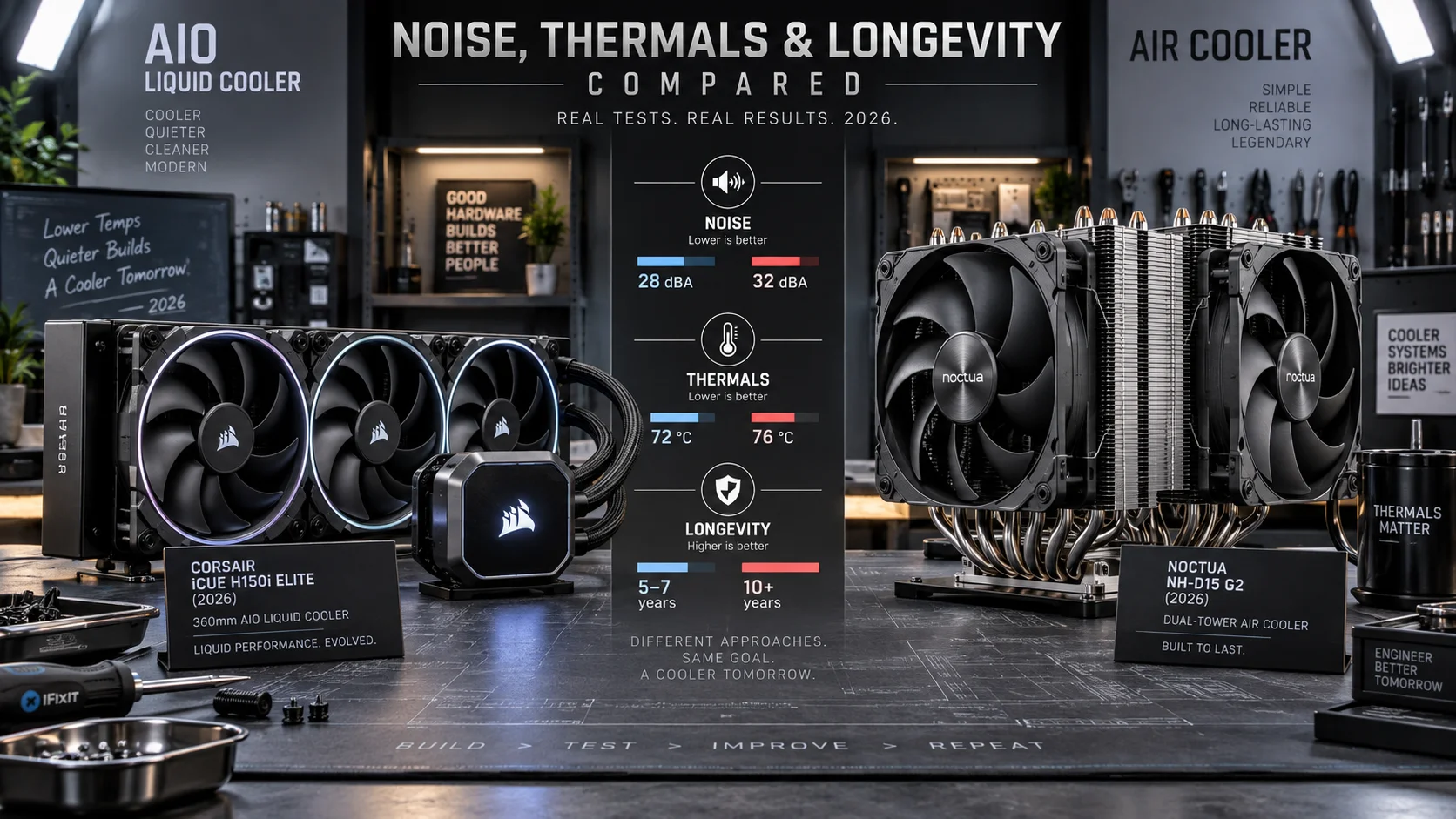
The table below consolidates expected behavior across cooler classes under a standardized 23°C ambient, using typical pc hardware 2026 test benches with 14th/15th-gen Intel and Ryzen 9000 CPUs at stock power limits.
| Metric | Premium Dual-Tower Air (e.g., 250W-class) | 240mm AIO | 360mm AIO |
|---|---|---|---|
| Max sustainable heat load | ~220–250W | ~230–280W | ~300–380W |
| Steady-state delta over ambient @ 200W | 48–55°C | 42–48°C | 36–42°C |
| Transient spike absorption (300W, 60s) | Weak — package hits limit within 10–20s | Moderate — 40–60s buffer | Strong — 90s+ buffer before saturation |
| Idle package delta over ambient | 4–8°C | 6–10°C | 6–10°C |
| Memory/VRM airflow collateral | Excellent — downdraft cools VRM and DIMMs | Poor — dead zone around socket | Poor — dead zone around socket |
| Typical expected service life | 10–15 years (fans replaceable, ~$15) | 5–7 years (sealed unit, non-serviceable) | 5–7 years (sealed unit, non-serviceable) |
| Realistic street price (2026) | $45–120 | $90–150 | $130–250 |
Heat load context matters when applying this table. Efficiency-focused six-core parts such as those in our AMD Ryzen 5 9600X vs Intel Core Ultra 5 245K comparison rarely exceed 160W at stock, making both cooler classes thermally indistinguishable — the decision there is acoustic and spatial, not thermal. Flagship 8+ core chips at unrestricted power limits are where radiator class changes measured boost residency. For deeper per-chip power characterization, see our desktop CPU benchmarks & reviews archive.
Noise — Where Air Coolers Win Idle and AIOs Win Load
The Pump Noise Floor
Every AIO has an irreducible noise floor: the pump. Even at its lowest duty cycle, a pump produces a 20–28 dBA tonal signature often described as a faint whine or gurgle, and pump speed is usually not tied to CPU temperature the way fans are. Air coolers have zero non-fan noise sources — at idle with stopped or 400 RPM fans, a quality air-cooled build is functionally silent. In bedroom and office environments, this is frequently the deciding factor in the liquid-cooler-vs-air-cooler question. For troubleshooting and reliability insights, consult our in-depth how to choose cpu cooler report.
Load Acoustics and Fan Scaling
Under sustained load the picture inverts. Air cooler fans must spin harder against dense fin-stack static pressure; a dual tower at 250W typically runs 35–42 dBA. A 360mm radiator’s three 120mm fans distribute the same airflow requirement across more surface area, landing at 30–36 dBA for equivalent heat rejection. Effective tuning rules for both architectures:
- Set fan curves on coolant temperature (AIO) or CPU package temperature (air) with 5-second polling intervals — 1-second intervals cause audible oscillation hunting.
- Cap fan ramps at 0.5 °C/second slew to eliminate the “jet spool-up” effect during brief background tasks.
- Fix pump speed at a constant 60–80% duty on AIOs rather than variable control; pump RPM modulation is more audible than fan RPM modulation at the same thermal benefit.
- Undervolt before upgrading coolers — a 50–80mV curve optimizer adjustment on modern CPUs cuts 10–20W and 3–6 dBA for free.
Longevity and Failure Mode Engineering
AIO Degradation Mechanics
AIOs fail through four mechanisms, all statistical rather than sudden in most cases. Coolant permeation: rubber tubing passes roughly 5–15ml of water vapor per year outward, concentrating the glycol mix and reducing thermal transfer capacity by an estimated 1–3°C per year. Pump bearing wear: ceramic impeller bearings are rated 50,000–70,000 hours MTBF, which is 6–8 years of heavy use. Galvanic corrosion: mixed copper (cold plate) and aluminum (radiator) metallurgy requires inhibitor fluid that depletes over time. Biological growth: rare in quality units, but causes visible clogging and flow restriction. Manufacturers like Arctic and Corsair now back AIOs with 6-year warranties, which is a reliable proxy for engineering confidence. Readers comparing setup options can review our technical analysis on thermal paste shelf life.
Air Cooler Degradation Mechanics
A heat pipe has no wear mechanism. The only failure point is the fan bearing — sleeve bearings last 4–6 years, fluid dynamic and maglev bearings 8–15 years — and replacement is a $15, two-screw operation. Dust accumulation is the primary performance degrader for both architectures, costing 2–8°C as fin channels occlude. This asymmetry is why air coolers routinely outlive two or three full platform rebuilds.
Diagnostic Symptom Matrix
| Symptom | Likely Cause (AIO) | Likely Cause (Air) | Action |
|---|---|---|---|
| Idle temps climbing 10°C+ over months | Coolant loss or pump wear | Paste pump-out or dust film | Repaste air cooler; RMA AIO if under warranty |
| Rhythmic gurgling or sloshing | Air pocket in pump housing | N/A | Tilt case to burb pump; run pump at 100% for 10 min |
| Sudden shutdown under load | Pump seizure — zero flow | Fan failure or mounting pressure loss | Verify pump RPM sensor and fan RPM in BIOS immediately |
| 10–15°C delta between radiator hoses under load | Normal — flow is healthy | N/A | No action; a 0°C delta indicates no flow |
| Rising temps proportional to room temperature only | Expected behavior | Expected behavior | No action; both scale 1:1 with ambient |
Cost, Case Compatibility, and System Integration
Price-Performance Reality
The strongest air coolers in 2026 — the $50–90 dual-tower class — beat every 240mm AIO on the market in price-per-degree while matching them in sustained thermals. AIO value begins at 280mm and above. Budget logic also cuts the other way: money saved on a $70 air cooler instead of a $200 360mm AIO frequently buys a full GPU tier step, a tradeoff quantified in analyses like our Radeon RX 9060 XT 8GB vs 16GB comparison, where VRAM capacity delivers more sustained performance than 4°C of CPU headroom on mid-range chips. For workload planning, our graphics card tests & GPU guides cover total system thermal budgets including cooler heat rejection into the case.
Physical Fit Constraints
Measure before buying either class. Dual-tower air coolers require 155–170mm of CPU socket clearance from the motherboard plane, which excludes most ITX cases and some mid-towers, and tall heatpipe towers can overhang the first DIMM slot on boards with tight socket-to-RAM spacing. AIOs require radiator + fan thickness clearance (typically 55–65mm combined for a 360mm with 25mm fans) at the top, front, or side mount, plus 20–30mm of tube routing room. Motherboard layout density matters here: in our ASUS ROG Maximus Z890 Hero vs MSI MEG Z890 ACE comparison, large VRM heatsinks and M.2 armor on flagship boards reduce air cooler overhang tolerance and favor AIOs in the same footprint. One underweighted AIO drawback: with no tower airflow over the socket area, VRM and M.2 temperatures run 5–12°C hotter, which matters on high-current boards running unlocked chips.
Decision Framework by CPU Class and Use Case
- 65–105W CPUs (Ryzen 5/7 non-X, Core Ultra 5): Mid-range air cooler. An AIO here buys aesthetics, not performance.
- 120–200W CPUs (Ryzen 7 X, Core Ultra 7): Premium dual-tower air ($70–110) or 240mm AIO. Thermally tied; choose on noise preference and case clearance.
- 220W+ CPUs (Ryzen 9, Core Ultra 9, overclocked Arrow Lake): 360mm AIO is the technically correct answer for sustained all-core boost residency.
- Small form factor: Depends on case design — low-profile air for compact ITX, or cases engineered around specific AIO radiators.
- Silent/bedroom builds: Air cooler with fan-stop at idle; zero pump noise floor.
- Workstations planned for 10+ years: Air cooler. The heat sink outlives every other component; fans are the only consumable.
Final Diagnostic Verdict & Maintenance Checklist
Verdict: air cooling wins on longevity, cost, idle noise, and platform airflow; liquid cooling wins on sustained 250W+ thermal capacity, transient absorption, socket clearance, and VRM clearance. For the majority of 2026 builds — CPUs at 200W or below — a $80 dual-tower air cooler is the engineering-correct choice, and spending the difference elsewhere in the system is the higher-value allocation. A 360mm AIO is justified equipment, not vanity, only at the top of the power envelope. Whichever you run, apply the checklist below on a fixed schedule. For complementary field maintenance guidelines, examine our breakdown of what is cpu ipc.
Air Cooler Maintenance (every 6 months)
- Power down, hold case at eye level, and inspect fin stacks for dust matting — compressed air at 30 PSI, held upright, in short bursts until fins are visibly clear.
- Spin each fan by hand with the system off; feel for bearing roughness or axial play. Replace at the first sign of grinding, not after failure.
- Verify mounting frame torque — 4 screws should require firm resistance; a loosened mount shifts temps 5–15°C within minutes of load.
- Repaste every 3–4 years or after any cooler removal, using a pea-sized dot of quality paste; pump-out under sustained heat is real on vertical cold plates.
AIO Maintenance (every 6 months)
- Check pump RPM reporting in BIOS or fan-control software every session cycle — a live pump speed reading is your only flow telemetry; zero RPM means immediate shutdown and inspection.
- Inspect tubing at the radiator fittings and along the run for coolant residue, crystallization, or swelling — any visible weep means the unit is on borrowed time.
- Verify the radiator’s exhaust air is warm under load; cold exhaust air with hot CPU temps indicates restricted or zero coolant flow.
- Clean radiator fins with compressed air only — they are softer and more closely spaced than tower fins, and bent fins permanently raise acoustic output.
- Plan replacement at year 5–6 proactively if the system carries critical workloads; treat the warranty length as the engineering service interval, not a floor.
Monitor package temperatures quarterly with a logging tool under a known load, and record the delta over ambient. A 3–5°C year-over-year increase at identical power draw is the earliest measurable signature of degradation in either architecture — catch it there and the cooler decision, whichever side of the liquid cooler vs air cooler divide it falls on, stays a planned upgrade instead of an emergency.
Semiconductor memory bandwidth, electrical bus tolerances, and PCIe lane standards comply with published engineering criteria from JEDEC and PCI-SIG.
Pros
- Very powerful specification set for AI, rendering, and other compute-intensive tasks.
- Large 256GB memory capacity is well suited to professional multitasking and oversized projects.
- Fast NVMe storage improves responsiveness for booting, loading, and transferring files.
- Preloaded Windows 11 Pro and latest drivers reduce setup time for professional use.
Cons
- The dual-RTX 5090, 256GB RAM configuration is likely excessive for casual users or general office work.
- No monitor, keyboard, mouse, or other peripherals are listed in the provided data.
- The 1600W dual-GPU design may require careful power and thermal planning in the workspace.
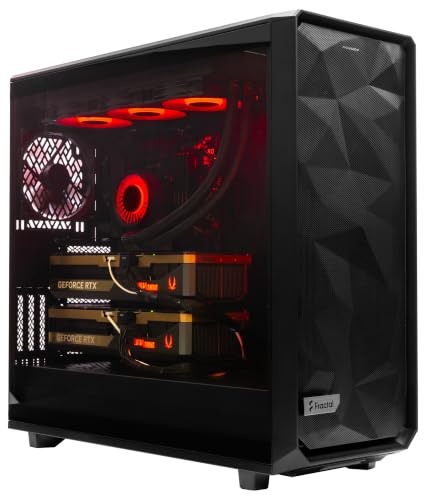
Overview & Design: The ArsenalPC MES2X is a custom-built tower workstation designed around very high-end desktop hardware. It combines a Ryzen 9-9950X3D2 processor, dual GeForce RTX 5090 GPUs, 256GB of DDR5 memory, and liquid cooling in a professionally assembled system with cable management.
Performance & Key Features: This configuration is aimed at AI development, 3D rendering, simulation, and other demanding workflows that benefit from both CPU and GPU power. The 8TB NVMe SSD boot and storage setup should help with fast startup times and quick access to large project files, while Windows 11 Pro and preinstalled drivers make it ready to use out of the box.
Drawbacks & Considerations: The main limitations are its extremely specialized nature and likely high power and cooling demands. It is also not a compact or entry-level machine, and the provided data does not list peripherals, dimensions, or other extras.
Verdict: This is best suited to professionals who need maximum workstation performance for AI, content creation, or compute-heavy production work. For mainstream users, the specification level is more than necessary, but for advanced workloads it offers a very capable hardware foundation.

Pros
- Very strong CPU and GPU pairing for premium gaming and content creation
- Large 64GB memory and 2TB SSD come included, reducing the need for early upgrades
- Cooling setup is extensive, with liquid cooling and multiple PWM fans
- Includes Windows 11 Pro, a keyboard, a mouse, and lifetime technical and diagnostic support
Cons
- This is a very high-end configuration that may be more power than casual gamers need
- The listing does not provide full details for the power supply, motherboard, or case dimensions
- Only one HDMI and one DisplayPort are guaranteed, so multi-monitor buyers should verify exact port needs
Overview: The Empowered PC Panorama XL is a premium prebuilt gaming desktop built around a Ryzen 9 9950X3D and RTX 5090. Its panoramic tempered-glass case and 10 ARGB PWM fans give it a showpiece look while also aiming to support strong airflow.
Performance and features: With 64GB of DDR5 memory and a 2TB PCIe Gen4 NVMe SSD, this system is designed for fast loading, smooth multitasking, and heavy desktop workloads. The RTX 5090 and 360mm liquid cooling make it suitable for demanding gaming, streaming, VR, and creative work.
Drawbacks to consider: The configuration is clearly aimed at enthusiasts, so many buyers will not need this much performance. The listing also leaves some hardware details unspecified, including the power supply and full expansion information, and the exact video output mix may vary beyond the guaranteed ports.
Verdict: This PC makes the most sense for users who want a no-compromise Windows 11 Pro gaming tower with top-tier hardware already assembled and stress-tested. It is best suited to enthusiasts, creators, and VR users who value premium performance and support over value pricing.
Pros
- Very powerful CPU and GPU pairing for premium gaming and productivity use.
- Large memory and storage capacity come standard, reducing the need for immediate upgrades.
- Strong cooling setup with a 360mm AIO and 10 fans.
- Includes Windows 11 Pro and basic peripherals for easier setup.
Cons
- The full-panel glass tower is likely to take up more space than a compact desktop.
- Only one HDMI and one DisplayPort are guaranteed, and additional video outputs may vary by configuration.
- The listing does not provide case dimensions or weight, which makes desk and placement planning harder.
Overview: The Empowered PC Panorama XL is a high-end prebuilt gaming desktop built around an AMD Ryzen 9 9950X3D and an RTX 5080. The panoramic tempered glass design gives it a showcase look, while the included 3 year limited hardware warranty and lifetime technical support add peace of mind.
Performance: With 96GB of DDR5 memory, a 4TB PCIe Gen4 SSD, 10 ARGB PWM fans, and 360mm liquid cooling, this PC is made for fast loading, strong multitasking, and stable thermals during gaming, streaming, and content creation. Windows 11 Pro and WiFi 7 make it a modern ready-to-run system.
Considerations: This is a large premium tower, so buyers should expect it to need more room than a smaller desktop. The listing also guarantees only one HDMI and one DisplayPort, with additional outputs varying by configuration, so multi-monitor plans should be checked carefully.
Verdict: The Panorama XL is best suited to enthusiasts who want a powerful prebuilt PC for demanding games and heavy productivity work. It offers an advanced spec sheet and broad feature set, but it is more machine than many casual users will need.

Pros
- Very powerful Apple silicon configuration for intensive multitasking and pro-grade workloads.
- Large 16.2-inch XDR display offers high brightness and strong contrast for detailed content creation.
- Extensive connectivity includes Thunderbolt 5, HDMI, SDXC, MagSafe 3, and headphone jack.
- Works closely with iPhone features such as iPhone Mirroring, Messages, and FaceTime integration.
Cons
- The M5 Max configuration is overkill for many everyday users who do not need this level of performance.
- The 16.2-inch form factor may be less convenient for users who want a smaller, lighter laptop.
- Some buyers may not need the fixed high-capacity 48GB memory and 2TB storage configuration.
Overview & Design: The Apple 2026 MacBook Pro with M5 Max is a large-format premium laptop aimed at users who want workstation-level capability in a portable design. The Space Black finish, 16.2-inch Liquid Retina XDR display, and extensive port selection give it a polished, professional feel right out of the box.
Performance & Key Features: Based on the listed specs, the M5 Max chip with an 18-core CPU, 40-core GPU, and built-in Neural Accelerators is designed for demanding tasks such as AI workloads, media production, and heavy multitasking. The 48GB unified memory and 2TB SSD should help keep large projects responsive, while Wi-Fi 7, Bluetooth 6, and support for multiple external displays add flexibility for advanced setups.
Drawbacks & Considerations: This model is clearly aimed at power users, so many shoppers will not need this much performance or storage. The 16.2-inch size may also be less practical for people who prioritize a compact travel laptop. Since this is a fixed high-end configuration, it is not the most accessible choice for casual computing or lighter workloads.
Verdict: The Apple MacBook Pro M5 Max is best suited to professionals, creators, and AI-focused users who want top-tier performance, a bright HDR display, and strong device integration. If you need a Mac that can handle intense work sessions and multiple external peripherals, this is a compelling option.

Pros
- Very strong specification set for professional AI, rendering, and content creation workloads.
- Massive 192GB RAM and 10TB NVMe storage support large projects and data-heavy workflows.
- Liquid cooling and a 1000W 80+ Gold PSU are suited to sustained high-performance use.
- USA assembly, stress testing, and included support add trust for business and pro buyers.
Cons
- The premium configuration and workstation class positioning make it a costly option compared with mainstream desktops.
- Large internal capacity is excellent for power users, but it may be more than casual users or basic office tasks require.
- No detailed physical dimensions or port breakdown were provided in the source data, which may matter for workspace planning.
Overview: The NOVATECH AI Workstation Desktop PC is a high-end tower built around the Intel Core i9-14900K and RTX PRO 6000. It is aimed at users who need workstation-class performance for AI development, 3D work, and other demanding professional tasks.
Performance: With 192GB of DDR5 6000MHz memory and 10TB of NVMe SSD storage, this system is designed to keep large projects and datasets moving smoothly. The RTX PRO 6000 adds serious GPU compute capability for CUDA-accelerated workloads, while liquid cooling and a 1000W 80+ Gold PSU support stable operation under sustained load.
Drawbacks: This is a specialized, premium machine, so it is not a practical choice for basic home use or light office work. The provided data also does not include full dimensions or a complete port list, which may be important for buyers planning a tight workspace or multi-peripheral setup.
Verdict: If you need a powerful desktop for AI, machine learning, data science, rendering, simulation, or advanced content creation, this NOVATECH workstation offers a very strong feature set. It is best suited to professionals and serious creators who can use its extreme hardware capacity.
- Built for AI and pro workloads
- Large memory and storage capacity
- Liquid-cooled for sustained performance
- Backed by USA assembly and warranty support

Pros
- Very strong CPU and GPU combination for top-tier gaming and creator workloads.
- Large 64GB memory and 4TB SSD come preinstalled, reducing the need for immediate upgrades.
- Includes Windows 11 Home, a tempered glass case, and free keyboard and mouse.
- Assembled in the USA and backed by a 1-year parts and labor warranty with free technical support.
Cons
- The NVIDIA RTX 5090 brand may vary, so the exact card partner is not fixed.
- Wireless and port details are not fully consistent across the listing, so exact connectivity specs may need confirmation.
- This is an enthusiast-class system, so it may be more PC than casual gamers or basic users need.
Overview: The Skytech Gaming Legacy 4 is a premium prebuilt gaming PC built around a black tempered glass Skytech Legacy case, a 420mm AIO liquid cooler, and a high-end modern component list. It is assembled in the USA and includes Windows 11 Home, a free keyboard and mouse, and a 1-year warranty on parts and labor.
Performance: With an AMD Ryzen 9 9950X3D, NVIDIA GeForce RTX 5090 32GB GDDR7, 64GB of DDR5 6000 memory, and a 4TB Gen4 NVMe SSD, this system is aimed at very demanding gaming and productivity use. The specification set is well suited to 4K ultra gaming, streaming, video editing, and other heavy multitasking workloads, with the liquid cooling helping maintain sustained performance.
Drawbacks and considerations: Some listing details vary, including the GPU brand and certain port or wireless specifications, so buyers should confirm the final configuration before purchase. It is also a very high-end system, which means it may be unnecessary for users who only play lighter games or need a basic desktop.
Verdict: The Legacy 4 makes the most sense for enthusiasts who want a no-compromise prebuilt PC with top-tier CPU and GPU power, fast storage, and plenty of memory out of the box. It is best for serious gamers, creators, and power users who want maximum headroom and minimal setup.

Pros
- Very strong CPU and GPU combination for high-end gaming and creator workloads
- Liquid-cooled Intel Core i9-14900KF helps support sustained performance under load
- Large 64GB DDR5 memory capacity and 4TB total NVMe storage are excellent for demanding users
- Deep RGB customization and CORSAIR iCUE integration add strong visual and control appeal
Cons
- This is a premium, high-spec tower that may be more machine than casual gamers need
- The provided listing does not include details on chassis dimensions, ports, or accessory bundle
- No customer review text is available in the source data, so real-world ownership feedback is limited
Overview: The Corsair Vengeance i8200 Gaming PC is a premium desktop tower built around an Intel Core i9-14900KF, NVIDIA GeForce RTX 5080, and 64GB of DDR5 memory. The black design and CORSAIR RGB lighting give it an enthusiast-grade look that matches its high-end hardware.
Performance: This system is aimed at demanding gaming, streaming, and creative workloads. The liquid-cooled 14th Gen Intel CPU, RTX 50 Series graphics, and dual 2TB M.2 SSDs should deliver fast responsiveness, while NVIDIA DLSS 4 and Blackwell-based GPU features add modern AI-enhanced performance benefits.
Considerations: The configuration is clearly built for users who want top-tier specs, so it may be more powerful than many casual players need. The listing also does not provide details such as dimensions, port layout, noise levels, or included accessories, so buyers may want to confirm those points before purchase.
Verdict: For gamers and creators who want a powerful Windows 11 Pro tower with strong cooling, lots of fast memory, and deep CORSAIR iCUE RGB control, the Vengeance i8200 is a compelling premium option.
Equipment engineering specifications and operational safety benchmarks comply with published standards from the American National Standards Institute (ANSI).
If you require additional technical details and buying criteria, review our analysis of cpu temperature spikes.
To see how this matches real-world operating conditions, see our complete guide on how to install cpu cooler.