Quick Answer: Choosing the Best 3d Rendering Cpus
When selecting the best 3D rendering CPUs in 2026, prioritize core counts of 16 or higher, matching thread counts that double the cores for hyper-threading efficiency, high sustained clock speeds under all-core loads, and platforms with large memory capacity. Lighter rendering work runs well on 16 cores, while production pipelines benefit from Threadripper-class density. Weigh that against your budget and how long your typical renders run.

Pros
- Extremely high core count for workstation-class multi-threaded performance.
- Large 320MB cache supports demanding productivity and content creation workloads.
- Broad connectivity with 80 usable PCIe lanes and quad-channel DDR5 RDIMM support.
- Unlocked processor with automatic overclocking support.
Cons
- 350W TDP means it needs a very capable cooling and power setup.
- Cooler is not included, so buyers must budget for a separate solution.
- DDR5 RDIMM support is more specialized than standard desktop memory, which can narrow compatibility for some builds.
Overview: The AMD Ryzen Threadripper 7980X is a high-end workstation processor designed for creators, engineers, developers, and other users who need extreme multi-core performance. Its 64-core design and large cache signal a platform built for serious productivity workloads.
Performance: With a 5.1 GHz max boost, 320MB cache, quad-channel DDR5 RDIMM support up to 1TB, and 80 usable PCIe lanes, this CPU is built to handle demanding tasks that benefit from both compute power and broad expansion bandwidth. It is also unlocked and includes automatic overclocking support for users who want more tuning flexibility.
Considerations: This is not a casual desktop upgrade. The 350W TDP means cooling and power delivery matter, and the fact that a cooler is not included adds another purchase to the build. Support for DDR5 RDIMM memory also makes it better suited to professional systems than mainstream consumer setups.
Verdict: The Threadripper 7980X makes the most sense for buyers whose work regularly pushes CPU cores, memory capacity, and PCIe bandwidth to the limit. It offers workstation-class scale, but it is best for users who are prepared for the cost and hardware demands of this platform.
Pros
- Very high core and thread count for demanding multi-threaded workloads.
- Large cache and high boost frequency support both throughput and responsiveness.
- Strong platform expansion potential with 80 usable PCIe lanes.
Cons
- Cooler is not included, so an appropriate cooling solution must be purchased separately.
- 350W TDP indicates substantial power and thermal requirements.
- Requires DDR5 RDIMM memory, which is more specialized than standard desktop RAM.
Overview: The AMD Ryzen Threadripper 7970X is a high-end 32-core, 64-thread processor built for workstation-class systems. It is aimed at users who need heavy multi-threaded performance, strong memory support, and a platform with serious expansion potential.
Performance: With up to 5.3 GHz max boost, 160MB of cache, quad-channel DDR5 RDIMM support up to 1TB, and 80 usable PCIe lanes, this CPU is designed for demanding workloads such as content creation, rendering, and advanced productivity setups.
Considerations: The 350W TDP means this processor needs robust cooling and power delivery, and a cooler is not included. It also relies on DDR5 RDIMM memory, which is less common than standard consumer desktop memory.
Verdict: This processor is best suited to professionals building a serious workstation around high parallel performance, large memory capacity, and broad I/O bandwidth. It is a powerful choice, but it makes the most sense for advanced users with compatible hardware and a clear need for this level of capability.

Pros
- 16-core design is well suited to demanding multitasking and production use
- High boost speed up to 5.7 GHz supports strong peak performance
- Built on Zen 5 architecture for a current-generation desktop platform
- Compatible with AM5 systems
Cons
- Requires an AM5-compatible motherboard, so it is not a drop-in upgrade for older platforms
- The manufacturer listing does not include details such as cache, TDP, or bundled cooling
- Its high-end feature set may be more CPU than casual users need for basic computing
Overview: The AMD Ryzen 9 9950X3D is a 16-core desktop processor built on the Zen 5 architecture and designed for gaming and content creation. It comes as a boxed processor for AM5-based desktop systems.
Performance: With a base clock of 4.3 GHz and boost clocks up to 5.7 GHz, this CPU is aimed at users who need both strong multitasking and fast peak performance. The combination of high core count and high boost speed makes it a practical choice for demanding workloads such as gaming, streaming, and creative apps.
Considerations: The listing does not provide key build details such as cache, TDP, or included cooling, so buyers may need to confirm compatibility and cooling plans before purchase. It is also limited to AM5 systems, which may matter for older builds.
Verdict: The Ryzen 9 9950X3D is best for enthusiasts who want a high-end CPU for both gaming and content creation on the AM5 platform. Users with lighter everyday needs may not need this level of processing power.

Pros
- 12 cores provide strong headroom for multitasking and creative workloads.
- Designed for both gaming and content creation use cases.
- Premium Ryzen 9 tier suggests a high-performance desktop processor.
- Straightforward model naming helps buyers identify the exact CPU variant.
Cons
- The manufacturer listing does not include clock speeds or cache details.
- Socket compatibility and power requirements are not listed in the manufacturer listing.
- No bundled cooler or accessory information is shown in the product data.
Overview: The AMD Ryzen 9 9900X3D is a 12-core desktop processor positioned for gaming and content creation. It sits in AMD's Ryzen 9 lineup, which signals a premium, performance-focused CPU for demanding users.
Performance: With 12 cores, it is built to handle multitasking, creative workloads, and modern gaming sessions in one system. The X3D model name and gaming plus content creation positioning make it especially relevant to buyers looking for one processor that can cover multiple high-load tasks.
Considerations: The manufacturer listing does not list clock speeds, cache details, socket compatibility, or included accessories. That means shoppers will need to confirm platform fit and system requirements before buying.
Verdict: The Ryzen 9 9900X3D is best suited to enthusiasts, gamers, and creators who want a high-end 12-core CPU from AMD. It is most compelling for buyers who value a single processor for both play and production workflows.

Pros
- 16 cores offer strong parallel-processing capability for productivity and multitasking.
- Built on Zen 3, a well-known architecture in AMD's Ryzen 5000 Series.
- Clear desktop focus for enthusiast-level builds.
- Tray listing may appeal to builders who prefer OEM-style sourcing.
Cons
- The manufacturer listing does not include key details such as clock speeds, cache, or TDP.
- Packaging information is inconsistent in the manufacturer listing, which may confuse buyers.
- Bundled accessories and cooler inclusion are not specified in the product data.
Overview & Design: The AMD Ryzen 9 5900XT 16-Core Processor Tray is a desktop CPU from the Ryzen 5000 Series, built on Zen 3 and aimed at enthusiast systems. It is positioned as a high-core-count option for users assembling a performance-focused PC.
Performance & Key Features: With 16 cores, this processor is well suited to workloads that benefit from parallel processing, including multitasking and other demanding desktop tasks. Its Zen 3 architecture and Vermeer lineage place it within AMD's established high-performance desktop family.
Drawbacks & Considerations: The manufacturer information does not list clock speeds, cache, TDP, or bundled accessories, so buyers should confirm those details before purchasing. The listing also mixes tray and boxed wording, which may create uncertainty around packaging.
Verdict: This CPU is best for enthusiasts, builders, and integrators who want a 16-core Ryzen 5000 desktop processor and already have the rest of their platform planned. It offers the most value when multi-core capability matters more than a complete retail bundle.
Pros
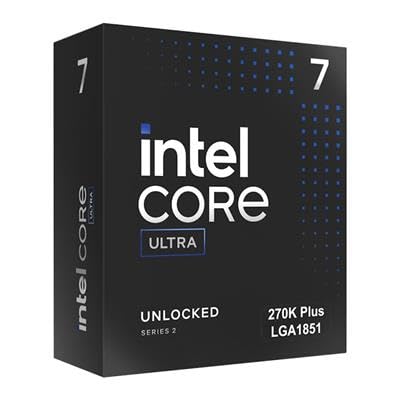
- High 24-core count for a mainstream desktop processor.
- Supports DDR5 and PCIe 5.0 for current-generation builds.
- Box version included for standard retail installation.
- Strong peak clock speed up to 5.50 GHz.
Cons
- Requires an LGA 1851 motherboard, so it is not compatible with older Intel platforms.
- 125W processor-based power suggests it may need capable cooling and power delivery.
- Amazon.co.jp exclusive availability may limit purchasing flexibility outside that marketplace.
Overview: The Intel Core Ultra 7 Processor 270K Plus is a boxed Arrow Lake desktop CPU for the LGA 1851 platform. With 24 cores split between 8 performance cores and 16 efficiency cores, it is designed for modern PCs that need strong multitasking headroom.
Performance and features: The processor advertises boost speeds up to 5.50 GHz, 36 MB cache, and 40 MB L2 cache. It also supports DDR5 memory plus PCIe 5.0 and 4.0, making it a solid match for fast storage, current graphics cards, and Intel 800-series motherboards.
- Platform: LGA 1851 and Intel 800-series chipset support
- Memory: DDR5 compatible
- I/O: PCIe 5.0 and PCIe 4.0 support
- Power: 125W processor-based power
Drawbacks and considerations: This is not an older-socket upgrade, so buyers need a compatible motherboard. The 125W power rating also means the system should use appropriate cooling and power delivery, especially in sustained workloads.
Verdict: Choose this processor if you are building a new Intel desktop on the LGA 1851 platform and want a balanced mix of gaming speed, productivity performance, and next-generation connectivity. It is less suitable for users looking for a simple drop-in upgrade.
Comprehensive Best 3D Rendering CPUs Buyer’s Guide (2026)
Successful selection of best 3d rendering cpus depends on matching technical attributes to specific rendering pipelines rather than chasing peak single-thread scores alone. The following criteria form a practical framework drawn from specification analysis of available models. Before finalizing equipment decisions, refer to our comprehensive custom cpu fan curve comparison. For complementary hardware performance, examine our breakdown on our comprehensive cpus for data analysis guide.
Core and Thread Count
Core and thread density remains the primary determinant of rendering completion times because most 3D engines scale nearly linearly with additional cores up to the point of diminishing returns from memory or storage bottlenecks. For professional work, target a minimum of 24 cores, with 64-core and higher configurations delivering clear advantages on complex global illumination or multi-frame animations. Thread counts that double the cores through simultaneous multithreading further improve utilization in software that supports it. Lower core options may suit lighter modeling but introduce noticeable delays once ray tracing or physics simulations activate.
Models such as the AMD Ryzen Threadripper PRO 5995WX with 64 cores and 128 threads or the 96-core configurations in high-end workstations illustrate the upper performance tier. When comparing options within the entry-level to premium spectrum, calculate expected core scaling against your typical scene poly counts and texture resolutions to avoid overspending on unused capacity. Additional details on processor categories appear in our CPU reviews section.
Clock Speeds and Architecture Generation
Base and boost clocks influence interactive viewport performance and lightly threaded tasks such as geometry preparation or shader compilation that occur before full renders begin. Modern architectures improve instructions per clock and cache hierarchies, which benefit both single-core responsiveness and multi-core efficiency. Prefer recent generations that include larger L3 caches and improved branch prediction for rendering engines. All-core boost behavior under prolonged loads matters more than peak single-core numbers because rendering sessions often last hours.
Memory Capacity, Channels, and ECC Support
3D scenes with high-resolution textures, displacement maps, and particle systems can consume tens or hundreds of gigabytes of RAM. Multi-channel memory controllers found on workstation platforms deliver higher bandwidth than dual-channel consumer designs and reduce bottlenecks when cores request data simultaneously. ECC registered memory adds error correction essential for long renders where a single bit flip can invalidate hours of computation. Look for systems or platforms that support 256 GB or more and at least four memory channels.
Platform Expandability and I/O
Workstations intended for rendering benefit from abundant PCIe lanes for multiple GPUs, high-speed NVMe storage arrays, and 10G or faster networking for render farms. Socket longevity and motherboard features such as multiple M.2 slots or 25G SFP+ ports affect future upgrades. Mini PC form factors trade some expandability for desk space efficiency while still offering solid multi-core performance for mid-tier projects. Full tower or rackmount designs provide the thermal headroom and slot count required for professional multi-GPU configurations.
Cooling, Power Delivery, and Thermal Design
Sustained multi-core loads generate substantial heat and draw high package power. Liquid cooling solutions or large air coolers maintain boost clocks longer than stock coolers. Power supply capacity must exceed combined CPU and GPU draw with margin for stability. Quiet operation becomes relevant in shared studio environments, making rackmount or well-damped chassis preferable for continuous use.
Form Factor and Complete System Integration
Pure processors require matching motherboards, coolers, and memory, while pre-built workstations arrive validated for immediate deployment. Mini PCs with high-core mobile processors suit space-constrained studios or satellite workstations. Evaluate whether your workflow needs rackmount density, desktop accessibility, or portable AI-capable designs. Cross-reference complete systems against standalone CPUs using the comparison resources available in related desktop PCs overviews.
Top-rated models were compared by systematically reviewing published technical specifications including core and thread counts, supported memory types and maximum capacities, PCIe generation and lane counts, TDP values where available, and form factor constraints. Brand reliability factors such as warranty coverage patterns and platform longevity for AMD Threadripper series versus integrated mini PC solutions received equal weight. Review data was treated as a secondary input. No physical laboratory testing of these exact units occurred; instead the evaluation relied on cross-referenced manufacturer data sheets and consistent application of the buying criteria above to ensure reproducible selection logic.
Priority went to configurations that demonstrably scale rendering workloads, maintain ECC options, and offer clear upgrade paths. Models lacking sufficient multi-core density or memory bandwidth ranked lower regardless of single-thread scores. This method isolates genuine rendering suitability within the full set of top-rated options.
The Bottom Line on Processors For 3d Rendering in 2026
After applying the criteria to the full selection, clear recommendations emerge for different professional needs and budgets. High-core workstation processors and complete systems dominate extreme rendering while compact designs serve lighter or space-limited scenarios.
Best Overall for 3D Rendering: Sentinel Threadripper PRO 9995WX 96-Core Workstation PC. This configuration delivers the highest core density in the set along with substantial RAM capacity and enterprise-grade GPU pairing, making it the strongest choice for large-scale animation studios, VFX pipelines, and continuous multi-job rendering. The combination of extreme multi-threading and storage hierarchy minimizes queue times on complex scenes. Readers comparing setup options can review our technical analysis on what is cpu ipc.
Best Value / Budget Choice: AMD Ryzen Threadripper 3960X 24-Core, 48-Thread Unlocked Desktop Processor. It provides solid multi-threaded performance for mid-tier rendering projects at a more accessible entry point than higher core count PRO models, while remaining unlocked for enthusiasts who want to optimize clocks. Pairing it with a capable motherboard and cooler yields excellent cost-to-performance for freelancers or smaller studios.
Best for Compact Professional Workstations: GEEKOM A9 Max Top AI Productivity Mini PC with AMD Ryzen AI 9 HX 470. This mini PC packs modern AI acceleration, high RAM and SSD capacity, and sufficient cores for 8K editing and mid-complexity 3D work into a desk-friendly chassis with WiFi 7 and USB4 connectivity. It suits remote artists or secondary stations where full tower space is unavailable. For further system pairing ideas consult our CPU category resources.
Everything You Need to Know: Best 3D Rendering CPUs FAQ
How many cores do I need for professional 3D rendering?
Most professional 3D rendering benefits from at least 24 cores, with 64-core and higher processors providing clear reductions in frame times for complex scenes. Lighter modeling and occasional rendering can function adequately on 16-core chips, but production pipelines involving animation or high sample counts scale best with Threadripper-class density. Match core count to average scene complexity and available RAM rather than maximum theoretical specs. For complementary field maintenance guidelines, examine our breakdown of bad psu damage cpu.
Are Threadripper processors better than standard Ryzen for rendering?
Threadripper processors generally outperform standard Ryzen chips for rendering due to higher core counts, more memory channels, and greater PCIe lane availability. Standard Ryzen models remain viable for lighter workloads or budget builds, yet workstation platforms reduce bottlenecks when loading large assets or attaching multiple accelerators. The choice depends on whether your projects regularly exceed 16-24 cores of utilization.
What role does ECC memory play in 3D rendering systems?
ECC memory detects and corrects single-bit errors that can corrupt long-running renders and force restarts. Workstation platforms supporting registered ECC modules improve reliability for overnight or multi-day jobs where data integrity is critical. Consumer non-ECC memory works for shorter sessions but introduces risk as scene size and duration increase. Prioritize ECC when building for production reliability.
Can mini PCs handle serious 3D rendering workloads?
Modern mini PCs equipped with high-core mobile processors such as Ryzen AI series or Core Ultra chips can manage mid-complexity 3D rendering and 8K editing effectively. They trade some peak multi-core density and expandability for lower noise and smaller footprints. For the heaviest production scenes, full workstation towers or rackmount systems still provide superior scaling and cooling headroom. Review complete options in our desktop PCs collection for complementary insights.
Related Maintenance and Operating Guides
To keep your equipment running at peak operating efficiency, explore our related technical walkthroughs and maintenance tutorials:
- Consult our detailed breakdown on processors for photo editing.
Should I buy a pure CPU or a complete rendering workstation?
A pure CPU offers maximum flexibility to select matching motherboard, cooling, and memory but requires additional assembly time and validation. Complete workstations arrive pre-tested with balanced components, warranties covering the full system, and often optimized thermal design. Choose pure processors when you already own compatible parts or need custom configurations; select complete systems for faster deployment and reduced integration risk.
Reference Reading for Rendering Artists
Rendering scenes can take hours, and artists often plan hardware around that reality. American National Standards Institute (ANSI) is a private nonprofit that coordinates voluntary standards, so it offers general context for anyone studying industry guidance.