

Quick Answer: Choosing the Best Ddr5 Motherboards
Choosing Best DDR5 Motherboards is more complicated than selecting a board with the right memory label. The motherboard must match your processor socket and chipset, fit your case, provide sufficient power delivery, and offer the storage, networking, USB, and expansion interfaces your build requires. An AMD AM5 board cannot accept an Intel LGA 1700 or LGA 1851 processor, while features…
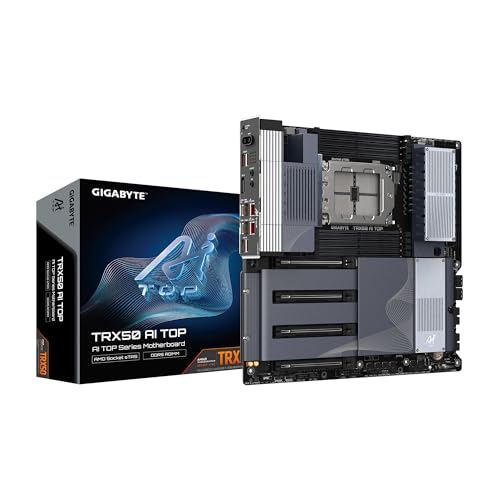
Pros
- sTR5 socket listed for Threadripper PRO 7000 and 7000 CPUs
- Eight memory slots, listed up to 2TB capacity
- Dual USB4 Type-C ports for connectivity
- Dual 10GbE LAN and Wi-Fi 7, per listing
- Quick-release, screwless M.2 and PCIe design, per listing
Cons
- Requires ECC R-DIMM memory, which limits memory options
- Listed at 16 x 15 x 4 inches; confirm case clearance

Pros
- Excellent platform support for AMD Threadripper PRO 7000 WX and Threadripper 7000 CPUs.
- Strong power delivery and cooling design for sustained workstation workloads.
- Broad connectivity with PCIe 5.0, WiFi 7, dual LAN, and multiple high-speed storage options.
- ECC R-DIMM DDR5 support is ideal for stability-focused professional systems.
Cons
- Limited to the AMD sTR5 platform, so it is not compatible with mainstream desktop CPUs.
- Advanced workstation features such as IPMI depend on expansion card support rather than being fully built in.
- Its feature set is likely more than most everyday users or gaming-only builds will need.
Overview and design: The ASUS Pro WS TRX50-SAGE WIFI CEB is a workstation-class motherboard built for AMD Ryzen Threadripper PRO 7000 WX-Series and Threadripper 7000 Series processors on the sTR5 platform. It is clearly aimed at professional builders who need a stable, high-expansion foundation rather than a typical consumer desktop board.
Performance and key features: The board combines 36 power stages, dual 8-pin CPU power connectors, and substantial VRM and M.2 cooling to support demanding, long-duration workloads. It also offers ECC R-DIMM DDR5 support up to 1TB, three PCIe 5.0 x16 slots, three M.2 slots, SlimSAS NVMe support, WiFi 7, and both 10 Gb and 2.5 Gb LAN for fast networking and storage performance.
Drawbacks and considerations: This is a specialized platform, so compatibility is limited to AMD sTR5 processors. Its server-inspired features, including IPMI support through expansion cards, are useful for professional environments but may be unnecessary for many users. It is best suited to builders who can use its full feature set.
Verdict: The ASUS Pro WS TRX50-SAGE WIFI CEB makes the most sense for creators, engineers, and workstation users building around Threadripper PRO 7000 hardware. If you need high memory capacity, strong expansion, and pro-grade connectivity, it is a compelling choice. For mainstream PC builds, it is more motherboard than most users will need.

Pros
- Supports AMD Ryzen 9000, 8000, and 7000 processors
- Two PCIe 5.0 and three PCIe 4.0 M.2 slots
- Wi-Fi 7 with 10Gb and 5Gb Ethernet
- Dual USB4 Type-C ports and two PCIe 5.0 x16 SafeSlots
- Q-Connector and Q-Release DIY features
Cons
- Many AI and overclocking features are manufacturer-described
- Listed at 7 pounds, so check case and cooler fit

Pros
- Built for AMD Threadripper PRO 7000 platforms, which suits high-end workstation builds.
- Strong connectivity selection with USB4, PCIe 5.0, dual LAN, and Wi-Fi 7.
- Cooling-focused design includes VRM Thermal Armor and M.2 Thermal Guard.
- EZ-Latch hardware simplifies installing and removing compatible PCIe 5.0 and M.2 devices.
Cons
- Only compatible with AMD sTR5 and Threadripper PRO 7000 Series CPUs, so it is not suitable for mainstream builds.
- The E-ATX form factor requires a large case and may limit chassis compatibility.
- Its feature set is aimed at premium workstation users, which may be more than some builders need.
Overview: The GIGABYTE TRX50 AERO D is an E-ATX workstation motherboard built for AMD sTR5 and Ryzen Threadripper PRO 7000 Series processors. Its 16+8+4 phase digital VRM, VRM Thermal Armor, and M.2 Thermal Guard give it a clear focus on sustained professional workloads.
Performance and features: This board is designed for fast storage, strong memory support, and modern connectivity. It offers four DDR5 SMD R-DIMM slots with AMD EXPO and Intel XMP support, PCIe 5.0 expansion, dual USB4 Type-C, and high-speed networking through 10GbE, 2.5GbE, and Wi-Fi 7.
Drawbacks and considerations: The biggest limitation is compatibility, since it is only for sTR5 Threadripper PRO 7000 CPUs. Its E-ATX size also means you will need a roomy case, and the workstation feature set may be excessive for users who do not need this level of expandability.
Verdict: For creators, engineers, and advanced users building a Threadripper PRO workstation, the TRX50 AERO D delivers a strong mix of power delivery, fast I/O, and premium networking. If you want a smaller or more mainstream platform, a different motherboard class will be a better fit.

Pros
- Native support for AMD Ryzen 7000 series processors on the AM5 platform.
- Four DDR5 slots with up to 128GB maximum memory capacity.
- Two PCIe 5.0 x16 slots for next-generation expansion bandwidth.
- Includes a vertical M.2 slot for flexible storage mounting.
Cons
- Requires AMD AM5 CPUs and DDR5 memory, so it is not compatible with older Ryzen or DDR4 systems.
- Integrated graphics support depends on the specific CPU used.
- The manufacturer specs do not list the full rear I/O and connectivity details, so buyers should verify those separately.
Overview: The ASRock X670E Taichi Carrara is an AM5 motherboard designed for AMD Ryzen 7000 series processors. It presents itself as a premium desktop base for builders who want a modern platform with current socket and memory support.
Performance and features: Its dual-channel DDR5 design supports 4 memory slots and up to 128GB total capacity, which is useful for heavy multitasking and demanding workloads. The board also includes two PCIe 5.0 x16 slots and a vertical M.2 slot, giving it strong expansion potential for fast storage and high-bandwidth add-in hardware.
Drawbacks and considerations: This motherboard is limited to AMD AM5 and Ryzen 7000 compatibility, so it will not work as an upgrade path for older platforms. Integrated graphics support also varies by CPU, and the manufacturer listing does not include a full list of rear-panel connectivity.
Verdict: The X670E Taichi Carrara is best suited to enthusiasts building a high-end Ryzen 7000 system and buyers who want DDR5 and PCIe 5.0 support from the start. If you are committed to the AM5 ecosystem, it offers a strong and future-focused specification set.

Pros
- Heavyweight 22+2+1+2 power stages designed for extreme overclocking
- Supports three PCIe 5.0 M.2 slots for cutting-edge SSD speeds
- Cutting-edge connectivity with Wi-Fi 7, 5G LAN, and Thunderbolt 4
- Includes NPU Boost and memory optimization suites like AEMP III
- Distinctive silver-white aesthetic for premium themed builds
Cons
- Geared heavily toward niche overclockers rather than general builders

Pros
- Strong VRM design with 18+2+2 power stages for high-performance AM5 processors.
- Feature-rich connectivity with PCIe 5.0, 5x M.2, Wi-Fi 7, and USB4.
- Multiple ASUS AI tools can simplify tuning, cooling, networking, and memory optimization.
- Premium ROG overclocking controls suit advanced users who want more manual performance adjustment.
Cons
- Requires an AM5 CPU and DDR5 memory, so it is not compatible with older AMD platforms or DDR4 builds.
- The ATX form factor may not fit compact PC cases.
- The advanced feature set may be more than casual or budget-focused builders need.
Overview: The ASUS ROG Crosshair X870E Hero is a premium AMD X870E ATX motherboard built for AM5 desktop processors. It is aimed at enthusiasts who want a feature-rich foundation for a high-end gaming, productivity, or AI-ready PC.
Performance and features: The board uses an 18(110A)+2(110A)+2 power stage design, ProCool II power connectors, MicroFine alloy chokes, and premium metallic capacitors to support demanding CPUs. It also includes PCIe 5.0, five M.2 slots, Wi-Fi 7, USB4, and ASUS tools such as AI Overclocking, AI Cooling II, AI Networking, and AEMP.
- Platform support: AMD Ryzen 9000, 8000, and 7000 series processors
- Expansion: PCIe 5.0 and 5x M.2
- Connectivity: Wi-Fi 7 and USB4
Drawbacks and considerations: This is a high-end motherboard, so it makes the most sense when paired with compatible AM5 hardware and a build that can use its advanced features. Its ATX size also means it is better suited to standard mid-tower or larger cases.
Verdict: If you are building a premium AM5 system and want strong power delivery, modern connectivity, and extensive tuning controls, the ASUS ROG Crosshair X870E Hero is a compelling choice. It is less suitable for simple or budget builds, but a strong fit for enthusiasts and performance-focused users.

Pros
- Supports AMD's AM5 socket for modern Ryzen processors.
- Uses DDR5 memory, not older DDR4, for newer-platform builds.
- Standard ATX form factor works with many mainstream cases.
- X670 chipset places it in AMD's newer desktop platform family.
Cons
- Not compatible with older AMD sockets or Intel CPUs.
- Requires DDR5 memory, which can increase total build cost.
- ATX size is too large for many compact cases.
Overview: The GIGABYTE AORUS Elite AX is an AMD X670 ATX motherboard designed for the AM5 platform. Its full-size layout and DDR5 support make it a practical base for a modern desktop build.
Performance & Key Features: As an X670 board, it is aimed at users assembling a current-generation Ryzen system. The DDR5 support aligns it with newer memory standards, while the ATX design gives builders a standard motherboard format for mainstream PC cases.
Drawbacks & Considerations: This is not a universal upgrade option. It requires compatible AM5 processors and DDR5 memory, and its ATX size will not suit smaller cases. The raw product data also does not provide detailed connectivity or expansion specifications, so shoppers should verify those details separately.
Verdict: The AORUS Elite AX is best for buyers who want to build on AMD's X670 and AM5 platform and prefer a full-size DDR5 motherboard from Gigabyte's AORUS line.

Pros
- Four M.2 sockets with toolless multi-layer heatsink
- Onboard USB4 connectivity
- Exclusive 20K cap with 1000uF capacitance
- 5G LAN and Wi-Fi 7 listed in the title
Cons
- Product description is brief and light on details
- EATX size may limit case compatibility

Pros
- Four DDR5 slots with Memory Boost, rated 9200+ MT/s OC by MSI
- One PCIe 5.0 x16 slot and one Gen5 M.2 slot listed
- Wi-Fi 7, Bluetooth 5.4 and Intel Killer 5G LAN included
- Thunderbolt 4 Type-C rear port with display output
- EZ M.2 Shield Frozr II and clip listed for storage cooling and install
Cons
- Single PCIe 5.0 x16 slot limits multi-graphics-card layouts
- Overclocking and cooling claims are manufacturer-stated, not independently verified

Pros
- Dual Thunderbolt 4 Type-C ports
- 18+1+1+1+1 power phase design, manufacturer-stated
- Toolless multi-layer M.2 heatsink
- Memory OC Shield and 20K capacitor design listed
Cons
- Product description is brief and light on details
- Performance claims are manufacturer-stated, not verified

Pros
- Supports the latest AM5 Ryzen desktop CPUs.
- Includes DDR5 with AMD EXPO support.
- Offers WiFi 7 plus 2.5GbE wired networking.
- Adds USB4 and USB-C on both front and rear I/O.
- VRM and M.2 Thermal Guard features help with thermals.
Cons
- ATX size requires a compatible mid-tower or larger case.
- The manufacturer listing conflicts on M.2 count, so the exact storage layout should be verified before purchase.
- No detailed audio codec or rear I/O breakdown is provided in the manufacturer listing.
Overview: The GIGABYTE X870 Eagle WIFI7 is an ATX motherboard for the AMD AM5 platform, built for Ryzen 9000, 8000, and 7000 Series processors. It supports DDR5 memory with AMD EXPO and includes a 5-year warranty, which makes it a practical option for builders planning a long-term desktop platform.
Performance and features: Its 14+2+2 power design, VRM Thermal Guard, and M.2 Thermal Guard point to a layout focused on stability and thermal management. Connectivity is a strong suit too, with PCIe 5.0, USB4, front and rear USB-C, WiFi 7, and 2.5GbE LAN suited to modern gaming, storage, and high-speed peripheral use.
Drawbacks and considerations: This is a full ATX board, so it is not ideal for compact cases. Buyers should also note that the manufacturer listing lists 3 M.2 slots in the feature section while the title references 4x M.2, so the exact storage configuration should be confirmed before purchase.
Verdict: Overall, this motherboard is best for users who want a current AM5 build with strong connectivity, fast memory support, and future-friendly I/O. It is especially appealing for gamers, enthusiasts, and general PC builders who value modern networking and expansion without moving into premium flagship pricing.

Pros
- Supports Intel Core Ultra Series 2 (LGA1851) processors
- Robust 20+1+2+1+1 power phase design with 110A SPS
- Features six integrated M.2 sockets for massive storage
- Dual Thunderbolt 4 Type-C connectivity included
- Memory support up to DDR5-9200+ (OC) across 4 DIMMs
Cons
- Requires an LGA1851 compatible processor
- Full ATX size may limit compact case choices

Pros
- Supports Intel Core Ultra Series 2 CPUs on LGA 1851
- High-speed networking with Wi-Fi 7 and Intel Killer 5G LAN
- Rear Thunderbolt 4 Type-C port with display output
- DDR5 Memory Boost rated up to 9200+ MT/s overclocked
- Includes PCIe 5.0 x16 slot with Steel Armor II reinforcement
Cons
- Offers only one PCIe 5.0 M.2 slot alongside two Gen4 slots

Pros
- 14+2+1 power phase design stated by the manufacturer
- Dual USB4 Type-C ports for high-speed external devices
- Toolless multi-layer M.2 heatsink for easier drive installation
- Wi-Fi 7 (802.11be) listed as integrated networking
- Bottom M.2 heatsink listed for additional storage cooling
Cons
- Listed dimensions (13.6 x 11.1 in) exceed standard ATX; check case fit
When choosing best ddr5 motherboards in 2026, first match the CPU socket and chipset, then compare VRM design, supported memory speeds, PCIe generation, M.2 capacity, networking, rear-panel connectivity, form factor, and warranty coverage. The strongest choice is not automatically the board with the longest feature list: it is the model that supports your processor, provides enough expansion for the expected life of the system, and directs more of your budget toward interfaces you will actually use.
Key Technical Factors to Consider Before Buying
The best DDR5 motherboard for a particular computer is the one that combines complete CPU compatibility with appropriate power delivery, expansion, storage, and networking. Use the following criteria to eliminate incompatible boards before comparing secondary features. For troubleshooting and reliability insights, consult our in-depth mix nvme and sata ssd report. For complementary hardware performance, examine our breakdown on motherboard buying guide.
Start With the CPU Socket and Chipset
Socket compatibility is non-negotiable. The GIGABYTE B850 AORUS Elite WiFi7, GIGABYTE B650 AORUS Elite AX, MSI MAG B850 Tomahawk MAX WiFi, GIGABYTE B650 Eagle AX, ASUS ROG Strix B650-A Gaming WiFi, and ASUS ROG Strix X870-A Gaming WiFi use AMD’s AM5 platform and list support for Ryzen 9000, 8000, and 7000 series processors. The ASUS Z790-AYW WiFi W II instead uses Intel LGA 1700, while the ASUS ROG Strix Z890-E Gaming WiFi uses Intel LGA 1851. These Intel sockets are not interchangeable with each other or with AM5.
After confirming the socket, evaluate the chipset. B650 boards cover mainstream AM5 builds, while B850 and X870 models add newer connectivity or expansion options depending on the model. Z790 and Z890 target different Intel socket generations. Check the CPU support list and BIOS requirements before assembly, particularly when combining a newer processor with an earlier chipset. Our broader desktop PC reviews and component guides can help place the motherboard decision within a complete system budget.
Compare VRM Design and Power Delivery
Power-stage count and design matter most when using a high-core-count processor, enabling sustained boost behavior, or experimenting with overclocking. Among the listed AM5 models, the GIGABYTE B850 AORUS Elite WiFi7 has a 14+2+2 phase design, the GIGABYTE B650 AORUS Elite AX uses 14+2+1 phases, and the ASUS ROG Strix X870-A lists 16+2+2 power stages. The MSI MAG B850 Tomahawk MAX WiFi specifies an 80A SPS VRM, while the ASUS ROG Strix B650-A lists 12+2 power stages.
Phase counts alone do not provide a complete thermal or electrical comparison because controller design, component quality, heatsink mass, airflow, and firmware behavior also affect sustained operation. Treat published VRM information as one part of the decision, not a standalone ranking. For a stock-clocked mainstream processor, expansion and connectivity may have more practical value than paying for an elaborate overclocking design.
Check DDR5 Speed Support and Memory Configuration
All top-rated boards use DDR5 memory, but achievable speed depends on the motherboard, processor memory controller, module capacity, number of installed DIMMs, and firmware. The MSI MAG B850 Tomahawk MAX WiFi explicitly advertises DDR5 Memory Boost at 8400+ MT/s when overclocked, while the ASUS ROG Strix X870-A includes DDR5 AEMP. Comparable maximum figures were not specified for the other models in manufacturer specifications.
For a practical configuration, calculate total memory as module capacity multiplied by the number of modules. Two 16 GB modules provide 32 GB, while two 32 GB modules provide 64 GB. A two-module kit is generally easier to configure at elevated memory speeds than filling every DIMM slot, although exact stability cannot be guaranteed from the motherboard specification alone. Confirm that the intended kit appears on the manufacturer’s qualified vendor list when high-speed memory is a priority.
Evaluate PCIe and M.2 Expansion
Count the drives and add-in cards you expect to install over the useful life of the computer. The GIGABYTE B850 AORUS Elite WiFi7 provides three M.2 slots and PCIe 5.0 support. The GIGABYTE B650 Eagle AX also has three M.2 positions, consisting of one PCIe 5.0 slot and two PCIe 4.0 slots. The ASUS ROG Strix X870-A increases the total to four M.2 slots, while the ASUS ROG Strix Z890-E provides seven M.2 slots for storage-heavy Intel builds.
A simple planning rule is to reserve one M.2 slot beyond your initial requirement. For example, a build starting with a system SSD and a separate project or game drive uses two slots, so a three-slot board leaves one position for expansion. Also distinguish between PCIe 5.0 support for an M.2 drive and PCIe 5.0 support for the main x16 graphics slot. The GIGABYTE B650 AORUS Elite AX specifically lists a PCIe 5.0 M.2 interface, while the MSI MAG B850 Tomahawk MAX WiFi explicitly lists PCIe 5.0 x16 and a Gen5 M.2 slot.
We compared top-rated models by analyzing the supplied raw specifications, platform compatibility, chipset, stated power design, DDR5 features, M.2 capacity, PCIe support, wireless standard, wired networking, USB connectivity, assembly features, listed price position, and warranty information. We did not claim hands-on testing because physical benchmark, thermal, BIOS, acoustic, and long-duration stability results were not provided.
User satisfaction was also considered as a potential evaluation category, but the manufacturer listing contains no usable star ratings or customer review totals for these products. We therefore did not infer reliability or owner satisfaction from missing data. Brand assessment was limited to documented features, platform support, service-related information, and the explicitly listed five-year warranty rather than unsupported assumptions about failure rates. To evaluate matched hardware tolerances, consult our detailed overview of how to clear cmos.
Wrap-Up: Which Model Delivers True Value?
Best Overall Best DDR5 Motherboards: GIGABYTE B850 AORUS Elite WiFi7. This AM5 ATX model offers the most balanced specification set for a current Ryzen build: support for Ryzen 9000, 8000, and 7000 series processors, a 14+2+2 power design, three M.2 slots, PCIe 5.0, WiFi 7, 2.5GbE, USB-C, EZ-Latch, and a stated five-year warranty. It is a practical choice for buyers who want modern connectivity without moving to the most expensive end of the entry-level to premium range.
Best Value or Budget Choice: GIGABYTE B650 AORUS Elite AX. Its combination of AM5 compatibility, 14+2+1 power phases, a PCIe 5.0 M.2 interface, WiFi 6E, 2.5GbE, USB-C 3.2 Gen 2, EZ-Latch, and Q-Flash gives it a strong cost-to-feature ratio. Buyers who do not need WiFi 7, 5G Ethernet, USB4, or an unusually large number of M.2 slots can direct more of the system budget toward the processor, graphics card, memory, or storage. Compare other platform options in our desktop PC review category.
Best for Storage-Heavy Intel Workstations: ASUS ROG Strix Z890-E Gaming WiFi. This LGA 1851 board stands out with seven M.2 slots, an 18+2+1+2-stage power design, WiFi 7, Thunderbolt 4, USB Type-C, and AI-assisted overclocking, cooling, and networking controls. It is the most expansion-focused option in this comparison, but it should only be selected for a compatible LGA 1851 processor. For an AM5 system emphasizing 5G LAN and explicit PCIe 5.0 x16 support, the MSI MAG B850 Tomahawk MAX WiFi is the more relevant alternative. When planning workspace deployment, consider the engineering criteria outlined in our atx vs matx vs itx guide.
Frequently Asked Questions About Best DDR5 Motherboards
Do all DDR5 motherboards work with every DDR5 processor?
No, DDR5 memory support does not make CPU sockets interchangeable. You must match the processor to the exact socket and a compatible chipset, such as AMD AM5, Intel LGA 1700, or Intel LGA 1851, and then verify BIOS support for the specific processor generation.
Is a B650 motherboard still a good choice in 2026?
Yes, a B650 motherboard can remain a practical choice when it supports your AM5 processor and provides the storage, networking, and USB interfaces you need. Models such as the GIGABYTE B650 AORUS Elite AX and ASUS ROG Strix B650-A support Ryzen 9000, 8000, and 7000 series processors according to the manufacturer specifications, although BIOS requirements should be checked.
How many M.2 slots should a DDR5 motherboard have?
Most buyers should choose at least one more M.2 slot than they plan to use initially. A system starting with two NVMe drives is therefore better served by three or more slots, while storage-heavy professional systems may benefit from the four slots on the ASUS ROG Strix X870-A or seven slots on the ASUS ROG Strix Z890-E.
Is WiFi 7 worth paying for on a motherboard?
WiFi 7 is most useful when you have a compatible router, fast local network resources, and a workload that benefits from newer wireless capabilities. WiFi 6E remains adequate for many builds, so compare the complete feature set rather than selecting a board solely for its wireless generation. Our motherboard comparison resources provide more platform-level context.
Related Maintenance and Operating Guides
To keep your equipment running at peak operating efficiency, explore our related technical walkthroughs and maintenance tutorials:
- Consult our detailed breakdown on z790 motherboard.
What is the typical lifespan of a DDR5 motherboard?
A precise lifespan cannot be determined from specifications alone, but compatibility and expansion often limit useful service life before the board physically fails. Adequate cooling, stable power, careful firmware updates, sufficient M.2 capacity, and the right USB and networking interfaces can help a motherboard remain useful through future storage, memory, and peripheral upgrades.
Memory Support Background Reading
Memory support determines which kits a board can use, and supported speeds vary with the processor. Readers can explore general electronics safety at American National Standards Institute (ANSI) while checking the memory kit list for the model they are considering.









