Quick Answer: What Is The Best Robotic Lawn Mower?
The best robotic lawn mower is the one that matches your lawn’s size, shape, slope, obstacles, and how much installation and upkeep you will accept. No single model is universally best, because yards, grass, weather, and household safety needs differ. Compare how the robot finds its boundary, how it cuts and charges, and what ownership and safety trade-offs you can…

Pros
- Powerful 80V brushless motor delivers 32HP gas-equivalent performance with quiet fume-free operation and no engine maintenance.
- Complete kit includes four 6.0Ah batteries and 600W charger for substantial runtime up to 1.5 acres.
- SmartCut technology and 42-inch heavy-duty steel deck ensure consistent cuts without bogging in tough conditions.
- Versatile towing up to 350 lbs and optional cargo hauling plus comfort features like high-back seat and LED lights.
- Strong 4-year limited warranty and full compatibility with the Greenworks 80V tool ecosystem.
Cons
- Rear utility cargo bed for 200 lb hauling is sold separately and not included in the kit.
- Runtime of up to 1.5 acres varies with conditions and may require recharging or battery swaps on larger properties.
- As a fully cordless model continuous operation depends on battery levels unlike gas engines with unlimited runtime.
The Greenworks 80V 42" CrossoverT Cordless Riding Lawn Tractor is a ready-to-mow zero-emission tractor designed for homeowners managing medium to large lawns. It features a reinforced 42-inch stamped steel deck of 12-gauge construction along with premium comfort elements such as a high-back padded seat with foldable armrests. The overall build emphasizes durability and user convenience right out of the box with the included battery and charger set.
Performance centers on the 80V TruBrushless motor that provides 32HP gas-equivalent power with instant torque and quiet fume-free operation. SmartCut technology senses grass conditions and automatically adjusts power to maintain a consistent cut even in tall thick or wet areas. The four 6.0Ah batteries support runtime for up to 1.5 acres depending on conditions while dual LED headlights and a 7-position deck height range from 1.5" to 4.5" add practicality. Front and rear attachments further allow towing up to 350 lbs for added yard utility.
Key considerations include that the rear utility storage bin capable of hauling 200 lbs is sold separately so full cargo functionality requires an extra purchase. Runtime remains condition-dependent and may fall short for properties significantly larger than 1.5 acres without using the 600W charger or swapping batteries. The cordless design prioritizes ease and low maintenance but trades off the continuous runtime of traditional gas models.
This tractor delivers strong value for eco-conscious owners of residential properties who want gas-like power without the emissions noise or upkeep. It suits those who already use or plan to expand into the Greenworks 80V family of tools and who appreciate the 4-year limited warranty. Users with exceptionally large or commercial-scale lawns should evaluate battery logistics carefully before purchase.

Pros
- Delivers strong 21 horsepower equivalent power comparable to gas riding mowers.
- Provides up to 1.5 acres of runtime on a full charge with the six included batteries.
- Features low-maintenance dual brushless motors without belts for greater durability.
- Offers versatile 12-position cutting height adjustment from 1.5 to 4.5 inches.
- Includes digital controls for blade settings, drive speeds, and cruise control.
Cons
- Limited to 1.5 acres of cutting per charge without purchasing additional batteries for bigger lawns.
- Requires recharging time for the six 56V batteries after each use session.
- Relies solely on battery power with no hybrid or gas backup option for extended operation.
The EGO Power+ TR4204 is a cordless electric riding lawn mower built as a modern tractor alternative for residential use. It features a robust 42-inch stamped steel deck and arrives ready to go with six 56V 6.0Ah batteries plus a charger, creating an immediate impression of convenience and solid construction free from gas engine complexity.
Performance shines through its equivalent 21 horsepower output and top speed of 6 MPH, allowing efficient coverage of up to 1.5 acres on a single charge. Dual brushless cutting motors operate without belts for added durability and less upkeep, while the digital display lets users select three blade settings, three drive speeds, and cruise control. The 12 adjustable heights ranging from 1.5 to 4.5 inches combined with anti-scalp wheels deliver precise results across varied terrain.
Drawbacks center on battery dependency, as larger properties beyond 1.5 acres require extra batteries and recharging intervals can interrupt workflow. The fully electric design eliminates fuel storage needs but demands access to power sources between sessions.
This mower suits homeowners with medium to large yards who value quiet, emission-free operation and reduced maintenance. Those seeking expandable battery capacity for bigger areas will find the EGO Power+ TR4204 a strong long-term investment in cordless lawn care.
Pros
- High-efficiency brushless motors maximize power output and durability over traditional motors
- Up to 2 acres runtime with three included 10.0 Ah batteries supports substantial mowing sessions
- Zero-emission operation with gas-equivalent 20 HP power for quieter environmentally friendly use
- Six-port auto-switchover battery system provides flexible extended runtime options
- Durable 42-inch steel deck plus included mulch and towing kits add immediate functionality
Cons
- Runtime is limited to approximately 70 minutes or 2 acres which may require recharging for larger properties
- Fully battery-dependent design means performance relies on charge levels and spare battery availability
- 42-inch deck size may require more passes on expansive lawns compared to wider commercial models
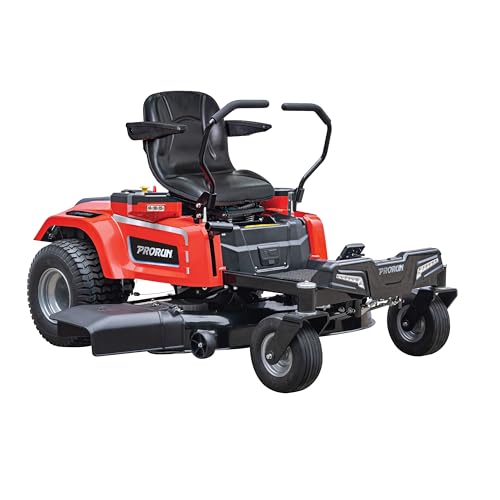
The PRORUN PZT60V42 is a fully electric 60V zero-turn riding lawn mower built for residential and light commercial use. Its primary design centers on a robust 42-inch 14-gauge stamped steel twin blade deck powered by direct-drive brushless motors, giving an immediate impression of solid construction and modern battery-focused engineering. The mower arrives complete with three 10.0 Ah batteries, a charger, mulch kit, and towing kit for ready-to-work versatility.
In performance terms, four high-efficiency brushless motors deliver power equivalent to a 20 HP gas engine while producing zero emissions. The system supports up to 2.0 acres or 70 minutes of runtime, and six battery ports with auto switchover intelligently manage all PRORUN 60V battery sizes for continuous operation. A washout port on the steel deck further simplifies post-mow maintenance during real-world sessions.
Potential drawbacks include the finite 70-minute runtime window which can limit coverage on larger properties without spare batteries or recharge breaks. As a fully electric model, it also depends entirely on battery charge levels rather than continuous fuel refills, and the 42-inch deck width may demand extra passes compared with wider traditional options.
Overall the PRORUN PZT60V42 offers strong value for homeowners and small-property managers who want gas-like cutting power without emissions or noise. Those with medium-sized lawns seeking quiet efficient zero-turn performance and included accessories will benefit most from this electric mower.

Pros
- Strong 24HP FR730 engine power for demanding cutting conditions
- Wide 54-inch FAB deck reduces total mowing time
- Zero turn design delivers excellent maneuverability
- Fabricated deck supports durable everyday operation
Cons
- Sparse details beyond engine and deck leave other features unspecified
- Gas-powered FR730 engine needs regular fuel and maintenance
- Large 54-inch deck size may feel oversized on compact properties
The Husqvarna Z254F is a zero turn mower from the established Husqvarna brand in the riding lawn mowers category. It centers on a solid build that pairs a 24HP 726cc FR730 engine with a 54-inch FAB deck for straightforward residential grass care.
Performance stems directly from the listed specifications. The FR730 engine delivers the horsepower needed for steady operation across typical lawns while the wide FAB deck completes passes efficiently. Zero turn handling improves control in real yard layouts based on the model design.
Considerations arise from the limited data available. Secondary elements such as comfort features fuel capacity or extras receive no mention and the gas engine format involves routine upkeep. The large deck suits open areas better than confined spaces.
The Husqvarna Z254F provides the most value for owners of medium or large properties who want reliable engine power and a broad cutting width. Users with smaller lots or those seeking extensive accessory options should weigh the core specs carefully before purchase.
There is no single best robotic lawn mower
“Best” is a fit question, not a trophy. A compact, simple lawn with one open rectangle and a nearby outdoor outlet is a different job from a multi-level yard with islands, shade trees, a steep bank, and children or pets using the grass all afternoon. Rankings collapse those differences into one score. That is why one-size lists fail for this category: they hide the yard, the household, and the work you are willing to do after the box is opened.
Before brand names matter, decide what the machine must do on your ground. The useful criteria are physical fit (area together with layout, slope, and surface stability), how the robot knows where it may go, how it cuts and returns to charge, how much setup and seasonal care you will actually perform, and whether an unattended machine with rotating blades is acceptable around the people and animals who use the lawn. Those criteria, not a “best overall” label, decide whether a robotic lawn mower is a good tool or an expensive ornament.
This article does not crown a winner or rank products. It explains how typical consumer robots work and how to compare them against a real yard. Manufacturer claims for coverage, slope, and weather are model-specific. Check them on the spec sheet against measurements you take yourself.
How a robotic lawn mower typically works
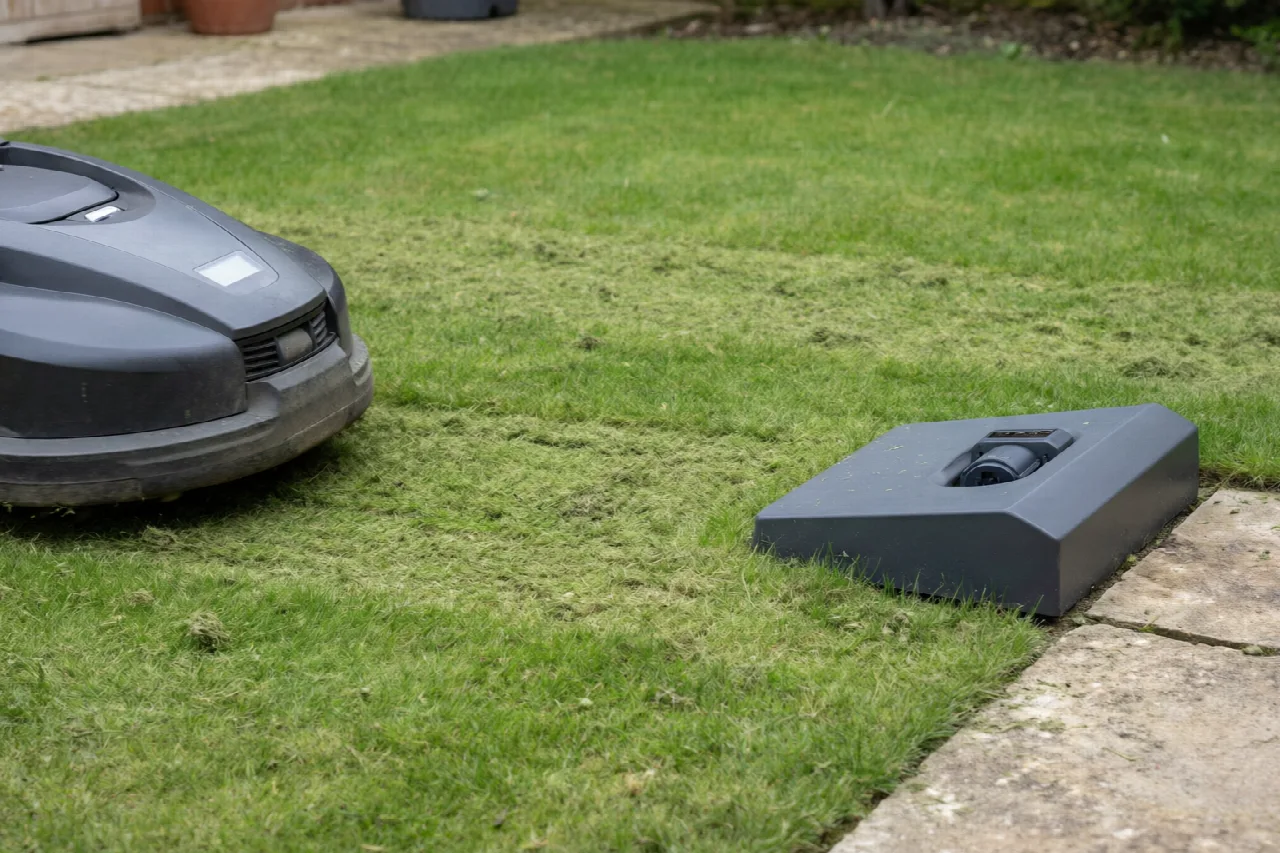
A walk-behind or riding mower is usually a weekly or biweekly event: you cut a lot of grass at once, then put the machine away. A robotic lawn mower is built for the opposite rhythm. Most consumer designs stay on the property, run often, and take relatively thin cuts so the lawn never gets long enough to choke the deck. The goal is maintenance, not rescue. Designs vary, but the daily pattern is similar enough to plan around.
When the battery runs low, the robot typically stops mowing and returns to a charging station on its own. After it recharges, it resumes according to its schedule or its remaining map of the lawn. You are not supposed to babysit every pass. You are supposed to keep the dock reachable, the path to it clear, and the lawn already at a height the robot can handle.
Clippings usually stay on the lawn. Many robotic mowers are mulching machines: they chop grass finely and drop it back into the turf instead of collecting it in a bag. That only works well when cuts stay short and frequent. A thick windrow of long, wet grass is not what these decks are designed to process.
Parts of the system sit permanently outside. Expect a charging station (a dock with a power connection), and, on many setups, a boundary or perimeter wire, guide wire, or some mix of physical markers and mapped virtual boundaries. The robot itself lives outdoors or is stored according to the maker’s seasonal guidance. Think of the purchase as a small outdoor system, not a tool you hang in the shed after each use.
Match the mower to lawn size, shape, slope, and grass
Total area is the number people shop first, and it is incomplete on its own. A 0.3-acre rectangle with one gate is not the same job as the same area split into three pockets, linked by a narrow side yard, wrapped around a patio, and dotted with beds. Layout complexity—pinch points, islands, multiple lawns, tight gates, and dead-end corridors—often decides whether the robot finishes, gets stuck, or leaves ragged strips. Measure the grass you actually want cut, including unused corners and the far side of islands, then look at how those pieces connect.
Narrow corridors and gates change the job in two ways. The robot has to find and traverse them reliably, and the path must stay wide and clear enough for the chassis plus whatever sensors or wire the design uses. Islands (trees, beds, ponds, play equipment) add keep-out work: you either loop them with perimeter wire, mark no-go zones in a map, or accept that the robot will treat them as obstacles every pass. Multiple disconnected lawns may need more than one mowing zone, more than one dock, or a design that can be carried between areas. If you are not willing to manage zones, a single open lawn is a much better starting point.
Slope, uneven ground, and surface stability matter for traction and for safety. A robot that is fine on a gentle, firm bank can struggle or tip on wet clay, loose fill, hidden drop-offs, or a terrace edge. Manufacturer slope figures are model-specific claims. Check the stated limit against the steepest grass you actually have, measured honestly, not the average of the front yard. Unstable banks, crumbling soil, and sudden grade changes are poor-fit conditions. Do not treat them as problems to push through.
Grass type, growth rate, and starting height affect results as much as acreage. Cool-season lawns in a wet spring and warm-season lawns in peak heat do not grow on the same calendar. A robot designed for frequent maintenance cutting can fall behind if the grass is already tall, wet, and matted, or if you start after weeks of neglect. Very tall growth, thick thatch, and debris-laden turf can stall blades, smear clippings, and leave the surface looking chewed rather than cut. Restore a maintainable height with a conventional mower first, then ask whether automation can keep it there.
Also note what the lawn is for. A display lawn that can be closed off during the day is a different fit from a play yard, a dog run, or a slope that sheds balls and toys into the path. Obstacle density is not only trees. It is furniture you move, hoses you forget, and anything a child might leave overnight.
Navigation and boundaries: wire, virtual maps, GPS, and RTK
Every robotic lawn mower needs a keep-in rule. How that rule is drawn is one of the largest differences between systems, and it is also one of the largest differences in installation patience.
Boundary or perimeter wire
A boundary wire (also called a perimeter wire) is a physical cable that typically marks where the robot may go and, in many layouts, loops around keep-out areas such as beds or ponds. The cable is laid along the edge of the grass and then pegged down or buried according to the manufacturer’s method. The robot senses the loop and treats the far side as off-limits. Some wired systems also use a guide wire to help the machine find the charging station or a narrow passage.
The trade-off is labor up front and less dependence on a clear sky later. You (or an installer) must plan the loop, handle gates and hard edges, and protect the cable from edging tools and digging. A simpler wired system is still a reasonable fit when the lawn is a straightforward shape, you are willing to install cable, satellite reception is poor under trees or between buildings, or you want a keep-in method that does not rely on a map staying accurate after you move a bed.
Virtual or mapped boundaries
A virtual boundary is a keep-in or keep-out line stored in software rather than (or in addition to) a physical wire. You typically walk or drive a mapping pass, then edit mowing zones and no-go zones in an app. Virtual systems can reduce or skip perimeter wire, which is the main reason people consider them. They depend on the robot’s mapping, onboard sensors, and often a clear enough view of the sky or a local reference. If the map is wrong, or the sensors cannot see a temporary obstacle, the robot can leave uncut patches or wander where you did not intend.
Virtual maps shine when you expect to change zones—closing a play area in summer, opening a side lawn after a project—without re-laying cable. They are a weaker fit if you dislike app setup, the property is a canyon of walls and evergreens, or you need a hard physical limit that still works when the network or the map is unavailable.
What GPS and RTK add
GPS gives the robot a satellite-based sense of position. RTK (real-time kinematic positioning) is a refinement that uses a reference signal, often from a local base or a correction service, to tighten that position estimate. On some designs, that support more systematic coverage: the robot can mow in planned passes instead of bouncing randomly until the lawn looks done. Systematic paths can reduce missed strips and repeated overlap on open ground.
Satellite-aided navigation is not magic, and it is not equally good on every suburban lot. Buildings, dense tree canopy, and poor satellite geometry can degrade the fix. A system that looks precise on an open sports field can hesitate or drift in a walled garden. Do not assume centimeter-level accuracy, do not assume a wire-free setup works everywhere, and do not assume RTK is always more accurate or always “the future” compared with a well-installed perimeter wire. Match the method to sky view, layout, and how much mapping versus trenching you will tolerate.
| System type | What it mainly does | Typical trade-off |
|---|---|---|
| Boundary / perimeter wire | Physical keep-in loop; often used for keep-out islands as well | Installation in the yard; less tied to sky view |
| Virtual / mapped boundary | Software mowing zones and no-go zones, with less or no perimeter cable | Depends on mapping, sensors, and often a usable signal environment |
| GPS- or RTK-assisted navigation | Satellite-aided position that can support more systematic coverage | Trees, buildings, and limited sky view can degrade performance |
Many products mix these ideas: a virtual map plus a backup wire, or satellite assist plus onboard cameras or bump sensors. Judge the whole keep-in story, not a single buzzword on the box.
Cutting, battery, weather, and app features to compare
Once the robot can stay on the grass, daily performance comes down to how it cuts, how it manages energy, what weather it is allowed to work in, and which software features you will actually use.
Cutting height and mulching behavior
Cutting height is a range, not a universal “best” setting. Match the advertised range to your grass species and local practice: some lawns want a short, dense surface; others stay healthier taller. Confirm that the lowest and highest settings you need are in range, that height is adjustable in steps you can live with, and that the deck mulches the way you expect. If you prefer to bag clippings or you have a lawn that sheds long stems, a mulching-only robot may not match your routine.
Blade access matters as much as height. You will inspect and replace blades. A design that hides the cutter behind fasteners you cannot reach without a workshop is a worse ownership fit than a slightly narrower height range you can service on the driveway.
Battery, charging, and schedule
Modern consumer robots typically use a lithium-ion battery. Capacity, charge time, and how the schedule is written interact with lawn size and complexity. A larger or more cut-up lawn needs more runtime, more return trips to the charging station, or both. What you should compare is not a marketing “covers any yard” line but whether the maker’s stated coverage is in the same neighborhood as your measured area and whether the dock placement lets the robot recharge without a long, obstacle-filled commute.
Do not treat unpublished watt-hours, minute-by-minute runtimes, or cycle-life numbers as facts unless you have them from the manufacturer for that model. Ask how the machine behaves if it cannot finish in one session, whether you can set quiet hours, and whether multiple mowing zones share one battery budget or need staggered days.
Weather and wet grass
Rain sensors and weather resistance vary by model. Some robots pause when a sensor gets wet; others keep going until a schedule or an app rule stops them. Wet grass is harder to cut cleanly and can smear on the chassis. Read the manufacturer’s limits rather than assuming an outdoor robot can mow in any rain or immediately after a storm. If your climate is frequently wet, the useful question is whether the schedule can slip a day without the lawn getting away from you—and whether you will remember to resume it.
App, zones, and features that change ownership
App control, geofencing, multi-zone maps, no-go zones, and smart-home hooks are conveniences. They do not, by themselves, improve cut quality. They do change ownership if you will actually use them: parking the robot during a party, closing a play corridor, or seeing that it never left the dock after a failed charge. Features that look impressive in a store demo but require constant map editing are a cost, not a benefit, if you wanted a set-and-forget loop.
Obstacle handling is another category to compare honestly. Bump sensors, lift sensors, cameras, and ultrasonic detectors are aids. They reduce some collisions; they do not see every toy, they do not make the blades safe, and they do not replace a walk-through of the lawn. Ask what the robot does when it meets a low fence, a hedgehog-sized animal, or a slope it cannot climb—then treat the answer as a limit, not a guarantee.
Installation, charging, maintenance, and ownership effort
“Best” includes whether you will keep the system running in month four. Setup work and weekly care are part of the product.
Placing the charging station
A charging station generally needs a suitable outdoor power source and a relatively flat, well-drained dock area with a clear approach. The robot has to find the dock, align with it, and sit there through rain and heat. Shade can help the electronics; deep puddles and downhill approaches do not. Do not improvise household wiring. If you lack a weather-appropriate outdoor supply in the right place, or you are unsure the circuit is suitable, involve a qualified electrician. If the lawn needs a long perimeter loop, complex islands, or work near buried utilities, a professional installer may be the safer path. This article is not a wiring or trenching guide.
Routine care
Typical ownership is unglamorous. Clear grass, mud, and debris from the chassis and wheels so sensors and blades stay usable. Inspect blades and replace them when they dull or bend; dull blades shred rather than cut. Keep the dock and its approach free of growth, toys, and drifted mulch. Follow the maker’s guidance for winter or harsh-season storage or protection. None of that is optional if you want the cut quality you saw in the first week.
Software updates can add features or fix navigation bugs; they can also change behavior you had already tuned. Spare blades, wheels, and dock parts are part of long-term ownership. Ask whether consumables are available before you buy, not after a season of use. Do not plan around invented service intervals or energy-cost savings. If you are unwilling to install a perimeter system, clean a deck, or change blades, this category may be a poor fit. There is no honest version of “installs in an afternoon and never needs you again” that covers every yard.
Safety, children, pets, theft, and connected-mower privacy
Robotic mowers use sharp, rotating blades. They can injure people, pets, and wildlife. They are not toys, and they are not child-safe. Small size and a plastic shell do not make the cutter harmless. Lift, tilt, and obstacle sensors are aids, not guarantees. Stopping behavior varies by design; do not invent a blade-stop time or assume a certification name you have not verified on the spec sheet.
Households with children, dogs, or frequent wildlife should treat schedule and supervision as part of the purchase. Run the machine when the lawn is empty, not during playtime. Keep bystanders away while it cuts. Walk the yard for toys, leashes, and low obstacles before a session. A robot that works at dawn on a fenced display lawn is a different risk profile from one that shares a suburban backyard with toddlers and a curious dog. If you cannot keep the area clear during operation, an unattended cutting robot is the wrong tool, regardless of how well it would fit the grass.
Unattended outdoor robots can be stolen or tampered with. At category level, ask whether the model offers a PIN or lockout, an alarm, and any form of tracking or geofence alert—and treat those as features to evaluate, not as proof the machine is secure. Do not disable locks or trackers, and do not follow advice that would help someone else do so. Physical placement still matters: a dock visible from the street is a different exposure than one inside a locked side yard.
Connected mowers and apps may collect location and usage data. Review the maker’s privacy policy and account-security settings: password strength, who else in the household has access, and whether you need the cloud features at all. GPS and app maps are convenient; they are also an account to protect. This is not legal, insurance, or ordinance advice. Local rules about unattended machines, noise hours, and liability differ. Check those separately if they apply to you.
Follow the manufacturer’s safety instructions for your specific model. If a task involves electrical supply, buried cable near utilities, or a slope you are not sure is stable, use a qualified professional rather than improvising.
A practical way to choose without crowning a winner
Turn the criteria into a short field exercise, then compare candidates pairwise against that record. You do not need a ranked list. You need a yard description honest enough to eliminate poor fits.
- Measure and sketch. Record the grass area you want cut, including corners and the far side of islands. Note the steepest slope you actually have, pinch points, gates, and how lawns connect. Mark shade versus open sky if you are considering virtual or satellite-assisted navigation. Photograph problem spots: drop-offs, retaining edges, cluttered side yards.
- Locate power and people. Note where a charging station could sit, whether a suitable outdoor supply already exists, and who uses the lawn and when. Write down whether you will install perimeter wire, hire that work, or refuse a wired system entirely.
- Eliminate early. Drop any model whose stated area or slope limit is below your measured yard. Drop navigation types that cannot handle your layout or your sky view. Drop the category if household safety constraints mean the lawn cannot be kept clear during operation, or if you will not maintain blades and a dock.
- Ask support or a dealer concrete questions. How would this system mark my islands and my narrow side yard? What happens if satellite reception is weak under those trees? What does winter storage look like here? Which parts are consumable? Who installs the dock power if I do not have it? You are testing fit, not collecting slogans.
- Compare two survivors against the same constraints. Hold them next to your sketch: keep-in method, dock placement, cutting-height range, wet-weather behavior, app zones you will use, blade access, and safety features you will actually rely on. The better machine is the one that clears your constraints with less wishful thinking—not the one with the longer feature list.
If both remaining options still fit, prefer the ownership story you will keep: a slightly simpler wired loop you will maintain beats a map-heavy system you will never update. Prefer clear manuals and reachable service over marketing language about perfect stripes or overnight coverage of any suburban lot.
When a robotic mower is the wrong tool
Some yards and households defeat this category, and walking away is the correct decision.
Very steep or unstable ground, dense obstacle fields, many disconnected postage-stamp lawns, thick thatch, and very tall neglected grass are common poor-fit cases. So are properties where the only dock site is a long, blind commute through gates the robot cannot negotiate. A robot is usually a maintenance mower for a lawn already at a reasonable height, not a brush cutter. If the lawn is overgrown or badly uneven, restore a maintainable surface with a conventional mower or a landscaper first, then reassess. Do not expect the robot to “catch up.”
A traditional walk-behind or rider is still more practical when you want bagging, when you cut infrequently on purpose, when the terrain is beyond stated model limits, or when you enjoy the weekly pass and do not want another outdoor device to charge and winterize. A professional service is still more practical when the household cannot keep children or pets clear, when you travel for weeks during peak growth, or when the layout would need more installation and mapping than you will support.
There is no universal best robotic lawn mower because there is no universal yard. The useful outcome of shopping is a documented fit—or a clear no. Either result is better than a ranked winner that was never measured against your grass.