Why Thermal Paste Degrades and Why It Matters
Thermal paste — formally called thermal interface material (TIM) — fills the microscopic air gaps between a CPU’s integrated heat spreader (IHS) and the cooler’s base plate. Air is a poor thermal conductor at roughly 0.025 W/mu00b7K. A quality silicone- or metal-based compound raises that interface conductivity to anywhere from 4 W/mu00b7K to over 80 W/mu00b7K for premium liquid-metal compounds. When the paste degrades, that interface reverts toward an air-gap condition, and CPU junction temperatures climb.
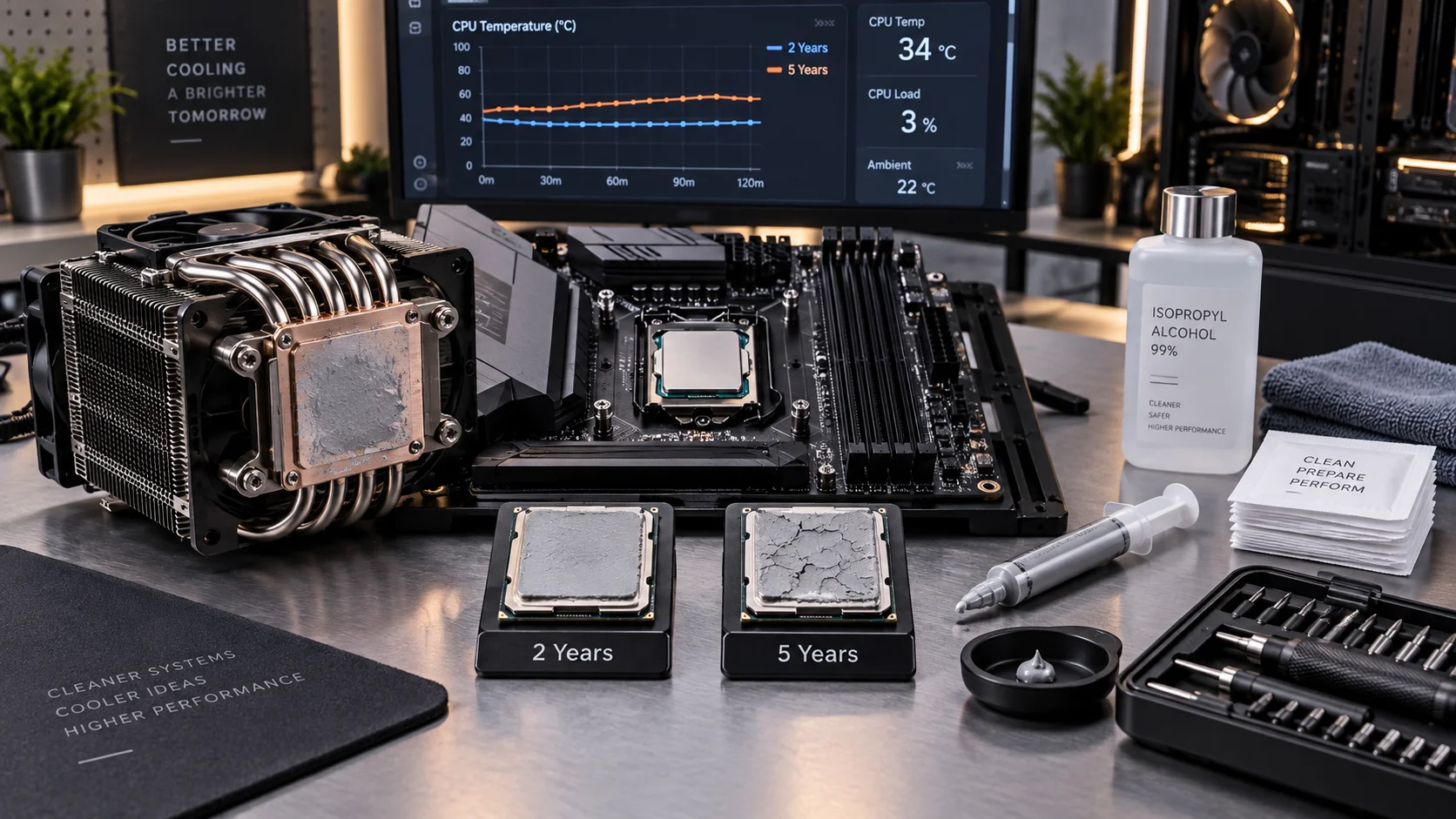
Degradation is not a single event — it is a cumulative electrochemical and mechanical process driven by thermal cycling, oxidation, and oil separation. Every boot cycle expands and contracts the metal surfaces above and below the paste layer by microns, slowly pumping the compound outward. This “pump-out” effect is measurable: independent studies have documented 3–8°C temperature increases on air-cooled systems after 24–36 months of daily use at high thermal loads. On all-in-one (AIO) liquid coolers, the cold-plate pressure retention varies by mounting system, which alters pump-out rates significantly.
Understanding the 2-year versus 5-year debate requires separating compound chemistry from use-case reality. A $12 silicone paste on a 105 W TDP processor running 24/7 rendering workloads will degrade on a very different timeline than the same compound on a 65 W office PC that sits idle most of the day. The guidance below is grounded in thermal engineering principles and field observations across consumer and prosumer builds.
Thermal Paste Degradation: Compound Types Compared
The compound type is the single largest variable in replacement interval. The table below consolidates key performance and longevity characteristics across the major TIM categories available to consumers.
| Compound Type | Examples | Conductivity (W/mu00b7K) | Typical Lifespan | Pump-Out Risk | Best Use Case |
|---|---|---|---|---|---|
| Silicone-based | Arctic MX-4, Noctua NT-H1 | 4–8.5 | 2–4 years | Moderate | General consumer builds |
| Carbon-based | Arctic MX-6, Thermal Grizzly Hydronaut | 8–14 | 3–5 years | Low–Moderate | Mid-range to high-end builds |
| Metal-oxide filled | Cooler Master MasterGel Maker | 11 | 3–5 years | Low | Enthusiast air cooling |
| Liquid metal | Thermal Grizzly Conductonaut, Kryonaut Extreme | 73–83 | 5–8 years | Very Low (bonds to IHS) | Delidded CPUs, extreme OC |
| Phase-change pads | Honeywell PTM7950, AI Squared | 10–14 (post-reflow) | 5–8 years | Extremely Low | OEM servers, AIO coolers |
| OEM stock pads | Pre-applied box cooler compound | 2–4 | 1–2 years | High | Budget builds, light workloads |
Intel’s own thermal design documentation acknowledges that the thermal interface resistance between the IHS and cooler is a primary variable in sustained performance delivery. Processors like the Core i9-13900K with 253 W PL2 ratings create extreme thermal cycling stress that accelerates pump-out in standard silicone compounds compared to chips with lower power envelopes. See Intel’s processor thermal management guidance for platform-specific IHS specifications that inform replacement scheduling.
The 2-Year vs 5-Year Reality: Which Timeline Applies to You
The industry commonly circulates both a “replace every 2 years” rule and a “paste lasts 5 years” counter-argument. Both are correct in their respective contexts. The divergence comes from three primary factors: thermal load, ambient environment, and compound quality.
When 2 Years Is the Right Interval
- High sustained loads: Video editors, 3D render farms, and machine learning workstations that saturate CPU TDP for hours daily create the most aggressive thermal cycling. Expansion and contraction cycles number in the tens of thousands per year.
- OEM stock paste: Pre-applied gray pads on boxed Intel and AMD coolers use low-grade silicone that separates and dries significantly faster than aftermarket compounds. Two years is a reasonable ceiling before temperature penalties become measurable.
- Poor case airflow: Ambient temperatures above 30°C inside the chassis elevate baseline temps, which increases the delta temperature the paste must bridge and accelerates oxidative degradation in the compound’s oil carriers.
- Overclocking: Pushing a CPU above its base voltage/frequency specification raises both peak temperature and thermal cycling amplitude, measurably shortening paste service life.
- Observed temp creep: If monitoring with HWiNFO64 or HWMonitor shows idle temps 7–10°C above original baseline values with no other system changes, paste replacement is warranted immediately regardless of calendar age. Track your CPU temperature limits as a baseline reference for detecting early degradation.
When 5 Years Is Realistic
- Premium aftermarket compounds: Products like Arctic MX-6, Noctua NT-H2, and Thermal Grizzly Kryonaut use refined polymer matrices with low oil-bleed formulations engineered specifically for longevity. Manufacturer ratings of 5–8 years are supported by independent accelerated aging tests.
- Light-duty systems: Office PCs, home theater PCs (HTPCs), and NAS boxes that rarely sustain loads above 30–40% TDP undergo minimal thermal cycling. A good compound applied in 2020 may still show negligible degradation in 2025.
- Phase-change materials: PTM7950 and similar compounds reflow above 45°C and self-redistribute under pressure, actively counteracting pump-out. These are the closest to a “fit and forget” TIM solution available to consumers.
- Controlled environments: Server rooms and climate-controlled home offices with stable 20–22°C ambient temperatures significantly reduce the thermal differential the compound must manage, slowing oxidative breakdown.
How to Diagnose Whether Your Paste Needs Replacing Now
Temperature monitoring is the most reliable diagnostic. Establish a baseline within the first week of a new build or paste application using a consistent benchmark — Cinebench R23 multi-core, Prime95 Small FFTs for 10 minutes, or similar. Record peak and sustained temperatures. Repeat annually. A confirmed rise of more than 5°C under identical load and ambient conditions is a strong replacement indicator.
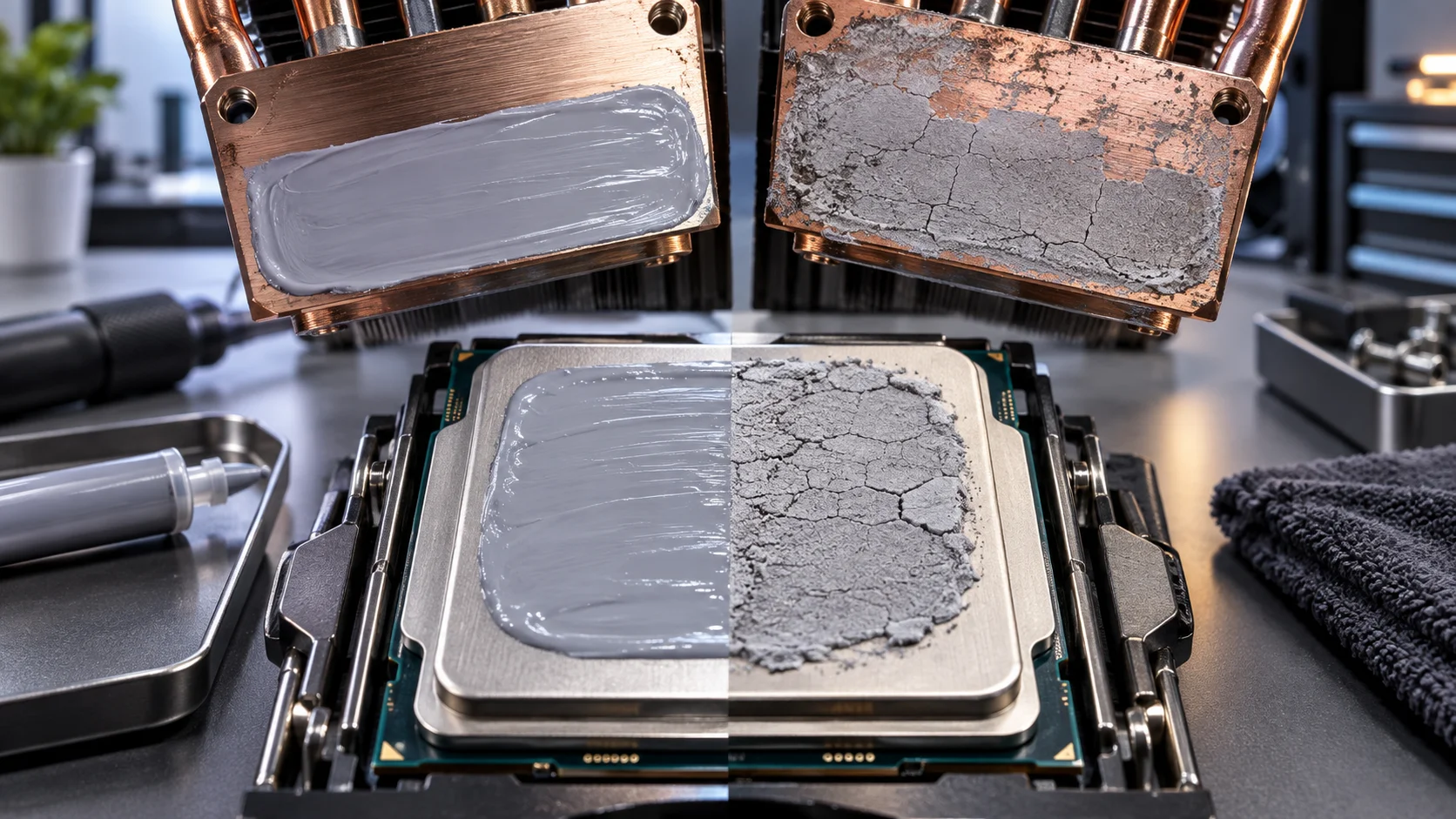
Physical inspection during cooler removal tells the rest of the story. Healthy paste is pliable, uniformly spread, and retains a consistent color. Degraded paste exhibits:
- Cracking or flaking at the edges of the IHS contact patch
- Oil separation visible as a translucent ring around a dried gray center
- Hardened, chalky consistency that resists removal with isopropyl alcohol
- Uneven coverage revealing bare metal spots on the IHS or cold plate
If any of these signs are present, replace immediately. Review proper thermal paste application technique before re-applying — incorrect volume and spread pattern can introduce thermal resistance as severe as degraded paste. A pea-sized dot centered on the IHS remains the field-validated standard for most consumer CPUs, though large-die Ryzen Threadripper and HEDT Intel platforms benefit from an X-pattern or direct spread to ensure edge coverage.
Step-by-Step Replacement Procedure
Execute this procedure in a static-controlled environment with the system fully powered down and unplugged.
- Step 1 — Remove the cooler: Loosen mounting screws in a cross-pattern to release pressure evenly. Rotate the cooler gently left and right before lifting to break the paste bond without twisting the CPU socket.
- Step 2 — Clean the IHS: Apply 91%+ isopropyl alcohol to a lint-free microfiber cloth or coffee filter. Wipe the IHS in one direction. Repeat with a fresh cloth section until no compound residue remains. Do not use acetone on plastic-framed CPUs.
- Step 3 — Clean the cold plate: Mirror the same process on the cooler’s contact surface. Copper and nickel-plated bases require identical treatment. Aluminum bases are more porous — allow extra drying time (60 seconds minimum).
- Step 4 — Apply new compound: For standard consumer CPUs, place a 3–4mm bead at the geometric center of the IHS. Avoid spreading manually unless using a high-viscosity compound on a large-die processor.
- Step 5 — Remount the cooler: Lower straight down without lateral movement. Tighten mounting screws in a cross-pattern to 3–5 in-lbs, or until manufacturer-specified resistance is met for your cooler bracket.
- Step 6 — Verify temperatures: Run a 10-minute stress test and compare against your historical baseline. A properly applied fresh compound should recover lost performance and may show a 2–5°C improvement over degraded paste.
Thermal paste replacement is also an appropriate maintenance milestone to inspect other system components. Verify RAM XMP/EXPO profiles are stable — degraded memory stability can masquerade as thermal throttling. Understanding RAM speed and timings helps isolate whether performance issues stem from the thermal interface or the memory subsystem.
Replacement Intervals by Use Case: Practical Reference
- Gaming PC (6–8 hours/day, aftermarket cooler, quality paste): 3 years, or at first confirmed 5°C temp creep
- Content creation workstation (sustained load, high TDP CPU): 2 years maximum regardless of compound brand
- Office / home PC (light load, stock cooler): 2 years if using OEM paste; 4 years with aftermarket compound
- Home server / NAS (always-on, low TDP): 4–5 years with quality compound; monitor quarterly via IPMI or software sensors
- Overclocked enthusiast system: Annually, particularly after seasonal temperature changes that alter ambient baselines
- Delidded CPU with liquid metal sub-IHS: 5–8 years; only reseat if the external cooler-to-IHS paste degrades
Common Mistakes That Shorten Paste Lifespan
Applying too much compound is among the most frequent errors. Excess paste migrates toward the CPU socket under clamping pressure — especially on LGA platforms where the CPU surface is elevated. This creates a contamination risk for socket pins rather than extending thermal performance. The correct volume is the minimum that achieves full IHS coverage under cooler pressure.
Overtightening cooler mounting hardware is equally damaging. Exceeding manufacturer torque specifications bows the cooler base plate, creating uneven contact pressure that accelerates localized pump-out. This is particularly relevant on AM5 and LGA1700 platforms where contact frame modifications (like the Thermalright LGA1700-BCF) were developed specifically to address die-warping from aggressive mounting.
Mixing compound types during replacement adds risk without benefit. Fully clean both surfaces before applying new paste — layering a fresh compound over even trace residue of an old one introduces unpredictable viscosity interactions and air entrapment. A clean interface is non-negotiable.
Finally, neglecting GPU thermal paste is a parallel maintenance oversight. GPU die temperatures and fan behavior often diagnose GPU paste degradation before CPU thermals become apparent. If conducting a full system maintenance cycle, a GPU driver clean install alongside physical GPU repasting ensures thermal and software-level baselines are reset simultaneously. And if you are also evaluating a platform upgrade while the system is disassembled, confirm PCIe 5.0 compatibility for any new storage or GPU additions to avoid bottlenecking a freshly serviced system.
Conclusion
The 2-year versus 5-year debate resolves to a compound-and-workload matrix, not a universal rule. OEM stock paste on high-TDP systems: replace at 2 years. Premium aftermarket compound on light-load systems: 5 years is achievable and supported by chemistry. Monitor temperatures systematically, inspect physically during any scheduled maintenance, and let data — not calendar dates alone — drive the replacement decision. A $5–$15 tube of quality thermal paste applied correctly is among the highest return-on-investment maintenance actions in consumer PC ownership.