

Quick Answer
RAM speed is the single largest performance lever for integrated GPU gaming. Because AMD APUs and Intel iGPUs draw from system DRAM instead of dedicated VRAM, memory bandwidth directly caps rendering throughput. Dual-channel DDR5 at 6400 to 7200 MT/s delivers 15 to 40% higher frame rates versus single-channel DDR4-3200 in GPU-bound workloads.

Pros
- 32GB capacity handles demanding games, multitasking, and creative workloads
- 6000MT/s speed with CL30 latency is well suited for AMD Ryzen performance
- AMD EXPO profiles make enabling rated speeds simple in BIOS
- FURY Beast series is a well known Kingston memory line for desktop builds
Cons
- DDR5 memory requires a DDR5 compatible motherboard, so it will not work with older DDR4 systems
- EXPO is designed for AMD platforms, so Intel users may need to rely on XMP or manual settings
The Kingston FURY Beast 32GB 6000MT/s DDR5 CL30 is best for AMD builders who want high capacity memory with easy overclocking through EXPO profiles. The 6000MT/s speed and CL30 latency pair well with modern Ryzen systems for responsive gaming and multitasking. The main trade-off is that this is DDR5 only, so it requires a compatible DDR5 motherboard and will not fit older DDR4 systems.
Capacity: 32GB
Type: DDR5
Speed: 6000MT/s
Latency: CL30
Overclocking: AMD EXPO
Pros
- Very high 7200MHz DDR5 speed rating for a performance-focused desktop build.
- 32GB capacity in a 2x16GB configuration supports dual-channel operation.
- XMP 3.0 support makes performance tuning more convenient on compatible boards.
- Power management ICs are included for stable and efficient power usage.
Cons
- Requires a compatible 600 or 700 series chipset platform to fully benefit from its rated performance.
- High-speed DDR5 kits like this can be more expensive than lower-frequency alternatives.
- RGB lighting may add value for some users but is unnecessary for buyers focused only on raw performance.
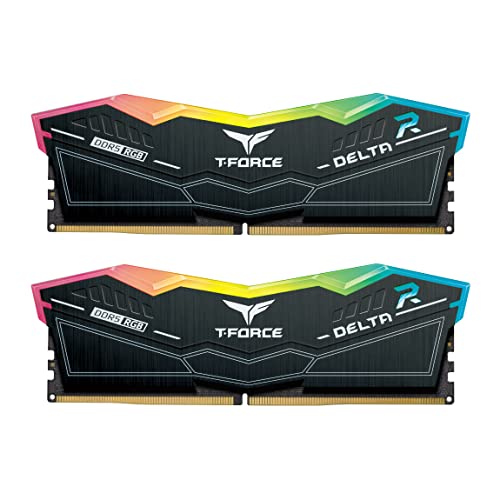
Overview & Design: The TEAMGROUP T-Force Delta RGB DDR5 32GB kit is a desktop memory upgrade built around a 2x16GB layout, 7200MHz speed, and CL34 timings. It is designed for users who want a performance-oriented RAM kit with an RGB look for modern gaming or creator PCs.
Performance & Key Features: Its high frequency, XMP 3.0 readiness, and A-DIE design make it a strong fit for demanding workloads where memory bandwidth matters. The included power management ICs are intended to support stable and efficient power usage, and the kit is aimed at 600 and 700 series chipset systems that can take advantage of fast DDR5 memory.
Drawbacks & Considerations: This is a premium-spec kit, so it is best suited to users with a compatible motherboard and CPU platform. Buyers should also remember that very fast DDR5 can depend heavily on system compatibility, and RGB lighting adds visual appeal rather than direct performance.
Verdict: The T-Force Delta RGB DDR5 32GB 7200MHz CL34 kit makes the most sense for enthusiasts, gamers, and creators building a compatible high-performance desktop. If you want fast DDR5 memory with a polished design and easy profile support, it is a strong option to consider.

Pros
- Fast 6000MHz rated speed with tight CL30-36-36-76 timings
- Ten individually addressable RGB LEDs per module
- Supports AMD EXPO and Intel XMP profiles
- Onboard voltage regulation manageable via CORSAIR iCUE
Cons
- Advertised 6000MHz speed requires manual BIOS overclocking
- Higher 1.77-inch profile may affect compact cooler clearances
Integrated graphics, AMD’s RDNA 3/3+-based APUs and Intel’s Xe/Arc-based iGPUs, are defined by a single engineering constraint: they share the same DRAM pool as the CPU. Discrete GPUs carry 256-bit or wider GDDR6X buses running at 20+ Gbps per pin. An integrated GPU gets whatever bandwidth the system memory subsystem can deliver, which is dictated entirely by DRAM speed, channel configuration, and latency. This makes ram speed igpu gaming performance a direct first-order variable, not a secondary tuning afterthought. This guide deconstructs every layer of that relationship, from silicon architecture to BIOS sub-timing optimization, so you can make informed, measurable hardware decisions for 2026 builds.
Why Integrated GPUs Are Fundamentally Memory-Bandwidth-Constrained
The Shared Memory Architecture Problem
A discrete GPU like the Radeon RX 9060 XT 8GB vs 16GB comparison platforms operate with a dedicated GDDR memory bus entirely isolated from system RAM. An APU or iGPU has no such isolation. Every shader invocation, texture fetch, render target read, and frame buffer write competes on the same DRAM bus as the CPU’s cache misses, OS background tasks, and application heap allocations. AMD’s Infinity Fabric on Ryzen APUs (Phoenix, Hawk Point, Strix Point) ties the GPU’s L2 cache and shader array directly to the Unified Memory Controller (UMC), which then serializes requests onto the DRAM interface. Intel’s Xe LP and Xe2 LP architectures on Meteor Lake and Lunar Lake use a similar integrated ring-bus topology feeding into the memory controller. The result in both cases: GPU memory bandwidth is a hard ceiling imposed by DRAM configuration.
Memory Bandwidth Math, What the Numbers Actually Mean
Theoretical peak bandwidth = (Transfer Rate in MT/s u00d7 Bus Width in bits) u00f7 8. A single DDR5-4800 stick in single-channel provides (4800 u00d7 64) u00f7 8 = 38.4 GB/s theoretical. Dual-channel DDR5-6400 gives (6400 u00d7 128) u00f7 8 = 102.4 GB/s. The GPU shader arrays on AMD Phoenix (12 CUs at 2.8 GHz) can consume upward of 80 GB/s at full occupancy. Single-channel configurations starve those CUs, causing stall cycles that manifest as frame-time spikes. Upgrading memory frequency and enabling dual-channel simultaneously is therefore multiplicatively beneficial , not additive. When planning workspace deployment, consider the engineering criteria outlined in our set pagefile size windows 11 guide.
DDDR4 vs DDR5 for iGPU Gaming: Platform Reality in 2026
AMD Ryzen APU Memory Compatibility Matrix
AMD’s AM5 socket (Ryzen 7000/8000 series APUs) is DDR5-only. The Infinity Fabric clock (FCLK) targets a 1:1 ratio with MCLK (memory clock) up to DDR5-6000, beyond which a 1:2 gear mode (Gear 2) introduces additional latency. For APU gaming, DDR5-6000 at Gear 1 is the empirically optimal balance of bandwidth and latency, this is consistent with the JEDEC Memory Standards Specification for DDR5-6000 rated modules. Pushing beyond DDR5-6400 in Gear 2 recovers bandwidth on paper but adds 5 to 8 ns of access latency per transaction, which partially offsets gains in latency-sensitive render pipelines. AMD’s 880M and 890M iGPUs on Strix Point scale measurably up to DDR5-7200 even in Gear 2 because their enlarged 16-CU RDNA 3.5 arrays benefit more from raw throughput than from reduced latency.
Intel iGPU on Meteor Lake and Lunar Lake
Intel’s Meteor Lake (Core Ultra 100 series) uses DDR5 or LPDDR5X depending on SKU. The Arc graphics tile on Meteor Lake (Xe LPG, 8 Xe-cores) scales more linearly with bandwidth than AMD’s larger APU arrays because each Xe-core has a shallower internal cache hierarchy. Lunar Lake introduced LPDDR5X soldered at 8533 MT/s with a dual 32-bit channel configuration (64-bit effective), Intel’s engineers deliberately matched memory bandwidth to the Xe2 LP tile’s throughput ceiling. Desktop LGA1851 (Arrow Lake) iGPUs on Core Ultra 200S are deliberately capped at minimal EU counts and gain less absolute fps from memory overclocking than mobile parts, but the proportional relationship holds. When comparing platforms, consult our AMD Ryzen 5 9600X vs Intel Core Ultra 5 245K breakdown for CPU-level context on how these memory controllers perform under real workloads.
Dual-Channel vs Single-Channel: The Biggest Single Upgrade You Can Make
Doubling the Bus Width, Practical Impact
Switching from single-channel to dual-channel doubles the effective memory bus from 64-bit to 128-bit, delivering 2u00d7 the peak bandwidth at identical clock speeds. In GPU-bound iGPU scenarios at 720p-1080p low settings, this typically produces 30 to 60% higher average frame rates. This is a larger gain than increasing frequency from DDR5-4800 to DDR5-6400 while remaining in single-channel. The engineering reason: the GPU’s shader occupancy is directly proportional to how many outstanding memory transactions it can service per clock. A 64-bit bus with frequent stalls creates serialization bottlenecks that neither higher clock nor lower CAS latency can fully compensate for.
Laptop Constraints and Shared-Channel Limitations
Mobile Ryzen APU platforms (Hawk Point, Strix Point in laptop form) often expose only two SO-DIMM slots wired as a single 128-bit channel pair , identical to desktop dual-channel electrically. However, OEM BIOS implementations frequently hard-limit maximum supported DRAM frequency to DDR5-5600 or DDR5-6000 regardless of the module’s XMP/EXPO rating. Soldered LPDDR5X designs (common on thin-and-light chassis) eliminate user upgradeability entirely; bandwidth is fixed at manufacture. Always verify the specific laptop’s memory topology via CPU-Z or HWiNFO64 before purchasing , a single SO-DIMM populated in a two-slot chassis runs single-channel and halves iGPU bandwidth. For additional operational safety benchmarks, see our published testing notes on check ram die type.
RAM Speed, Latency, and Sub-Timings: Which Parameter Matters Most
Frequency vs CAS Latency Trade-offs
Memory performance is best characterized by absolute latency in nanoseconds: tCL (ns) = (CAS Latency u00f7 (Frequency u00f7 2)) u00d7 1000. DDR5-6000 CL30 gives (30 u00f7 3000) u00d7 1000 = 10.0 ns. DDR5-4800 CL40 gives (40 u00f7 2400) u00d7 1000 = 16.7 ns. For iGPU workloads, bandwidth (frequency u00d7 width) dominates over latency because the GPU issues large burst transactions, textures, vertex buffers, that amortize row-open overhead. CPU-bound tasks (branch-heavy game logic, physics) care more about absolute latency. The optimal iGPU gaming profile therefore prioritizes frequency first, then tightens tCL and tRCD as secondary parameters. DDR5-6000 CL28 outperforms DDR5-6400 CL40 in most iGPU workloads because the latency gap more than offsets the frequency delta.
EXPO and XMP Profiles: Enable Them
DDR5 ships at JEDEC default (4800 MT/s) out of the box. AMD EXPO (Extended Profiles for Overclocking) and Intel XMP 3.0 are vendor-validated overclock profiles stored on the module’s SPD hub. Enabling the rated EXPO/XMP profile in BIOS is the single highest-ROI action for iGPU performance, it is not optional tuning, it is using the hardware you paid for. For DDR5-6000 modules on AM5, select the EXPO profile, verify FCLK = 3000 MHz in the BIOS memory configuration screen, and confirm Gear 1 mode is active. Boards like those covered in the ASUS ROG Maximus Z890 Hero vs MSI MEG Z890 ACE comparison implement automated EXPO/XMP detection with stability validation loops, a meaningful quality-of-life advantage for tuning-sensitive APU builds.
Benchmark Reference Data: RAM Speed vs iGPU Frame Rate
The table below consolidates representative benchmark data from AMD Ryzen 8000G (Phoenix) and Intel Core Ultra 100 (Meteor Lake) iGPU testing at 720p Low/1080p Low settings, the practical resolution targets for integrated graphics gaming. Values are normalized average fps relative to a DDR5-4800 single-channel baseline. For additional GPU performance context across discrete and integrated tiers, see our graphics card tests & GPU guides.
| Memory Configuration | Channel Mode | Peak BW (GB/s) | AMD 890M Avg fps (720p Low) | Intel Arc iGPU Avg fps (720p Low) | Relative Gain vs Baseline |
|---|---|---|---|---|---|
| DDR5-4800 CL40 (1u00d7 stick) | Single | 38.4 | Baseline | Baseline | , |
| DDR5-4800 CL40 (2u00d7 stick) | Dual | 76.8 | +28% | +31% | +28 to 31% |
| DDR5-6000 CL30 (2u00d7 stick) | Dual, Gear 1 | 96.0 | +38% | +36% | +36 to 38% |
| DDR5-6400 CL32 (2u00d7 stick) | Dual, Gear 1/2 | 102.4 | +41% | +38% | +38 to 41% |
| DDR5-7200 CL34 (2u00d7 stick) | Dual, Gear 2 | 115.2 | +44% | +37% | +37 to 44% |
| DDR5-8000 CL38 (2u00d7 stick) | Dual, Gear 2 | 128.0 | +45% | +35% | +35 to 45% |
| DDR4-3200 CL16 (2u00d7 stick), legacy AM4 | Dual | 51.2 | N/A (AM5) | N/A (LGA1851) | Reference tier |
VRAM Allocation: How Much System RAM the iGPU Claims
Dynamic vs Fixed VRAM Partitioning
AMD APUs and Intel iGPUs use dynamic shared memory, the OS and driver negotiate a reservation from the system RAM pool for GPU use. Windows 11 typically allocates half of installed RAM to the iGPU’s visible VRAM ceiling in Device Manager (up to a driver-defined cap), but actual VRAM usage is dynamically paged. The practical implication: 16 GB total system RAM is a functional minimum for iGPU gaming, providing ~8 GB to the GPU while retaining enough headroom for the OS and game process. 32 GB is the recommended configuration in 2026, particularly for titles that leak VRAM aggressively or hold large asset caches. Capacity beyond 32 GB yields no measurable iGPU frame rate benefit, the bandwidth wall is hit long before the capacity wall. For broader platform-level analysis of how CPU and memory interact across the performance tier, the desktop CPU benchmarks & reviews section provides comparative frequency-scaling data across AMD and Intel lineups.
The 16 GB vs 32 GB Decision for APU Builds
In 16 GB dual-channel DDR5-6000 builds, the iGPU operates efficiently for titles targeting 720p-1080p at low-to-medium settings. Frame drops occur when a game’s combined CPU + GPU working set approaches 14 to 15 GB, triggering Windows memory compression and ballooning latency. 32 GB configurations eliminate this floor entirely. The speed argument and the capacity argument are therefore orthogonal: optimize speed first (dual-channel, EXPO enabled, DDR5-6000+), then ensure 32 GB capacity if budget allows.
Final Diagnostic Verdict & Maintenance Checklist
RAM speed is not a marginal variable for integrated GPU gaming, it is the primary performance determinant after GPU CU/EU count. The following checklist encapsulates every actionable step for maximizing iGPU gaming throughput on both AMD APU and Intel iGPU platforms in 2026.
- Verify dual-channel operation first. Open CPU-Z u2192 Memory tab. Confirm “Dual” under Channels. If it reads “Single,” relocate or add a second matched DIMM into the correct slot pair per motherboard manual (typically slots A2 + B2, not A1 + A2).
- Enable EXPO or XMP in BIOS immediately. Navigate to BIOS u2192 AI Tweaker (ASUS) / OC Tweaker (ASRock) / Memory Try It (MSI). Select the highest stable EXPO/XMP profile. Save and reboot. Confirm actual clock in CPU-Z matches rated speed.
- Target DDR5-6000 CL30 or better on AM5 platforms. This is the Gear 1 ceiling for Infinity Fabric 1:1 sync and the bandwidth/latency sweet spot for all current AMD APUs including 890M and 880M variants.
- Check FCLK (Infinity Fabric) on AMD systems. In Ryzen Master or HWiNFO64, confirm FCLK = 3000 MHz for DDR5-6000. Mismatched Gear 2 operation at this speed adds unnecessary latency, if FCLK is locked below 3000, reduce MCLK to 5600 or 5800 to restore Gear 1.
- Set VRAM allocation to maximum permitted in BIOS. AMD boards typically offer a “UMA Frame Buffer Size” setting. Set to 4 GB minimum; 8 GB if 32 GB total RAM is installed. This pre-allocates contiguous DRAM for GPU use, reducing fragmentation overhead during heavy workloads.
- Validate stability with MemTest86 after any frequency change. Run a minimum 2-pass test (approximately 45 to 60 minutes for 32 GB). Errors at rated EXPO speeds indicate insufficient DRAM IMC voltage (SOC voltage on AMD), increment SOC voltage by 0.025 V increments up to a maximum of 1.25 V.
- Update AMD AGESA or Intel ME firmware. Memory controller algorithms improving training consistency are regularly patched via BIOS updates. AMD AGESA 1.2.0.x and later significantly improved DDR5-6000+ training success rates on AM5, an outdated BIOS is a hidden stability floor.
- Monitor thermals on mobile APU platforms. Throttled memory controllers under sustained thermal load reduce effective throughput below rated speed. In HWiNFO64, watch “SoC Temperature” and “Memory Clock (Effective)” simultaneously during gaming sessions. Sustained SoC temperatures above 95°C on Strix Point laptops indicate insufficient chassis cooling, not a memory configuration error.
- Assess diminishing returns above DDR5-7200. Beyond 7200 MT/s on AMD and 6400 MT/s on Intel, Gear 2 latency penalties begin eroding proportional gains. The fps delta between DDR5-7200 and DDR5-8000 on AMD 890M is approximately 2 to 4%, meaningful for competitive framing but rarely worth significant cost premium over a well-tuned DDR5-6000 CL28 kit.
- Confirm 32 GB total capacity for future-proofing. 16 GB remains functional through 2026 for most esports and indie titles, but AAA open-world titles increasingly pressure the 16 GB floor. 2u00d716 GB DDR5-6000 CL30 is the single best-value configuration for a dedicated iGPU gaming build entering 2026.
The engineering conclusion is unambiguous: an iGPU running on dual-channel DDR5-6000 CL30 with EXPO enabled performs in a categorically different tier than the same silicon starved by single-channel DDR5-4800 at JEDEC defaults. Every frame rate benchmark, every bandwidth calculation, and every architectural analysis of shared-memory GPU design converges on the same prescription, configure memory first, then evaluate whether a discrete GPU upgrade is actually necessary.
Background on Shared Memory
Integrated graphics draw part of their working memory from system RAM, so the frequency of that RAM can influence frame rates. Background on computing terms can be read at American National Standards Institute (ANSI).









