Quick Answer: How To Remove A Lawn Mower Blade?
To remove a lawn mower blade, first disconnect the spark plug wire to prevent accidental starting. Secure the mower on a flat surface, then tilt it carefully with the carburetor and air filter side facing up to avoid oil or fuel leaks. Use a block of wood to wedge between the blade and the mower deck to hold it steady….
Pros
- Strong dual-motor 2WD system with upgraded tires for reliable performance on inclines up to 24 degrees.
- Versatile 21-inch blade setup includes both standard mowing and mulching options for year-round tasks.
- Automotive-grade LiFePO4 battery offers extended life and fast 70-minute charging for efficient sessions.
- Simple out-of-box remote operation with no RTK setup or apps required.
- Built-in safety sensors and compact agile design support family-friendly mowing near gardens and play areas.
Cons
- Operates only via remote control rather than fully autonomous navigation, requiring continuous user presence.
- Maximum 0.75-acre coverage per charge limits suitability for larger properties.
- 2WD configuration prioritizes simplicity and may need more careful path planning on highly uneven terrain.
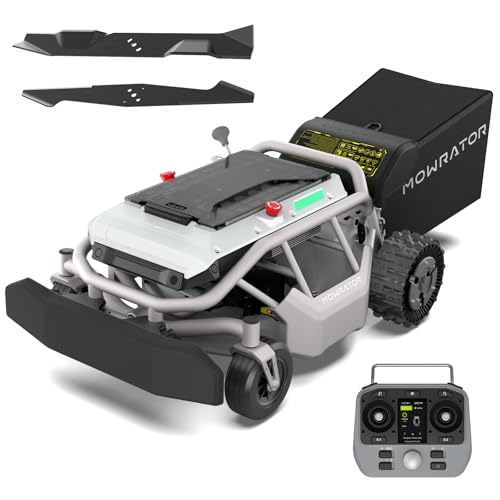
The Mowrator S1 2WD remote control lawn mower features a robust steel deck, dual high-torque rear motors, and upgraded soft-compound grip tread tires with weighted metal hubcaps. Its compact and agile build gives an immediate sense of durability suited for residential yards while supporting multi-season tasks.
Performance centers on the 1985.6 W motor driving a 21-inch steel blade that switches easily between standard mowing for thick grass and the included mulching blade for leaf shredding. It maintains steady power on slopes up to 24 degrees (45 percent gradient), covers up to 0.75 acres on a 56V 12Ah LiFePO4 battery with 1.5-hour runtime, and recharges fully in 70 minutes via the 600W charger. Five cutting heights from 1.8 to 4.6 inches plus ultrasonic sensors and emergency stop complete a practical safety package.
Key considerations include the need for active remote operation instead of hands-free autonomy, a coverage limit of 0.75 acres that may require multiple charges on bigger lawns, and the 2WD layout that works well on moderate slopes yet benefits from attentive handling on irregular ground.
This model delivers strong value for homeowners with medium-sized yards, seniors, or anyone seeking to reduce physical strain. It stands out for users wanting reliable slope capability, mulching versatility, and straightforward controls without complex setup.
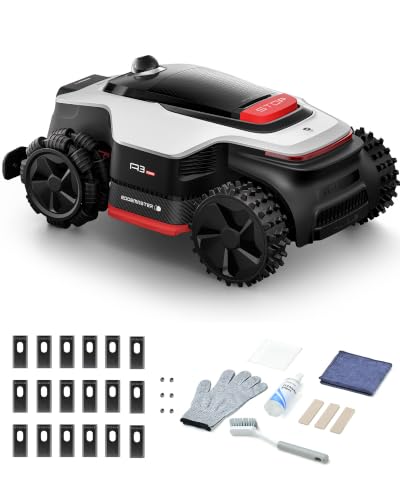
Pros
- AWD hub motors, rated by the maker for 80% (38.7°) slopes
- Wire-free setup using 360° LiDAR and binocular AI vision
- Manufacturer-claimed 45-minute recharge with included 5A adapter
- Night mowing mode, described by the maker as whisper-quiet
- Dreamehome app control with 4G module and HDR camera
Cons
- Edge trimmer module is sold separately
- Manufacturer rates coverage at 0.25-0.5 acre
- No customer reviews available to verify performance

Pros
- Includes two 4.0Ah batteries and a rapid charger
- Self-propelled rear-wheel drive assists on slopes
- 4-in-1 system: mulch, bag, side discharge, and leaf pickup
- Comes with an extra mower blade
Cons
- Coverage up to 3/4 acre varies by terrain and technique
- Requires 60V platform compatibility for spare batteries

Pros
- Highly efficient brushless motor offers more torque and quieter operation than gas models
- Self-propelled variable speed design improves control and reduces user fatigue
- LED headlight enables flexible early or late-day mowing sessions
- Dual battery ports support automatic switchover for longer continuous use
- Durable steel deck and dual blades ensure wide efficient cutting coverage
Cons
- Runtime reaches only up to 3/4 acre on a full 4.0Ah charge and varies with grass conditions and technique
- Single 4.0Ah battery included despite dual ports, so extra battery purchase needed for full dual-port benefit
- Cordless operation requires ongoing battery charging and management between uses
The Greenworks 80V 25" Brushless Cordless Self-Propelled Dual Blade Lawn Mower is a capable electric walk-behind model built for residential use. It features a durable steel deck, aluminum handles, and a solid overall construction that conveys quality and readiness for regular yard maintenance. The self-propelled rear-wheel design creates an immediate impression of controlled power and user-friendly handling.
Performance centers on the brushless motor that supplies strong torque for thorough cutting while remaining 3x quieter than gas alternatives. The 25-inch dual-blade deck delivers an efficient wide path, LED headlights improve visibility in low light, and dual battery ports with automatic switchover extend runtime. With the included 4.0Ah battery the mower covers up to 3/4 acre per charge based on grass condition and operator technique.
Drawbacks to consider include runtime that fluctuates with grass density and the need for regular battery charging. Only one 4.0Ah battery ships with the unit even though dual ports are present, which may require an extra battery for uninterrupted larger jobs.
This mower suits homeowners with medium-sized lawns who want a quiet, low-maintenance cordless alternative to gas power. It delivers strongest value for users prioritizing self-propulsion, LED lighting, and efficient dual-blade cutting in a durable package.
Why You Might Need to Remove Your Lawn Mower Blade
Removing the blade is a common maintenance task that ensures your lawn mower operates efficiently and safely. Over time, blades become dull, bent, or damaged, which can tear grass instead of cutting it cleanly, leading to a ragged lawn appearance and increased risk of disease. Regular removal allows for proper sharpening, balancing, or complete replacement. It’s also necessary for thorough cleaning of the mower deck’s underside, where grass clippings and debris accumulate, potentially causing corrosion and reduced airflow.
Essential Tools and Safety Precautions
Before beginning, gather the correct tools and prioritize safety. The primary tool needed is a socket wrench or a blade removal tool that fits the center bolt. A block of wood (like a 2×4) is crucial for securing the blade. You’ll also need gloves for hand protection and safety glasses. Always work on a flat, stable surface. The most critical safety step is to disconnect the spark plug wire or remove the ignition key (for riding mowers) to ensure the engine cannot start accidentally. If your mower has a gas engine, consider draining the fuel or ensuring the mower is tilted correctly to prevent leaks.
Step-by-Step Guide to Removing a Lawn Mower Blade
Step 1: Prepare the Mower
Position the mower on a flat, level surface like a driveway or garage floor. For a walk-behind mower, engage the parking brake if it has one. For a riding mower, set the parking brake, turn off the engine, and remove the key.
Step 2: Disconnect Power and Secure the Mower
Disconnect the spark plug wire from the spark plug and tuck it away from the plug. This is the most important safety precaution to prevent the engine from firing. For electric mowers, ensure the battery is disconnected or the power cord is unplugged.
Step 3: Tilt the Mower Correctly
For a walk-behind mower, carefully tilt the mower onto its side. It is essential to tilt it so that the carburetor and air filter are facing up. Tilting it the opposite way can cause oil to flood the air filter or carburetor, making the engine difficult to start afterward. For a riding mower, you may need to use a jack or ramps to access the underside safely, following the manufacturer’s instructions. For additional operational safety benchmarks, see our published testing notes on z890 vs x870e motherboard.
Step 4: Secure the Blade
The blade will spin freely when you try to loosen the bolt. To prevent this, wedge a block of wood between the blade and the inner wall of the mower deck. Position it so that when you turn the bolt, the blade will press against the wood, locking it in place.
Step 5: Loosen and Remove the Center Bolt
Identify the center bolt that holds the blade to the mower. Using the correct size socket wrench, apply firm, steady pressure to loosen the bolt. Most bolts are standard right-hand thread and will loosen when turned counterclockwise. However, be aware that some mower models, particularly older ones or certain brands, may use a reverse-thread (left-hand) bolt, which tightens counterclockwise and loosens clockwise. Check your owner’s manual if unsure. Once the bolt is loose, remove it and the blade. To compare alternative configurations, check our hands-on review of marshall stanmore iii vs harman kardon onyx studio 8.
Step 6: Mark Blade Orientation (If Reinstalling)
If you plan to reinstall the same blade after sharpening or cleaning, it’s crucial to note its orientation. Most blades are marked “Grass Side” or have an arrow indicating which way should face down toward the grass. If not marked, use a permanent marker to label the side that was facing down before removal. This ensures proper airflow and cutting action upon reinstallation.
Important Considerations for Different Mower Types
Walk-Behind vs. Riding Mowers
The core process is similar, but access differs. Walk-behind mowers are easier to tilt and access. Riding mowers are heavier and may require lifting with a jack and jack stands for safe access. Always consult your riding mower’s manual for the correct jacking points to avoid damaging the frame or causing instability. Users looking for related component recommendations can explore our dyson v8 cyclone vs bissell featherweight stick breakdown.
Handling Reverse-Thread Bolts
As mentioned, some mowers use left-hand threads on the blade bolt. If the bolt does not loosen with standard counterclockwise force, do not force it. Stop and verify the thread direction in your owner’s manual. Using the wrong technique can strip the bolt or damage the crankshaft.
Blade Orientation and Balance
When reinstalling, ensure the blade is oriented correctly. Installing it upside down will result in poor cutting performance and can be dangerous. Additionally, if you are sharpening the blade, it must be properly balanced afterward. An unbalanced blade will cause excessive vibration, which can damage the mower’s engine and bearings over time. You can balance a blade by hanging it on a nail or using a blade balancer tool. Before finalizing equipment decisions, refer to our comprehensive bissell crosswave hydrosteam vs shark stainforce comparison.
Reinstallation and Final Checks
To reinstall, position the blade in the correct orientation against the mower deck spindle. Insert the center bolt and tighten it by hand first to avoid cross-threading. Remove the wood block, then use your socket wrench to tighten the bolt securely. Consult your owner’s manual for the specific torque specification, which is typically between 35 and 50 foot-pounds for walk-behind mowers. Over-tightening can damage the crankshaft threads. After tightening, reconnect the spark plug wire. Before starting the mower, give the blade a spin by hand to ensure it rotates freely without hitting anything. Finally, start the mower and listen for any unusual vibrations, which could indicate an unbalanced blade.
Everything You Need to Know: How To Remove A Lawn Mower Blade FAQ
Which way do you turn the bolt to remove a lawn mower blade?
On most modern lawn mowers, the blade bolt is a standard right-hand thread and will loosen when turned counterclockwise. However, some models, especially older ones, may have a reverse-thread (left-hand) bolt that loosens when turned clockwise. Always check your owner’s manual to be certain before applying force.
Do I need to drain the gas before tipping my lawn mower?
It is not always necessary to drain the gas, but you must tilt the mower correctly. For a walk-behind mower, always tilt it so the carburetor and air filter are facing up. This prevents oil from flowing into the air filter or carburetor, which can cause starting problems. If you tilt it the wrong way (carburetor down), you should drain the fuel first to avoid leaks and contamination.
How do I know if my lawn mower blade is reverse thread?
The most reliable way is to consult your lawn mower’s owner’s manual. If you don’t have the manual, you can often find it online using the mower’s model number. As a general rule, if the bolt does not loosen with firm counterclockwise pressure, stop immediately. It may be a reverse-thread bolt. You can also look for markings like “LH” (left-hand) near the bolt.
Can I sharpen the blade myself or should I replace it?
You can sharpen the blade yourself if it is in good condition, meaning it is not bent, cracked, or excessively worn. Sharpening can be done with a metal file, a bench grinder, or a dedicated blade sharpener. However, if the blade is severely damaged, unbalanced after sharpening, or has lost significant metal, it is safer and more effective to replace it with a new, balanced blade.
Background on Mower Blade Work
A stubborn bolt can be loosened with a breaker bar and steady pressure rather than a sudden jerk. Keep your hands clear of the edge as the nut comes free. Readers after general safety reading on lawn equipment can look to American National Standards Institute (ANSI).