Quick Answer: RX 7900 XTX vs RX 9070 XT — Which Should You Buy in 2026?
Choose the RX 9070 XT for most new purchases: it is usually less expensive, uses less power, is materially faster in ray-traced games, and supports AMD’s newer FSR 4 upscaling. Choose the RX 7900 XTX instead if native 4K raster performance and 24GB of VRAM matter most, provided you can find one for roughly $800–$900 and no more than about $100–$150 above a comparable RX 9070 XT.
Winner by Category
| Category | Winner | Margin / Evidence |
|---|---|---|
| 1080p | RX 7900 XTX | About 5% faster in a broad 16-game rasterized suite, although CPU limits can reduce the difference. |
| 1440p | RX 7900 XTX | Approximately 5% faster in one aggregate suite, with other testing reporting an 8% advantage. |
| 4K | RX 7900 XTX | About 5% faster in rasterized testing; its 384-bit bus and 24GB VRAM help in demanding games. |
| Ray tracing | RX 9070 XT | Typically 10–12% faster on average, with larger leads in heavy RT titles: 19 vs 12 fps in Alan Wake 2 and 36 vs 28 fps in Cyberpunk 2077. |
| Upscaling | RX 9070 XT | Its RDNA 4 AI accelerators support FSR 4, which generally improves image quality over FSR 3.1, although game support is more limited. |
| VRAM | RX 7900 XTX | 24GB GDDR6 versus 16GB GDDR6, giving the XTX 50% more memory for large textures, high-resolution timelines, and large local AI models. |
| Power | RX 9070 XT | 304W TBP versus 355W, a 51W reduction in rated board power. |
| Value | RX 9070 XT | Usually $700–$800 new, most commonly around $740–$750, versus approximately $800–$1,050 for a new RX 7900 XTX. |
Pros
- Large 16GB VRAM buffer is well suited to demanding games and visual settings.
- Advanced WINDFORCE cooling design offers multiple thermal management features.
- Dual BIOS provides useful flexibility between performance and lower-noise operation.
- Reinforced build quality adds confidence for long-term desktop installation.
Cons
- The 2.7-slot design may be too bulky for smaller cases or tightly spaced builds.
- Full AMD platform benefits are best realized with compatible Ryzen 9000 and AM5 hardware.
- RGB customization depends on GIGABYTE CONTROL CENTER, which adds software overhead.
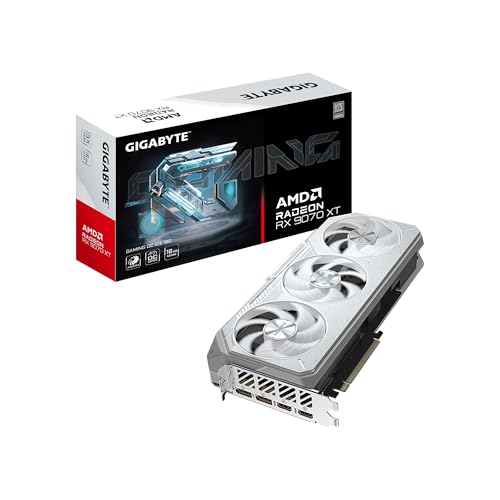
Overview: The GIGABYTE Radeon RX 9070 XT Gaming OC ICE 16G is a premium graphics card built around AMD Radeon RX 9070 XT graphics and 16GB of GDDR6 memory. Its reinforced metal backplate, 2.7-slot design, and ICE styling give it a sturdy, high-end look and feel right out of the box.
Performance: This card is positioned for demanding gaming setups, with PCIe 5.0 support, DisplayPort 2.1, and AMD Smart Access Memory compatibility for modern AM5 systems. GIGABYTE's WINDFORCE cooling combines server-grade thermal conductive gel, Hawk fans, copper heat pipes, a copper plate, and 3D active fans to support sustained gaming loads.
Considerations: The larger cooler may be a challenge in compact cases, and users will get the most from its AMD-specific features when paired with compatible Ryzen 9000 and AM5 hardware. RGB lighting and mode switching are useful, but they also add a layer of software and system management.
Verdict: This is a strong option for gamers who want a well-cooled, feature-rich Radeon card with modern display support and 16GB of memory. It is best suited to builders who have enough case space and plan to use it in a modern AMD-based gaming PC.

Pros
- 16GB of GDDR6 memory is well suited for modern game assets and multitasking.
- Includes WINDFORCE Cooling System for thermal management under load.
- PCIe 5.0 interface supports newer desktop platforms.
- RGB lighting provides a customizable aesthetic for themed builds.
Cons
- No detailed dimensions or case-clearance information is provided in the listing.
- The product page does not include full specification details beyond the main features.
- Customer feedback is limited in the provided data, so real-world owner insight is scarce.
Overview: The GIGABYTE Radeon RX 9070 XT Gaming OC 16G is a desktop graphics card built around AMD Radeon RX 9070 XT graphics. It combines 16GB GDDR6 memory with GIGABYTE's Gaming OC line styling, making it a practical choice for users assembling a modern gaming PC.
Performance and Features: This model highlights WINDFORCE cooling, a Hawk Fan design, and server-grade thermal conductive gel, all of which suggest a focus on heat control during extended gaming or GPU-heavy use. PCIe 5.0 support and RGB lighting add platform compatibility and visual appeal for users who want both function and style.
Drawbacks and Considerations: The listing does not provide detailed dimensions, power requirements, or bundled accessories, so compatibility planning may require additional research. There is also limited customer feedback in the provided data, which makes long-term user experience harder to judge from this page alone.
Verdict: This graphics card is best suited to buyers who want a Radeon RX 9070 XT-based option with 16GB memory and a cooling-focused design. It is a strong fit for gaming-focused desktop builds, especially when visual customization and thermal management are important.

Pros
- Cooling-focused design with Axial-tech fans and a phase-change thermal pad.
- Dual-ball fan bearings should offer stronger long-term durability.
- Modern display outputs include HDMI 2.1 and DisplayPort 2.1.
- Dual BIOS adds flexibility for different operating preferences.
- Backed by a 3-year warranty.
Cons
- The 2.5-slot cooler may still be too large for some compact cases.
- Exact dimensions and power requirements are not listed in the provided data, so builders need to confirm compatibility separately.
- 0dB silent operation is mainly for light gaming, so fan noise can increase under heavier loads.
Overview: The ASUS Prime AMD Radeon RX 9070 XT 16GB GDDR6 OC Edition is a PCIe 5.0 graphics card built for modern gaming PCs and performance-focused systems. Its 2.5-slot cooler, Dual BIOS, and GPU Guard point to a design that values thermal management and practical installation.
Performance and features: ASUS combines Axial-tech fans, a phase-change GPU thermal pad, and dual-ball fan bearings to support better cooling and long-term reliability. HDMI 2.1 and DisplayPort 2.1 outputs make it a strong fit for current high-refresh displays, while 0dB technology can keep the card quiet during lighter workloads.
Drawbacks and considerations: The 2.5-slot design is more compact than some larger coolers, but it can still be a tight fit in smaller cases. The supplied data does not include exact dimensions or power requirements, so compatibility should be checked before purchase. Silent operation is also mainly limited to light gaming.
Verdict: This card makes the most sense for users who want a well-cooled AMD GPU with 16GB of GDDR6 memory and a practical feature set. It is a sensible option for gamers and PC builders who value cooling, modern connectivity, and a balanced size profile.
Specifications Side-by-Side
The RX 7900 XTX and RX 9070 XT are both high-end AMD graphics cards, but they prioritize different strengths. The older XTX has a larger GPU memory subsystem and more stream processors, while the newer 9070 XT has a newer architecture, higher ray-tracing capability, and dedicated hardware intended for FSR 4. For complementary field maintenance guidelines, examine our breakdown of how to clean gpu dust.
| Specification | Radeon RX 7900 XTX | Radeon RX 9070 XT |
|---|---|---|
| Architecture | RDNA 3; Navi 31 chiplet GPU | RDNA 4; Navi 48 on a 4nm process |
| AMD stream processors | 6,144 | 4,096 |
| Compute units | 96 | 64 |
| CUDA cores | None | None |
| VRAM | 24GB GDDR6 | 16GB GDDR6 |
| Memory bus | 384-bit | 256-bit |
| Infinity Cache | 96MB | 64MB third-generation Infinity Cache |
| Memory bandwidth | 960GB/s | 640GB/s, approximately 644GB/s depending on specification convention |
| Base clock | 1,900MHz | Approximately 1,660MHz |
| Game clock | Approximately 2,300MHz | Approximately 2,400MHz |
| Boost clock | Up to 2,500MHz | Up to 2,970MHz; partner cards may be higher |
| Total board power | 355W | 304W |
| Launch MSRP | $999 | $599 |
| Launch date | December 2022 | March 6, 2025 |
| Typical 2026 street price | Approximately $800–$1,050 new; used cards around $800 | Approximately $700–$800 new; commonly around $740–$750 |
Gaming Performance
1080p
The RX 7900 XTX is approximately 5% faster in a broad 16-game rasterized 1080p suite. That is a narrow lead rather than a generational landslide, and a fast CPU can make the difference less visible by limiting both GPUs. At this resolution, the RX 9070 XT remains a very capable option, particularly when its lower price and newer features matter more than the last few percentage points of traditional rendering performance. For complementary field maintenance guidelines, examine our breakdown of how to clean gpu dust.
1440p
At 1440p, the RX 7900 XTX again leads in rasterized games by about 5% in one 16-game test suite. A separate aggregate result reports a wider 8% advantage, showing why the exact game mix matters. The practical difference is usually modest, but the XTX’s extra VRAM gives it more headroom for demanding texture settings and future games. The 9070 XT is still close enough to remain the stronger value at its usual $740–$750 pricing. To evaluate matched hardware tolerances, consult our detailed overview of vertical gpu mount airflow.
4K
Native 4K rasterization is the RX 7900 XTX’s clearest gaming advantage. It is about 5% faster in the broad raster test, and the 384-bit memory bus, 960GB/s bandwidth, and 24GB VRAM are useful in demanding titles. However, the lead varies by game: God of War Ragnarök averaged 107 fps on both cards at 4K, while Call of Duty: Black Ops 6 averaged 71 fps on the XTX versus 69 fps on the 9070 XT.
Ray Tracing & Upscaling
Ray tracing reverses the result. The RX 9070 XT is typically 10–12% faster in RT testing, with especially large gains in demanding workloads. In one test, it produced 19 fps versus 12 fps in Alan Wake 2, 36 fps versus 28 fps in Cyberpunk 2077 at RT Ultra, and 15 fps versus 9 fps in Black Myth: Wukong. The 9070 XT also supports FSR 4 through its RDNA 4 AI hardware. In one Cyberpunk 2077 test, it averaged approximately 53 fps at native 1440p and 90 fps with FSR 4, with a 74 fps 1% low. To evaluate matched hardware tolerances, consult our detailed overview of vertical gpu mount airflow.
Features & Ecosystem
The biggest feature difference is AMD’s upscaling direction. The RX 7900 XTX supports FSR 2 and FSR 3, plus some FSR 4 functionality in supported or driver-override scenarios. The RX 9070 XT is the intended RDNA 4 platform for FSR 4, AMD’s newer machine-learning-based upscaler. FSR 4 generally delivers better image quality than FSR 3.1, including improved temporal stability and less ghosting, but its supported-game list is substantially smaller and enabling it can be awkward in some cases.
Neither card can run NVIDIA DLSS natively. DLSS is an NVIDIA technology, while these AMD cards rely on FSR, Radeon Super Resolution, or third-party solutions such as OptiScaler. Buyers who specifically require DLSS should consider NVIDIA hardware rather than choosing between these two Radeon models. When planning workspace deployment, consider the engineering criteria outlined in our weak psu cause gpu stutter guide.
Both cards provide hardware H.264, HEVC/H.265, and AV1 encoding, so either can support modern streaming and video-export workflows. The RX 9070 XT has the newer media engine and newer AI hardware, including 128 AI accelerators, which gives it the more current feature direction. The RX 7900 XTX’s RDNA 3 AI accelerators remain useful, but AMD’s strongest consumer AI-upscaling push is designed primarily around RDNA 4.
Driver maturity is a trade-off. The RX 7900 XTX has a longer and more mature RDNA 3 driver history, while the RX 9070 XT benefits from a newer architecture and continued optimization. Early RX 9070 XT reviews reported driver crashes and inconsistent FSR 4 behavior, so buyers who want the newest features should accept some possibility of software refinement. For additional operational safety benchmarks, see our published testing notes on black screen gpu drivers.
For productivity, neither card has CUDA cores. AMD workloads instead use HIP/ROCm, Vulkan, OpenCL, or DirectML depending on the application. ROCm support for RDNA 4 has improved, particularly under Linux, but compatibility remains less predictable than CUDA for AI, rendering, and scientific software. The 9070 XT can be competitive in some applications such as Topaz Video AI, while AMD performance remains inconsistent in Adobe Premiere Pro, Resolve AI effects, and other CUDA-optimized creator software.
Power, Thermals & Build Compatibility
The RX 9070 XT has the efficiency advantage on paper. Its 304W TBP is 51W lower than the RX 7900 XTX’s 355W TBP. That does not determine every card’s actual temperature or noise level, because partner cooler designs and case airflow also matter, but it gives the newer card a lower power target and makes it the easier choice for a build where power consumption is a priority. To compare alternative configurations, check our hands-on review of daisy chain pcie cables.
Neither research set provides a specific recommended PSU wattage, so the safest comparison is to plan around the cards’ rated power and the rest of the system rather than apply an unsupported number. The XTX’s 355W TBP deserves particular attention in compact or airflow-limited cases. The 9070 XT’s lower 304W TBP is more forgiving, though the individual partner card’s cooler and physical dimensions still need to fit your system.
- Check that your case has enough space for the selected partner card and its cooler.
- Allow for the RX 7900 XTX’s higher 355W TBP when planning system power and airflow.
- Prefer the RX 9070 XT if lower rated board power is an important build requirement.
- Review the specific card’s cooling design, because the GPU name alone does not describe the complete thermal solution.
- For creator systems, match the card to the software: neither option provides CUDA compatibility.
Price & Value Analysis
The RX 9070 XT has a major pricing advantage relative to its launch position. Its launch MSRP was $599, and typical 2026 new-card pricing is approximately $700–$800, with many listings around $740–$750. The RX 7900 XTX launched at $999 and is now approximately $800–$1,050 new, with used cards around $800. Availability is limited, and its price varies substantially.
At roughly $700–$750, the RX 9070 XT offers near-XTX raster performance, better ray tracing, lower rated power, and access to FSR 4 for substantially less money than many new RX 7900 XTX listings. That makes it the value winner for most buyers. At $800 or more, its value advantage becomes much weaker, especially if a 7900 XTX is available near $800–$900 and native 4K raster performance or 24GB of VRAM is important.
The price gap should be judged against the type of games you play. A raster-focused 4K buyer can justify paying up for the XTX when the premium is no more than about $100–$150. A mixed raster and ray-tracing player gets more from the 9070 XT’s newer RT hardware. Existing RX 7900 XTX owners should not upgrade solely for raster performance: the 9070 XT is primarily an RT, efficiency, and feature upgrade rather than a major traditional-gaming upgrade.
Which Should You Buy?
Choose RX 7900 XTX if…
- You want the highest native 4K raster performance between these two cards.
- You need 24GB of VRAM for large textures, high-resolution timelines, large scenes, or local AI models that exceed 16GB.
- You play primarily rasterized games and ray tracing is not a major priority.
- You find a card near $800–$900, with the premium kept to roughly $100–$150 above a comparable RX 9070 XT.
- You value its 384-bit memory bus and 960GB/s memory bandwidth for demanding 4K workloads.
Choose RX 9070 XT if…
- You are buying new and find one around $700–$750.
- You play a mixture of rasterized and ray-traced games.
- You want the stronger RT performance, including the 10–12% average advantage reported in ray-traced testing.
- You want AMD’s intended FSR 4 platform and its newer machine-learning-based upscaling features.
- You prefer the lower 304W TBP over the RX 7900 XTX’s 355W rating.
- You want a newer architecture and media engine, while accepting that early driver and FSR 4 behavior may require further optimization.
Consider a different card if…
Consider an NVIDIA GPU if you need CUDA, DLSS, broad plug-in compatibility, or more predictable support in CUDA-optimized AI, rendering, and scientific applications. Neither Radeon card is the safer choice for a workflow built around CUDA-dependent software, even though AMD’s HIP/ROCm ecosystem continues to improve.
Everything You Need to Know: Rx 7900 Xtx Vs Rx 9070 Xt FAQ
Is the RX 7900 XTX faster than the RX 9070 XT?
Yes, in rasterized gaming it is generally about 5–8% faster, depending on the test suite and resolution. The advantage is approximately 5% at 1080p and 4K in one broad suite, while other aggregate testing reports an 8% lead at 1440p. The RX 9070 XT is faster in ray tracing, however.
Is the RX 9070 XT better for ray tracing?
Yes. The RX 9070 XT is typically 10–12% faster on average in ray-traced testing, and its advantage can be much larger in demanding games. The tested results include 19 versus 12 fps in Alan Wake 2, 36 versus 28 fps in Cyberpunk 2077 at RT Ultra, and 15 versus 9 fps in Black Myth: Wukong.
Does the RX 7900 XTX’s 24GB VRAM matter in 2026?
It can matter for native 4K gaming with demanding textures, heavy texture modifications, high-resolution video timelines, large scenes, and local AI models that exceed 16GB. The RX 9070 XT has 16GB, so the XTX offers 50% more VRAM. That does not automatically make it faster in every game, but it gives the older card more memory headroom for particularly large workloads.
Can either card use DLSS or CUDA?
No. Neither Radeon card supports NVIDIA DLSS natively or includes CUDA cores. They use AMD and cross-platform technologies such as FSR, Radeon Super Resolution, HIP/ROCm, Vulkan, OpenCL, and DirectML depending on the game or application. If DLSS or CUDA is essential to your workload, an NVIDIA GPU is the safer alternative.
Mechanical safety standards, operational tolerances, and protective gear guidelines align with benchmark specifications established by the American National Standards Institute (ANSI).
Related Posts
For more detailed testing breakdowns and top recommendations, check our in-depth guide to cordless stick vacuum buyer guide.
For more hands-on benchmarks and buying recommendations, consult our guides on robotic pool cleaner comparison guide, as well as deep carpet cleaning machine reviews, as well as automated robotic vacuum cleaning systems, as well as all-in-one vacuum steam mop combo guide.