

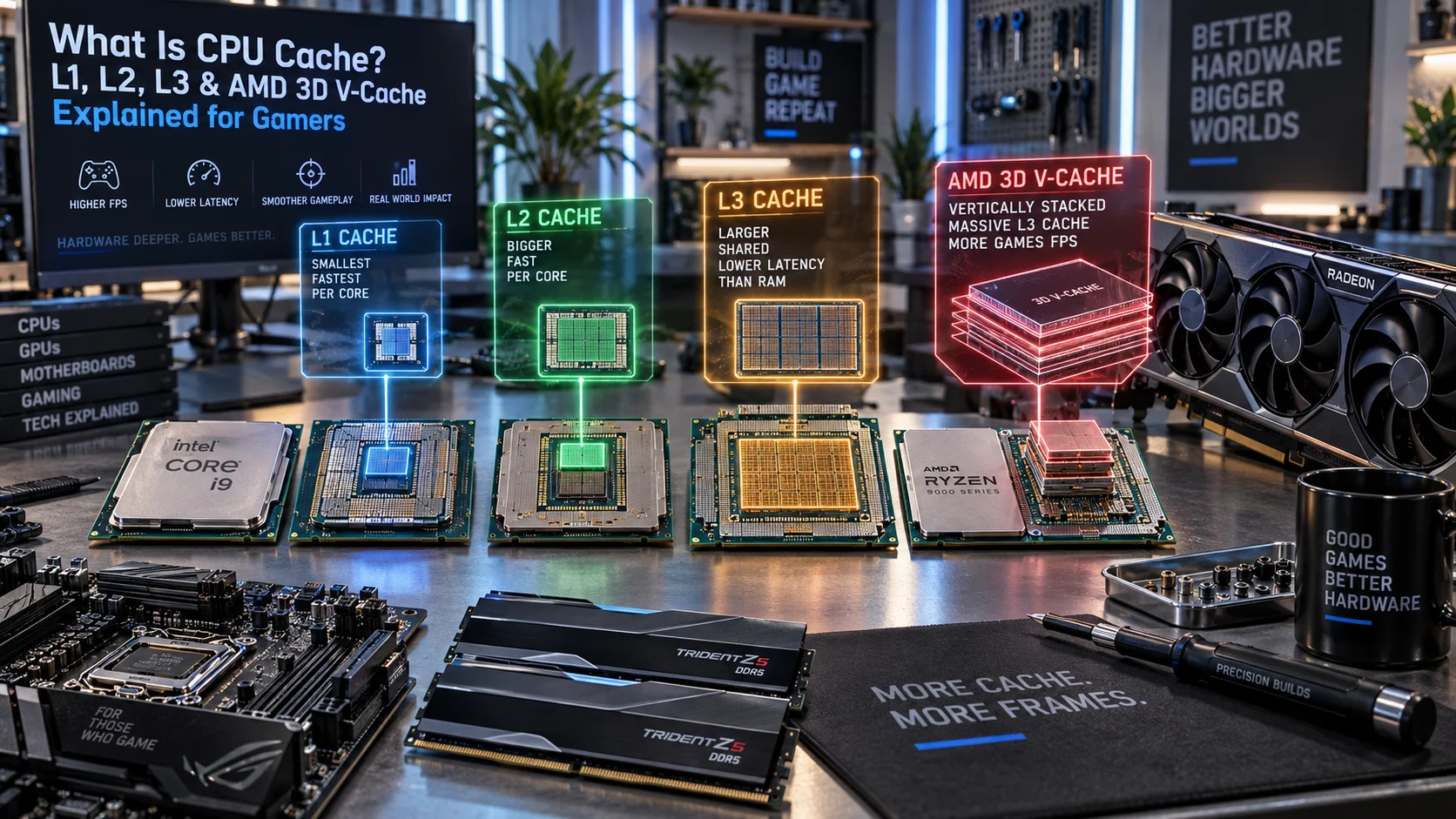
CPU cache is the high-speed, small-capacity memory built directly into your processor that stores frequently accessed data and instructions. It sits between your main RAM and the CPU cores, dramatically reducing latency when the processor needs to fetch information. Without cache, every single data request would require the CPU to access system RAM, which operates orders of magnitude slower than the processor itself. Modern CPUs employ a hierarchical cache architecture with multiple levels—L1, L2, and L3—each optimized for speed versus capacity trade-offs. Understanding how cache works is essential for gamers and enthusiasts because cache efficiency directly impacts gaming performance, frame rates, and overall system responsiveness.
Quick Answer
CPU cache is ultra-fast embedded memory that stores frequently accessed data. L1 cache (32–64 KB per core) is fastest but smallest; L2 cache (256–512 KB per core) balances speed and capacity; L3 cache (8–32 MB shared) serves as a large buffer before main RAM access. AMD’s 3D V-Cache stacks additional cache vertically, boosting performance 5–15% in gaming by increasing total available cache to 96 MB on Ryzen chips.

Pros
- 14-core hybrid architecture with 6 P-cores and 8 E-cores
- Unlocked clock speeds up to a rated 5.2 GHz
- Equipped with 26MB cache for responsive processing
- Supports modern PCIe 5.0 and 4.0 standards
- Compatible with Intel 800 series motherboards
Cons
- Requires a dedicated discrete graphics card
- Does not include a cooling solution

Pros
- 24 cores (8 P-cores, 16 E-cores) and 32 threads for intense multitasking
- Advertised maximum clock speed reaching up to 6.0 GHz
- Broad compatibility with both DDR4 and DDR5 memory platforms
- Features integrated Intel UHD Graphics 770
Cons
- Requires a potential BIOS update for Intel 600-series motherboards

Pros
- High 5.4 GHz max boost is well suited to gaming workloads.
- Unlocked multiplier gives experienced users tuning headroom.
- AM5 and DDR5 support align with current-generation desktop platforms.
- 6-core, 12-thread layout is practical for gaming and general use.
Cons
- Cooler is not included, so buyers must plan for separate cooling.
- Requires an AM5 motherboard and DDR5 memory, which limits drop-in upgrades for older systems.
- 6 cores may be less ideal for heavy content creation or workstation tasks than higher-core CPUs.
Overview: The AMD Ryzen 5 9600X is a 6-core, 12-thread unlocked desktop processor built on the Zen 5 architecture. It is aimed at users who want a fast, modern CPU for an AM5-based gaming PC or a responsive everyday desktop build.
Performance and features: With a 5.4 GHz max boost, 38 MB cache, and DDR5-5600 support, this processor is positioned for strong gaming responsiveness and smooth multitasking. Select AM5 motherboards can also provide PCIe 5.0 support, which adds future-ready flexibility for compatible components.
Drawbacks and considerations: The main limitation is that a cooler is not included, so total build cost can rise once cooling is added. It also depends on the AM5 platform and DDR5 memory, which makes it less convenient for older AMD or Intel system upgrades.
Verdict: This CPU makes the most sense for gamers and PC builders who want a fast, unlocked Ryzen chip for a current-generation AM5 system. If you want a straightforward upgrade path and value high boost clocks over bundled extras, the Ryzen 5 9600X is a strong fit.
Why CPU Cache Matters: The Memory Hierarchy Problem
Modern processors operate at gigahertz speeds, completing operations in nanoseconds. Main system RAM, by contrast, requires approximately 60–100 nanoseconds to deliver data to the CPU. This represents a fundamental architectural bottleneck: the processor sits idle, waiting for memory to catch up. CPU cache solves this latency crisis by storing a copy of the most recently accessed data in extremely fast SRAM located on the processor die itself. For additional operational safety benchmarks, see our published testing notes on custom cpu fan curve.
The cache hierarchy reflects a classic engineering trade-off between speed and capacity. The fastest caches are the smallest; the largest caches are slower. L1 cache, sitting nearest to the execution units, can deliver data in just a few clock cycles. L3 cache, though slower, can hold substantially more data and reduces the frequency of expensive main RAM accesses. When you’re gaming, this cache efficiency determines whether your CPU sustains peak performance or throttles down waiting for memory—directly translating to frame rates and latency.
Cache miss rates matter more than raw CPU speed in many real-world gaming scenarios. A processor with slightly lower clock speed but superior cache architecture often outperforms a higher-clocked chip with inferior cache implementation. This principle explains why professional reviewers scrutinize cache specifications as closely as boost frequencies when comparing platforms like the AMD Ryzen 5 9600X vs Intel Core Ultra 5 245K.
L1 Cache: The Fastest Private Memory Tier
L1 Architecture and Specifications
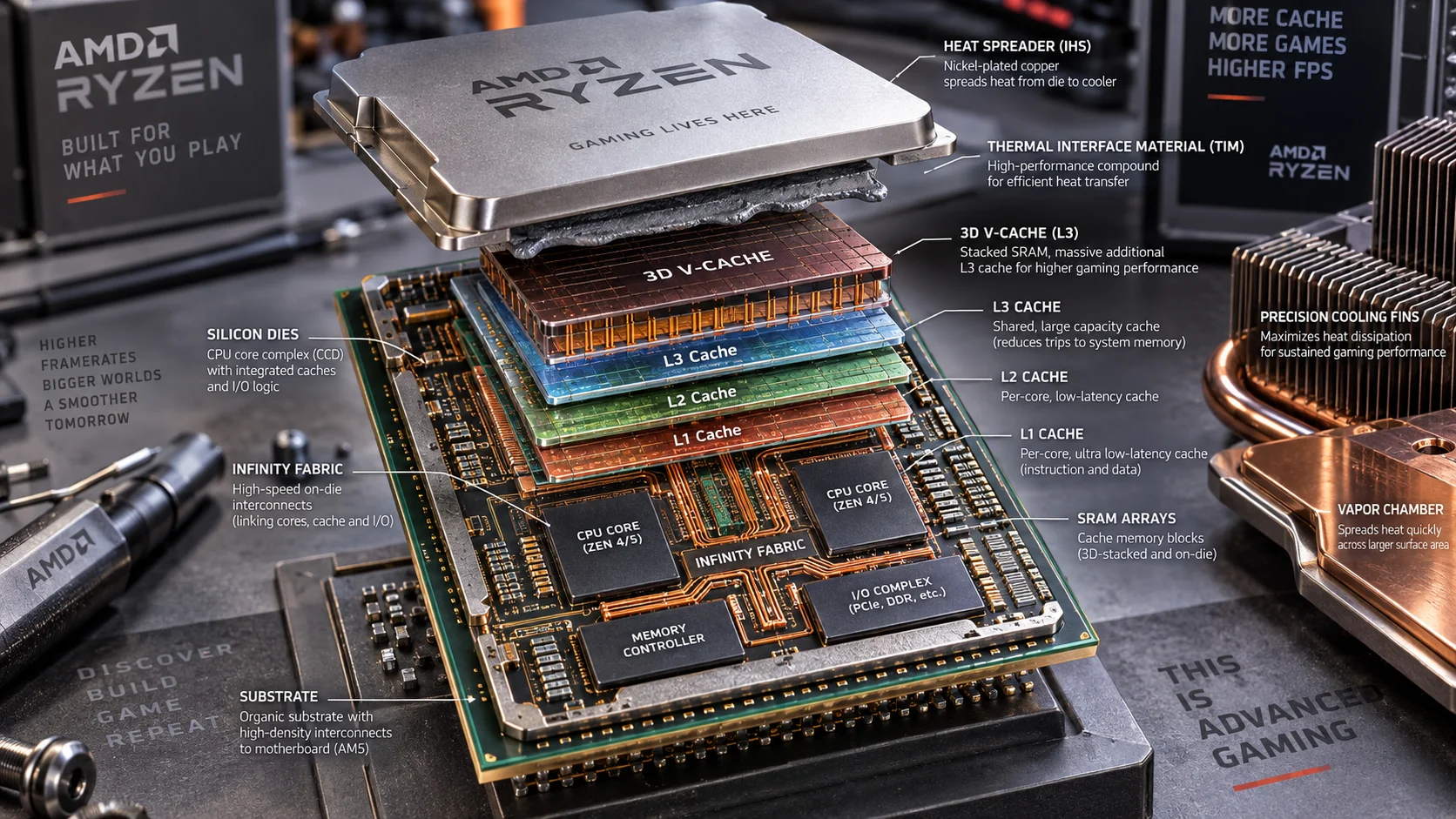
L1 cache operates as private cache for each individual CPU core, meaning every core has its own dedicated L1 cache that other cores cannot directly access. This design eliminates inter-core contention and enables maximum speed. L1 is typically split into two separate caches: instruction cache (L1I) and data cache (L1D), each usually 32 KB on modern processors, though some high-end designs allocate 48 KB or 64 KB per core. To compare alternative configurations, check our hands-on review of how to choose cpu cooler.
L1 access latency is typically 4–5 clock cycles on current-generation processors. For a CPU running at 5 GHz, this translates to approximately 0.8–1 nanoseconds. L1 cache hit rates—the percentage of memory accesses satisfied by L1 without accessing lower tiers—typically range from 80–95% depending on workload. Gaming workloads benefit heavily from high L1 hit rates because game engines exhibit strong temporal and spatial locality, repeatedly accessing the same small working sets of data.
L1 Cache Performance Impact
A single L1 cache miss forces the CPU to check L2 cache, incurring approximately 12–15 additional clock cycles of latency. This seemingly small miss can cascade into major performance degradation during complex game scenes with heavy memory access patterns. Developers optimize game code specifically to maximize L1 cache locality—keeping inner loops small, aligning data structures, and minimizing pointer chasing to keep working sets within L1 capacity. Users looking for related component recommendations can explore our thermal paste shelf life breakdown.
L2 Cache: The Speed-Capacity Bridge
Per-Core L2 Design Philosophy
L2 cache is also private per-core but significantly larger than L1, typically 512 KB per core on contemporary mainstream processors, with premium chips allocating up to 1 MB. L2 sits between L1 and L3 in both speed and size. Access latency to L2 ranges from 12–20 clock cycles depending on the specific architecture, substantially slower than L1 but orders of magnitude faster than main RAM access.
L2 operates as the primary working memory for general program execution. When L1 registers and L1 cache cannot satisfy a request, L2 becomes the critical performance battleground. Game rendering loops, physics calculations, and AI decision trees frequently stress L2 capacity because they involve larger datasets than fit in L1. CPU manufacturers have progressively increased L2 allocations over architectural generations specifically to reduce the miss rate that would otherwise force expensive L3 or main RAM accesses. Before finalizing equipment decisions, refer to our comprehensive what is cpu ipc comparison.
L2 Cache and Gaming Performance
For gaming specifically, L2 cache efficiency often matters more than L1 because game code exhibits moderate working set sizes that regularly exceed L1 capacity. A processor with undersized L2 cache will experience frequent L2 misses, forcing multiple L3 accesses per game frame. This creates frame rate variance and stuttering, even at identical CPU clock speeds. High-end processors distinguish themselves partly through aggressive L2 sizing and optimized L2 replacement policies that predict which data will be needed next.
L3 Cache: The Shared Last-Level Tier
L3 Architecture and Capacity Scaling
L3 cache represents the largest cache tier and is shared among all cores on the processor die. This shared architecture enables efficient inter-core communication: if one core needs data that another core recently used, L3 can deliver it far faster than main RAM. L3 sizes have scaled dramatically over the past decade, reflecting both die size growth and the performance gains that large shared caches provide. For broader ecosystem context, read through our operational guide on bad psu damage cpu.
Current mainstream processors allocate 16–32 MB of L3 cache; high-end enthusiast and server SKUs scale to 48–64 MB. L3 access latency is typically 40–75 clock cycles depending on the specific implementation and access pattern. L3 miss rates—which force fallback to main RAM—are heavily workload-dependent. Gaming workloads with poor cache locality can experience L3 miss rates exceeding 10%, meaning one in ten memory accesses requires expensive main RAM retrieval.
The L3 Shared Cache Trade-off
Shared L3 cache introduces complexity in multi-threaded scenarios. All cores compete for L3 capacity and bandwidth. In highly threaded workloads like content creation, this competition can reduce per-thread cache efficiency. However, for gaming—which typically exploits 6–12 cores even in heavily multi-threaded engines—shared L3 provides substantial benefits. The largest games on platforms like the ASUS ROG Maximus Z890 Hero vs MSI MEG Z890 ACE motherboards demonstrate how proper cache sizing interacts with platform architecture to deliver optimal gaming performance.
| Cache Level | Capacity Per Core | Access Latency | Typical Hit Rate | Private vs Shared |
|---|---|---|---|---|
| L1 Cache | 32–64 KB | 4–5 cycles (~1 ns) | 80–95% | Private per core |
| L2 Cache | 512 KB–1 MB | 12–20 cycles (~4 ns) | 85–92% | Private per core |
| L3 Cache | 8–32 MB shared | 40–75 cycles (~15 ns) | 70–85% | Shared among all cores |
| Main RAM | Gigabytes | 60–100 cycles (~20 ns) | Variable | System-wide shared |
AMD 3D V-Cache: Vertical Cache Stacking Innovation
3D V-Cache Technology Explained
AMD’s 3D V-Cache represents a breakthrough approach to the cache capacity problem. Rather than expanding cache horizontally across the die—which increases transistor count and power consumption—AMD stacks additional cache vertically using chiplet interconnect technology. The original Ryzen 7 5800X3D introduced this technology, and it has evolved across subsequent Ryzen 7000 and 9000 series processors.
3D V-Cache adds an extra 64 MB of L3 cache stacked on top of the standard L3 cache, doubling total L3 capacity from 32 MB to 96 MB on 8-core Ryzen chips. This additional cache is accessed through a specialized interface that adds minimal latency penalty—typically 1–2 additional cycles compared to standard L3 access—while providing massive capacity gains. The technology fundamentally changes cache miss characteristics for applications that can exploit the enlarged working set.
Performance Impact for Gaming
Gaming performance improvement from 3D V-Cache ranges from 5–15% depending on the specific game engine and resolution. Lower-resolution gaming where the CPU bears more load shows greater improvements; high-resolution scenarios where GPU load dominates see more modest gains. The benefit stems from reduced L3 miss rates: the 96 MB total L3 capacity can hold substantially more game state, AI data, physics calculations, and rendering command buffers without spilling to main RAM.
Benchmark data across major AAA titles reveals consistent 8–12% frame rate improvements when comparing 3D V-Cache-equipped Ryzen processors to equivalently-clocked standard Ryzen chips. This performance delta justifies the premium pricing AMD commands for 3D V-Cache SKUs, particularly for gaming-focused enthusiasts. When cross-shopping processors, the presence of 3D V-Cache should factor prominently into value calculations, especially when paired with high-refresh-rate gaming targets of 144+ fps.
How Cache Coherency Works in Multi-Core Systems
Multi-core processors introduce a critical cache complexity: maintaining consistency when multiple cores have copies of the same data in their private L1 and L2 caches. If Core 0 modifies a value stored in its L1 cache, Core 1’s L1 copy becomes stale. Modern processors implement cache coherency protocols—typically MESI or MOESI variants—that automatically invalidate stale copies when modifications occur.
Cache coherency transactions consume bandwidth and introduce latency penalties during inter-core communication. This is why modern game engines employ careful data partitioning strategies, attempting to keep data accessed by specific cores localized to those cores’ private caches. Heavily shared data that multiple cores access frequently gets placed in L3, reducing coherency invalidation overhead. Understanding this dynamic explains why CPU architecture reviews emphasize coherency protocol efficiency as strongly as raw cache capacity.
How to Clear CPU Cache: Diagnostic and Troubleshooting Context
Why You Might Clear Cache
Clearing CPU cache is rarely necessary under normal circumstances. However, in diagnostic troubleshooting scenarios—particularly when diagnosing stability issues, memory corruption, or thermal problems—clearing cache can help isolate whether instability stems from cache coherency bugs, corrupted cache contents, or other systemic issues. Additionally, software developers and extreme overclockers occasionally clear cache as part of benchmark validation to ensure reproducible, deterministic results.
Methods for Cache Clearing
On Windows systems, third-party utilities like CPU-Z or specialized benchmarking software can perform cache invalidation operations, though modern operating systems provide limited direct user-level cache control. The most reliable method involves a full system restart, which flushes all cache contents and resets cache state to clean conditions. Overclocking software and BIOS updates occasionally include cache-clearing options, though these are typically reserved for advanced users and extreme overclockers addressing specific technical problems.
From a practical gamer’s perspective, cache clearing is almost never necessary. Modern operating systems and CPU microcode handle cache management automatically, and the performance penalty from invalid cache is negligible compared to the performance benefits of functional cache. If you’re experiencing stuttering or performance degradation, the root cause lies elsewhere—faulty RAM, GPU driver issues, thermal throttling, or software conflicts—rather than cache corruption.
Cache Performance Across GPU Platforms and System Configuration
Cache architecture interacts intimately with the broader system configuration. The motherboard you select—such as options detailed in the ASUS ROG Maximus Z890 Hero vs MSI MEG Z890 ACE comparison—influences memory subsystem latency, which affects how quickly main RAM supplies data to the CPU when L3 cache misses occur. A platform with aggressive memory timings and optimal memory controller tuning can reduce the performance penalty of L3 misses by 10–20%.
GPU selection also indirectly impacts effective CPU cache efficiency in gaming scenarios. A faster graphics card places higher demands on the CPU to maintain frame rate—pushing CPU cache subsystems harder and exposing cache efficiency issues that might go unnoticed with slower GPUs. When evaluating whether to invest in a high-performance graphics card like options in the Radeon RX 9060 XT 8GB vs 16GB comparison, consider that your CPU’s cache architecture may become a bottleneck if your current processor exhibits poor cache characteristics.
Practical Cache Implications for Game Engine Architecture
Modern game engines optimize specifically for cache hierarchies. Unreal Engine 5, Unity, and proprietary engines used by AAA studios implement data-oriented design patterns that maximize cache locality. Game developers pre-sort rendering commands by material, texture, and shader to improve memory access patterns. Physics simulation uses spatial partitioning and grid-based acceleration structures that exploit cache line sizes (typically 64 bytes on contemporary processors). AI decision trees and behavior trees are structured to fit within L2 or L3 cache.
When evaluating gaming performance across different platforms, understanding these cache-conscious design patterns explains why seemingly minor cache differences produce measurable frame rate variations. Larger L3 cache reduces stalls in complex game scenes with heavy AI and physics activity. Improved L1 hit rates directly translate to lower frame time variance and more consistent frame pacing. Benchmarking methodology matters: synthetic benchmarks that don’t exercise realistic cache access patterns fail to predict actual gaming performance. Real-world testing with shipping games reveals true cache efficiency, which is why professional reviewers at desktop CPU benchmarks & reviews focus on game-specific results rather than theoretical cache metrics.
Cache Interaction with Thermal Behavior and Power Efficiency
Cache architecture directly influences processor thermal characteristics. Larger caches contain more transistors in the same area, increasing power density. Increased power density generates more heat. Processors with aggressive cache sizing—particularly those incorporating 3D V-Cache—run at slightly higher temperatures than equivalently-clocked processors with smaller caches. This thermal penalty is minor but measurable: a 3D V-Cache equipped Ryzen 9 might run 3–5°C warmer than the standard variant under full-load gaming workloads.
Modern processors implement sophisticated dynamic voltage and frequency scaling that interacts with cache behavior. When cache miss rates are high, the CPU cannot maintain peak efficiency, increasing power consumption relative to computational output. Conversely, when cache hit rates remain high, the processor delivers superior performance-per-watt. This creates a feedback loop where cache-efficient workloads benefit from lower thermal output and better sustained turbo boost behavior compared to cache-inefficient scenarios.
Intel Architecture and Cross-Platform Cache Comparison
Intel and AMD implement fundamentally similar cache hierarchies—both use private L1 and L2 caches and shared L3 caches. However, architectural details diverge significantly. Intel’s 12th and 13th-generation processors implement hybrid architectures combining performance cores (P-cores) with efficiency cores (E-cores), each with different cache configurations. P-cores receive larger L2 and prioritized L3 access, while E-cores operate with reduced cache. This asymmetry requires sophisticated OS scheduling to balance performance and efficiency.
Intel’s proprietary Intel Architecture Technical Documentation provides detailed specifications of their latest cache implementations. Comparing Intel 14th-generation Core Ultra processors to AMD Ryzen 9000 series reveals that Intel compensates for slightly smaller per-core caches through superior branch prediction and instruction prefetching, which reduces cache miss rates in practice. Real-world gaming performance comparisons show these theoretical differences matter little; both platforms deliver excellent cache performance for gaming when equipped with sufficient L3 capacity.
Content Creator and Streaming Workload Cache Considerations
Content creators engaged in simultaneous gaming and streaming place extreme stress on CPU cache subsystems. Gaming requires cache optimization for game engines; streaming requires cache efficiency for video encoding. These workloads exhibit completely different cache access patterns, forcing CPU cache to service competing demands. Processors with larger L3 caches handle this scenario more gracefully because there’s sufficient capacity for both working sets without constant eviction and reloading.
Ryzen processors with 3D V-Cache significantly outperform equivalently-clocked standard Ryzen chips in simultaneous gaming-and-streaming scenarios, precisely because the enlarged L3 cache accommodates both workloads’ data without excessive capacity conflicts. Streamers and content creators benefit disproportionately from 3D V-Cache SKUs compared to pure gamers because the additional cache capacity directly prevents cache thrashing during multi-workload execution.
Final Diagnostic Verdict & Maintenance Checklist
CPU cache is the critical performance hidden behind the scenes of every gaming session. Understanding cache hierarchy—L1, L2, and L3 tiers—reveals why seemingly identical processors at the same clock speed deliver different gaming performance. L1 cache serves the ultra-fast inner loops; L2 cache handles general computation; L3 cache buffers against expensive main RAM access. AMD’s 3D V-Cache innovation doubles L3 capacity, translating to 5–15% gaming performance improvements in cache-sensitive titles.
Diagnostic Checklist for Cache-Related Performance Issues:
- Verify CPU temperature stability during gaming (sustained under 95°C ideal); excessive thermal throttling indicates potential cache power delivery problems
- Monitor frame time variance during intense game scenes; high variance suggests cache miss-induced stalls
- Compare frame rates across multiple games; performance variation between titles correlates with cache locality differences in their engines
- Validate memory subsystem through graphics card tests & GPU guides paired with CPU stress testing; memory latency directly impacts L3 miss penalty
- Ensure BIOS cache settings remain at defaults unless deliberately optimizing; never attempt manual cache coherency modifications without extensive technical documentation review
- Confirm your processor’s L3 capacity matches advertised specifications using CPU-Z; misreporting indicates potential BIOS corruption or hardware failure
- Update motherboard BIOS to latest version; manufacturers periodically release BIOS updates that optimize cache timing and coherency protocols
Cache optimization is the domain of CPU manufacturers and software developers. As an enthusiast gamer or content creator, your responsibility is selecting hardware with appropriate cache specifications for your workload and maintaining system stability through proper cooling and BIOS configuration. When selecting your next processor, review cache specifications with the same scrutiny you evaluate boost clocks—cache determines whether your investment delivers consistent, stutterfree gaming performance or frustrating frame time variance.
Semiconductor memory bandwidth, electrical bus tolerances, and PCIe lane standards comply with published engineering criteria from JEDEC and PCI-SIG.
Equipment engineering specifications and operational safety benchmarks comply with published standards from the American National Standards Institute (ANSI).









