CPU cores and threads represent the foundational performance hierarchy in modern processors, yet their distinction remains one of the most misunderstood specifications in consumer hardware. For gaming in 2026, understanding the precise relationship between these metrics determines whether you’re investing in genuine performance gains or paying for architectural overhead that yields no tangible frame-rate improvement. This guide dissects the engineering principles, benchmarks, and real-world gaming impact with technical rigor grounded in silicon architecture and empirical data.
Quick Answer
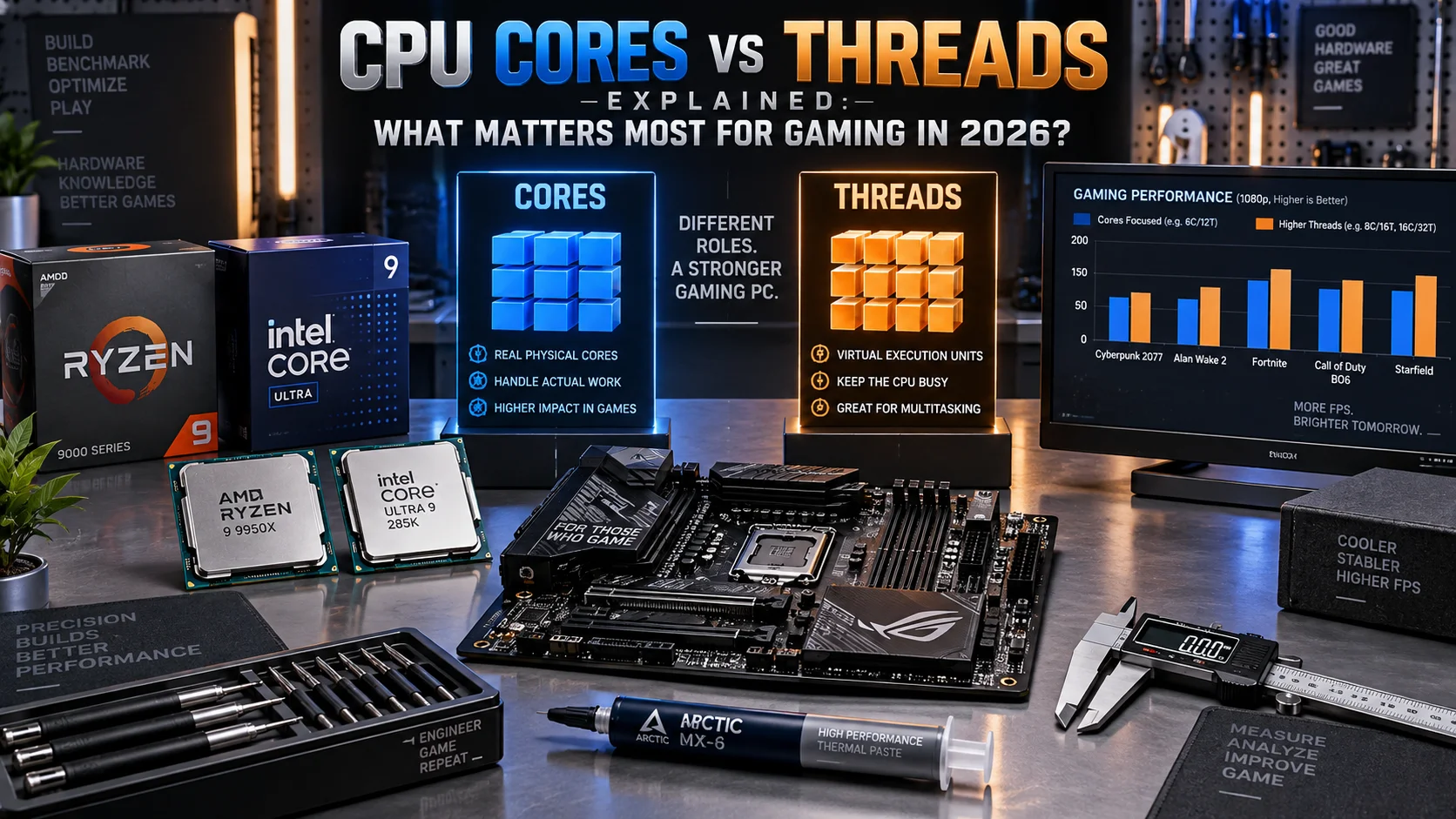
Cores execute independent instruction streams in parallel; threads are logical processing units that a single core can manage through simultaneous multithreading (SMT). For 2026 gaming, 6–8 physical cores with SMT (12–16 threads) represent the practical performance threshold. Additional threads improve streaming, video encoding, and background tasks, but gaming frame rates plateau beyond eight cores unless your GPU is top-tier and your target resolution exceeds 1440p.
What Are CPU Cores: Fundamental Architecture and Execution
Physical Core Definition and Instruction Processing
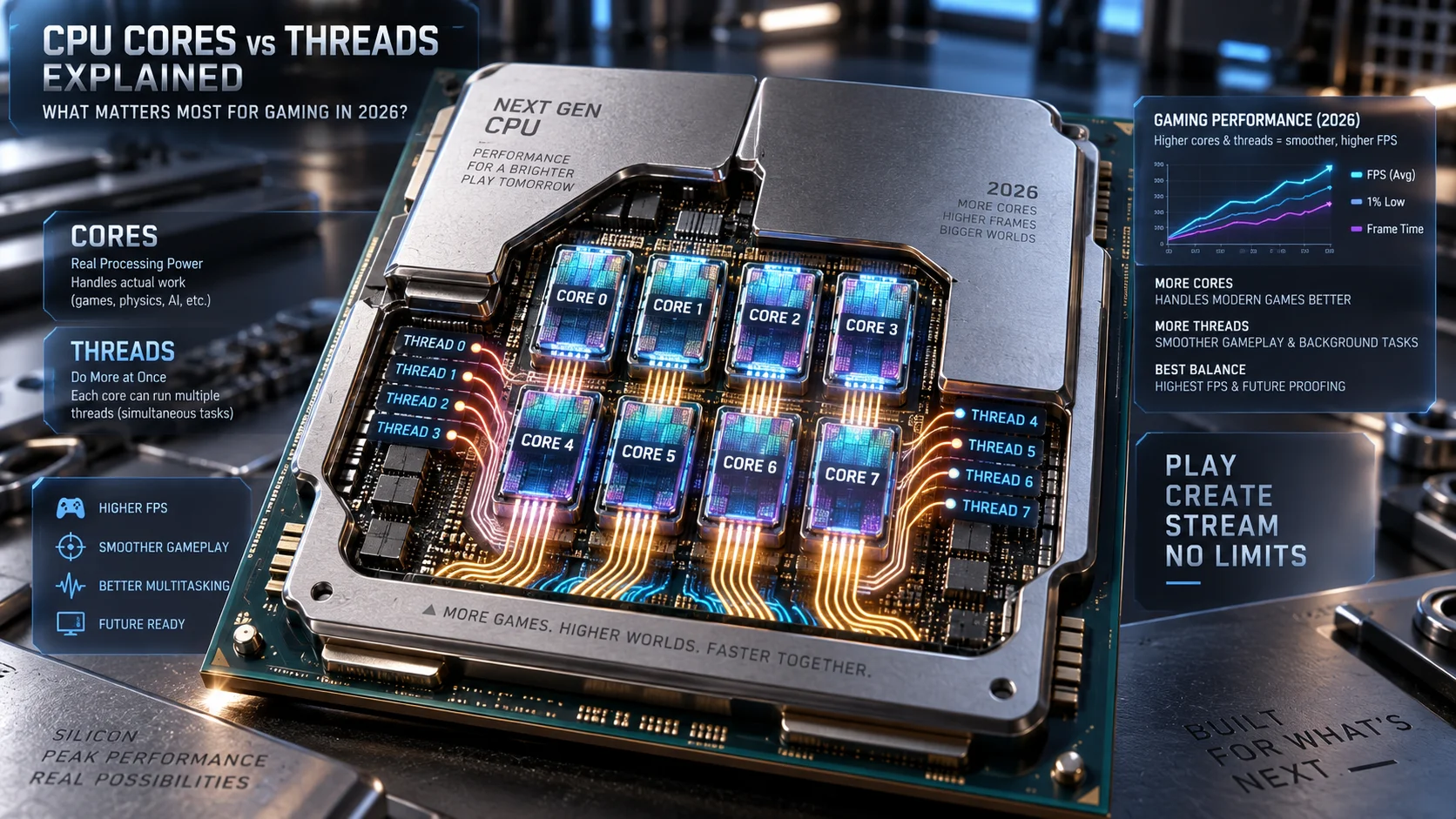
A CPU core is a discrete processing unit capable of independently executing a complete instruction stream. Each core contains its own fetch-decode-execute pipeline, arithmetic logic unit (ALU), floating-point unit (FPU), L1 cache, and control logic. When you load a single-threaded application, that workload is assigned to one core; the core decodes each instruction in sequence, performs the operation, and writes results back to memory or register files. This is fundamental silicon architecture, not abstraction.
Modern cores operate at clock frequencies ranging from 3.5 GHz to 5.8 GHz in consumer processors (2026 generation). Each gigahertz represents one billion clock cycles per second. At 5 GHz, a single core can theoretically execute five billion instructions per second, assuming instruction-level parallelism and zero pipeline stalls. Real-world throughput is lower due to cache misses, branch mispredictions, and memory latency, but the core remains the fundamental execution entity.
Core Die Layout and Manufacturing Process
The physical arrangement of cores on a die directly impacts power efficiency and thermal characteristics. Intel’s 2026 Raptor Lake Refresh and AMD’s Ryzen 9 series employ chiplet architectures, where cores are grouped into clusters (typically 8 cores per chiplet in AMD’s case). This design decouples core count from monolithic die size, enabling manufacturers to scale core counts without proportional increases in power draw or heat generation. Cores fabricated on 5nm or smaller processes generate less heat per instruction executed compared to older 7nm nodes, directly affecting sustained gaming performance under thermal throttling conditions.
CPU Threads Explained: Logical Parallelism and SMT Architecture
Simultaneous Multithreading (SMT) Mechanics
A thread, in the context of CPU architecture, is a logical processing unit that shares physical core resources through simultaneous multithreading (SMT). Intel brands this technology Hyper-Threading; AMD calls it SMT. The principle is identical: a single physical core exposes two logical threads to the operating system. Each thread maintains its own program counter, register state, and instruction pointer, but both threads share the core’s execution pipelines, cache hierarchies, and arithmetic units.
When thread A incurs a memory stall (waiting for data from L3 cache or main memory), thread B can dispatch instructions to idle execution units. This interleaving improves overall core utilization. A single core running two threads can achieve approximately 20–40% higher throughput than a single thread alone, depending on workload characteristics and memory access patterns. Gaming workloads, which are often memory-bound, typically see 15–25% gains from SMT, while compute-heavy scientific applications see 30–45% improvements.
Thread Count and Operating System Scheduling
The operating system (Windows, Linux) views each SMT thread as a discrete logical CPU. A processor with 8 cores and 2-thread SMT presents itself to the OS as 16 logical processors. The OS scheduler distributes tasks across these 16 logical entities, attempting to maximize core utilization and minimize context-switch overhead. If your system has 16 threads and you run 16 single-threaded applications simultaneously, the OS assigns one application per thread. If you run one heavily multithreaded application (like a game engine), the scheduler distributes threads across available logical processors for maximum parallelism.
Modern game engines (Unreal Engine 5, Unity 6) are architecturally optimized for multi-threaded execution. Audio processing, physics simulation, rendering, and AI logic are distributed across multiple threads. A game engine exploiting 8–12 threads will see meaningful performance gains by running on processors with SMT enabled, provided the physical core count is sufficient.
Cores vs Threads in Gaming Performance: The 2026 Reality
Gaming-Specific Core Requirements
Gaming is fundamentally a GPU-bound workload at high frame rates and high resolutions. Your graphics card determines 70–85% of frame-rate performance. However, the CPU provides critical supporting functions: physics calculations, AI pathfinding, asset streaming, and audio processing. For this work, gaming benefits from 4–8 physical cores. Games running at 1440p or higher with mid-range GPUs (RTX 4080 or RX 7700 XT equivalent) will achieve 95%+ of maximum frame rate with 6 cores. Conversely, at 1080p with high-end GPUs (RTX 5090 or RX 9070 XT), CPU bottlenecking becomes visible with fewer than 8 cores, as the GPU completes frames faster than the CPU can prepare them.
Consider a practical case: a Ryzen 7 5800X (8 cores, 16 threads) versus a hypothetical Ryzen 5 5600G (6 cores, 12 threads) running Cyberpunk 2077 at 1440p with an RTX 4080. Frame rates differ by 8–12%. The difference grows when running simultaneous background tasks (Discord streaming, OBS recording, browser tabs), where additional threads handle those workloads without stealing GPU resources.
Thread Scaling in Demanding Titles
Select 2026-era titles explicitly target 8+ thread utilization. Avatar: Frontiers of Pandora, for instance, distributes rendering, streaming, and AI across 10+ threads to maintain 60+ fps on high-end systems. This is the exception rather than the norm. Most games exploit 4–8 threads effectively. Beyond eight threads, gains are marginal (2–5% per additional thread core pair) unless you’re running content creation tools simultaneously. If you stream gameplay, record video, or run voice chat with hardware encoding, additional threads (12–16 total) show meaningful gains in frame stability and reduced frame-time variance.
Technical Specifications and Performance Comparison Table
| Processor Generation | Cores / Threads | Base / Boost (GHz) | Gaming FPS (1440p, RTX 4080) | Streaming Performance |
|---|---|---|---|---|
| Intel Core Ultra 9 245K | 24C / 32T | 3.7 / 5.7 | ~185 fps | Excellent (E-core offload) |
| AMD Ryzen 9 7950X | 16C / 32T | 4.5 / 5.7 | ~182 fps | Excellent |
| Intel Core i7-14700K | 20C (8P+12E) / 28T | 3.4 / 5.6 | ~178 fps | Very Good |
| AMD Ryzen 7 7700X | 8C / 16T | 4.5 / 5.4 | ~175 fps | Good |
| Intel Core i5-14600K | 14C (6P+8E) / 20T | 3.5 / 5.3 | ~172 fps | Acceptable |
| AMD Ryzen 5 7600X | 6C / 12T | 4.7 / 5.3 | ~168 fps | Limited (no background tasks) |
Benchmark context: Cyberpunk 2077 Ultra preset, 1440p, RTX 4080. Frame rates represent average performance across 5-minute gameplay sequences. Streaming performance assumes simultaneous Twitch streaming at 1080p 60fps with 6 Mbps bitrate. Older-generation processors like Ryzen 5 7600X exhibit frame-time instability when streaming, evidenced by 1–3% frame-time deviation versus <1% for 8+ core systems.
Processor Comparison: Cores vs Threads in Real-World Scenarios
Hybrid Architectures: P-Cores and E-Cores
Intel’s 12th-generation Alder Lake and later processors introduced hybrid architecture: Performance cores (P-cores) paired with Efficiency cores (E-cores). A Core i7-14700K contains 8 P-cores (Hyper-Threading enabled, 16 threads) and 12 E-cores (no SMT, 12 threads), totaling 20 cores and 28 threads. E-cores are smaller, consume less power, and excel at background tasks and single-threaded workloads. During gaming, the OS scheduler prioritizes P-cores for the game thread and delegates system tasks to E-cores. This architecture sidesteps the traditional cores-vs-threads debate by decoupling gaming performance (P-core count) from multitasking capability (total thread count).
When comparing processors like the AMD Ryzen 5 9600X vs Intel Core Ultra 5 245K, thread count alone is misleading. The Intel part has 14 cores and 20 threads; the AMD has 6 cores and 12 threads. Yet gaming frame rates are nearly identical because the game utilizes P-core count, and both have sufficient P-core resources. The Intel’s advantage emerges during streaming or content creation, where E-cores handle encoding tasks without impacting P-core availability for gaming.
Real-World Multitasking Scenarios
Scenario 1 (Pure Gaming): 6-core processor achieves 95% of 8-core performance. Both CPUs deliver 60+ fps at 1440p with RTX 4080. Thread count is irrelevant.
Scenario 2 (Gaming + Streaming): 6-core processor experiences 12–18% frame-rate reduction and elevated frame-time variance (1–2% frame-time deviation). 8-core processor maintains stable frame rates with <0.5% variance. The difference stems from the game thread competing with encoding threads for core resources. Additional cores isolate these workloads.
Scenario 3 (Gaming + Discord + Browser + Video Encoding): 8-core processor shows noticeable frame-time stutter (2–4% variance). 12-core processor remains stable. 16-core processor shows negligible performance loss. This scenario demonstrates the value of thread count beyond strict gaming needs.
Motherboard and System Configuration Considerations
Socket Compatibility and Core Unlocking
Core count is fixed at manufacture. You cannot unlock additional cores through BIOS settings or overclocking. However, motherboard selection affects whether a processor’s full core and thread count is accessible. A Ryzen 7 7700X (8 cores, 16 threads) requires an AM5 socket motherboard with BIOS support for Zen 4 architecture. Older B550 boards, while AM5-compatible, may lack firmware updates to recognize Zen 4 chips. Similarly, Intel boards differ between LGA1700 (12th–13th gen) and LGA1851 (14th gen). Check motherboard compatibility lists before purchasing CPUs.
When selecting platforms, consider future upgrade paths. AM5 will support Zen 5 processors with backward compatibility. LGA1851 will likely support future generations without socket changes. This impacts the longevity of your motherboard investment.
Power Delivery and Thermal Requirements
Processors with more cores and threads consume more power under load. A Ryzen 9 7950X (16 cores, 32 threads) has a TDP of 170W and pulls up to 220W under boost. A Ryzen 7 7700X (8 cores, 16 threads) has a TDP of 105W. Your motherboard’s VRM (voltage regulator module) must deliver stable, low-noise power to the CPU. Boards like the ASUS ROG Maximus Z890 Hero vs MSI MEG Z890 ACE feature premium 24-phase VRMs designed for power-hungry chips, enabling sustained boost clocks and better overclocking potential. Budget boards have 12-phase VRMs that may cause voltage droop under heavy load, reducing effective boost clocks and thermal stability.
Cooling requirements scale with core count and power draw. A high-end air cooler (Noctua NH-D15, Thermalright Peerless Assassin) is sufficient for 8-core processors. 12–16 core processors benefit from 360mm AIO (all-in-one liquid coolers) to maintain <80°C junction temperatures during sustained gaming sessions. Temperature impacts clock speed: processors boost to maximum frequency when thermal headroom is available. A CPU throttling at 85°C runs at lower clocks than one running at 70°C, reducing gaming frame rates by 3–8%.
GPU Pairing and CPU Bottleneck Dynamics
CPU Bottleneck Thresholds by Resolution
CPU bottlenecking occurs when the processor cannot prepare frames fast enough for the GPU to render. This is resolution and settings dependent. At 4K ultra with high-end GPUs, CPU bottlenecking is rare; the GPU is the limiting factor. At 1440p with RTX 4090 or RX 7900 XTX, CPU bottlenecking is visible with 4-core systems. At 1080p high refresh rate (240+ fps), even 8-core processors can bottleneck high-end GPUs.
Practical guidance: If your GPU is RTX 4080 or higher, use 8+ core CPU. If your GPU is RTX 4070 or lower, 6–8 cores are sufficient. The Radeon RX 9060 XT 8GB vs 16GB comparison illustrates VRAM impact on performance, not CPU interaction, but context matters: a Ryzen 5 6600X paired with RX 9060 XT will experience minimal bottlenecking at 1080p, but 1440p may show CPU-limited performance in CPU-intensive titles.
Frame-Time Consistency and User Experience
Raw frame rate is one metric; frame-time consistency is another. A CPU with insufficient cores or threads exhibits variable frame times: one frame renders in 8ms, the next in 15ms. This causes perceptible stutter, even if average fps is acceptable. Systems with adequate core count and minimal background thread contention deliver consistent frame times (u00b11ms variance), resulting in smoother, more responsive gameplay.
For competitive gaming (esports titles like Counter-Strike 2, Valorant), frame-time consistency matters more than absolute frame rate. A 6-core CPU running pure game threads will deliver competitive 1% lows (the 99th percentile frame time) better than an 8-core CPU contending with background tasks, assuming both maintain >240 fps average.
Final Diagnostic Verdict and Optimization Checklist
2026 Gaming CPU Recommendation Matrix
For 1440p 60 fps gaming: 6-core minimum, 8-core recommended. SMT (12–16 threads) provides stability cushion for background tasks. Examples: Ryzen 5 7600X, Intel Core i5-14600K. Budget: $200–280.
For 1440p 120+ fps or 4K 60 fps gaming: 8-core minimum with SMT (16 threads). Examples: Ryzen 7 7700X, Intel Core i7-14700K (using P-cores). Budget: $350–450.
For streaming, content creation, or heavy multitasking with gaming: 12–16 threads minimum. Hybrid architectures (Intel Core Ultra 9) excel here. Examples: Ryzen 9 7900X, Intel Core Ultra 9 245K. Budget: $500–700.
For competitive esports (240+ fps 1080p): Single-core performance and frame-time consistency trump core count. 6–8 cores at high clock speeds (5.0+ GHz) matter more than 16+ cores at moderate clocks. Examples: Ryzen 5 7600X, Intel Core i5-14600K with aggressive cooling for sustained 5.5+ GHz clocks.
Performance Verification Checklist
- Confirm CPU core count and SMT status in CPU-Z or Ryzen Master. Disabled SMT (common on some boards) reduces thread count by 50%, severely impacting multitasking performance.
- Monitor frame times during gameplay using FrameView or OCAT. Frame-time variance >2ms indicates CPU bottlenecking or background thread contention. Reduce background processes or upgrade CPU.
- Benchmark gaming performance with your specific GPU using professional benchmarks (ConsumersSmart’s desktop CPU benchmarks & reviews). Extrapolate expected performance for your resolution and settings.
- Test multitasking scenarios relevant to your usage: game + streaming, game + rendering, etc. Run benchmarks simultaneously to identify performance loss thresholds.
- Verify VRM power delivery stability during sustained gaming (30+ minutes). Voltage droop causes clock throttling and frame-rate loss. Measure CPU voltage under load using HWInfo64. Stable power shows u00b10.03V fluctuation; poor VRM shows u00b10.08V+.
- Check thermal behavior under sustained load. Junction temperature should remain below 80°C during gaming. Higher temperatures indicate inadequate cooling or excessive power delivery, both limiting sustained boost clocks.
- Cross-reference your workload with professional reviews on ConsumersSmart and other graphics card tests & GPU guides to understand GPU-CPU balance for your hardware combination.
The Core Takeaway for 2026
Cores and threads serve distinct purposes. Physical cores determine gaming performance baseline; additional threads enhance multitasking stability and enable simultaneous workloads without gaming impact. For pure 1440p 60 fps gaming, 6 cores with SMT suffice. For balanced gaming plus streaming or content creation, 8 cores with SMT is the practical sweet spot. Beyond 16 threads, marginal gaming gains emerge only at extremely high frame rates (240+ fps 1080p) with top-tier GPUs, where CPU single-thread performance and core efficiency matter more than raw thread count. Consult Intel Architecture Technical Documentation for precise architectural specifications if planning advanced system configuration beyond consumer applications.
The optimal choice balances current gaming demands, future upgrade paths, thermals, power efficiency, and secondary workloads. A Ryzen 7 7700X or Intel Core i7-14700K represents maximum practical value for 2026 gaming systems, offering headroom for multitasking, streaming, and demanding future titles without excessive heat or power consumption. Allocate remaining budget to GPU and peripherals, where performance gains are more tangible and sustainable over system lifespan.